Efcore: Migration in 2.1-preview2 fails with "Your startup project doesn't reference Microsoft.EntityFrameworkCore.Design"
Using the latest 2.1 preview I get this error when applying migrations through dotnet exec. Adding the package reference does not help. Same command was working in 2.0.2, see example repo.
@bricelam did not think it was related to #11437 so I opened a separate issue.
Command:
$publishDir = '..\Web\bin\Debug\netcoreapp2.1\publish\'
dotnet exec --depsfile $publishDir\Web.deps.json --additionalprobingpath $home\.nuget\packages ef.dll database update --assembly $publishDir\Web.dll --startup-assembly $publishDir\Web.dll --project-dir $publishDir --data-dir $publishDir --verbose --root-namespace Data
Exception message:
Your startup project 'Web' doesn't reference Microsoft.EntityFrameworkCore.Design. This package is required for the Entity Framework Core Tools to work. Ensure your startup project is correct, install the package, and try again.

Stack trace:
Using assembly 'Web'.
Using startup assembly 'Web'.
Using application base 'C:\Dev\netcore-dbupgrade-issue-2.1.300\Web\bin\Debug\netcoreapp2.1\publish'.
Using working directory 'C:\Dev\netcore-dbupgrade-issue-2.1.300\Data'.
Using root namespace 'Data'.
Using project directory '..\Web\bin\Debug\netcoreapp2.1\publish\'.
Microsoft.EntityFrameworkCore.Tools.CommandException: Your startup project 'Web' doesn't reference Microsoft.EntityFrameworkCore.Design. This package is required for the Entity Framework Core Tools to work. Ensure your startup project is correct, install the package, and try
again. ---> System.IO.FileNotFoundException: Could not load file or assembly 'Microsoft.EntityFrameworkCore.Design, Culture=neutral, PublicKeyToken=null'. The system cannot find the file specified.
   at System.Reflection.RuntimeAssembly._nLoad(AssemblyName fileName, String codeBase, Evidence assemblySecurity, RuntimeAssembly locationHint, StackCrawlMark& stackMark, IntPtr pPrivHostBinder, Boolean throwOnFileNotFound, Boolean forIntrospection, Boolean suppressSecurityChecks, IntPtr ptrLoadContextBinder)
   at System.Reflection.RuntimeAssembly.InternalLoadAssemblyName(AssemblyName assemblyRef, Evidence assemblySecurity, RuntimeAssembly reqAssembly, StackCrawlMark& stackMark, IntPtr pPrivHostBinder, Boolean throwOnFileNotFound, Boolean forIntrospection, IntPtr ptrLoadContextBinder)
   at System.Reflection.Assembly.Load(AssemblyName assemblyRef)
   at Microsoft.EntityFrameworkCore.Tools.ReflectionOperationExecutor..ctor(String assembly, String startupAssembly, String projectDir, String dataDirectory, String rootNamespace, String language)
   at Microsoft.EntityFrameworkCore.Tools.Commands.ProjectCommandBase.CreateExecutor()
   --- End of inner exception stack trace ---
   at Microsoft.EntityFrameworkCore.Tools.Commands.ProjectCommandBase.CreateExecutor()
   at Microsoft.EntityFrameworkCore.Tools.Commands.DatabaseUpdateCommand.Execute()
   at Microsoft.DotNet.Cli.CommandLine.CommandLineApplication.Execute(String[] args)
   at Microsoft.EntityFrameworkCore.Tools.Program.Main(String[] args)
Steps to reproduce
Working ex. repo:
https://github.com/AndersSahlin/netcore-dbupgrade-issue
Upgraded repo with issue:
https://github.com/AndersSahlin/netcore-dbupgrade-issue-2.1.300
Further technical details
EF Core version: 2.1.0-preview2-final
Database Provider: Microsoft.EntityFrameworkCore.SqlServer
Operating system: Win10
IDE: VS Code 1.22.2
 AndersSahlin
All 11 comments
I'm having the same problem when migrating from assembly using this script:
https://www.benday.com/2018/04/27/deploy-entity-framework-core-2-0-migrations-from-a-dll
https://www.benday.com/wp-content/uploads/2018/04/deploy-ef2-migrations.bat_.txt
 toralux
on 7 Jun 2018
toralux
on 7 Jun 2018
Is there a workaround in place for deploying updates on compiled projects for 2.1??
 thedragan
on 20 Jun 2018
thedragan
on 20 Jun 2018
The Microsoft.EntityFrameworkCore.Tools.DotNet package was removed in EF Core 2.1. dotnet ef is now an SDK tool. The new path to ef.dll is here:
C:\Program Files\dotnet\sdk\2.1.300\DotnetTools\dotnet-ef\2.1.0\tools\netcoreapp2.1\any\tools\netcoreapp2.0\any\ef.dll
 bricelam
on 21 Jun 2018
bricelam
on 21 Jun 2018
cc @benday
bricelam
on 21 Jun 2018
@bricelam — is that going to be the guaranteed official path on Windows? Is there a similar official path on Linux?
 benday
on 22 Jun 2018
benday
on 22 Jun 2018
Yes, if you use the installer, it will be there. Not exacly sure where it is on Linux, but it shouldn't be too hard to find (start with which dotnet)
bricelam
on 22 Jun 2018
"guaranteed official" might be a bit strong though, the dotnet/cli guys determine the location. They'd probably tell you it's just an implementation detail and subject to change in the future. But that's no different than it was previously.
Have you considered bundling a copy of ef.dll with your plugin? That might be the most reliable option. It's intended to be forward-compatible (e.g. the 2.1 version should work just fine when 2.2 is released)
bricelam
on 22 Jun 2018
Hi,
this error
'Your startup project doesn't reference Microsoft.EntityFrameworkCore.Design. This package is required for the Entity Framework Core Tools to work. Ensure your startup project is correct, install the package, and try again.'
appears on all versions .net core 2.1 :
- 2.1.0-preview2
- 2.1.0-rc1-final
- 2.1.0
- 2.1.1
version 2.0.2 for .net core 2.0 works as well
is there any workaround please?
we have blocked right now with CI setup for teamcity affected by this error :-(
Thanks,
Vadym.
 VadymZakusyloDevPro
on 25 Jun 2018
VadymZakusyloDevPro
on 25 Jun 2018
@VadymZakusyloDevPro --
I'd like to understand better how your solution, projects, and code is organized so that I can try to reproduce the problem. Can you describe your solution and projects? Here are the top things that I'm wondering about:
- Do you have multiple projects such as a web project and an API dll?
- If multiple projects, which project are you trying to deploy the migrations from?
- Which project has your DbContext?
- Which project has your Entity classes?
- Are you using an implementation of IDesignTimeDbContextFactory? If yes, which project is it in?
Thanks,
-Ben
benday
on 25 Jun 2018
@benday
Thank you for help,
1) I have multiple projects, Web (mvc project, it has rejerence to Data project) and Data (data context, migrations etc, this project has referenced Microsoft.EntityFrameworkCore.Design)
2) I've tried to deploy Data and set Web as a start up project.
3) Data project has DbContext
4) Data project has Entites
5) I am not use IDesignTimeDbContextFactory:
Web project has injection for DataContext and starts as IWebHost
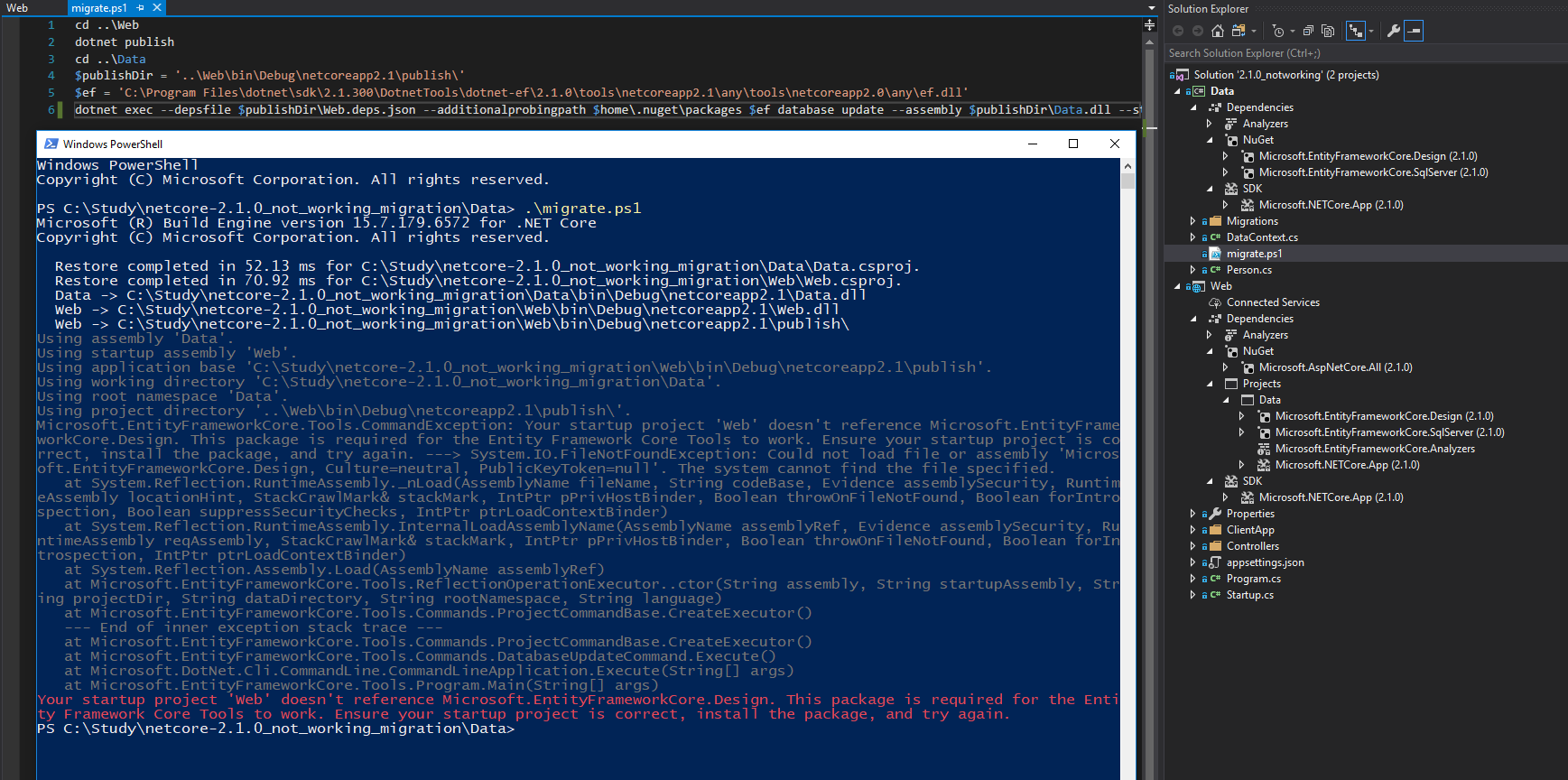

here the migration script:
cd ..Web
dotnet publish
cd ..Data
$publishDir = '..WebbinDebugnetcoreapp2.1publish'
$ef = 'C:Program Filesdotnetsdk2.1.300DotnetToolsdotnet-ef2.1.0toolsnetcoreapp2.1anytoolsnetcoreapp2.0anyef.dll'
dotnet exec --depsfile $publishDirWeb.deps.json --additionalprobingpath $home.nugetpackages $ef database update --assembly $publishDirWeb.dll --startup-assembly $publishDirWeb.dll --project-dir $publishDir --data-dir $publishDir --verbose --root-namespace Data
VadymZakusyloDevPro
on 26 Jun 2018
@VadymZakusyloDevPro --
I've been trying to reproduce your exact error but I haven't figured out exactly what you've got going wrong. If you can share a GitHub repo with your failing app and scripts, that could be helpful.
In your script, can you try changing "--assembly" to point to data.dll and then "--startup-assembly" should point to Web.dll?
Another thing to try is to add an implementation of IDesignTimeDbContextFactory in your Data project that points to your DbContext and the correct connection string. Having an implementation of IDesignTimeDbContextFactory makes all this command line stuff about 100x easier.
Here's a sample implementation of IDesignTimeDbContextFactory.
https://github.com/benday/asp-mvc-invoice-sample/blob/master/src/Benday.InvoiceApp.Api/InvoiceDesignTimeDbContextFactory.cs
-Ben
benday
on 29 Jun 2018
Related issues
 ghost
·
3Comments
ghost
·
3Comments
 spottedmahn
·
3Comments
spottedmahn
·
3Comments
 leak
·
3Comments
leak
·
3Comments
 divega
·
3Comments
divega
·
3Comments
 bgribaudo
·
3Comments
bgribaudo
·
3Comments