Efcore: `Remove-Migration` command not removing migrations from TFS Pending Changes
Current Behvaior
After applying a Migration using the Add-Migration <MigrationName> command. A new migration is added; however, if I decide to revert those changes and use Remove-Migration, the latest migration is removed from the project, but is still registered as a pending [add] change in TFS.
I was expecting that if the migration was removed through the PM Console that the changes would also be undone. These files have to manually have their changes undone from the Pending Changes panel.
Steps to reproduce
- Add a migration with
Add-Migration "MyFancyMigration" - See that the
MyFancyMigration.csandMyFancyMigration.Designer.csare listed as adds in Pending Changes. - Try to remove the migration with the
Remove-Migrationcommand - Note that the migration has not been removed from the Pending Changes
- Try to check in and you should receive a message similar to this:
Could not find file 'C:\<local_path>\Migrations\20180323193556_MyFancyMigration.cs'.
Further technical details
EF Core version: 2.1.3-preview1-final (occurred also on 2.0.2)
Database Provider: Microsoft.EntityFrameworkCore.SqlServer
Operating system: Windows 10
IDE: VS 2017 15.6.4
Source Control: TFS/VSTS
 Psypher9
All 25 comments
EF Core PMC commands don't interact with TFS. They don't add files to Pending Changes so they don't remove from it when removing migration. Something else is doing it.
 smitpatel
on 23 Mar 2018
smitpatel
on 23 Mar 2018
What kind of project are you using? We call EnvDTE.ProjectItem.Remove() which should trigger a remove in source control.
 bricelam
on 23 Mar 2018
bricelam
on 23 Mar 2018
I am facing a similar issue too. I am using
- VS 15.6.4 community
- Models are in a .net standard 2.0 project
- DBContext is in a .net core library
- Startup project is .net core MVC
- Using
Pomelo.EntityFrameworkCore.MySql
In my case was a bit different.
- I have first added and pushed migrations to TFS.
- I have then used
remove-migrationto remove multiple migrations. - Added new migration
- Pushed with some more code.
The removed migrations were still in TFS. I had to manually remove them from the source control explorer.
 neville-nazerane
on 26 Mar 2018
neville-nazerane
on 26 Mar 2018
What kind of project are you using? We call EnvDTE.ProjectItem.Remove() which should trigger a remove in source control.
@bricelam this is a .csproj. See that's what I was thinking too, it just doesn't seem to actually be affecting source control.
Psypher9
on 26 Mar 2018
@bricelam suggested triage decision on this?
 ajcvickers
on 28 Mar 2018
ajcvickers
on 28 Mar 2018
Need more info. Could be caused by various TFS or VS settings, could be an issue with the project system...
@Psypher9 @neville-nazerane Could you send us a solution this repros on so we can investigate further and forward to the correct team?
bricelam
on 29 Mar 2018
@bricelam here is a link to my example solution, I just made a new repo to contain it. TFS Migration Lag Example
Somethings I'll point out about this example solution are:
- I don't have an initial migration in the solution currently as I added it locally then removed it to test the source control lag. The pending changes were still lagging.
- I left this solution still without an initial migration so it could be easier for you to test the results.
- I modeled the environment of this project after the project I first started to notice this behavior in.
I hope this helps! Let me know if you need any other information. Thank you!
Psypher9
on 29 Mar 2018
Looks like it's a "new" csproj, so it could be dotnet/project-system or CPS... (Just thinking out loud here)
bricelam
on 30 Mar 2018
Since the project-system is default for VS 2017, which I'm using, should I be directing this issue to them?
Psypher9
on 30 Mar 2018
Can you reproduce it without EF by running the following inside PMC?
(Get-Project MyFancyProject).ProjectItems.Item('Migrations').ProjectItems.Item('20180323193556_MyFancyMigration.cs').Remove()
Also, can you try the same on a .NET Framework Console project?
bricelam
on 5 Apr 2018
So I tried to reproduce this like you suggested on that solution I shared. When I added a Migration (Init Migration) I ran this:
(Get-Project TFS Migration Lagging).ProjectItems.Item('Migrations').ProjectItems.Item('20180404203427_Init Migration.cs').Remove()
And received this error:
Get-Project : A positional parameter cannot be found that accepts argument 'Migration'.
At line:1 char:2
+ (Get-Project TFS Migration Lagging).ProjectItems.Item('Migrations').P ...
+  ~~~~~~~~~~~~~~~~~~~~~~~~~~~~~~~~~
    + CategoryInfo          : InvalidArgument: (:) [Get-Project], ParameterBindingException
    + FullyQualifiedErrorId : PositionalParameterNotFound,NuGet.PackageManagement.PowerShellCmdlets.GetProjectCommand
Which looks like it wasn't related because it seems like the Get-Project cmdlet was looking at the project name as multiple parameters, so I renamed the project to not have spaces and ran this:
(Get-Project TFSMigrationLagging).ProjectItems.Item('Migrations').ProjectItems.Item('20180404203427_Init Migration.cs').Remove()
And received this error:
You cannot call a method on a null-valued expression.
At line:1 char:1
+ (Get-Project TFSMigrationLagging).ProjectItems.Item('Migrations').Pro ...
+ ~~~~~~~~~~~~~~~~~~~~~~~~~~~~~~~~~~~~~~~~~~~~~~~~~~~~~~~~~~~~~~~~~~~~~
    + CategoryInfo          : InvalidOperation: (:) [], RuntimeException
    + FullyQualifiedErrorId : InvokeMethodOnNull
But I verified that the project itself was not null, by running Get-Project TFSMigrationLagging. I can't find which expression is returning null.
I'll try on a new Console application now.
Psypher9
on 5 Apr 2018
I was not anticipating spaces. 😄 Use a string:
Get-Project 'TFS Migration Lagging'
(Web App) I'm still returning this error message:
You cannot call a method on a null-valued expression.
At line:1 char:1
+ (Get-Project 'TFS Migration Lagging').ProjectItems.Item('Migrations') ...
+ ~~~~~~~~~~~~~~~~~~~~~~~~~~~~~~~~~~~~~~~~~~~~~~~~~~~~~~~~~~~~~~~~~~~~~
    + CategoryInfo          : InvalidOperation: (:) [], RuntimeException
    + FullyQualifiedErrorId : InvokeMethodOnNull
I think I need some clarification though, were you meaning to run this script before or after I use Remove-Migration?
Psypher9
on 6 Apr 2018
@Psypher9 - Run the script without using Remove-Migration. Essentially, that script is the way to interact with VS project system. Remove-Migration just calls into VS project system which does all work. If the script is not working properly then Remove-Migration won't work properly either.
That script basically, removes file name Project\Migrations\MigrationName.cs from VS.
smitpatel
on 6 Apr 2018
Okay, that's what I was thinking, I just wanted to make sure I was on the same page. I was able to get the Remove() script to work this time.
So, although I was able to use the remove script on both the Web app and the Console App and Pending Changes was still not updating correctly. I did notice though that using the script just excluded the file from the project and made them hidden, while running Remove-Migration was actually deleting the files from the directory.
This meant that I was still able to check in after running the script but not when I used Remove-Migration.
Psypher9
on 8 Apr 2018
Oh interesting--that API isn't designed to remove them from the disk or source control (only from the project)
bricelam
on 9 Apr 2018
Is there any update on this? I'm facing the same issue.
I was working around a database design issue and add and removed a lot of migrations in the process which ended up looking like this in my Pending Changes:
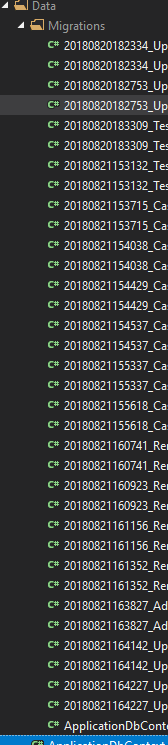
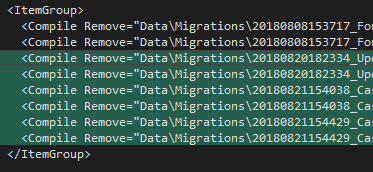
In reality, there should only be three Migrations (and their designer files), also shown in my Pending Changes:
Further technical details
Project Type: .Net Core 2.1 Razor Pages Web App with Identity Authentication
EF Core version: 2.1.1.0
Database Provider: Microsoft.EntityFrameworkCore.SqlServer
Operating system: Windows 10
IDE: VS 2017 Professional 15.8.1
Source Control: TFS/VSTS
 RyanTaite
on 21 Aug 2018
RyanTaite
on 21 Aug 2018
@bricelam would this be an item you guys would entertain a PR for?
Psypher9
on 30 Aug 2018
We would consider a well-written PR for any open issue. 😉 (And even some closed ones.)
bricelam
on 31 Aug 2018
Cool, I will see what I can do then. So is the original intent to have the Remove-Migration command take a step back on the Snapshot and remove the latest migration from the project while _not_ removing it from the disk?
Psypher9
on 31 Aug 2018
It should be removed from disk.
bricelam
on 31 Aug 2018
Ah okay. I see now!
Psypher9
on 31 Aug 2018
Okay, so after
- testing and testing some more
- reading and re-reading back through all of our conversation here
- as well as making some changes in
Remove-Migrationand testing them with some Git and TFS controlled projects
I agree with @smitpatel and I too think this is a bug in the EnvDTE.ProjectItem.Remove() endpoint. That and probably something else along the way TFS that isn't functioning properly. When I was trying this out with Git repos, I could still commit but the files were still removed from the disk. All of this to say, you guys would know better than I would, but I really don't see what I could do to contribute that would solve this problem.
The root cause doesn't seem to be coming from EF Core, but from EnvDTE and/or TFS. With all of that being said, I just reported a problem with Visual Studio. So I don't know how this issue here needs to be handled. I can see it being closed, but do you guys still want to keep it open or should I close it?
Psypher9
on 7 Sep 2018
UPDATE: This is fully functioning as of VS 2019 Preview 1. So I think I'll close this now, because it can't be an EF Core problem.
Psypher9
on 11 Jan 2019
Related issues
 ryanwinter
·
3Comments
ryanwinter
·
3Comments
 yukozh
·
3Comments
yukozh
·
3Comments
 ericvb
·
3Comments
ericvb
·
3Comments
 TPJ11
·
3Comments
TPJ11
·
3Comments
 bgribaudo
·
3Comments
bgribaudo
·
3Comments