Efcore: Diagnostics API conflicts with post preview2 APIs
This is affecting EF Core's attempt to use DI to load services at runtime. It is not just EF but other aspnetcore APIs having the same issue. I've added this issue in the MVC repository but wanted to leave you a link to it here:
Most likely it's a problem of the SDK and package versions where I'm not finding the magic combination, but it's blocking me from testing to see if some issues I've reported have been resolved yet.
Here is the issue with all of the relevant details: https://github.com/aspnet/Mvc/issues/6520
 julielerman
All 17 comments
@julielerman - You will need to get newer CLI. This is breaking change in CLI since CLI upgraded its dependency version. When we started taking new CLI, we had to upgrade our versions too.
You can download latest CLI which is compatible with nightly builds here https://github.com/dotnet/cli/tree/release/2.0.0#installers-and-binaries
 smitpatel
on 8 Jul 2017
smitpatel
on 8 Jul 2017
THANK YOU. I keep looking at the SDK and runtime downloads and don't think to check teh CLI. Downloading now. So happy you saw this since I would have just kept trying and trying other things all weekend! :) Build and run are happy now with both preview3-* and rtm-*. I'll test for the fixes I'm seeking on both.
julielerman
on 8 Jul 2017
SDK download would be here. https://github.com/dotnet/core-setup#officially-released-builds
Not sure if you need to install nightly SDK too.
smitpatel
on 8 Jul 2017
I need to tattoo these links to the inside of my eyelids! :)
julielerman
on 8 Jul 2017
Yeah, it seems there's a small discovery problem for where to download prerelease/daily builds... But all good on my side too.
(hey @julielerman !)
 roji
on 8 Jul 2017
roji
on 8 Jul 2017
I came here due to the same issue @julielerman was experience because I'm trying to build with packages from the nightly myget feeds.
I wanted to try to integrate auth into a project I've been using to mess around with core mvc 1.1/2.0 and I saw that this has just recently become an option
https://github.com/openiddict/openiddict-core/issues/398
But as mentioned above, the steps to take to use the daily/nightly builds are a bit mystical at the moment.
I realize this is a 'here be dragons' approach to development but during the most recent asp.net community standup, @DamianEdwards was encouraging the community to come and try the fresh bits to give feedback.
Maybe I'm just ill-prepared but I wanted to give it a shot.
Anyway, I know this isn't EF related but the issue I ran into was seemingly resolved here. If you'd prefer I can take this to aspnet/Home?
Here's the packages I'm using

I'm using https://dotnet.myget.org/f/aspnetcore-dev and https://www.myget.org/F/aspnet-contrib/api/v3/index.json
With all that I saw the same error @julielerman did above.
Here are the errors I started seeing once I installed the nightly CLI (Release/2.0.X from the above link
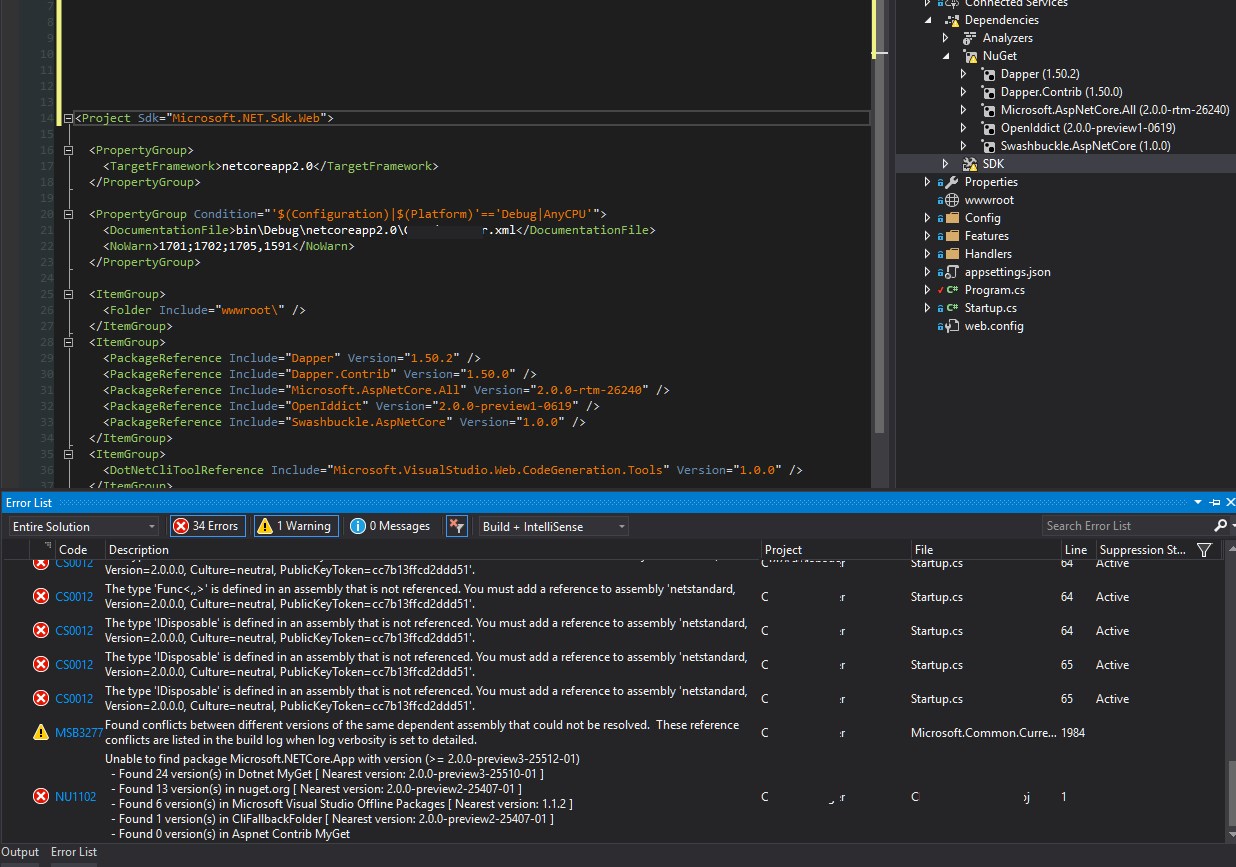
I didn't restart my machine after installing the new SDK, though I did restart VS (and I'm using the Preview build).
From gitbash
$ dotnet --version
2.0.0-preview3-006743
Any suggestions?
Thanks!
 seangwright
on 13 Jul 2017
seangwright
on 13 Jul 2017
@sgwatgit - are you targeting net461?
smitpatel
on 13 Jul 2017
The properties dialog in VS for my project says Target Framework - .NET Core 2.0 which should reflect <TargetFramework>netcoreapp2.0</TargetFramework> in my .csproj right?
I have worked on other aspnet core demo apps targeting full framework, but I don't think I've done that here.
seangwright
on 13 Jul 2017
@sgwatgit - Sorry. I did not realize csproj was open in the image.
Looking at those error messages,
It seems like you are missing the shared runtime. You should install the SDK from https://github.com/dotnet/core-setup#officially-released-builds
That would take care of last error, which says Microsoft.NETCore.App not found.
The reason I had asked for net framework is that netstandard reference in net framework was made implicit recently only otherwise it had required to reference certain package. But since you are targeting netcoreapp2.0 it should bring in netstandard itself. As the first error suggest, it is still missing. Perhaps lacking NETCore.App is the reason behind it.
Let us know if above works.
smitpatel
on 13 Jul 2017
That is the link I downloaded the SDK from that gave me the errors in the 2nd picture. I used the Release/2.0.X link for Windows (x64).
Should I be using Master? Do I need to restart my machine?
seangwright
on 13 Jul 2017
The current version is 2.0.0-preview3-25512-01. According to image you posted above, that version is missing in your computer. The version is not fixed yet and could move forward till final release. So re-installing could make difference.
My guess would be your CLI & runtime went out of sync. So you have newer CLI which uses particular version of runtime which is not installed on the machine.
smitpatel
on 13 Jul 2017
@smitpatel
The link I used to install the runtime was https://dotnetcli.blob.core.windows.net/dotnet/Runtime/release/2.0.0/dotnet-runtime-latest-win-x64.exe
I restarted after installing. Here is the version that appears to be in my PATH
$ dotnet --version
2.0.0-preview3-006743
And below are the versions of runtimes and sdks I have installed.
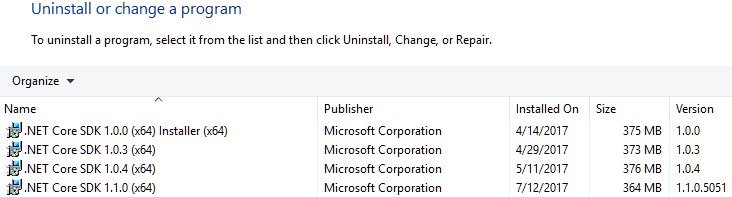

What am I missing and how should I go about installing it? Is there something I have installed that is causing an issue?
Thanks
seangwright
on 15 Jul 2017
Here is my environment info
$ dotnet --info
.NET Command Line Tools (2.0.0-preview3-006743)

Product Information:
 Version:            2.0.0-preview3-006743
 Commit SHA-1 hash:  f84e41a7d3

Runtime Environment:
 OS Name:     Windows
 OS Version:  10.0.15063
 OS Platform: Windows
 RID:         win10-x64
 Base Path:   C:\Program Files\dotnet\sdk\2.0.0-preview3-006743\

Microsoft .NET Core Shared Framework Host

  Version  : 2.0.0-preview3-25514-02
  Build    : 1b047a04057cec973cfb890fd21f7a639cfcd118
I updated my Microsoft.AspNetCore.All meta package to 2.0.0-rtm-26339 and everything appears to be working now.
I'm getting warnings in the VS error list like
Warning NU1603  AspNet.Security.OpenIdConnect.Server 2.0.0-preview1-1265 depends on
Microsoft.AspNetCore.Authentication (>= 2.0.0-rtm-26259)
but Microsoft.AspNetCore.Authentication 2.0.0-rtm-26259 was not found.
An approximate best match of Microsoft.AspNetCore.Authentication 2.0.0-rtm-26319 was resolved.
MyProject C:\dev\my-project\MyProject\MyProject.csproj  1
and
Warning NU1603  MyProject  depends on Microsoft.NETCore.App (>= 2.0.0-preview3-25512-01)
but Microsoft.NETCore.App 2.0.0-preview3-25512-01 was not found.
An approximate best match of Microsoft.NETCore.App 2.0.0-preview3-25513-02 was resolved.
MyProject C:\dev\my-project\MyProject\MyProject.csproj  1
But I'm guessing these can't be resolved while everything is in flux (ie while I'm using daily builds)?
seangwright
on 15 Jul 2017
@sgwatgit - It seems that you are in bad state due to multiple incoherencies built up in your machine. I suggest following steps. (I haven't tested them and they are point in time)
- Clear your nuget caches. run command
dotnet nuget locals all --clear - Uninstall programs which has in name
.NET Core runtime&.NET Core SDK(all of them, you may need to install 1.0 back later if you have apps depending on them but that is easy. - Check
%UserProfile%/.dotnet&%ProgramFiles%/.dotnetfolders. If they exists just delete them. - Install latest .net core from here https://github.com/dotnet/cli/tree/release/2.0.0#installers-and-binaries
- Open your csproj files and update version no. to latest one by checking myget/nuget gallaries of what is latest.
Now try restoring and building it.
For the first error in last post, it looks like version of OpenIdConnect.Server is bit stale so its dependency is not found. (Myget nightly feed holds a limited no. of versions only and remove older versions). If you are using nightly then perhaps best idea is to use floating version no.
The second error was some inconsistency in dotnet (or some packages). Few days back there was some case when an inconsistent packages were published. Perhaps you download during that phase only. With latest CLI & packages it should go away.
smitpatel
on 16 Jul 2017
@smitpatel I finally got to try out these steps and I'm now building my project without any errors and everything is running again.
Thanks so much for helping me out with this!
seangwright
on 28 Jul 2017
@smitpatel Thank You So Much!! your instructions helped me to resolve the issue.
 muheebhussain
on 12 Aug 2017
muheebhussain
on 12 Aug 2017
just following this instructions solved for me
- Clear your nuget caches. run command
dotnet nuget locals all --clear
 gandarez
on 13 Sep 2017
gandarez
on 13 Sep 2017
Related issues
 HeMinzhang
·
3Comments
HeMinzhang
·
3Comments
 HappyNomad
·
3Comments
HappyNomad
·
3Comments
 yukozh
·
3Comments
yukozh
·
3Comments
 TPJ11
·
3Comments
TPJ11
·
3Comments
 spottedmahn
·
3Comments
spottedmahn
·
3Comments
Most helpful comment
@julielerman - You will need to get newer CLI. This is breaking change in CLI since CLI upgraded its dependency version. When we started taking new CLI, we had to upgrade our versions too.
You can download latest CLI which is compatible with nightly builds here https://github.com/dotnet/cli/tree/release/2.0.0#installers-and-binaries