Efcore.pg: Postgresql slow with Entity Framework Core
I'm trying to use Postgresql with Entity Framework Core. But I have problem with performance.
When I simply call the same SQL directly to Postgresql it runs in 1 ms, but in Entity Framework runs in ~120 ms. So, it is 120 times slower.
Here is an example query
      SELECT COUNT(*)::INT
      FROM "Campaign" AS x
      WHERE x."UserId" = 3
This SQL query runs in 1 ms.
Here is Entity Framework Core debug result for the same query, it takes 133 ms
    info: Microsoft.EntityFrameworkCore.Database.Command[20101]
      Executed DbCommand (133ms) [Parameters=[@__userId_0='?' (DbType = Int32)], CommandType='Text', CommandTimeout='30']
      SELECT COUNT(*)::INT
      FROM "Campaign" AS x
      WHERE x."UserId" = @__userId_0
What is wrong here?
    info: Microsoft.EntityFrameworkCore.Infrastructure[10403]
          Entity Framework Core 2.2.0-rtm-35687 initialized 'PostgreSqlContext' using provider 'Npgsql.EntityFrameworkCore.PostgreSQL' with options: None
    dbug: Microsoft.EntityFrameworkCore.Database.Connection[20000]
          Opening connection to database 'postgres' on server 'tcp://my-db-connection'.
    dbug: Microsoft.EntityFrameworkCore.Database.Connection[20001]
          Opened connection to database 'postgres' on server 'tcp://my-db-connection'.
    dbug: Microsoft.EntityFrameworkCore.Database.Command[20100]
          Executing DbCommand [Parameters=[@__ipNumber_0='?' (DbType = Double)], CommandType='Text', CommandTimeout='30']
          SELECT x."Id", x."CityName", x."CountryCode", x."CountryName", x."IpFrom", x."IpTo", x."RegionName"
          FROM "IpLocation" AS x
          WHERE (@__ipNumber_0 > x."IpFrom") AND (@__ipNumber_0 < x."IpTo")
          LIMIT 1
    info: Microsoft.EntityFrameworkCore.Database.Command[20101]
          Executed DbCommand (133ms) [Parameters=[@__ipNumber_0='?' (DbType = Double)], CommandType='Text', CommandTimeout='30']
          SELECT x."Id", x."CityName", x."CountryCode", x."CountryName", x."IpFrom", x."IpTo", x."RegionName"
          FROM "IpLocation" AS x
          WHERE (@__ipNumber_0 > x."IpFrom") AND (@__ipNumber_0 < x."IpTo")
          LIMIT 1
    dbug: Microsoft.EntityFrameworkCore.Database.Command[20300]
          A data reader was disposed.
    dbug: Microsoft.EntityFrameworkCore.Database.Connection[20002]
          Closing connection to database 'postgres' on server 'tcp://my-db-connection'.
    dbug: Microsoft.EntityFrameworkCore.Database.Connection[20003]
          Closed connection to database 'postgres' on server 'tcp://my-db-connection'.
    dbug: Microsoft.EntityFrameworkCore.ChangeTracking[10806]
          Context 'PostgreSqlContext' started tracking 'IpLocation' entity. Consider using 'DbContextOptionsBuilder.EnableSensitiveDataLogging' to see key values.
    dbug: Microsoft.EntityFrameworkCore.Database.Connection[20000]
          Opening connection to database 'postgres' on server 'tcp://my-db-connection'.
    dbug: Microsoft.EntityFrameworkCore.Database.Connection[20001]
          Opened connection to database 'postgres' on server 'tcp://my-db-connection'.
    dbug: Microsoft.EntityFrameworkCore.Database.Command[20100]
          Executing DbCommand [Parameters=[@__id_0='?' (DbType = Int32)], CommandType='Text', CommandTimeout='30']
          SELECT x."Id", x."ApiToken", x."BirthDate", x."CountryId", x."CreatedAt", x."DeletedAt", x."Email", x."EmailVerify", x."FacebookId", x."GoogleId", x."Image", x."InvoicePaymentFailCount", x."LastLoginAt", x."LoginErrorCount", x."Name", x."Password", x."PaymentStatus", x."PlanId", x."ResetPasswordToken", x."SelectedLanguageCode", x."ShopifyToken", x."Status", x."StripeId", x."Surname", x."Type", x."UpdatedAt"
          FROM "User" AS x
          WHERE x."Id" = @__id_0
    info: Microsoft.EntityFrameworkCore.Database.Command[20101]
          Executed DbCommand (134ms) [Parameters=[@__id_0='?' (DbType = Int32)], CommandType='Text', CommandTimeout='30']
          SELECT x."Id", x."ApiToken", x."BirthDate", x."CountryId", x."CreatedAt", x."DeletedAt", x."Email", x."EmailVerify", x."FacebookId", x."GoogleId", x."Image", x."InvoicePaymentFailCount", x."LastLoginAt", x."LoginErrorCount", x."Name", x."Password", x."PaymentStatus", x."PlanId", x."ResetPasswordToken", x."SelectedLanguageCode", x."ShopifyToken", x."Status", x."StripeId", x."Surname", x."Type", x."UpdatedAt"
          FROM "User" AS x
          WHERE x."Id" = @__id_0
    dbug: Microsoft.EntityFrameworkCore.ChangeTracking[10806]
          Context 'PostgreSqlContext' started tracking 'User' entity. Consider using 'DbContextOptionsBuilder.EnableSensitiveDataLogging' to see key values.
    dbug: Microsoft.EntityFrameworkCore.Database.Command[20300]
          A data reader was disposed.
    dbug: Microsoft.EntityFrameworkCore.Database.Connection[20002]
          Closing connection to database 'postgres' on server 'tcp://my-db-connection'.
    dbug: Microsoft.EntityFrameworkCore.Database.Connection[20003]
          Closed connection to database 'postgres' on server 'tcp://my-db-connection'.
    dbug: Microsoft.EntityFrameworkCore.Database.Connection[20000]
          Opening connection to database 'postgres' on server 'tcp://my-db-connection'.
    dbug: Microsoft.EntityFrameworkCore.Database.Connection[20001]
          Opened connection to database 'postgres' on server 'tcp://my-db-connection'.
    dbug: Microsoft.EntityFrameworkCore.Database.Command[20100]
          Executing DbCommand [Parameters=[@__get_Item_0='?' (DbType = Int32)], CommandType='Text', CommandTimeout='30']
          SELECT e."Id", e."CreatedAt", e."DeletedAt", e."Description", e."DisplayCount", e."ImpressionCount", e."InteractionCount", e."Name", e."PopupCount", e."Price", e."StripeId", e."Type", e."UpdatedAt"
          FROM "Plan" AS e
          WHERE e."Id" = @__get_Item_0
          LIMIT 1
    info: Microsoft.EntityFrameworkCore.Database.Command[20101]
          Executed DbCommand (134ms) [Parameters=[@__get_Item_0='?' (DbType = Int32)], CommandType='Text', CommandTimeout='30']
          SELECT e."Id", e."CreatedAt", e."DeletedAt", e."Description", e."DisplayCount", e."ImpressionCount", e."InteractionCount", e."Name", e."PopupCount", e."Price", e."StripeId", e."Type", e."UpdatedAt"
          FROM "Plan" AS e
          WHERE e."Id" = @__get_Item_0
          LIMIT 1
    dbug: Microsoft.EntityFrameworkCore.Database.Command[20300]
          A data reader was disposed.
    dbug: Microsoft.EntityFrameworkCore.Database.Connection[20002]
          Closing connection to database 'postgres' on server 'tcp://my-db-connection'.
    dbug: Microsoft.EntityFrameworkCore.Database.Connection[20003]
          Closed connection to database 'postgres' on server 'tcp://my-db-connection'.
    dbug: Microsoft.EntityFrameworkCore.ChangeTracking[10806]
          Context 'PostgreSqlContext' started tracking 'Plan' entity. Consider using 'DbContextOptionsBuilder.EnableSensitiveDataLogging' to see key values.
    dbug: Microsoft.EntityFrameworkCore.Database.Connection[20000]
          Opening connection to database 'postgres' on server 'tcp://my-db-connection'.
    dbug: Microsoft.EntityFrameworkCore.Database.Connection[20001]
          Opened connection to database 'postgres' on server 'tcp://my-db-connection'.
    dbug: Microsoft.EntityFrameworkCore.Database.Command[20100]
          Executing DbCommand [Parameters=[@__userId_0='?' (DbType = Int32)], CommandType='Text', CommandTimeout='30']
          SELECT COUNT(*)::INT
          FROM "Campaign" AS x
          WHERE x."UserId" = @__userId_0
    info: Microsoft.EntityFrameworkCore.Database.Command[20101]
          Executed DbCommand (133ms) [Parameters=[@__userId_0='?' (DbType = Int32)], CommandType='Text', CommandTimeout='30']
          SELECT COUNT(*)::INT
          FROM "Campaign" AS x
          WHERE x."UserId" = @__userId_0
    dbug: Microsoft.EntityFrameworkCore.Database.Command[20300]
          A data reader was disposed.
    dbug: Microsoft.EntityFrameworkCore.Database.Connection[20002]
          Closing connection to database 'postgres' on server 'tcp://my-db-connection'.
    dbug: Microsoft.EntityFrameworkCore.Database.Connection[20003]
          Closed connection to database 'postgres' on server 'tcp://my-db-connection'.
    dbug: Microsoft.EntityFrameworkCore.Database.Connection[20000]
          Opening connection to database 'postgres' on server 'tcp://my-db-connection'.
    dbug: Microsoft.EntityFrameworkCore.Database.Connection[20001]
          Opened connection to database 'postgres' on server 'tcp://my-db-connection'.
    dbug: Microsoft.EntityFrameworkCore.Database.Command[20100]
          Executing DbCommand [Parameters=[@__userId_0='?' (DbType = Int32), @__startDate_1='?' (DbType = DateTime), @__endDate_2='?' (DbType = DateTime)], CommandType='Text', CommandTimeout='30']
          SELECT COUNT(*)::INT
          FROM "Impression" AS x
          WHERE ((x."UserId" = @__userId_0) AND (x."CreatedAt" > @__startDate_1)) AND (x."CreatedAt" < @__endDate_2)
    info: Microsoft.EntityFrameworkCore.Database.Command[20101]
          Executed DbCommand (134ms) [Parameters=[@__userId_0='?' (DbType = Int32), @__startDate_1='?' (DbType = DateTime), @__endDate_2='?' (DbType = DateTime)], CommandType='Text', CommandTimeout='30']
          SELECT COUNT(*)::INT
          FROM "Impression" AS x
          WHERE ((x."UserId" = @__userId_0) AND (x."CreatedAt" > @__startDate_1)) AND (x."CreatedAt" < @__endDate_2)
    dbug: Microsoft.EntityFrameworkCore.Database.Command[20300]
          A data reader was disposed.
    dbug: Microsoft.EntityFrameworkCore.Database.Connection[20002]
          Closing connection to database 'postgres' on server 'tcp://my-db-connection'.
    dbug: Microsoft.EntityFrameworkCore.Database.Connection[20003]
          Closed connection to database 'postgres' on server 'tcp://my-db-connection'.
    dbug: Microsoft.EntityFrameworkCore.Database.Connection[20000]
          Opening connection to database 'postgres' on server 'tcp://my-db-connection'.
    dbug: Microsoft.EntityFrameworkCore.Database.Connection[20001]
          Opened connection to database 'postgres' on server 'tcp://my-db-connection'.
    dbug: Microsoft.EntityFrameworkCore.Database.Command[20100]
          Executing DbCommand [Parameters=[@__userId_0='?' (DbType = Int32), @__domain_1='?', @__Replace_2='?'], CommandType='Text', CommandTimeout='30']
          SELECT x."Id", x."CampaignGoalId", x."CreatedAt", x."DeletedAt", x."JsonData", x."Name", x."Status", x."UpdatedAt", x."UserId"
          FROM "Campaign" AS x
          WHERE ((x."UserId" = @__userId_0) AND (x."Status" = TRUE)) AND EXISTS (
              SELECT 1
              FROM "CampaignDomainRelation" AS y
              INNER JOIN "Domain" AS "y.Domain" ON y."DomainId" = "y.Domain"."Id"
              WHERE ((("y.Domain"."Url" = @__domain_1) OR ((('www.' || "y.Domain"."Url")) = @__domain_1)) OR ("y.Domain"."Url" = @__Replace_2)) AND (x."Id" = y."CampaignId"))
    info: Microsoft.EntityFrameworkCore.Database.Command[20101]
          Executed DbCommand (134ms) [Parameters=[@__userId_0='?' (DbType = Int32), @__domain_1='?', @__Replace_2='?'], CommandType='Text', CommandTimeout='30']
          SELECT x."Id", x."CampaignGoalId", x."CreatedAt", x."DeletedAt", x."JsonData", x."Name", x."Status", x."UpdatedAt", x."UserId"
          FROM "Campaign" AS x
          WHERE ((x."UserId" = @__userId_0) AND (x."Status" = TRUE)) AND EXISTS (
              SELECT 1
              FROM "CampaignDomainRelation" AS y
              INNER JOIN "Domain" AS "y.Domain" ON y."DomainId" = "y.Domain"."Id"
              WHERE ((("y.Domain"."Url" = @__domain_1) OR ((('www.' || "y.Domain"."Url")) = @__domain_1)) OR ("y.Domain"."Url" = @__Replace_2)) AND (x."Id" = y."CampaignId"))
    dbug: Microsoft.EntityFrameworkCore.ChangeTracking[10806]
          Context 'PostgreSqlContext' started tracking 'Campaign' entity. Consider using 'DbContextOptionsBuilder.EnableSensitiveDataLogging' to see key values.
    dbug: Microsoft.EntityFrameworkCore.Database.Command[20300]
          A data reader was disposed.
    dbug: Microsoft.EntityFrameworkCore.Database.Connection[20002]
          Closing connection to database 'postgres' on server 'tcp://my-db-connection'.
    dbug: Microsoft.EntityFrameworkCore.Database.Connection[20003]
          Closed connection to database 'postgres' on server 'tcp://my-db-connection'.
    dbug: Microsoft.EntityFrameworkCore.Database.Connection[20000]
          Opening connection to database 'postgres' on server 'tcp://my-db-connection'.
    dbug: Microsoft.EntityFrameworkCore.Database.Connection[20001]
          Opened connection to database 'postgres' on server 'tcp://my-db-connection'.
    dbug: Microsoft.EntityFrameworkCore.Database.Command[20100]
          Executing DbCommand [Parameters=[@__8__locals1_location_CountryCode_0='?'], CommandType='Text', CommandTimeout='30']
          SELECT x."Id", x."Code", x."CreatedAt", x."DeletedAt", x."Name", x."UpdatedAt"
          FROM "Country" AS x
          WHERE x."Code" = @__8__locals1_location_CountryCode_0
    info: Microsoft.EntityFrameworkCore.Database.Command[20101]
          Executed DbCommand (132ms) [Parameters=[@__8__locals1_location_CountryCode_0='?'], CommandType='Text', CommandTimeout='30']
          SELECT x."Id", x."Code", x."CreatedAt", x."DeletedAt", x."Name", x."UpdatedAt"
          FROM "Country" AS x
          WHERE x."Code" = @__8__locals1_location_CountryCode_0
    dbug: Microsoft.EntityFrameworkCore.ChangeTracking[10806]
          Context 'PostgreSqlContext' started tracking 'Country' entity. Consider using 'DbContextOptionsBuilder.EnableSensitiveDataLogging' to see key values.
    dbug: Microsoft.EntityFrameworkCore.Database.Command[20300]
          A data reader was disposed.
    dbug: Microsoft.EntityFrameworkCore.Database.Connection[20002]
          Closing connection to database 'postgres' on server 'tcp://my-db-connection'.
    dbug: Microsoft.EntityFrameworkCore.Database.Connection[20003]
          Closed connection to database 'postgres' on server 'tcp://my-db-connection'.
    dbug: Microsoft.EntityFrameworkCore.Database.Connection[20000]
          Opening connection to database 'postgres' on server 'tcp://my-db-connection'.
    dbug: Microsoft.EntityFrameworkCore.Database.Connection[20001]
          Opened connection to database 'postgres' on server 'tcp://my-db-connection'.
    dbug: Microsoft.EntityFrameworkCore.Database.Command[20100]
          Executing DbCommand [Parameters=[@__country_Id_0='?' (DbType = Int32), @__8__locals1_location_RegionName_1='?'], CommandType='Text', CommandTimeout='30']
          SELECT x."Id", x."CountryId", x."CreatedAt", x."DeletedAt", x."Name", x."UpdatedAt"
          FROM "City" AS x
          WHERE (x."CountryId" = @__country_Id_0) AND (x."Name" = @__8__locals1_location_RegionName_1)
    info: Microsoft.EntityFrameworkCore.Database.Command[20101]
          Executed DbCommand (133ms) [Parameters=[@__country_Id_0='?' (DbType = Int32), @__8__locals1_location_RegionName_1='?'], CommandType='Text', CommandTimeout='30']
          SELECT x."Id", x."CountryId", x."CreatedAt", x."DeletedAt", x."Name", x."UpdatedAt"
          FROM "City" AS x
          WHERE (x."CountryId" = @__country_Id_0) AND (x."Name" = @__8__locals1_location_RegionName_1)
    dbug: Microsoft.EntityFrameworkCore.ChangeTracking[10806]
          Context 'PostgreSqlContext' started tracking 'City' entity. Consider using 'DbContextOptionsBuilder.EnableSensitiveDataLogging' to see key values.
    dbug: Microsoft.EntityFrameworkCore.Database.Command[20300]
          A data reader was disposed.
    dbug: Microsoft.EntityFrameworkCore.Database.Connection[20002]
          Closing connection to database 'postgres' on server 'tcp://my-db-connection'.
    dbug: Microsoft.EntityFrameworkCore.Database.Connection[20003]
          Closed connection to database 'postgres' on server 'tcp://my-db-connection'.
    dbug: Microsoft.EntityFrameworkCore.Database.Connection[20000]
          Opening connection to database 'postgres' on server 'tcp://my-db-connection'.
    dbug: Microsoft.EntityFrameworkCore.Database.Connection[20001]
          Opened connection to database 'postgres' on server 'tcp://my-db-connection'.
    dbug: Microsoft.EntityFrameworkCore.Database.Command[20100]
          Executing DbCommand [Parameters=[@__countryCode_0='?'], CommandType='Text', CommandTimeout='30']
          SELECT x."Id", x."Code", x."CreatedAt", x."DeletedAt", x."Name", x."UpdatedAt"
          FROM "Country" AS x
          WHERE x."Code" = @__countryCode_0
          LIMIT 1
    info: Microsoft.EntityFrameworkCore.Database.Command[20101]
          Executed DbCommand (132ms) [Parameters=[@__countryCode_0='?'], CommandType='Text', CommandTimeout='30']
          SELECT x."Id", x."Code", x."CreatedAt", x."DeletedAt", x."Name", x."UpdatedAt"
          FROM "Country" AS x
          WHERE x."Code" = @__countryCode_0
          LIMIT 1
    dbug: Microsoft.EntityFrameworkCore.Database.Command[20300]
          A data reader was disposed.
    dbug: Microsoft.EntityFrameworkCore.Database.Connection[20002]
          Closing connection to database 'postgres' on server 'tcp://my-db-connection'.
    dbug: Microsoft.EntityFrameworkCore.Database.Connection[20003]
          Closed connection to database 'postgres' on server 'tcp://my-db-connection'.
    dbug: Microsoft.EntityFrameworkCore.ChangeTracking[10808]
          'PostgreSqlContext' generated a temporary value for the 'Id' property of new 'Impression' entity. Consider using 'DbContextOptionsBuilder.EnableSensitiveDataLogging' to see key values.
    dbug: Microsoft.EntityFrameworkCore.ChangeTracking[10806]
          Context 'PostgreSqlContext' started tracking 'Impression' entity. Consider using 'DbContextOptionsBuilder.EnableSensitiveDataLogging' to see key values.
    dbug: Microsoft.EntityFrameworkCore.ChangeTracking[10800]
          DetectChanges starting for 'PostgreSqlContext'.
    dbug: Microsoft.EntityFrameworkCore.ChangeTracking[10801]
          DetectChanges completed for 'PostgreSqlContext'.
    dbug: Microsoft.EntityFrameworkCore.ChangeTracking[10800]
          DetectChanges starting for 'PostgreSqlContext'.
    dbug: Microsoft.EntityFrameworkCore.ChangeTracking[10801]
          DetectChanges completed for 'PostgreSqlContext'.
    dbug: Microsoft.EntityFrameworkCore.ChangeTracking[10800]
          DetectChanges starting for 'PostgreSqlContext'.
    dbug: Microsoft.EntityFrameworkCore.ChangeTracking[10801]
          DetectChanges completed for 'PostgreSqlContext'.
    dbug: Microsoft.EntityFrameworkCore.Update[10004]
          SaveChanges starting for 'PostgreSqlContext'.
    dbug: Microsoft.EntityFrameworkCore.ChangeTracking[10800]
          DetectChanges starting for 'PostgreSqlContext'.
    dbug: Microsoft.EntityFrameworkCore.ChangeTracking[10801]
          DetectChanges completed for 'PostgreSqlContext'.
    dbug: Microsoft.EntityFrameworkCore.Database.Connection[20000]
          Opening connection to database 'postgres' on server 'tcp://my-db-connection'.
    dbug: Microsoft.EntityFrameworkCore.Database.Connection[20001]
          Opened connection to database 'postgres' on server 'tcp://my-db-connection'.
    dbug: Microsoft.EntityFrameworkCore.Database.Transaction[20200]
          Beginning transaction with isolation level 'ReadCommitted'.
    dbug: Microsoft.EntityFrameworkCore.Database.Command[20100]
          Executing DbCommand [Parameters=[@p0='?' (DbType = Int32), @p1='?' (DbType = Int32), @p2='?' (DbType = DateTime), @p3='?' (DbType = DateTime), @p4='?', @p5='?' (DbType = DateTime), @p6='?' (DbType = Int32)], CommandType='Text', CommandTimeout='30']
          INSERT INTO "Impression" ("CampaignId", "CountryId", "CreatedAt", "DeletedAt", "SessionId", "UpdatedAt", "UserId")
          VALUES (@p0, @p1, @p2, @p3, @p4, @p5, @p6)
          RETURNING "Id";
    info: Microsoft.EntityFrameworkCore.Database.Command[20101]
          Executed DbCommand (133ms) [Parameters=[@p0='?' (DbType = Int32), @p1='?' (DbType = Int32), @p2='?' (DbType = DateTime), @p3='?' (DbType = DateTime), @p4='?', @p5='?' (DbType = DateTime), @p6='?' (DbType = Int32)], CommandType='Text', CommandTimeout='30']
          INSERT INTO "Impression" ("CampaignId", "CountryId", "CreatedAt", "DeletedAt", "SessionId", "UpdatedAt", "UserId")
          VALUES (@p0, @p1, @p2, @p3, @p4, @p5, @p6)
          RETURNING "Id";
    dbug: Microsoft.EntityFrameworkCore.ChangeTracking[10803]
          Foreign key property 'Impression.Id' detected as changed. Consider using 'DbContextOptionsBuilder.EnableSensitiveDataLogging' to see property values.
    dbug: Microsoft.EntityFrameworkCore.Database.Command[20300]
          A data reader was disposed.
    dbug: Microsoft.EntityFrameworkCore.Database.Transaction[20202]
          Committing transaction.
    dbug: Microsoft.EntityFrameworkCore.Database.Connection[20002]
          Closing connection to database 'postgres' on server 'tcp://my-db-connection'.
    dbug: Microsoft.EntityFrameworkCore.Database.Connection[20003]
          Closed connection to database 'postgres' on server 'tcp://my-db-connection'.
    dbug: Microsoft.EntityFrameworkCore.Database.Transaction[20204]
          Disposing transaction.
    dbug: Microsoft.EntityFrameworkCore.ChangeTracking[10807]
          An 'Impression' entity tracked by 'PostgreSqlContext' changed from 'Added' to 'Unchanged'. Consider using 'DbContextOptionsBuilder.EnableSensitiveDataLogging' to see key values.
    dbug: Microsoft.EntityFrameworkCore.Update[10005]
          SaveChanges completed for 'PostgreSqlContext' with 1 entities written to the database.
    dbug: Microsoft.EntityFrameworkCore.Infrastructure[10407]
          'PostgreSqlContext' disposed.
Here is my Campaign model class:
    using System;
    using System.Collections.Generic;

    namespace Model.Models
    {
        public partial class Campaign
        {
            public Campaign()
            {
                CampaignDomainRelation = new HashSet<CampaignDomainRelation>();
                CampaignFormData = new HashSet<CampaignFormData>();
                Display = new HashSet<Display>();
                Domain = new HashSet<Domain>();
                Impression = new HashSet<Impression>();
                Interaction = new HashSet<Interaction>();
            }

            public int Id { get; set; }
            public int? UserId { get; set; }
            public string Name { get; set; }
            public int? CampaignGoalId { get; set; }
            public string JsonData { get; set; }
            public bool? Status { get; set; }
            public DateTime? CreatedAt { get; set; }
            public DateTime? UpdatedAt { get; set; }
            public DateTime? DeletedAt { get; set; }

            public virtual CampaignGoal CampaignGoal { get; set; }
            public virtual User User { get; set; }
            public virtual ICollection<CampaignDomainRelation> CampaignDomainRelation { get; set; }
            public virtual ICollection<CampaignFormData> CampaignFormData { get; set; }
            public virtual ICollection<Display> Display { get; set; }
            public virtual ICollection<Domain> Domain { get; set; }
            public virtual ICollection<Impression> Impression { get; set; }
            public virtual ICollection<Interaction> Interaction { get; set; }
        }
    }
Here is my jsporj file :
<Project Sdk="Microsoft.NET.Sdk">

  <PropertyGroup>
    <TargetFramework>netcoreapp2.2</TargetFramework>
    <RuntimeFrameworkVersion>2.2.0</RuntimeFrameworkVersion>
  </PropertyGroup>

  <ItemGroup>
    <PackageReference Include="Microsoft.EntityFrameworkCore.SqlServer" Version="2.2.0" />
    <PackageReference Include="Microsoft.EntityFrameworkCore.Design" Version="2.2.0" />
    <PackageReference Include="Microsoft.EntityFrameworkCore.Tools" Version="2.2.0" />
    <PackageReference Include="Newtonsoft.Json" Version="12.0.2" />
    <PackageReference Include="Npgsql.EntityFrameworkCore.PostgreSQL" Version="2.2.0" />
    <PackageReference Include="Microsoft.Extensions.Logging.Console" Version="2.2.0" />
  </ItemGroup>

</Project>
 kervanaslan
All 15 comments
Now I am sure about this problem occurs on NpgsqlConnection
            var cs = "my connection string";

            using (var con = new NpgsqlConnection(cs)) {
                con.Open();

                var sql = "SELECT * from \"Campaign\" where \"id\"=1";


                for (var i=0;i<10;i++) {
                    var cmd = new NpgsqlCommand(sql, con);
                    var version = cmd.ExecuteScalar().ToString();
                               DateTime dt = DateTime.Now;

                    //getting Milliseconds only from the currenttime
                    int ms = dt.Millisecond;

                    //printing the current date & time
                    Console.WriteLine("The current time is: " + dt.ToString());

                    //printing the Milliseconds value of the current time
                    Console.WriteLine("Milliseconds of current time: " + ms.ToString());
                }

                Console.WriteLine($"PostgreSQL version:");
            }
Here is the output
The current time is: 2.03.2020 23:43:03
Milliseconds of current time: 461
The current time is: 2.03.2020 23:43:03
Milliseconds of current time: 634
The current time is: 2.03.2020 23:43:03
Milliseconds of current time: 788
The current time is: 2.03.2020 23:43:04
Milliseconds of current time: 334
The current time is: 2.03.2020 23:43:04
Milliseconds of current time: 516
The current time is: 2.03.2020 23:43:04
Milliseconds of current time: 681
The current time is: 2.03.2020 23:43:04
Milliseconds of current time: 853
The current time is: 2.03.2020 23:43:06
Milliseconds of current time: 889
The current time is: 2.03.2020 23:43:07
Milliseconds of current time: 61
The current time is: 2.03.2020 23:43:07
Milliseconds of current time: 224
@kervanaslan your benchmarking is definitely problematic: you're not taking warmup into account (when first starting up, EF Core compiles the model, which takes some time but doesn't affect later query perf which doesn't do this). 10 iterations aren't enough to get a significant result, and DateTime is also a pretty inaccurate way to benchmark (Stopwatch is a better option).
Because of the above and other considerations, benchmarking is complicated; you should use BenchmarkDotNet which will care of all that for you. I coded up a quick benchmark to compare EF Core (3.1.2) and plain Npgsql (4.1.3.1), running against PostgreSQL on localhost, and got the following results:
BenchmarkDotNet=v0.12.0, OS=ubuntu 19.10
Intel Xeon W-2133 CPU 3.60GHz, 1 CPU, 12 logical and 6 physical cores
.NET Core SDK=5.0.100-preview.1.20110.1
  [Host]     : .NET Core 3.1.1 (CoreCLR 4.700.19.60701, CoreFX 4.700.19.60801), X64 RyuJIT
  DefaultJob : .NET Core 3.1.1 (CoreCLR 4.700.19.60701, CoreFX 4.700.19.60801), X64 RyuJIT
| Method | Mean | Error | StdDev | Median |
|------- |---------:|---------:|---------:|---------:|
| Ado | 217.5 us | 6.24 us | 18.39 us | 218.1 us |
| EfCore | 572.1 us | 13.41 us | 39.53 us | 584.7 us |
This shows around x2 slowdown by using EF Core, from 0.21ms to 0.57ms. The EF Core slowdown is very likely to be constant, so if you benchmark against a remote database with actual network latency, the slowdown should largely disappear as network latency dominates. This isn't perfect (I intend to work on EF Core perf for the 5.0 milestone), but it's very far from being 120 times slower.
Below is the code for the benchmark. If you think there's a problematic scenario, please try to take this code and write the scenario which shows such a big gap between EF Core and plain Npgsql (please let me know if you intend to do this, I'll leave the issue open for now).
```c#
public class Program
{
const string ConnectionString = @"Host=localhost;Database=test;Username=test;Password=test";
[GlobalSetup]
public void GlobalSetup()
{
    using var ctx = new BlogContext();
    ctx.Database.EnsureDeleted();
    ctx.Database.EnsureCreated();
}

[Benchmark]
public int Ado()
{
    using var conn = new NpgsqlConnection(ConnectionString);
    conn.Open();

    using var cmd = new NpgsqlCommand(@"SELECT COUNT(*)::INT FROM ""Blogs"" AS b WHERE b.""Id"" = 3", conn);
    return (int)cmd.ExecuteScalar();
}

[Benchmark]
public int EfCore()
{
    using var ctx = new BlogContext();
    return ctx.Blogs.Count(b => b.Id == 3);
}

public class BlogContext : DbContext
{
    public DbSet<Blog> Blogs { get; set; }

    protected override void OnConfiguring(DbContextOptionsBuilder optionsBuilder)
        => optionsBuilder.UseNpgsql(ConnectionString);
}

public class Blog
{
    public int Id { get; set; }
}

static void Main(string[] args)
    => BenchmarkRunner.Run<Program>();
}
```
/cc @ajcvickers
 roji
on 3 Mar 2020
roji
on 3 Mar 2020
Hi @roji
Here is my benchmark results. Values about 175ms.
Same query runs in 0~1 ms in Dbeaver :(

kervanaslan
on 4 Mar 2020
@kervanaslan so it seems that the plain Npgsql and EF Core performance is almost the same - above you wrote that you got 1ms connecting without EF Core - was that connecting to a different server?
Regardless of EF Core, 170ms seems like a lot - are you connected to a far-away server, or is it extremely overloaded? Queries really shouldn't take that long.
In any case, am going to close this as there doesn't seem to be any EF Core issue.
roji
on 4 Mar 2020
@roji I'm using a AWS PostgreSQL database. It is tx3 Large and it is a test DB which is using only by me. It is not overloaded.
By the way; I'm running this benchmark in my development environment also DBeaver is working in the same environment and connects the same DB server.
I can't understand why DBeaver response is 1ms but c# does it in ~120ms in the same machine?
Can you please give me an advice where to to continue research?
kervanaslan
on 4 Mar 2020
Some notes:
- If the plain ADO Npgsql benchmark above shows 170ms, it's very unlikely that any other database access method (e.g. DBeaver) is actually running 1ms.
- Are you sure pooling is being used? With Npgsql it is the default unless you disable it in the connection string. In the benchmark I ran above, pooling is on so what we're really benchmarking is command execution, and not physical connection. Make sure it's the same in your case.
- Are you sure your AWS database is in the same geographic (and availability zone) as the application? If you're connecting around the world that would explain a slowdown (though 170ms still sounds very slow). Is non-database communication between the two servers slow as well (e.g. ping times)?
- Finally, try to simply add a benchmark method for DBeaver. If it really does continue doing the same thing in 1ms, try posting it here and I'll try to help.
roji
on 4 Mar 2020
@roji
I used the same connection string as yours : const string ConnectionString = @"Host=localhost;Database=test;Username=test;Password=test";
only changed the credentials.
I'am located in Europe and my postgress db is Located in US.
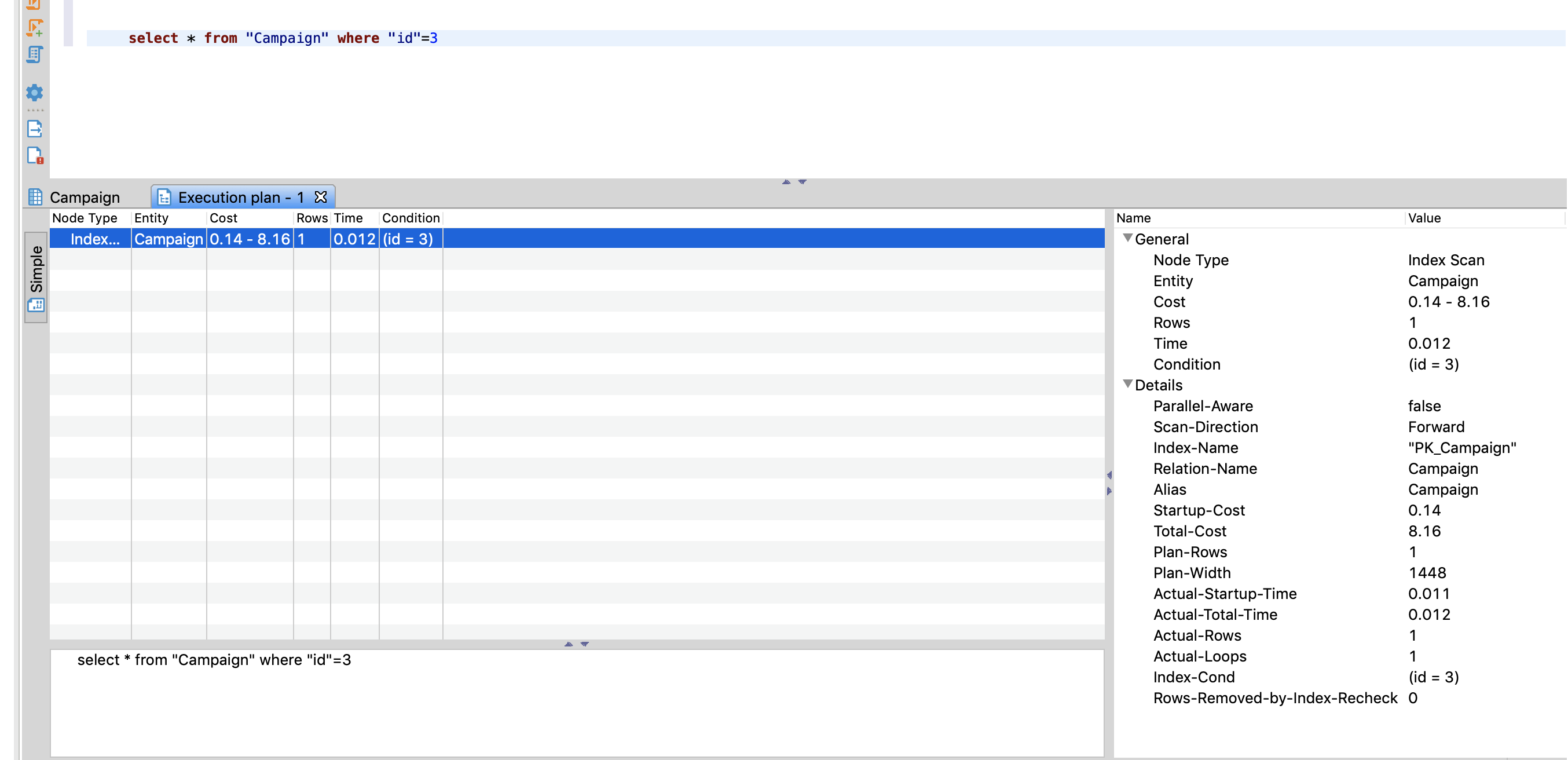
Here is Execution Plan for Dbeaver
And one more information, I have tried it from psql and here is the results.

kervanaslan
on 4 Mar 2020
I used the same connection string as yours : const string ConnectionString = @"Host=localhost;Database=test;Username=test;Password=test";
That means you're connecting to localhost, i.e. the same machine has both the application and database running. Did you execute this on the AWS database machine? Where are you running the client and where is the server?
I'm not sure what Time: 141,293 ms means in your case... When I run SELECT 1 (which you should try too), against localhost, I get Time: 0.452 ms (note the dot instead of the comma).
roji
on 4 Mar 2020
I used the same connection string as yours : const string ConnectionString = @"Host=localhost;Database=test;Username=test;Password=test";
That means you're connecting to localhost, i.e. the same machine has both the application and database running. Did you execute this _on_ the AWS database machine? Where are you running the client and where is the server?
No I have changed the credentials as my AWS Database, but the template is the same as yours.
Server located in US and I'm located in Europe, I'm running psql in my local computer.
I'm not sure what Time: 141,293 ms means in your case... When I run SELECT 1 (which you should try too), against localhost, I get Time: 0.452 ms (note the dot instead of the comma).
I'm also not sure what does this time means, I'm writing it as an additional information.
kervanaslan
on 4 Mar 2020
No I have changed the credentials as my AWS Database, but the template is the same as yours.
Server located in US and I'm located in Europe, I'm running psql in my local computer.
I'm sorry, I'm confused... The idea is to run the benchmarks I provided above against your actual AWS server, but the connection string runs them against localhost... I simply don't understand when you're getting 1ms and when you're getting 137ms...
roji
on 4 Mar 2020
I'm running all test at my local server.
On Dbeaver I'm getting 1 ms.
On c# and psql I'm getting ~120ms
I will try to check to results in US located machine.
Tanks @roji for your time.
kervanaslan
on 4 Mar 2020
@kervanaslan did you find a solution? I have the same issue, when I execute the query from Dbeaver it is 120ms but when I execute it from Npsql it is over 1 second. Same machine, database is hosted on Azure.
 zoran-petrovic-87
on 21 Jul 2020
zoran-petrovic-87
on 21 Jul 2020
No solution, It is about geo-location. I don't know why but Postgres responses are extremely slow if calling from an other region.
kervanaslan
on 21 Jul 2020
For anyone arriving here, Npgsql really is just a PostgreSQL client - it opens a TCP connection to your PostgreSQL server just like any other driver would (or psql); as a general rule, this makes it very unlikely for Npgsql to be the cause of consistent and significant query slowdown. When comparing Npgsql perf against any other client, carefully check that you're testing from the same client machine, and connecting to the same server (PostgreSQL) machine.
roji
on 21 Jul 2020
For anyone arriving here, Npgsql really is just a PostgreSQL client - it opens a TCP connection to your PostgreSQL server just like any other driver would (or psql); as a general rule, this makes it very unlikely for Npgsql to be the cause of consistent and significant query slowdown. When comparing Npgsql perf against any other client, carefully check that you're testing from the same _client_ machine, and connecting to the same _server_ (PostgreSQL) machine.
Yes, this is right. It is not about npgsql. My experience was about multi regional purpose. So, npgsql was slow as the other clients.
kervanaslan
on 21 Jul 2020
Related issues
 austindrenski
·
5Comments
austindrenski
·
5Comments
 win32nipuh
·
4Comments
win32nipuh
·
4Comments
 sebstr
·
4Comments
sebstr
·
4Comments
 bikeladam
·
3Comments
bikeladam
·
3Comments
 TPucke
·
3Comments
TPucke
·
3Comments
Most helpful comment
Yes, this is right. It is not about npgsql. My experience was about multi regional purpose. So, npgsql was slow as the other clients.