Efcore.pg: Fixed-length char mapping is incompatible with CLR type-changing value converters
I tried using EnumToStringConverter to map an enum property on my entity class to a text database column as per:
https://docs.microsoft.com/en-us/ef/core/modeling/value-conversions#built-in-converters
It works fine to read values out of the table but when I try to insert a new row, I get an exception when calling SaveChanges():
System.InvalidOperationException
  HResult=0x80131509
  Message=No coercion operator is defined between types 'EFCoreConsoleSample.LimitType' and 'System.String'.
  Source=Microsoft.EntityFrameworkCore
  StackTrace:
   at Microsoft.EntityFrameworkCore.Metadata.Internal.ClrAccessorFactory`1.Create(PropertyInfo propertyInfo, IPropertyBase propertyBase)
   at Microsoft.EntityFrameworkCore.Internal.NonCapturingLazyInitializer.EnsureInitialized[TParam,TValue](TValue& target, TParam param, Func`2 valueFactory)
   at Microsoft.EntityFrameworkCore.ChangeTracking.Internal.InternalEntityEntry.ReadPropertyValue(IPropertyBase propertyBase)
   at Microsoft.EntityFrameworkCore.ChangeTracking.Internal.ChangeDetector.DetectChanges(InternalEntityEntry entry)
   at Microsoft.EntityFrameworkCore.ChangeTracking.Internal.ChangeDetector.DetectChanges(IStateManager stateManager)
   at Microsoft.EntityFrameworkCore.DbContext.SaveChanges(Boolean acceptAllChangesOnSuccess)
   at EFCoreConsoleSample.Program.Main(String[] args) in C:\git\EFCoreConsoleSample\EFCoreConsoleSample\Program.cs:line 15
The same thing works with SQL Server so it seems to be an issue with the PostgreSQL provider.
 andrewcfrancis2
All 12 comments
Could you provide the model configuration?
 YohDeadfall
on 5 Jul 2019
YohDeadfall
on 5 Jul 2019
Here's a simple model that reproduces the issue:
```c#
using Microsoft.EntityFrameworkCore;
using Microsoft.EntityFrameworkCore.Storage.ValueConversion;
using System.ComponentModel.DataAnnotations.Schema;
namespace EFCoreConsoleSample
{
public class BloggingContext : DbContext
{
public DbSet
    protected override void OnModelCreating(ModelBuilder modelBuilder)
    {
        modelBuilder.Entity<Blog>()
            .Property(b => b.BlogTypeCode)
             .HasConversion(new EnumToStringConverter<BlogType>());
    }

    protected override void OnConfiguring(DbContextOptionsBuilder optionsBuilder)
    {
        optionsBuilder.UseNpgsql("User ID=postgres;Host=localhost;Port=5432;Database=Repro;Pooling=true;");
    }
}

public class Blog
{
    public int BlogId { get; set; }
    public string Url { get; set; }

    [Column(TypeName = "char(3)")]
    public BlogType BlogTypeCode { get; set; }

}

public enum BlogType
{
    Per = 1,
    Com = 2,
}
}
The error occurs when I use the model like this:

```c#
using (var db = new BloggingContext())
{
    db.Blogs.Add(new Blog { Url = "http://www.google.com", BlogTypeCode = BlogType.Per });
    var count = db.SaveChanges(); // it throws an exception here
}
@andrewcfrancis2 Can you confirm your EF Core/npgsql versions?
 austindrenski
on 11 Jul 2019
austindrenski
on 11 Jul 2019
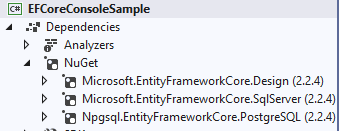
@austindrenski I can reproduce the issue with the code above using EF Core and Npgsql v2.2.4:
andrewcfrancis2
on 11 Jul 2019
Any news on this issue? Has someone been able to reproduce it? Is there any chance it will get fixed in the next release?
andrewcfrancis2
on 30 Jul 2019
Have the same issue:
There is InvalidOperationException ('No coercion operator is defined between types 'EnumName' and 'System.String'.') when try to insert entity with enum property. This property is described via fluent api:
``` C#
modelBuilder.Entity
.HasConversion
Almost same code (without `IsFixedLength()`) works fine
``` C#
modelBuilder.Entity<MyEntity>().Property(e => e.EnumField).IsFixedLength().HasMaxLength(3)
                .HasConversion<string>(v => v.ToString(), v => Enum.Parse<MyEnum>(v));
Steps to reproduce
Create entity with Enum field and describe it via fluent:
``` C#
modelBuilder.Entity
.HasConversion
run migration (create db). And try to insert value in the table via EF Core.

### Further technical details

EF Core version: 3.0.0
Database provider: PostgreSQL (Npgsql.EntityFrameworkCore.PostgreSQL  Version=3.0.1)
Target framework: .NET Core 3.0
Operating system: windows 10


Stack trace:
at Microsoft.EntityFrameworkCore.Metadata.Internal.ClrAccessorFactory1.Create(MemberInfo memberInfo, IPropertyBase propertyBase)
at Microsoft.EntityFrameworkCore.Metadata.Internal.ClrPropertyGetterFactory.Create(IPropertyBase property)
at Microsoft.EntityFrameworkCore.Metadata.Internal.PropertyBase.<>c.<get_Getter>b__33_0(PropertyBase p)
at Microsoft.EntityFrameworkCore.Internal.NonCapturingLazyInitializer.EnsureInitialized[TParam,TValue](TValue& target, TParam param, Func2 valueFactory)
at Microsoft.EntityFrameworkCore.Metadata.Internal.PropertyBase.get_Getter()
at Microsoft.EntityFrameworkCore.ChangeTracking.Internal.InternalEntityEntry.ReadPropertyValue(IPropertyBase propertyBase)
at Microsoft.EntityFrameworkCore.ChangeTracking.Internal.InternalEntityEntry.get_Item(IPropertyBase propertyBase)
at Microsoft.EntityFrameworkCore.ChangeTracking.Internal.ChangeDetector.LocalDetectChanges(InternalEntityEntry entry)
at Microsoft.EntityFrameworkCore.ChangeTracking.Internal.ChangeDetector.DetectChanges(IStateManager stateManager)
at Microsoft.EntityFrameworkCore.ChangeTracking.ChangeTracker.DetectChanges()
at Microsoft.EntityFrameworkCore.DbContext.TryDetectChanges()
at Microsoft.EntityFrameworkCore.DbContext.SaveChanges(Boolean acceptAllChangesOnSuccess)
at Microsoft.EntityFrameworkCore.DbContext.SaveChanges()
at DBScaffold.Program.
Code to reproduce:
``` C#
using Microsoft.EntityFrameworkCore;
using Microsoft.EntityFrameworkCore.ChangeTracking;
using Microsoft.EntityFrameworkCore.ValueGeneration;
using System;
using System.Linq;
using System.Threading.Tasks;

namespace EFCoreIssue
{
    public class MyEntity
    {
        public int Id { get; set; }

        public MyEnum EnumField { get; set; }
    }

    public enum MyEnum
    {
        One,
        Two
    }

    public class CurrentUserNameGenerator : ValueGenerator<string>
    {
        public override bool GeneratesTemporaryValues => false;

        public override string Next(EntityEntry entry) => "FooBarUser";
    }

    public class BloggingContext : DbContext
    {
        protected override void OnConfiguring(DbContextOptionsBuilder optionsBuilder)
        {
            //optionsBuilder.UseSqlServer(@"Server=(localdb)\mssqllocaldb;Database=Test;ConnectRetryCount=0");
            optionsBuilder.UseNpgsql(@"Host=192.168.122.1;Database=pg_db;Username=postgres;Password=postgres");
        }

        protected override void OnModelCreating(ModelBuilder modelBuilder)
        {
            modelBuilder
                .Entity<MyEntity>()
                .Property(e => e.EnumField)
                .IsFixedLength()
                .HasMaxLength(3)
                .HasConversion(v => v.ToString(), v => Enum.Parse<MyEnum>(v));
        }
    }

    public static class Program
    {
        public static async Task Main()
        {
            using (var context = new BloggingContext())
            {
                context.Database.EnsureDeleted();
                context.Database.EnsureCreated();

                context.Add(new MyEntity { EnumField = MyEnum.Two });
                context.SaveChanges();
            }

            using (var context = new BloggingContext())
            {
                var value = context.Set<MyEntity>().FirstOrDefault();
            }
        }
    }
}
 cspwizard
on 17 Oct 2019
cspwizard
on 17 Oct 2019
Hi Guys!
@YohDeadfall @austindrenski are there any plans on this issue?
Thanks!
cspwizard
on 22 Oct 2019
Bump
 rockstardev
on 4 Feb 2020
rockstardev
on 4 Feb 2020
@roji, could you take a look at it?
YohDeadfall
on 4 Feb 2020
Thanks for the reminder @YohDeadfall. This is a bug wherever a property is mapped to PostgreSQL fixed-length char (e.g. char(3)), and also uses a value converter to have a different CLR type in .NET.
 roji
on 4 Feb 2020
roji
on 4 Feb 2020
Note: as a workaround, map to varchar(3) instead of char(3) (or just to text) and everything should be fine.
roji
on 4 Feb 2020
Thanks for the fix and workaround @roji ... can confirm varchar worked for us; but am looking forward to switching to char.
rockstardev
on 4 Feb 2020
Related issues
 guoyongchang
·
3Comments
guoyongchang
·
3Comments
 aaronhudon
·
3Comments
aaronhudon
·
3Comments
 mrclayman
·
3Comments
mrclayman
·
3Comments
 Joseph-Anthony-King
·
3Comments
Joseph-Anthony-King
·
3Comments
 bikeladam
·
3Comments
bikeladam
·
3Comments