Ef6: Error in generate database from model using EF6 tools
Repro steps:
- Create an empty .NET Core console app
- Add EF 6.3 preview 6 to it
(Note: I suspect the two previous steps can be skipped, but I haven't verified) - Create an empty .NET Framework console app
- Created an empty EDMX file using the wizard
- Add an entity type on the designer
- Right-click on the designer surface and click on the _Generate database from model_ option
- Create a new connection to SQL Server LocalDB (first step of the wizard)
- Select EF 6.x (second step of the wizard)
- Click on the next button
Result:
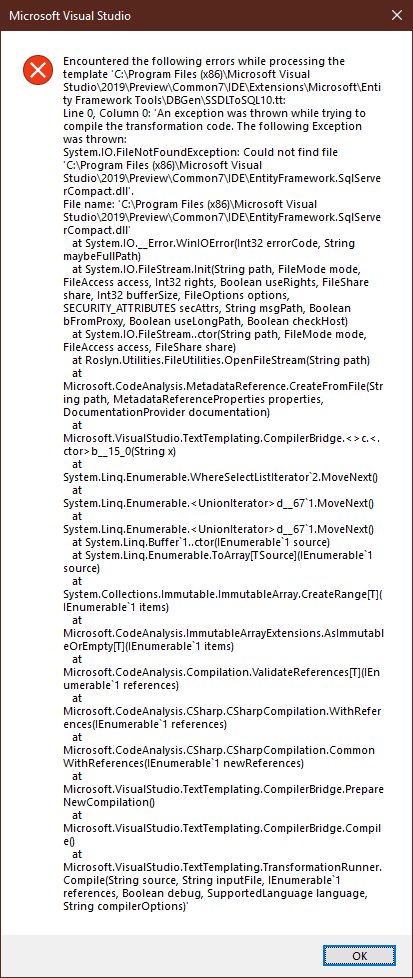
An error dialog is displayed containing a stack trace. The text starts with:
Encountered the following errors while processing the template 'C:\Program Files (x86)\Microsoft Visual Studio2019\Preview\Common7\IDEExtensions\Microsoft\Entity Framework Tools\DBGen\SSDLToSQL10.tt: Line 0, Column 0: 'An exception was thrown while trying to compile the transformation code. Teh following Exception was thrown: System.IO.FileNotFoundException: Could not find the file 'C:\Program files (x86)\Microsoft Visual Studio2019\Preview\Common7\IDE\EntityFramework.SqlServerCompact.dll'...
Screen shot:
 divega
All 10 comments
@divega What VS version?
@lajones Could this be a result of moving the templates off the C:\ drive?
 ajcvickers
on 12 Jun 2019
ajcvickers
on 12 Jun 2019
I was able to repro on my laptop with
Microsoft Visual Studio Enterprise 2019 Int Preview
Version 16.2.0 Preview 2.0 [29001.23.d16.2stg]
VisualStudio.16.IntPreview/16.2.0-pre.2.0+29001.23.d16.2stg
Microsoft .NET Framework
Version 4.8.03752
I will try to remember checking what I had in my desktop when I found it earlier.
divega
on 12 Jun 2019
Repros on this as well:
Microsoft Visual Studio Enterprise 2019 Int Preview
Version 16.2.0 Preview 3.0 [29011.400.d16.2stg]
VisualStudio.16.IntPreview/16.2.0-pre.3.0+29011.400.d16.2stg
Microsoft .NET Framework
Version 4.8.03752
divega
on 12 Jun 2019
@ajcvickers I don't think it's moving things to the shared drive - that was the .nupkg packages - and as long as the registry entry is consistent then it should find them. Besides what it's saying is missing is EntityFramework.SqlServerCompact.dll. @divega can you confirm whether that file is there or not? Also can you try e.g. SqlServer instead?
 lajones
on 13 Jun 2019
lajones
on 13 Jun 2019
@divega Nvm about the SqlServer repro. There's a direct reference to EntityFramework.SqlServerCompact.dll in the script:
<#@ assembly name="$(VSAPPIDDIR)EntityFramework.SqlServerCompact.dll" #>
If that file is not installed then the script will fail regardless of what it's targeting. Looks like a bug. Assigning to me.
lajones
on 13 Jun 2019
I can confirm that EntityFramework.SqlServerCompact.dll are not located on the Common7\IDE directory on my machines. But EntityFramework.dll and EntityFramework.SqlServer.dll 6.2 are there.
divega
on 13 Jun 2019
I'm seeing this same issue. Working around it right now by copying EntityFramework.SqlServerCompact.dll from the EntityFramework.SqlServerCompact Nuget package into this folder.
 WiredUK
on 27 Jun 2019
WiredUK
on 27 Jun 2019
Fix will be in 16.2 Preview 4.
lajones
on 30 Jun 2019
I confirm the workaround informed by @WiredUK and I add that it can be obtained from c:\Program Files (x86)\Microsoft Visual Studio 14.0\Common7\IDE. The dll is already in the IDE installation folder.
 RamiroGuasti
on 4 Jul 2019
RamiroGuasti
on 4 Jul 2019
Fixed in 16.2 Preview 4.
lajones
on 1 Nov 2019
Related issues
 AnReZa
·
4Comments
AnReZa
·
4Comments
 AmirGeorge
·
5Comments
divega
·
3Comments
AmirGeorge
·
5Comments
divega
·
3Comments
 hungdqht
·
3Comments
hungdqht
·
3Comments
 Elufimov
·
7Comments
Elufimov
·
7Comments
Most helpful comment
@divega Nvm about the SqlServer repro. There's a direct reference to
EntityFramework.SqlServerCompact.dllin the script:<#@ assembly name="$(VSAPPIDDIR)EntityFramework.SqlServerCompact.dll" #>If that file is not installed then the script will fail regardless of what it's targeting. Looks like a bug. Assigning to me.