Ef6: EDMX Wizard table selection cutoff or blank
From VS Feedback:
When adding an edmx model or updating the table, views and store procedure selection is cutoff or blank
 ajcvickers
All 16 comments
EF Team Triage: This issue is lacking enough information for us to be able to effectively triage it. In particular, it is missing the following information requested in the new issue template. Can you please provide this information?
Steps to reproduce
Ideally include a complete code listing that we can run to reproduce the issue.
Alternatively, you can provide a project/solution that we can run.
BTW we're not just doing this to be mean :smile:... we get a lot traffic on this project and it takes time to attempt to reproduce an issue based on fragments of information. In addition, our attempt is often unsuccessful as the exact conditions required to hit the issue are often not explicitly included in the code provided. To ensure we maximize the time we have to work on fixing bugs, implementing new features, etc. we ask that folks give us a self-contained way to reproduce an issue.
For a guide on submitting good bug reports, read Painless Bug Tracking.
BTW this is a canned response and may have info or details that do not directly apply to this particular issue. While we'd like to spend the time to uniquely address every incoming issue, we get a lot traffic on the EF projects and that is not practical. To ensure we maximize the time we have to work on fixing bugs, implementing new features, etc. we use canned responses for common triage decisions.
ajcvickers
on 22 Apr 2019
Here are the steps to reproduce.
- Add new ADO.NET Entity Data Model through wizard
- Select EF Designer from database.
- Setup connection and click next
From here, once you are on the "Choose Your Database Objects and Settings" the view is cut off. Attached is a screenshot of what it looks like.
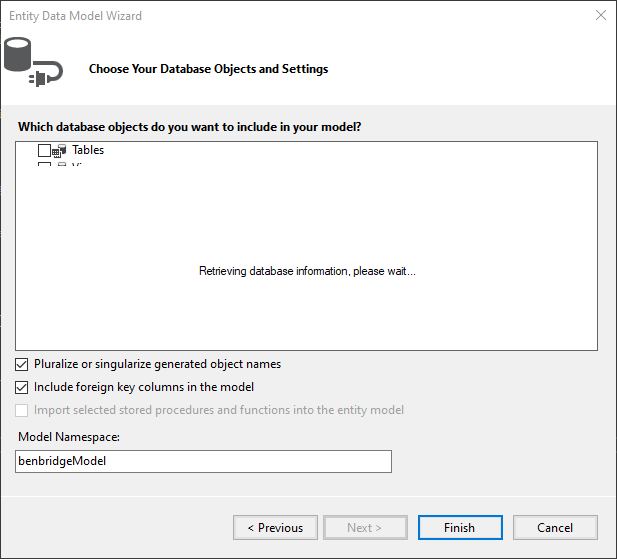
Also when you go back in to update the model nothing shows up except for "Retrieving database information, please wait..."
Side note not sure if it's prudent, but this is connecting to a MySQL database.
 tottes200
on 24 Apr 2019
tottes200
on 24 Apr 2019
@tottes200 - we are not seeing that in current builds - so could you provide a few more details please - e.g. operating system, version(s) of VS installed and which one you are using when you see this, version(s) of .NET installed and using in this project, what kind of project you created etc. As much as you can to help us track it down please.
Also - if you wait a long time does that message ever go away? That message is supposed to appear while querying the database for the tables, views, sprocs to display. But it should go away once it has retrieved the information. If so, how long does it take and what numbers of tables, views, sprocs do you have in your database?
 lajones
on 24 Apr 2019
lajones
on 24 Apr 2019
OS:
Windows 10/Windows Server 2016 (seeing it on both OS versions)
Visual Studio:
Microsoft Visual Studio Enterprise 2019 Preview
Version 16.1.0 Preview 2.0
VisualStudio.16.Preview/16.1.0-pre.2.0+28822.285
Project:
.Net 4.6.2 WPF
Entity Framework 6.2.0
My initial thought was that this could be a bug in VS 2019, but it was kicked over here for support. Please let me know of anything else I can provide.
Below is a list of Installed Products pulled from Visual Studio. Sorry for the information overload.
_Microsoft Visual Studio Enterprise 2019 Preview
Version 16.1.0 Preview 2.0
VisualStudio.16.Preview/16.1.0-pre.2.0+28822.285
Microsoft .NET Framework
Version 4.8.03752
Installed Version: Enterprise
Architecture Diagrams and Analysis Tools 00435-60000-00000-AA786
Microsoft Architecture Diagrams and Analysis Tools
Visual C++ 2019 00435-60000-00000-AA786
Microsoft Visual C++ 2019
ADL Tools Service Provider 1.0
This package contains services used by Data Lake tools
Application Insights Tools for Visual Studio Package 9.0.20307.1
Application Insights Tools for Visual Studio
ASP.NET and Web Tools 2019 16.1.302.53887
ASP.NET and Web Tools 2019
ASP.NET Web Frameworks and Tools 2019 16.1.302.53887
For additional information, visit https://www.asp.net/
Atomineer Pro Documentation 1.0
Source-code documentation-comment creation and maintenance, and other documentation-related tools.
Azure App Service Tools v3.0.0 16.1.302.53887
Azure App Service Tools v3.0.0
Azure Data Lake Node 1.0
This package contains the Data Lake integration nodes for Server Explorer.
Azure Data Lake Tools for Visual Studio 2.3.7000.2
Microsoft Azure Data Lake Tools for Visual Studio
Azure Functions and Web Jobs Tools 16.1.302.53887
Azure Functions and Web Jobs Tools
Azure Stream Analytics Tools for Visual Studio 2.3.7000.2
Microsoft Azure Stream Analytics Tools for Visual Studio
C# Tools 3.1.0-beta2-19211-01+9d88fee4efb9f7ae4ae053d63b9f8b5b31217c90
C# components used in the IDE. Depending on your project type and settings, a different version of the compiler may be used.
Common Azure Tools 1.10
Provides common services for use by Azure Mobile Services and Microsoft Azure Tools.
Dotfuscator Community Edition 5.40.1.8956-03f69f61d
PreEmptive Protection - Dotfuscator CE
JetBrains ReSharper Ultimate 2019.1 EAP 6 Build 191.0.20190410.221853-eap06
JetBrains ReSharper Ultimate package for Microsoft Visual Studio. For more information about ReSharper Ultimate, visit http://www.jetbrains.com/resharper. Copyright © 2019 JetBrains, Inc.
Microsoft Azure HDInsight Azure Node 2.3.7000.2
HDInsight Node under Azure Node
Microsoft Azure Hive Query Language Service 2.3.7000.2
Language service for Hive query
Microsoft Azure Stream Analytics Language Service 2.3.7000.2
Language service for Azure Stream Analytics
Microsoft Azure Stream Analytics Node 1.0
Azure Stream Analytics Node under Azure Node
Microsoft Azure Tools 2.9
Microsoft Azure Tools for Microsoft Visual Studio 0x10 - v2.9.0.0
Microsoft Continuous Delivery Tools for Visual Studio 0.4
Simplifying the configuration of Azure DevOps pipelines from within the Visual Studio IDE.
Microsoft JVM Debugger 1.0
Provides support for connecting the Visual Studio debugger to JDWP compatible Java Virtual Machines
Microsoft Library Manager 1.0
Install client-side libraries easily to any web project
Microsoft MI-Based Debugger 1.0
Provides support for connecting Visual Studio to MI compatible debuggers
Microsoft Visual C++ Wizards 1.0
Microsoft Visual C++ Wizards
Microsoft Visual Studio Tools for Containers 1.1
Develop, run, validate your ASP.NET Core applications in the target environment. F5 your application directly into a container with debugging, or CTRL + F5 to edit & refresh your app without having to rebuild the container.
Microsoft Visual Studio VC Package 1.0
Microsoft Visual Studio VC Package
MySQL for Visual Studio 1.2.8
Data design and management tools for MySQL. Copyright (c) 2007, 2018, Oracle and/or its affiliates. All rights reserved.
Node.js Tools 1.5.10326.1 Commit Hash:f12bb7408a1f644400cbb5ca43f601559ea6bec5
Adds support for developing and debugging Node.js apps in Visual Studio
NuGet Package Manager 5.1.0
NuGet Package Manager in Visual Studio. For more information about NuGet, visit http://docs.nuget.org/.
ProjectServicesPackage Extension 1.0
ProjectServicesPackage Visual Studio Extension Detailed Info
ResourcePackage Extension 1.0
ResourcePackage Visual Studio Extension Detailed Info
ResourcePackage Extension 1.0
ResourcePackage Visual Studio Extension Detailed Info
Snapshot Debugging Extension 1.0
Snapshot Debugging Visual Studio Extension Detailed Info
SQL Server Data Tools 16.0.61904.17120
Microsoft SQL Server Data Tools
Syntax Highlighting Pack 2.8.134
Adds syntax highlighting and snippet support for a wide variety of programming languages such as Clojure, Go, Jade, Lua, Swift, Ruby and many more...
Test Adapter for Boost.Test 1.0
Enables Visual Studio's testing tools with unit tests written for Boost.Test. The use terms and Third Party Notices are available in the extension installation directory.
Test Adapter for Google Test 1.0
Enables Visual Studio's testing tools with unit tests written for Google Test. The use terms and Third Party Notices are available in the extension installation directory.
ToolWindowHostedEditor 1.0
Hosting json editor into a tool window
TypeScript Tools 16.0.10411.2001
TypeScript Tools for Microsoft Visual Studio
Visual Basic Tools 3.1.0-beta2-19211-01+9d88fee4efb9f7ae4ae053d63b9f8b5b31217c90
Visual Basic components used in the IDE. Depending on your project type and settings, a different version of the compiler may be used.
Visual F# Tools 10.4 for F# 4.6 16.0.0.0. Commit Hash: 809f41207b74a1356208f11b8fa3a15233734050.
Microsoft Visual F# Tools 10.4 for F# 4.6
Visual Studio Code Debug Adapter Host Package 1.0
Interop layer for hosting Visual Studio Code debug adapters in Visual Studio
Visual Studio Tools for CMake 1.0
Visual Studio Tools for CMake
Visual Studio Tools for CMake 1.0
Visual Studio Tools for CMake
Visual Studio Tools for Containers 1.0
Visual Studio Tools for Containers
WiX Toolset Visual Studio Extension 0.9.21.62588
WiX Toolset Visual Studio Extension version 0.9.21.62588
Copyright (c) .NET Foundation and contributors. All rights reserved._
tottes200
on 24 Apr 2019
Also, it never comes up no matter how long it sits.
tottes200
on 24 Apr 2019
@tottes200 Thanks - that's great info - I'll see if I can repro on my end.
lajones
on 25 Apr 2019
@tottes200 I'm sorry. I've tried multiple different ways with as close as I can get to your setup and I can't repro the problem - the wizard always looks good to me. But I realize that doesn't help you much.
Potential workaround: that dialog is resizable - if you try expanding it as large as it goes does that help you navigate to the tables, views & sprocs that you need even if some portion of the screen is still covered by the message?
Potential workaround 2: does changing the screen resolution help?
lajones
on 27 Apr 2019
EF Team Triage: Closing this issue as we have been unable to reproduce it.
BTW this is a canned response and may have info or details that do not directly apply to this particular issue. While we'd like to spend the time to uniquely address every incoming issue, we get a lot traffic on the EF projects and that is not practical. To ensure we maximize the time we have to work on fixing bugs, implementing new features, etc. we use canned responses for common triage decisions.
lajones
on 3 May 2019
I'm having the same issue
 thenextfreud
on 13 May 2019
thenextfreud
on 13 May 2019
Same error here.
I created a ticket a couple of days ago.
https://developercommunity.visualstudio.com/content/problem/562586/entity-data-model-wizard-display-error.html
 blfuentes
on 15 May 2019
blfuentes
on 15 May 2019
This is caused by large fonts. I have a 4K monitor and fonts set to 150% and experience exactly this problem. The work-around is to change your fonts back down to 100%, close VS and reopen. Now it behaves properly. Of course, the fonts are too freaking tiny, but at least this wizard is functional. Select the items you need to get passed that, then go and enlarge your fonts again so you can read.
 csharpner
on 11 Jun 2019
csharpner
on 11 Jun 2019
Reopening To try to repro with different font size in high density display.
 divega
on 11 Jun 2019
divega
on 11 Jun 2019
Cc @lajones @ajcvickers
divega
on 11 Jun 2019
@lajones Was this fixed by #934?
ajcvickers
on 26 Jun 2019
@ajcvickers No. That was for the Model Browser and Mapping Details Windows. I'm working on this now.
lajones
on 26 Jun 2019
Note: the VS side of this fix this was checked in (internal PR 188912) and the fix will appear in 16.2 Preview 4.
lajones
on 28 Jun 2019
Related issues
 AmirGeorge
·
5Comments
divega
·
3Comments
AmirGeorge
·
5Comments
divega
·
3Comments
 Colorfulmoose
·
4Comments
Colorfulmoose
·
4Comments
 hayer
·
6Comments
hayer
·
6Comments
 leandrovip
·
4Comments
leandrovip
·
4Comments