Eel: [eel + pyinstaller] FileNotFoundError: [Errno 2] No such file or directory eel.js
Eel version
Please state the version of Eel you're using.
0.11.0
Describe the bug
Error prevents me to start my app.
To Reproduce
Kindly unzip and auto-py-to-exe
web.zip
Expected behavior
Startup of my application
Screenshots

Desktop (please complete the following information):
- OS: Windows 10
- Browser chrome
- Version [e.g. 22]
Additional context
I think pyinstaller doesn't add eel.js. But I wasn't able to find why it doesn't add.
Let me know if you need some help on this issue.
** What I did to solve this
It was my eel folder of output folder. (i.e output\app\eel)

I was able to solve this issue by manually adding to eel folder from github eel folder
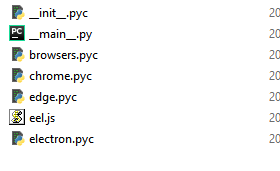
Thank you,
Antonio
 jhyunetp
All 9 comments
Yes, you are correct. Pyinstaller can't find eel.js so you have to help it by saying pick eel.js from this location. There are 3 ways to do this:
- If you are using auto-py-exe, then in the add datas place, add the location of eel.js (../site-packages/eel/eel.js)
- Or, directly add that location under datas in the .spec file generated by pyinstaller.
- Or, you could refer to eel's readme here. That handles all that automatically, so you won't have to worry about it.
 RahulBadenkal
on 11 Mar 2020
RahulBadenkal
on 11 Mar 2020
Third Option was very helpful for me.
But I guess many people can miss that option like me.
I think it is better to automate that process in pyinstaller as well.
Like creating js script via python script.
jhyunetp
on 12 Mar 2020
Well, agreed. Ideally someone should write a pyinstaller hook for eel and submit a PR to pyinstaller team.
 RahulBadenkalSarci
on 12 Mar 2020
RahulBadenkalSarci
on 12 Mar 2020
Thanks @RahulBadenkal for helping @jhyunetp get to the bottom of this problem. I'm going to close this issue off for now - but am going to look at proposing a hook for pyinstaller. It doesn't look too tricky.
 samuelhwilliams
on 19 Jun 2020
samuelhwilliams
on 19 Jun 2020
hey,
I am currently having the same issue,
Could someone be so kind to explain me, how the 3rd option is working :)
1st and 2nd wasnt doing anything :/
I dont realy get what you mean with refering.
Thank you so much,
Q. Schilling
 asdat3
on 2 Jul 2020
asdat3
on 2 Jul 2020
hey,
I am currently having the same issue,
Could someone be so kind to explain me, how the 3rd option is working :)
1st and 2nd wasnt doing anything :/I dont realy get what you mean with refering.
Thank you so much,
Q. Schilling

asdat3
on 2 Jul 2020
Hi @asdat3. Rather than using pyinataller directly, please instead use 'python -m eel' to package your app.
We've submitted a pyinataller hook that should make this less error prone in the future, but it hasn't yet been made available in a release. It should be coming soon.
samuelhwilliams
on 2 Jul 2020
Hi, @samuelhwilliams
dont realy get it, what does the python -m eel command package? where to launch it?
asdat3
on 2 Jul 2020
Could you open a new issue and include the code you're running and the command, etc? Then we can provide more help. Thanks!
samuelhwilliams
on 2 Jul 2020
Related issues
 andrewtquick
·
4Comments
andrewtquick
·
4Comments
 axl3blaz3
·
4Comments
axl3blaz3
·
4Comments
 ghost
·
6Comments
ghost
·
6Comments
 04fsnape
·
4Comments
04fsnape
·
4Comments
 jerearaujo03
·
3Comments
jerearaujo03
·
3Comments