Edex-ui: EDEX-UI not opening after double-clicking on icon nothing responds at all
The following (lightweight) template is made to avoid recurring questions in new bug reports and to facilitate problem diagnosis. You are free to ignore it, but filling it correctly will help a lot. Either way, thanks for taking the time to write a report.
You can delete this introduction message if you want to.
Technical information
Using version:
- [ ]
master(running from GitHub-published source code, currentlyv3.0.0-pre) - [ ]
latest(latest release, currentlyv2.2.1) - [ ]
vX.X.X(specify other version)
Running on:
- [ ] Linux
- [x] Windows
- [ ] macOS
How comfortable you are with your system and/or IT in general:
- [ ] I'm kind of lost, honestly
- [ ] I know what's up, I could help you run some commands or checks
- [x] My machine is fully under my control, tell me what you need
- [ ] I attended Defcon last year
(Write your report here)
 0-0eth0
All 40 comments
Yeah. SAME problem with me.
 ghost
on 12 May 2019
ghost
on 12 May 2019
Have you changed any settings? Could be related to #496
 GitSquared
on 12 May 2019
GitSquared
on 12 May 2019
Have you changed any settings? Could be related to #496
no i did nothing....just installed ur package as normal installation
0-0eth0
on 12 May 2019
In task manager, I can see two background process of EDEX_UI but none in the apps. It sort of loads, probably loads the two processes and then nothing happens.
ghost
on 12 May 2019
In task manager, I can see two background process of EDEX_UI but none in the apps. It sort of loads, probably loads the two processes and then nothing happens.
same here bro... I can see two background process of EDEX_UI but none in the apps. probably loads the two processes and then nothing happens. OS: Win 7 64-bit
0-0eth0
on 12 May 2019
This is what I get when starting from CMD:-
Γû║ start Starting eDEX-UI v2.2.1
i info With Node 10.11.0 and Electron 4.1.4
i info Renderer is Chrome 69.0.3497.128
Γû║ Startup Initialized timer...
i info Base config dir is C:UsersacerAppDataRoamingeDEX-UI
[ ] pending Loading settings file...
√ success Settings loaded!
[ ] pending Creating new terminal process on port 3000
(node:7260) UnhandledPromiseRejectionWarning: Error: File not found:
at new WindowsPtyAgent (C:UsersacerAppDataLocalProgramsedex-uiresourcesapp.asarnode_modulesnode-ptylibwindowsPtyAgent.js:53:36)
at new WindowsTerminal (C:UsersacerAppDataLocalProgramsedex-uiresourcesapp.asarnode_modulesnode-ptylibwindowsTerminal.js:49:24)
at Object.spawn (C:UsersacerAppDataLocalProgramsedex-uiresourcesapp.asarnode_modulesnode-ptylibindex.js:29:12)
at new Terminal (C:UsersacerAppDataLocalProgramsedex-uiresourcesapp.asarclassesterminal.class.js:1:8188)
at App.app.on (C:UsersacerAppDataLocalProgramsedex-uiresourcesapp.asar_boot.js:180:11)
(node:7260) UnhandledPromiseRejectionWarning: Unhandled promise rejection. This error originated either by throwing inside of an async function without a catch block, or by rejecting a promise which was not handled with .catch(). (rejection id: 1)
(node:7260) [DEP0018] DeprecationWarning: Unhandled promise rejections are deprecated. In the future, promise rejections that are not handled will terminate the Node.js process with a non-zero exit code.
ghost
on 12 May 2019
Do you fellas know how to launch it from a cmd/powershell window? It could print out some interesting logs.
Edit: You were faster than me. Hold up, i'm reading it.
GitSquared
on 12 May 2019
@RajTechKing Are you also on Win7?
GitSquared
on 12 May 2019
No I am on windows 8.1
ghost
on 12 May 2019
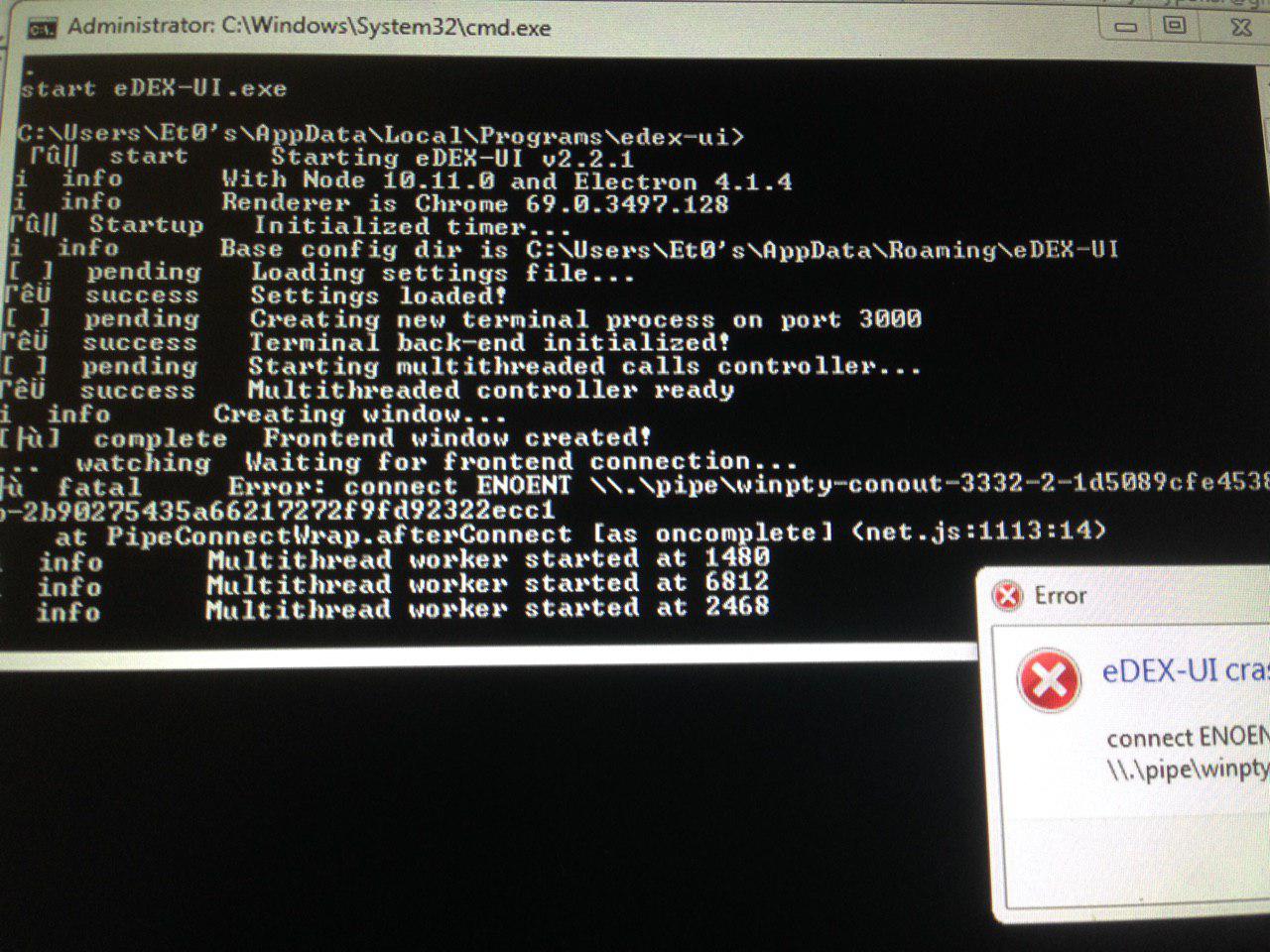
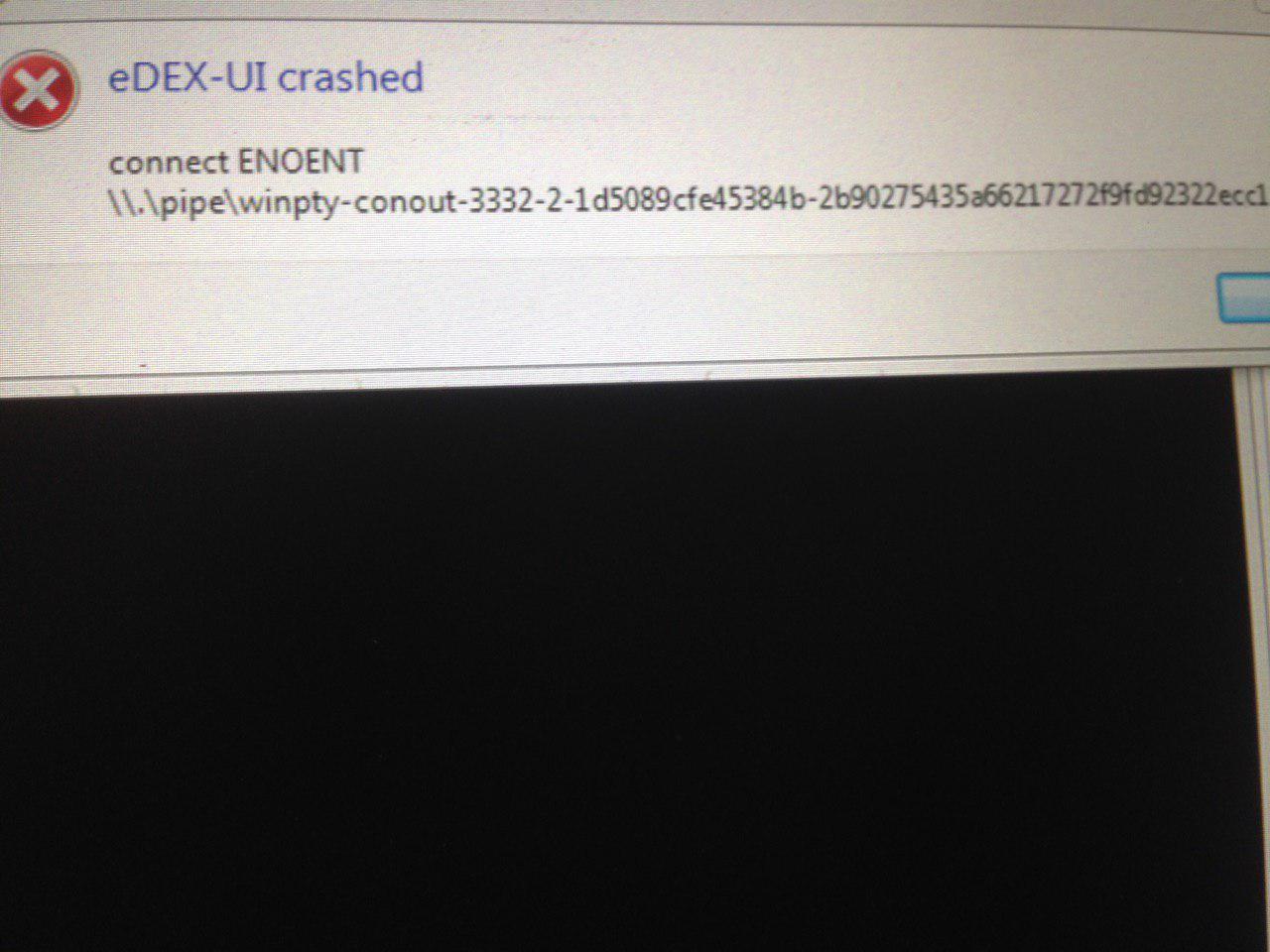
Okay. From the logs it seems that some internal Windows dependency can't be found on your system - and I'm guessing the same thing is happening for @Et0hacker
Those pre-compiled packages have only been tested on win10, I'll see if I can maybe relink some stuff by building on older versions.
In the meantime if you're feeling adventurous you could try to build from source (instructions are in the readme) and see if the same error appears.
GitSquared
on 12 May 2019
I also tried compatibility settings for Windows 7 and Windows Vista. Still doesn't work.
ghost
on 12 May 2019
0-0eth0
on 12 May 2019
Okay. From the logs it seems that some internal Windows dependency can't be found on your system - and I'm guessing the same thing is happening for @Et0hacker
Those pre-compiled packages have only been tested on win10, I'll see if I can maybe relink some stuff by building on older versions.
In the meantime if you're feeling adventurous you could try to build from source (instructions are in the readme) and see if the same error appears.
Alright. I am not so good at programming(I only know basics of programming) but I guess I'll try. Thanks for your time.
ghost
on 12 May 2019
Okay. From the logs it seems that some internal Windows dependency can't be found on your system - and I'm guessing the same thing is happening for @Et0hacker
Those pre-compiled packages have only been tested on win10, I'll see if I can maybe relink some stuff by building on older versions.
In the meantime if you're feeling adventurous you could try to build from source (instructions are in the readme) and see if the same error appears.Alright. I am not so good at programming(I only know basics of programming) but I guess I'll try. Thanks for your time.
@GitSquared same applies for me
@RajTechKing lets try toghether
0-0eth0
on 12 May 2019
@GitSquared do u have any development group? In platforms like Telegram Etc.
0-0eth0
on 12 May 2019
Yeah. We might help out.(HOPEFULLY :D)
ghost
on 12 May 2019
@Et0hacker No, sorry. I'm pretty much working alone on this one.
GitSquared
on 12 May 2019
To build the thing on Windows you'll need to have Node.js installed and then it should be just a matter of putting in the right commands in order.
GitSquared
on 12 May 2019
To build the thing on Windows you'll need to have Node.js installed and then it should be just a matter of putting in the right commands in order.
ok i'll try but....u also pls work on this
0-0eth0
on 12 May 2019
Hey @Et0hacker do you have telegram? If yes, email me your mobile no on [email protected] and I'll Connect with you.
ghost
on 12 May 2019
@Et0hacker Yes of course. I'm just suggesting, you don't have to do anything.
GitSquared
on 12 May 2019
Hey @Et0hacker do you have telegram? If yes, email me your mobile no on [email protected] and I'll Connect with you.
tell me ur telegram id, adding you now by id
0-0eth0
on 12 May 2019
I can't find anything like ID.
ghost
on 12 May 2019
I can't find anything like ID.
open your telegram and on search type: @iamjinay
0-0eth0
on 12 May 2019
If you are looking for username, it is @RajTechKing
ghost
on 12 May 2019
@GitSquared
I'm using windows 10 pro 64bit.
The system installed the EDEX_UI without any issues.
When launching it through shortcut it shows nothing.
But two EDEX_UI processes running in background.
Please help me.☺
 shivamshukl4
on 17 May 2019
shivamshukl4
on 17 May 2019
I just installed 2.2.2 on Windows 10 64-bit 1903 and the same problem is happening. I didn't see anything in the release notes about this, so I assume this is yet ot be fixed?
 dkozinn
on 19 May 2019
dkozinn
on 19 May 2019
@dkozinn Indeed, the latest version is just an emergency vuln fix. I haven't taken the time to research this issue yet - it's quite difficult since everything works flawlessly on my machine, so I need to figure out a way to reproduce the bug first.
I'm currently studying for final exams so I won't give an estimated ETA just yet. I'll make sure to look into it before the next release, though.
GitSquared
on 19 May 2019
@GitSquared Thanks for letting me know. When you're done with finals if there's anything I can do to let, please let me know. More than happy to run debug versions, etc.
Good luck with your finals.
dkozinn
on 19 May 2019
Okay, after taking some time to look into this again, It seems that the shell program eDEX attempts to load as a terminal back-end is not found, which due to my laziness a lack in error handling in the early stages of the startup procedure, causes eDEX to silently crash.
The default shell program for fresh windows installs of edex is powershell.exe.
Maybe some $PATH misconfigurations prevent it from being found; in which case this issue would be solved by the yet-to-be-released automatic shell path resolution feature (f1dbf08).
Otherwise, powershell might be simply missing from your systems - a quick way to verify that is to open the quick launch window (Win+R) and type powershell.exe then enter.
If a blue command line appears, you're good, and hopefully the next update of edex will be able to correctly find your shell.
GitSquared
on 13 Jul 2019
In the meantime, I believe you should be able to work around this issue by starting eDEX once (to generate configuration files) and replacing the value in the shell entry of the setting file to cmd.exe.
GitSquared
on 13 Jul 2019
I do have powershell on my machine though shell was set to bash which perhaps is why it was failing? In any case, I set shell to powershell.exe and it seems to be working now.
dkozinn
on 13 Jul 2019
The shell was set to bash??
This is really weird. Thanks for the info, I'll check what's going on.
Just to confirm, this is on the v2.2.2 release?
GitSquared
on 13 Jul 2019
I believe that I was running 2.2.1. I've replaced that with 2.2.2 now but I can see that the settings file hasn't been touched since I manually modified it. Obviously it's still working fine after that change.
dkozinn
on 13 Jul 2019
It is programmed to never overwrite the config file. Which is why I hope the 7225 people who downloaded v2.2.1 on Windows didn't get a broken default configuration. :grimacing:
Seems weird because if it was a code error I'd expect to have much more feedback about this. I hope to figure out what happened soon.
GitSquared
on 13 Jul 2019
I think I started with an earlier version, then upgraded to 2.2.1, so perhaps it goes back further?
dkozinn
on 13 Jul 2019
I checked and the specific line of code that sets powershell as the default option on Windows is correct and hasn't moved in 2 years. I'm not sure how you got bash to appear in your config.
I'm going to wait for @Et0hacker's feedback on this.
In the meantime, you gave me an idea for a small logging feature I'm going to implement.
GitSquared
on 14 Jul 2019
I wonder if when I ran it the first time, I set that myself to bash figuring I'd get that instead of powershell? In other words ... user error. I don't remember doing that, but I can't swear that I didn't either.
dkozinn
on 14 Jul 2019
Thought about this too. I need OP's feedback to confirm what's in his configuration file.
GitSquared
on 14 Jul 2019
This thread is starting to rot and is not really relevant due to the changes in the shell path finder that I committed in the past few months. I'm going to close it.
If you're having this issue, do the following:
- Check the
shellvalue in your configuration file (see this repo's wiki for up-to-date information about where to find it), verify that there is a valid path to powershell/cmd/git-bash in there, - If the path is non-existent and you haven't edited your configuration, comment here with the value you found,
- If you have edited the config, revert it back to a valid path, or remove the settings file to let eDEX automatically find default values at startup.
GitSquared
on 2 Sep 2019
Related issues
 clragon
·
6Comments
clragon
·
6Comments
 bdgza
·
3Comments
bdgza
·
3Comments
 tandriamil
·
5Comments
tandriamil
·
5Comments
 jwulf
·
5Comments
jwulf
·
5Comments
 probonopd
·
4Comments
probonopd
·
4Comments
Most helpful comment
@GitSquared Thanks for letting me know. When you're done with finals if there's anything I can do to let, please let me know. More than happy to run debug versions, etc.
Good luck with your finals.