Edex-ui: Add setting to override external network interface
It would be super-handy to have an option in settings.json to override the automatically detected external interface. On my system, awdl0 is chosen (which has no address is isn't used), whereas my actual external interface is bond0 (bonded ethernet).
Very cool project! :)
 dsokoloski
All 13 comments
Got the same(ish) problem in the Windows release : It doesn't bind to the correct NIC and therefore no Network Traffic shows up on the counter. Would be a useful addition to have a control panel (of sorts) to be able to change some basic settings.
Other than that, it's a very cool project! :+1: :)
 v2maxx
on 10 Jan 2019
v2maxx
on 10 Jan 2019
Hey @dsokoloski @v2maxx, sorry for the delay, i'm going to take care of this now :P
I'm OK with adding an override option, but i'd also like to take the opportunity to improve the automatic choosing algorithm so that it'll work for more people without a hacky tweak.
I would really appreciate if you guys could run a test binary I made and show me what it outputs in a CLI (powershell or even CMD should do find if you're on windows). It should list all detected network interfaces and allow me to see how i could parse this data better for setups like yours.
Link to download said binary | Source code if you want to run it directly with Node
 GitSquared
on 12 Jan 2019
GitSquared
on 12 Jan 2019
@GitSquared Thanks for working on this!
Here's the output from my system (my external interface -- well, LAN interface to be precise, is bond0, and edex chooses the first "external", awdl0):
```[
{
"iface": "lo0",
"ip4": "127.0.0.1",
"ip6": "::1",
"mac": "",
"internal": true
},
{
"iface": "awdl0",
"ip4": "",
"ip6": "fe80::20f2::dead:beef",
"mac": "22:f2:4e:e4:fd:de",
"internal": false
},
{
"iface": "bond0",
"ip4": "192.168.0.1",
"ip6": "fe80::cf3::dead:beef",
"mac": "00:11:22:33:44:55",
"internal": false
},
{
"iface": "utun0",
"ip4": "",
"ip6": "fe80::ef81::dead:beef",
"mac": "",
"internal": false
}
]
dsokoloski
on 13 Jan 2019
@dsokoloski All right, i'll add a check for both "internal = false" and a valid IPv4 field, that should do it in most cases. Also a custom interface option.
Thanks for your help!
GitSquared
on 13 Jan 2019
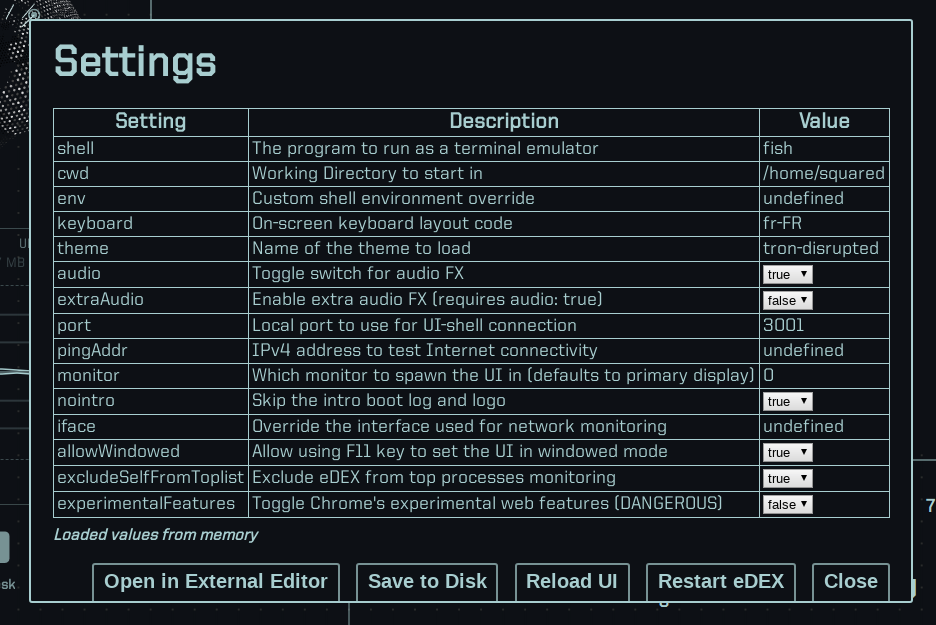
There's a new iface parameter in settings.json.
Also, the automatic networkInterface chooser has been modified to select the first interface with:
internalset to false- a non-empty
ip4field - a non-empty
macfield (mac address)
This should correctly select the right interface for most users.
GitSquared
on 13 Jan 2019
Wow! Fantastic, thanks a lot -- much appreciated!
dsokoloski
on 13 Jan 2019
Oh, and @v2maxx:
Would be a useful addition to have a control panel (of sorts) to be able to change some basic settings.
Working on it.
GitSquared
on 13 Jan 2019
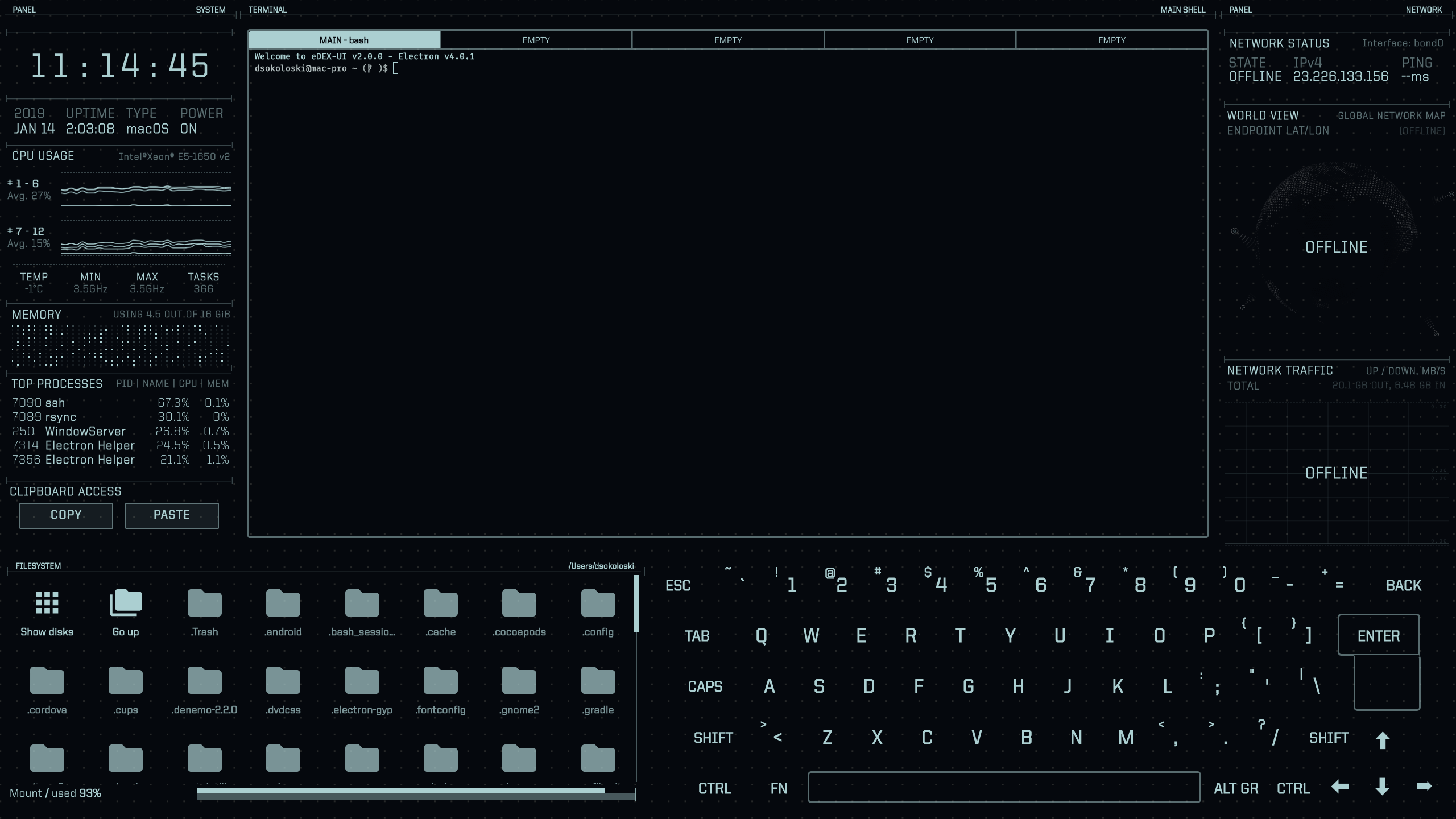
@GitSquared I had some time this morning to test the latest changes. The correct interface is now being selected but doesn't appear to be working (offline).
No stats for the interface are being reported. No ping time, the IP address that it displays is a total mystery (not my external IP). See attached screen shot:
The output from your ifacetest script again:
dsokoloski@mac-pro ifacetest $ node index
[
  {
    "iface": "lo0",
    "ip4": "127.0.0.1",
    "ip6": "::1",
    "mac": "",
    "internal": true
  },
  {
    "iface": "awdl0",
    "ip4": "",
    "ip6": "fe80::20f2:4eff:fee4:fdde",
    "mac": "22:f2:4e:e4:fd:de",
    "internal": false
  },
  {
    "iface": "bond0",
    "ip4": "192.168.242.14",
    "ip6": "fe80::cf3:88b7:1471:c01c",
    "mac": "00:3e:e1:c0:2a:ba",
    "internal": false
  },
  {
    "iface": "utun0",
    "ip4": "",
    "ip6": "fe80::ef81:c9d:a033:f9a3",
    "mac": "",
    "internal": false
  }
]
Output from ifconfig bond0:
dsokoloski@mac-pro ~ $ ifconfig bond0
bond0: flags=8843<UP,BROADCAST,RUNNING,SIMPLEX,MULTICAST> mtu 1500
    options=b<RXCSUM,TXCSUM,VLAN_HWTAGGING>
    ether 00:3e:e1:c0:2a:ba
    inet6 fe80::cf3:88b7:1471:c01c%bond0 prefixlen 64 secured scopeid 0x14
    inet 192.168.242.14 netmask 0xffffff00 broadcast 192.168.242.255
    nd6 options=201<PERFORMNUD,DAD>
    media: autoselect (1000baseT <full-duplex,flow-control,energy-efficient-ethernet>)
    status: active
    bond interfaces: en0 en1
The output of my two external interfaces on my gateway:
[root@gw ~]# ip addr ls dev ppp0
172: ppp0: <POINTOPOINT,MULTICAST,NOARP,UP,LOWER_UP> mtu 1492 qdisc htb state UNKNOWN group default qlen 30
    link/ppp
    inet 104.247.xxx.yyy peer 206.248.xxx.yyy/32 scope global ppp0
       valid_lft forever preferred_lft forever

[root@gw ~]# ip addr ls dev ens34
4: ens34: <BROADCAST,MULTICAST,UP,LOWER_UP> mtu 1500 qdisc htb state UP group default qlen 30
    link/ether 00:90:fb:26:27:68 brd ff:ff:ff:ff:ff:ff
    inet 67.204.xxx.yyy/21 brd 67.204.xxx.255 scope global dynamic ens34
       valid_lft 123933sec preferred_lft 123933sec
    inet6 fe80::290:fbff:fe26:2768/64 scope link
       valid_lft forever preferred_lft forever
What format does the override field expect the network name in (on windows?)?
I've tried typing the physical adaptor name and the name assigned in "network connections"..
 wolfen351
on 18 Jan 2019
wolfen351
on 18 Jan 2019
@wolfen351 The override field expects a string with the interface name (like "wlan0")
GitSquared
on 18 Jan 2019
Please would you provide a windows based example?
wolfen351
on 18 Jan 2019
GitSquared
on 18 Jan 2019
@dsokoloski I believed I fixed the problem that caused a weird IPv4 address to be shown on your system. I'm not sure that it will be sufficient, though - could you run the latest master and tell me if everything's all right?
GitSquared
on 21 Jan 2019
Related issues
 Vhenrique05
·
3Comments
Vhenrique05
·
3Comments
 tandriamil
·
5Comments
tandriamil
·
5Comments
 clragon
·
6Comments
clragon
·
6Comments
 probonopd
·
4Comments
probonopd
·
4Comments
 dvdmuckle
·
6Comments
dvdmuckle
·
6Comments