Easyadminbundle: Improve the form collections design
Improving the design and JS behaviour of form collections is a recurring issue in Symfony world (see https://github.com/symfony/symfony/issues?utf8=%E2%9C%93&q=is%3Aissue+is%3Aopen+form+collection).
In EasyAdmin 2.0 I added this CSS rule:
.form-widget-compound label {
    display: none;
}
Because collections displayed these ugly numeric labels 🤢:
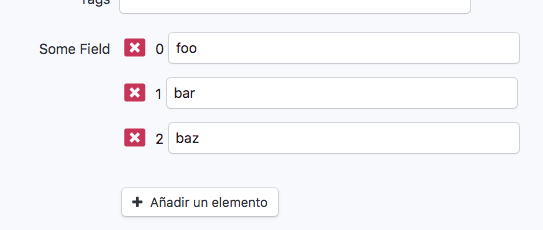
Thanks to that CSS style, this is now displayed like this 😍:
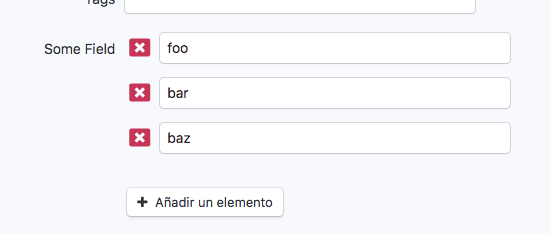
However, this doesn't work for some people. This morning we received a message about this on Symfony's Slack.
So, I need your help to improve this. My ideal behavior would be like this:
- If labels are the ugly autonumbered labels, don't show them.
- If labels are truly useful/needed labels, display them.
I need volunteers who know the Symfony Form component to take over this. I can help with the design/CSS and tests. Thanks!
 javiereguiluz
All 5 comments
I think labels should not be hidden with CSS rules but in the configuration of the form in config/easy_admin.yml :
easy_admin:
    entities:
        MyEntity:
            form:
                - property: myRelatedItems
                      label: 'Items'
                      type: collection
                      type_options:
                        entry_options: { label: false }
And if you really want to hide auto-numbered labels, it should done, IMHO, in the Twig that generates collection items. But is possible to differenciate auto-numbered label from numeric chosen labels ?
 alterphp
on 12 Dec 2018
alterphp
on 12 Dec 2018
Maybe the solution is this one:
- If each element of the collection contains only a simple widget (like a single
<input>or 3<select>of a single date) then don't display the labels. It's verbose, ugly and unnecessary. - If each element of the collection contains multiple widgets (imagine an AddressType with "Address Line 1", "Address Line 2", "City", "Country" and "ZIP Code") then show the labels.
javiereguiluz
on 12 Dec 2018
Most of the time we don't need this label, but as @alterphp pointed it out we should make this change by config, maybe a form configurator or through a type extension to change its default to false?
 yceruto
on 12 Dec 2018
yceruto
on 12 Dec 2018
This is what I've in mind to achieve it (not tested yet) according to Javier's idea:
class CollectionTypeExtension extends AbstractTypeExtension
{
    public function finishView(FormView $view, FormInterface $form, array $options)
    {
        if ($form->getConfig()->hasAttribute('prototype') && !$view->vars['prototype']->vars['compound'] && $options['prototype_name'].'label__' === $view->vars['prototype']->vars['label']) {
            $view->vars['prototype']->vars['label'] = false;
        }

        foreach ($view->children as $child) {
            if (!$child->vars['compound'] && null === $child->vars['label']) {
                $child->vars['label'] = false;
            }
        }
    }

    public static function getExtendedTypes()
    {
        return [CollectionType::class];
    }
}
If each element of the collection contains multiple widgets (imagine an AddressType with "Address Line 1", "Address Line 2", "City", "Country" and "ZIP Code") then show the labels.
I don't remember well, but I believe numeric labels are displayed for this case too, in that case we should remove the ->vars['compound'] check from above code snippet.
yceruto
on 12 Dec 2018
Related issues
 ndench
·
4Comments
ndench
·
4Comments
 devkbsc
·
3Comments
devkbsc
·
3Comments
 seb-jean
·
3Comments
seb-jean
·
3Comments
 nickicool
·
4Comments
nickicool
·
4Comments
 ghost
·
3Comments
ghost
·
3Comments
Most helpful comment
Maybe the solution is this one:
<input>or 3<select>of a single date) then don't display the labels. It's verbose, ugly and unnecessary.