Easy-digital-downloads: 3.0 - Orders - Combine Items, Adjustments, and Amounts UI
Enhancement Request
Explain your enhancement (please be detailed)
Create a unified UI to present Order Items, Adjustments, and Amounts.
Justification or use case
Currently when viewing or creating an order in EDD 3.0 there are 3 separate areas containing amounts related to the Order: Items, Adjustments, and Amounts.
As it stands the Items and Adjustments are implemented with WP_List_Table, separate from the Amounts area:
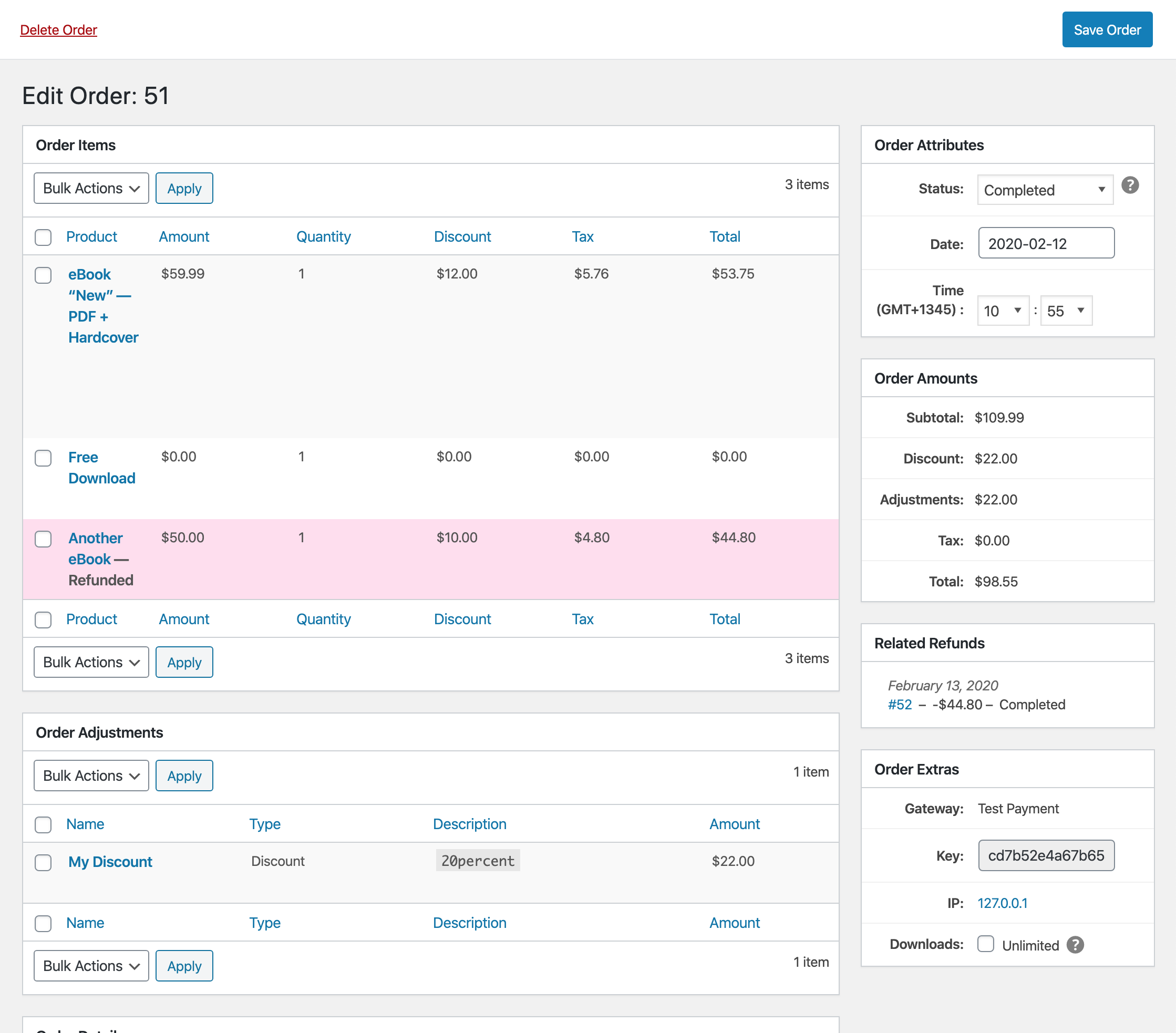
The "Order Adjustments" area is likely causing the most disconnect in the UI. Grouping applied Discounts inside of "Order Adjustments" but then displaying "Adjustments" and "Discount" amounts separately in other areas causes confusion as to what an Adjustment actually is.
While the new database has provided tons of great new functionality I think the current UI presents the information too much in a _database-y_ way versus a more traditional invoice. The user does not need to know that we store or classify tax, credit, fee, or discount as an adjustment.
Another potentially confusing concept is adjusting or displaying a "Refunded" status for individual line items. To help further enforce the concept of "order amounts cannot change" not adjusting the line item will help show that in this order nothing has changed.
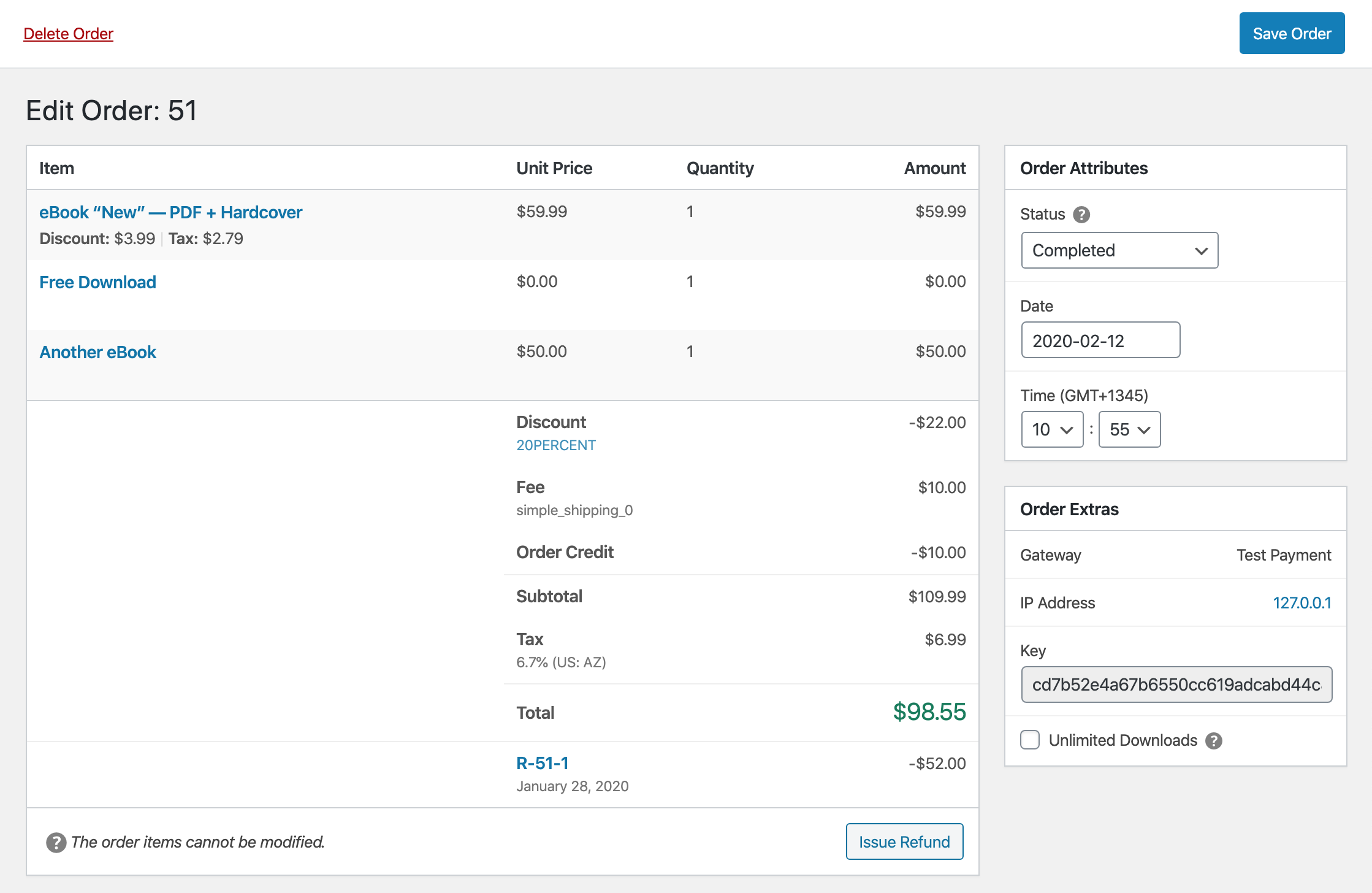
The above prototype (amounts are not accurate) displays a way to potentially resolve these disconnects.
By not "classifying" adjustments but instead simply listing how they affect the Order subtotal the user has fewer dots to connect.
Beyond that "refunded" line items remain the same after a Refund has been issued and instead a new entry is added to the amount summary after the existing Order total is listed. This helps enforce that the current order has not changed -- but there is a new record that affects the net. The Net amount could be shown below as well.
The line-item Discount and Tax amounts were moved below the Download name as secondary information because having them in their own column disrupts the Discount and Tax total amounts in the summary area. They can be shown when hovering a row if the specific information is needed.
Clicking "Issue Refund" will work similarly to what is setup now: listing the available order items that can be "refunded". Ideally you should be able to create a refund for a specific item quantity as well as any additional fees.
Creating an Order would present a similar UI, with "Add" buttons replacing the Refund button at the bottom. They would trigger a modal similar to the Refund modal allowing options to be selected (and the ability to override amounts).
Some previous discussion in https://github.com/easydigitaldownloads/easy-digital-downloads/issues/7341
 spencerfinnell
All 28 comments
I think the current UI presents the information too much in a database-y way versus a more traditional invoice. The user does not need to know that we store or classify tax, credit, fee, or discount as an adjustment.
:100:
 ashleyfae
on 12 Feb 2020
ashleyfae
on 12 Feb 2020
Using a modal for adding items would allow that UI to be expressed a little more freely/clearly:
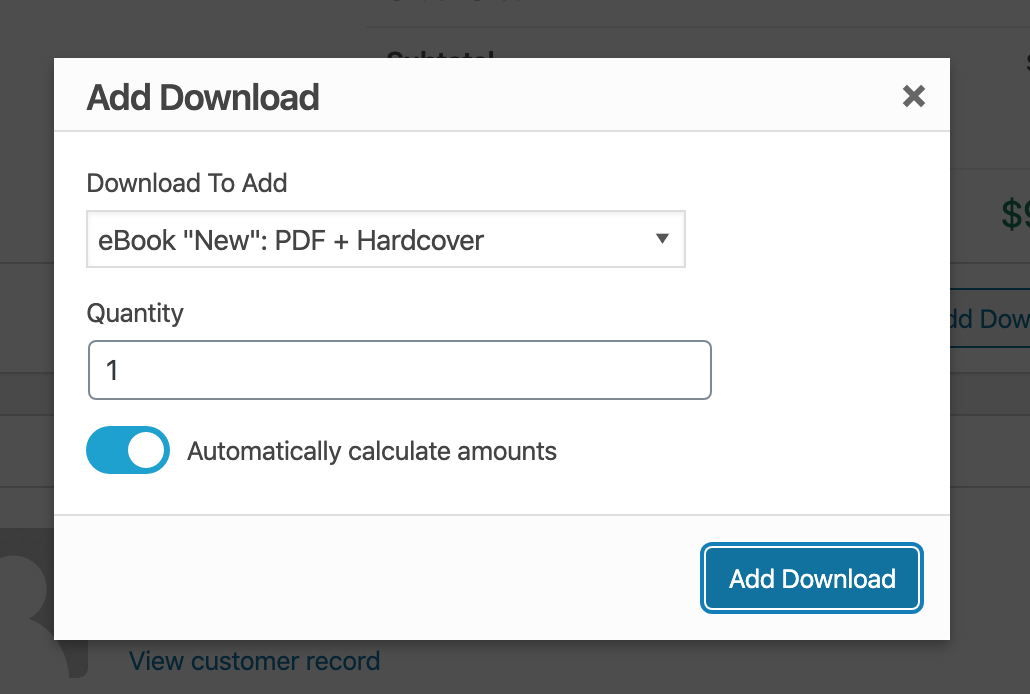
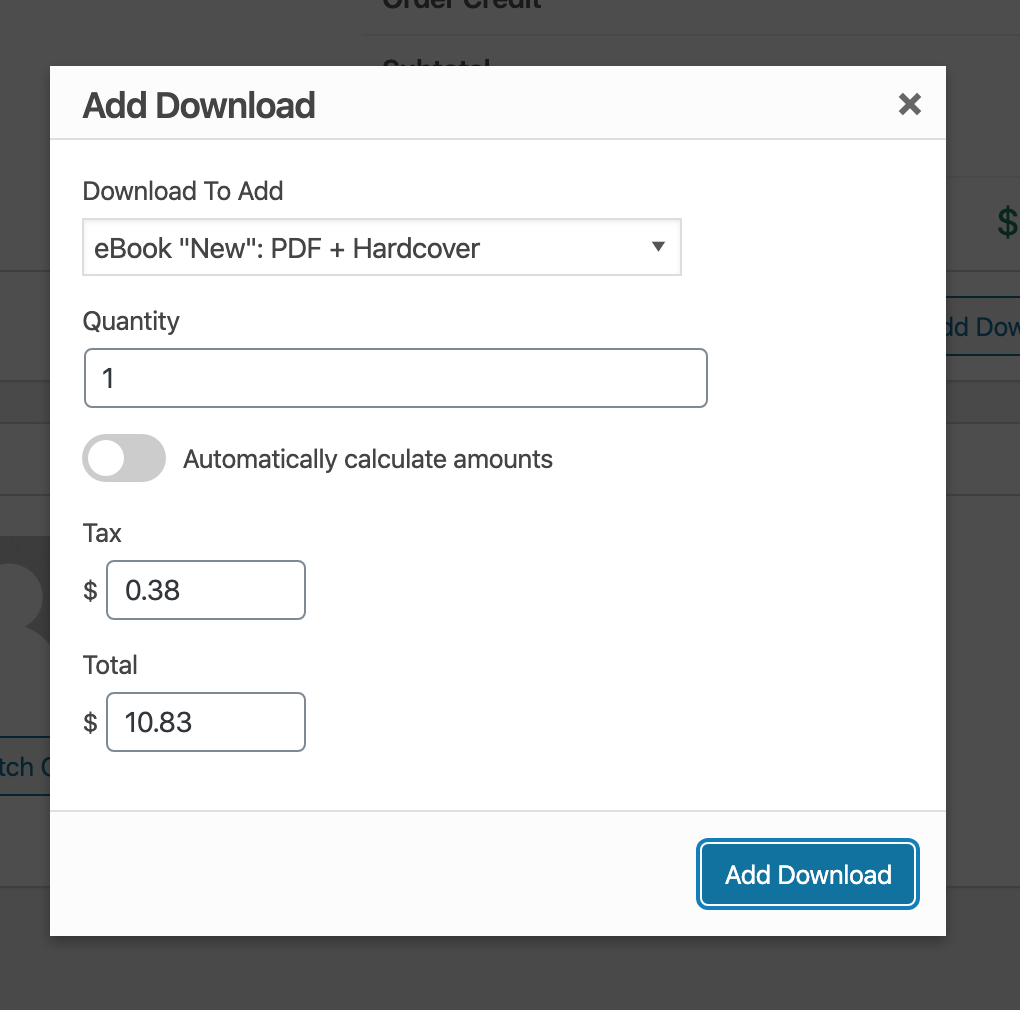
As well as keeping the base Add/View screens more consistent.
spencerfinnell
on 12 Feb 2020
Bringing the PR discussion back here.
@nosegraze regarding pull/7599#issuecomment-592003274 -- how about something like this:
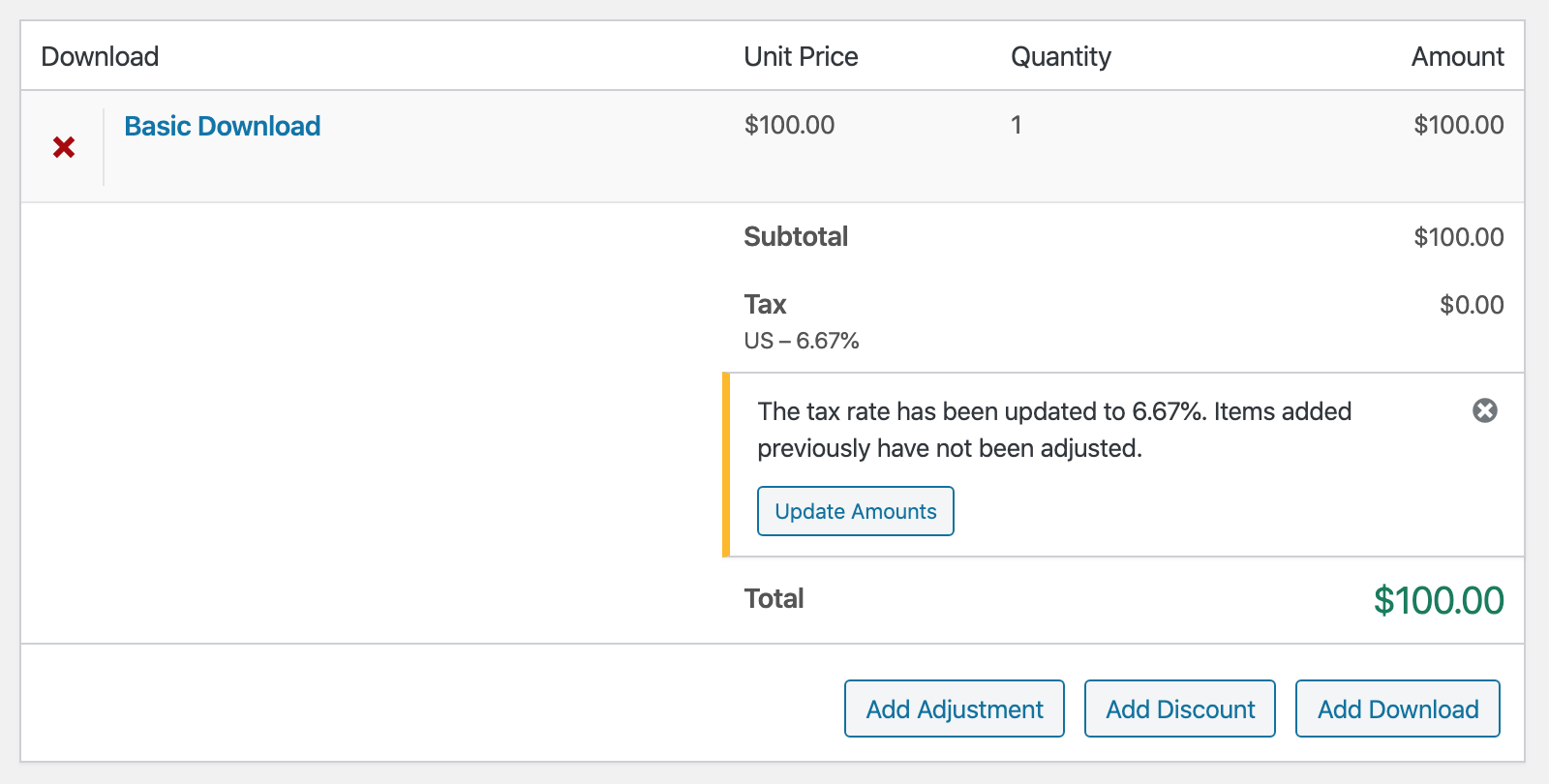
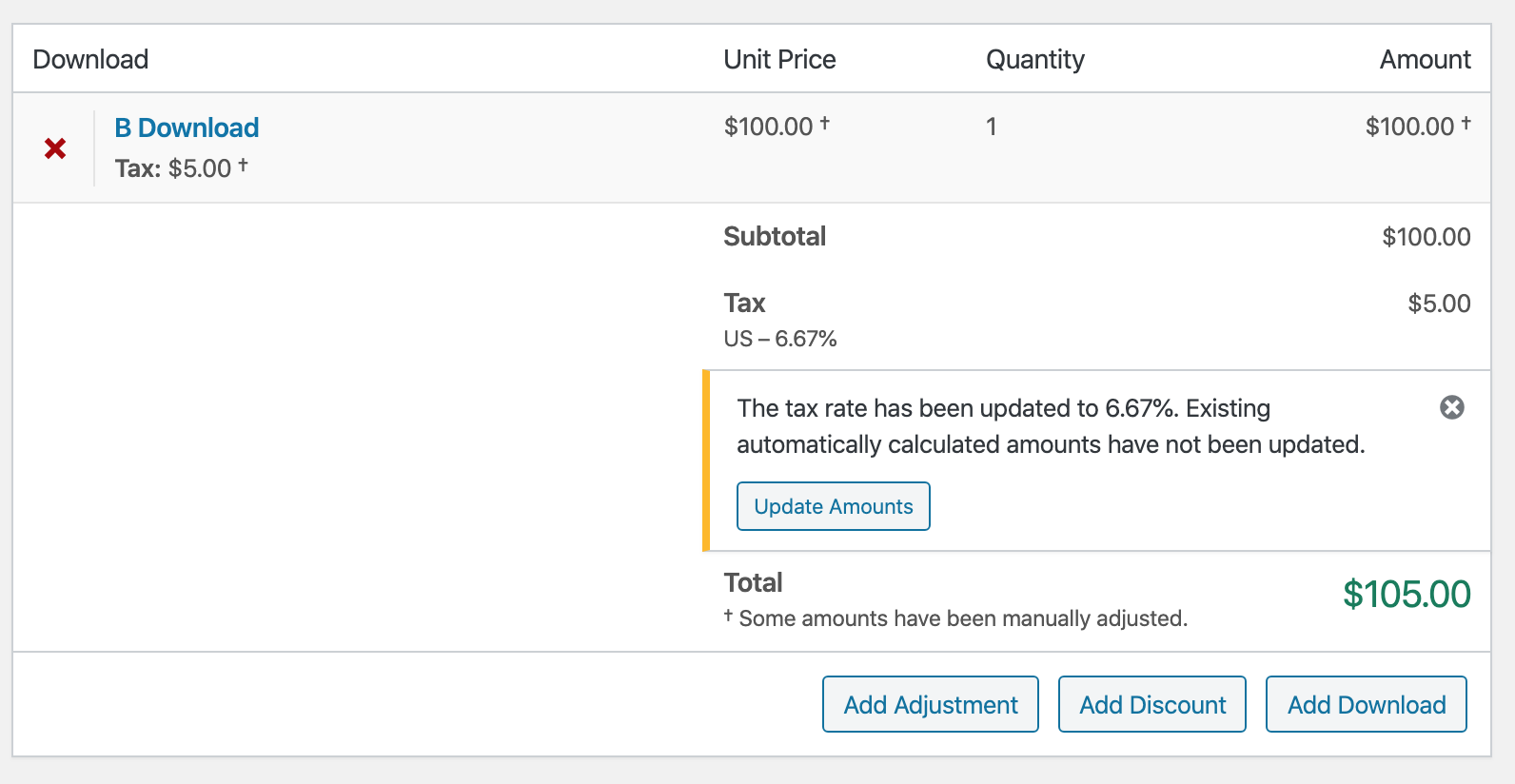
This would appear when the tax rate has changed and there are existing Order Items. Clicking "Update Amounts" would recalculate taxes for Order Items that were added without manually entering amounts.
We also may consider differentiating Order Item rows that were manually adjusted so it's more obvious why they do not change.
spencerfinnell
on 27 Feb 2020
@spencerfinnell I like that :+1:
ashleyfae
on 28 Feb 2020
@nosegraze Since an Order can only have one actual tax rate the process now would mean that if you:
- Add a Download
- Change the rate
- Dismiss the tax rate notice
- Add another Download
All other Downloads that weren't manually adjusted when initially adding will be adjusted a well -- essentially doing the same as if you _had_ clicked Update Amounts.
If that's the case then the only time the notice is really helpful is if you're just about to create the order, realize the taxes are all wrong, and make an adjustment. I think that is a valid time to show it but wonder if the side effect of it showing _during_ order creation might cause confusion.
spencerfinnell
on 28 Feb 2020
@spencerfinnell
All other Downloads that weren't manually adjusted when initially adding will be adjusted a well
Not sure if I'm 100% clear on this. In the steps you listed, are you saying that download from step 1 would be adjusted with the new tax amount?
ashleyfae
on 4 Mar 2020
Not sure if I'm 100% clear on this. In the steps you listed, are you saying that download from step 1 would be adjusted with the new tax amount?
Yes.
If the Tax amount wasn't manually set (on the individual Order Item) when it was initially added then changing the rate and adding a new Download updates all existing Order Items based on the new percentage. That is done under the assumption that an order only supports one tax rate.
However, looking again now, if you make a purchase on the frontend checkout there is an Order Adjustment record generated that stores a tax rate percentage for each Order Item. I'm not sure that amount is actually used anywhere currently, but we could (and probably _should_) do the same thing when manually creating an order which would allow Order Item tax amounts to remain independent of each other.
spencerfinnell
on 4 Mar 2020
Unrelated to the above... I've discovered an inconsistency with fees and total calculations.
I'm testing with the Discounts Pro add-on, which adds discounts as "fees" (adjustments).
release/3.0
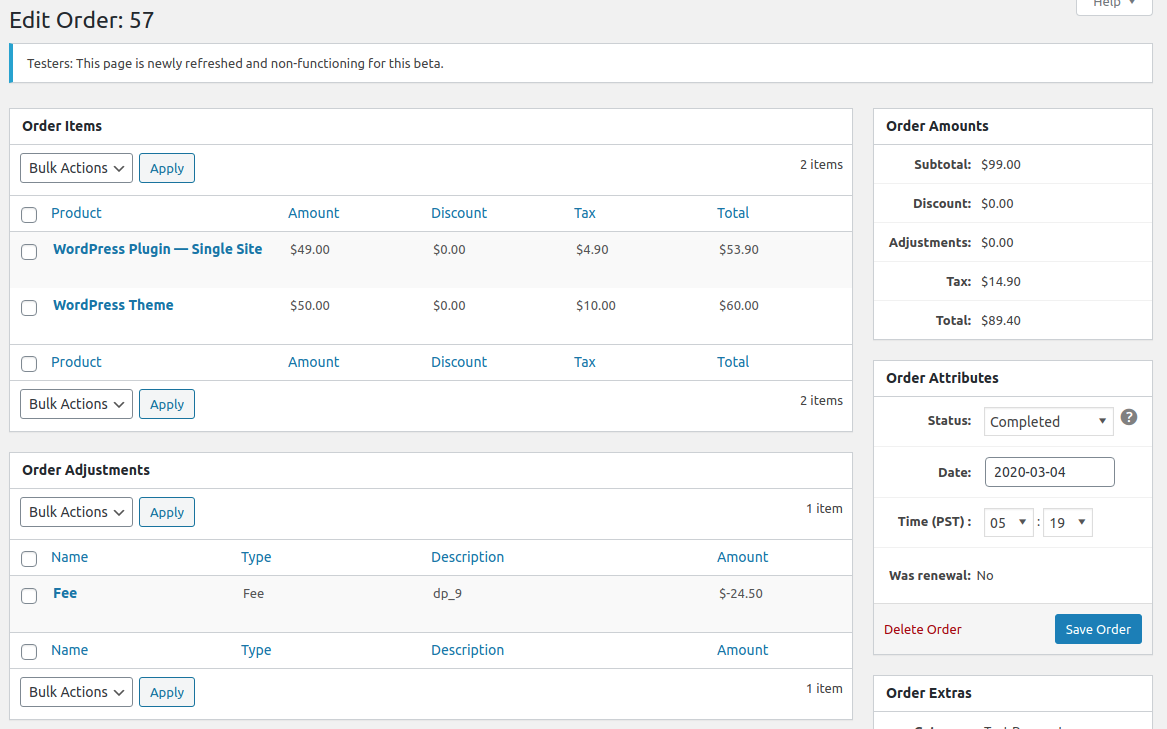
Notice there's one adjustment record and total is $89.40.
issue/7582
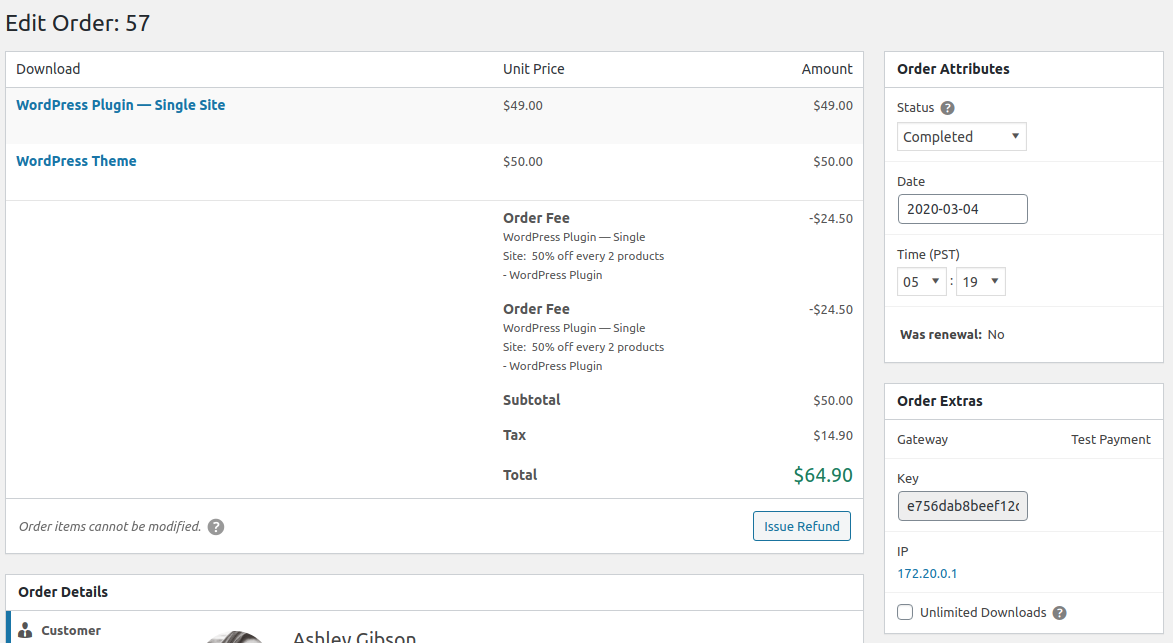
There are now two fee entries and total is recorded as $64.90.
I'm wondering if it's because of this:

The discount is applied to the order and order_item. In this case both of the object_ids are 57. I tried to reproduce this a second time and couldn't, because that second time the order_item ID happened to be different:

Possibly missing an object_type = order somewhere?
ashleyfae
on 4 Mar 2020
@nosegraze Maybe, but I'm still not 100% sure about these Adjustments being generated. I'm going to see what you find in https://github.com/easydigitaldownloads/easy-digital-downloads/issues/7621 first before trying anything further with Order Item-specific tax rates or Order Item-specific fees.
spencerfinnell
on 4 Mar 2020
Some adjustments related to ensuring tax rates are easy to use/understand in https://github.com/easydigitaldownloads/easy-digital-downloads/tree/issue/7582-tax-change
When adding a Download before a rate is set there is a more obvious notice:
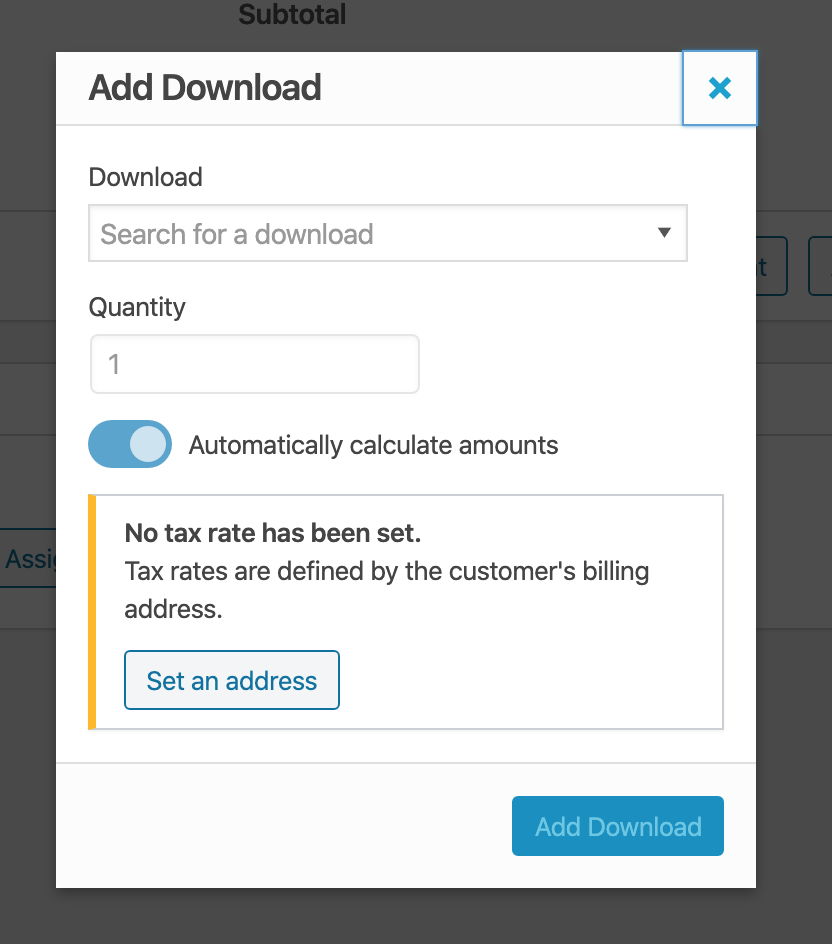
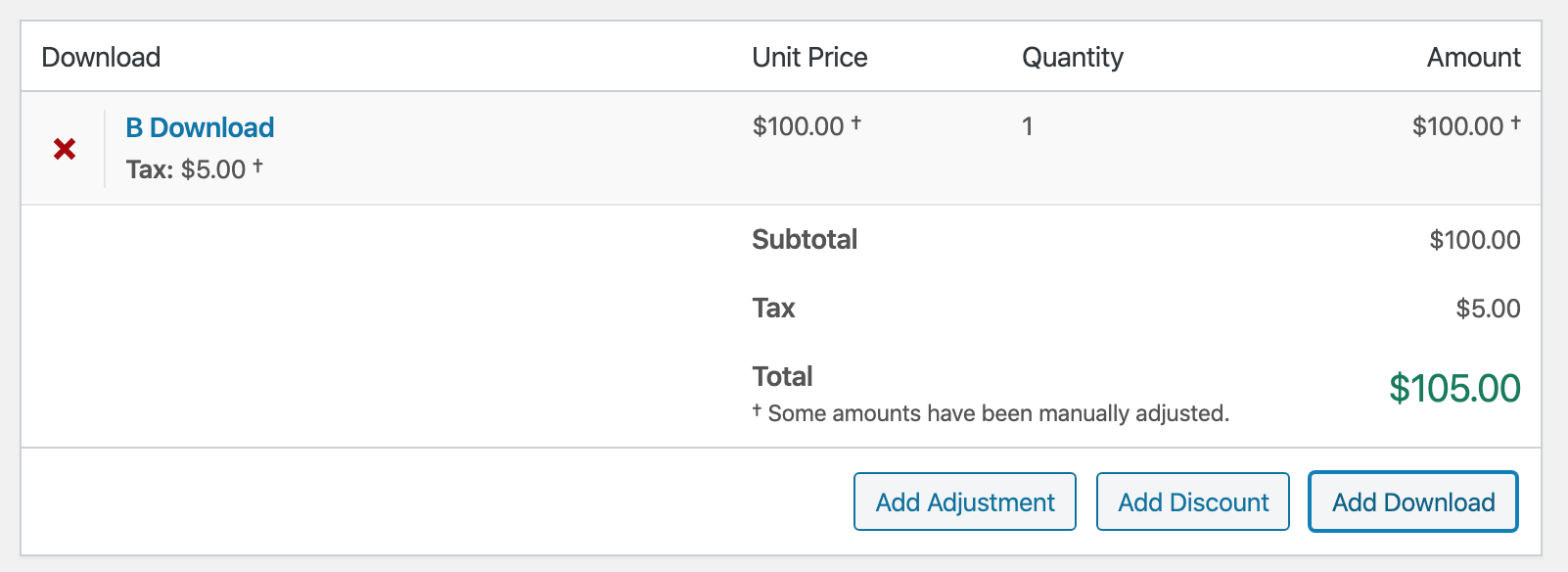
Manually set amounts are noted via
†
The tax rate change notice explicitly mentions automatic calculations:
spencerfinnell
on 16 Mar 2020
I like that :+1:
Note: removing an item doesn't appear to work for me. Clicking the x doesn't do anything. No console errors.
ashleyfae
on 16 Mar 2020
Correction: clicking the x does not remove the item from the table, but it does change the Total at the bottom to $0.00.
ashleyfae
on 16 Mar 2020
@ashleyfae Thanks -- I've noticed that before and wasn't sure if it was just a fluke or not. I'll figure that out.
spencerfinnell
on 16 Mar 2020
7599 has been updated to address previous feedback.
Any remaining mobile issues should not be specific to this implementation and happen at a core/WordPress-level.
spencerfinnell
on 17 Mar 2020
- Confirmed inconsistent fee/totals issue has been fixed.
- Confirmed issue with removing a download has been fixed.
- Confirmed I can now add a download, then set a customer, then set a tax rate, then use provided button to update tax rate for existing downloads.
- Confirmed responsive design works.
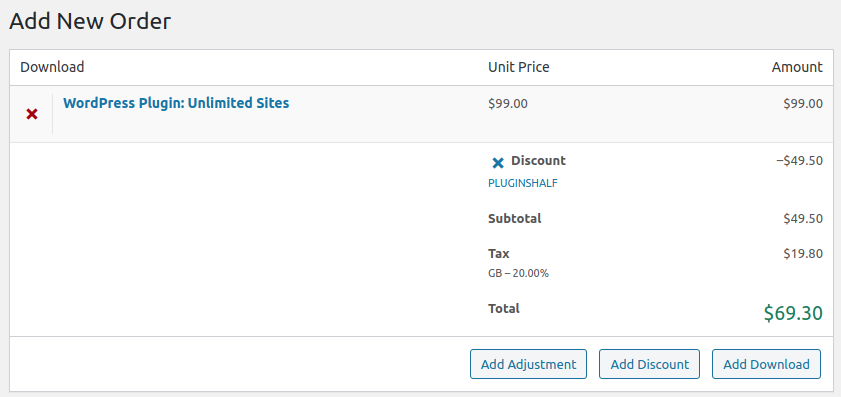
There is an issue with discount codes and tax calculations.
- Create a new order.
- Assign a customer / country that has a tax rate.
- Add a download. Tax amount is calculated correctly.
- Add a discount.
- Tax rate is not reduced / recalculated.
Here's how it looks:
Here's what it should be:
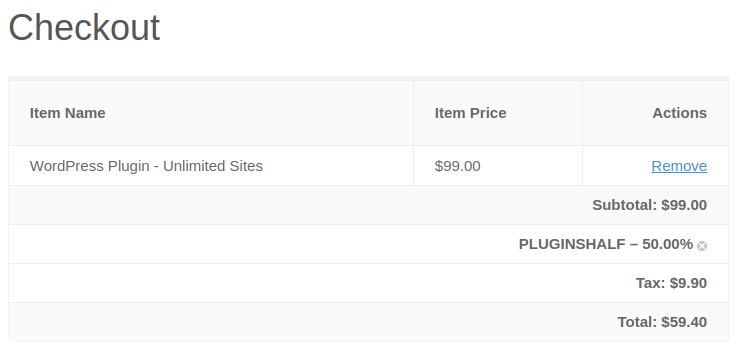
In the admin UI the tax amount is the _pre-discount tax amount_ but it should be recalculated to take the discount into account.
ashleyfae
on 19 Mar 2020
@ashleyfae Updated #7599
spencerfinnell
on 23 Mar 2020
@spencerfinnell Looking good now!
I have encountered one issue but it's sporadic and I don't know how to tell you to reproduce it. Sometimes when I'm adding a download, clicking Add Download doesn't do anything, so then I click it again, and it works but adds the download _twice_ (so I guess it did actually work the first time, the UI just didn't tell me it had?). I had it happen 3 times while messing around just now, but I couldn't _make_ it happen intentionally. :woman_shrugging:
ashleyfae
on 24 Mar 2020
@ashleyfae thanks for testing! I’ll try to reproduce that. I still want to try and preload some Downloads in the modal too.
spencerfinnell
on 24 Mar 2020
@ashleyfae Pushed some error handling that should prevent any of those weird situations from happening and includes recent Downloads in the list.
spencerfinnell
on 24 Mar 2020
@spencerfinnell Excellent! I played around a bunch and the problem didn't happen again. I love the loading of products. :+1: There is one minor quirk... It doesn't impact functionality, just looks a bit weird.
- Add one product to the order.
- Add a second product. Keep an eye on the "Download" dropdown as you press the
Add Downloadbutton. - You'll see the dropdown, like, quickly cycle through all the downloads that are already on the order. The more downloads you have in the order, the more noticeable it is.
ashleyfae
on 27 Mar 2020
Good catch. Pushed a few tweaks to stop that.
spencerfinnell
on 27 Mar 2020
Don't think I can break anything else! Well done @spencerfinnell .
ashleyfae
on 6 Apr 2020
When adding a new order @spencerfinnell I'm seeing a weird date as the default:
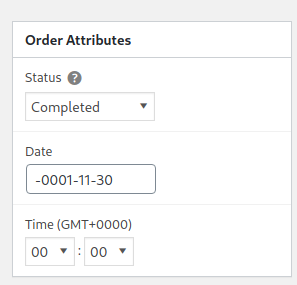
Currently I'm on GMT +0
 cklosowski
on 23 Apr 2020
cklosowski
on 23 Apr 2020
@cklosowski Addressed in https://github.com/easydigitaldownloads/easy-digital-downloads/issues/7578#issuecomment-586281961
spencerfinnell
on 23 Apr 2020
@spencerfinnell got it, merged that into release/3.0 and then updated both this issue branch and the try/edd3-orders
cklosowski
on 23 Apr 2020
At this point, I'm starting to think we should just merge this whole thing into release/3.0 and we can follow up with anything needed there. I can't find anything breaking at this point, but there are a lot of things that this introduces that might be blocking going forward. It will clear out our issue list for the 3.0 milestone quite a bit and allow us to move forward, focusing on things that needed to be wrapped up.
thoughts @ashleyfae and @spencerfinnell ?
cklosowski
on 23 Apr 2020
Fine by me! It will be easier to review any follow up issues in smaller PRs.
spencerfinnell
on 23 Apr 2020
Yes, let's do it!
ashleyfae
on 23 Apr 2020
Related issues
 JeroenSormani
·
5Comments
JeroenSormani
·
5Comments
 davidsherlock
·
4Comments
davidsherlock
·
4Comments
 scottbuscemi
·
5Comments
scottbuscemi
·
5Comments
 zackkatz
·
5Comments
zackkatz
·
4Comments
zackkatz
·
5Comments
zackkatz
·
4Comments