Easy-digital-downloads: 3.0: No longer possible to add tax rates when there are none
Bug Report
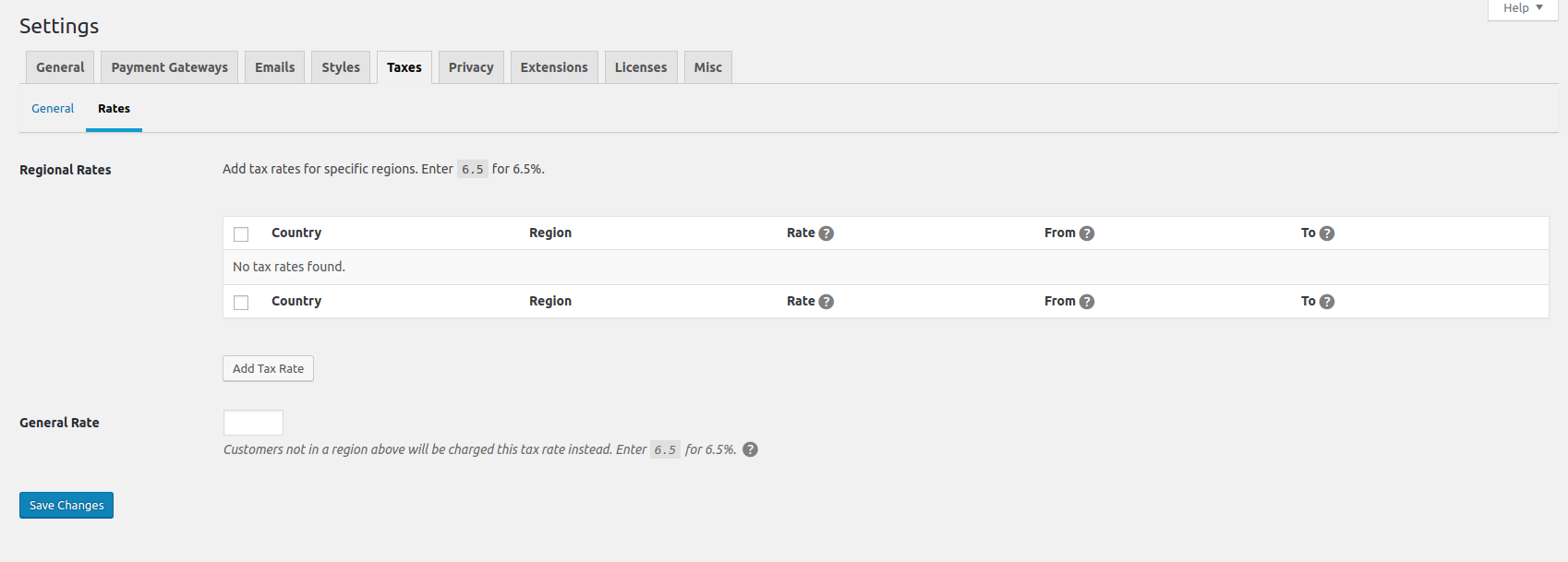
New tax rates cannot be added. There is a Add Tax Rate button but no fields for selecting the country nor region. Clicking the button doesn't do anything, nor are there any JS errors thrown on the page.
Steps to reproduce the behavior
1) Checkout release/3.0
2) Try to add a tax rate
 pippinsplugins
All 18 comments
Just ran into the same thing. And if you try to "Save Changes" on the Rates page, perhaps after adding a General Rate, you're hit with:

 SDavisMedia
on 24 Aug 2018
SDavisMedia
on 24 Aug 2018
@SDavisMedia Think that's happening because the tax rates table is now an instance of EDD\Admin\List_Table rather than just static HTML so we're getting additional nonce fields that are being generated.
 sunnyratilal
on 25 Aug 2018
sunnyratilal
on 25 Aug 2018
Oh interesting, we're getting two nonce fields being generated, so one of them is overwriting, so we're not validating. Looking into it further.
 cklosowski
on 29 Aug 2018
cklosowski
on 29 Aug 2018
So to get this working for now i'm removing bulk actions from this list. The bulk actions bundeled with the WP_List_Table class are causing some validation issues with nonces when it comes to dealing with saving other options on that page. For now I'm going to get this to the previous system where each item is deleted individually, as well as all tax rates on the same page until we can get this working in a much more stable manor.
cklosowski
on 29 Aug 2018
I love the way this works. :heart:
I replicated again on master and confirmed that regional tax rates are properly created/removed from the UI as well as added/adjusted (never deleted) from the DB based on user input. All seems to be working really well there. :+1:
Took a look a the Reports Overview and the tax total look accurate, based on the sum of tax from my test purchases. However, I see an error and something I think is slightly wrong on the Tax tab of the Reports:
Notice that I have 3 payments here, all three on a $100 product:
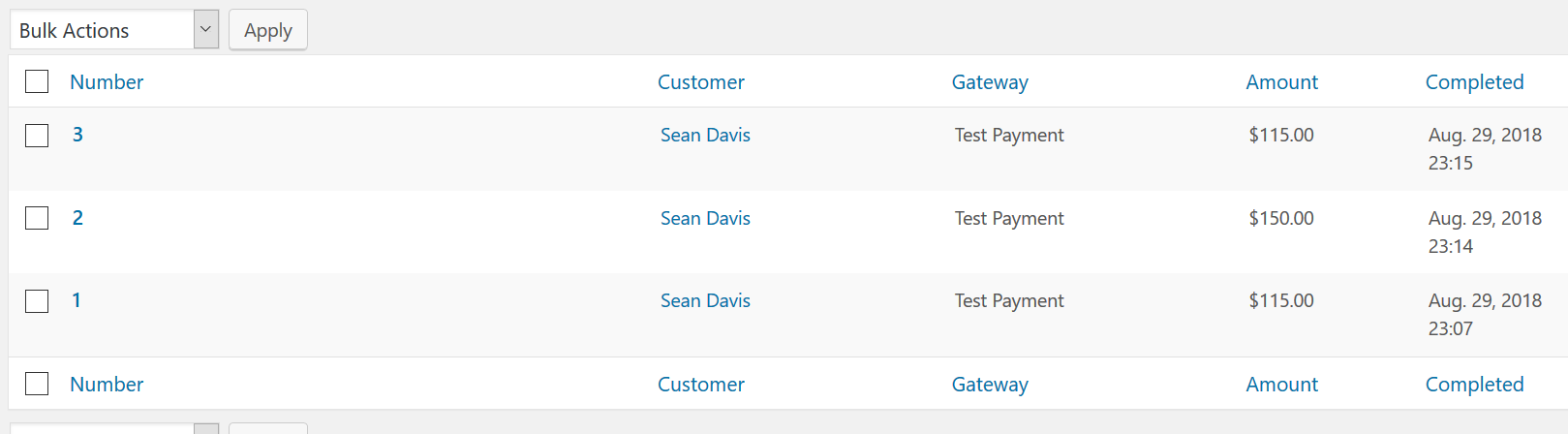
The first payment was using a regional tax rate of 15% ($15), the second used a rate of 50% ($50), and the third went back to the 15% ($15) rate. I did this to test purchasing with a rate where the Country & State match the regional rate of _another_ rate that has been deleted (set as inactive). That test was the second purchase. The first purchase was with the original rate, then deleted for the second purchase, then brought back again for the third purchase. (sorry if this doesn't make sense... basically just testing to make sure deleted and resurrected rates apply when they should/shouldn't)
Now see the Tax tab on Reports:
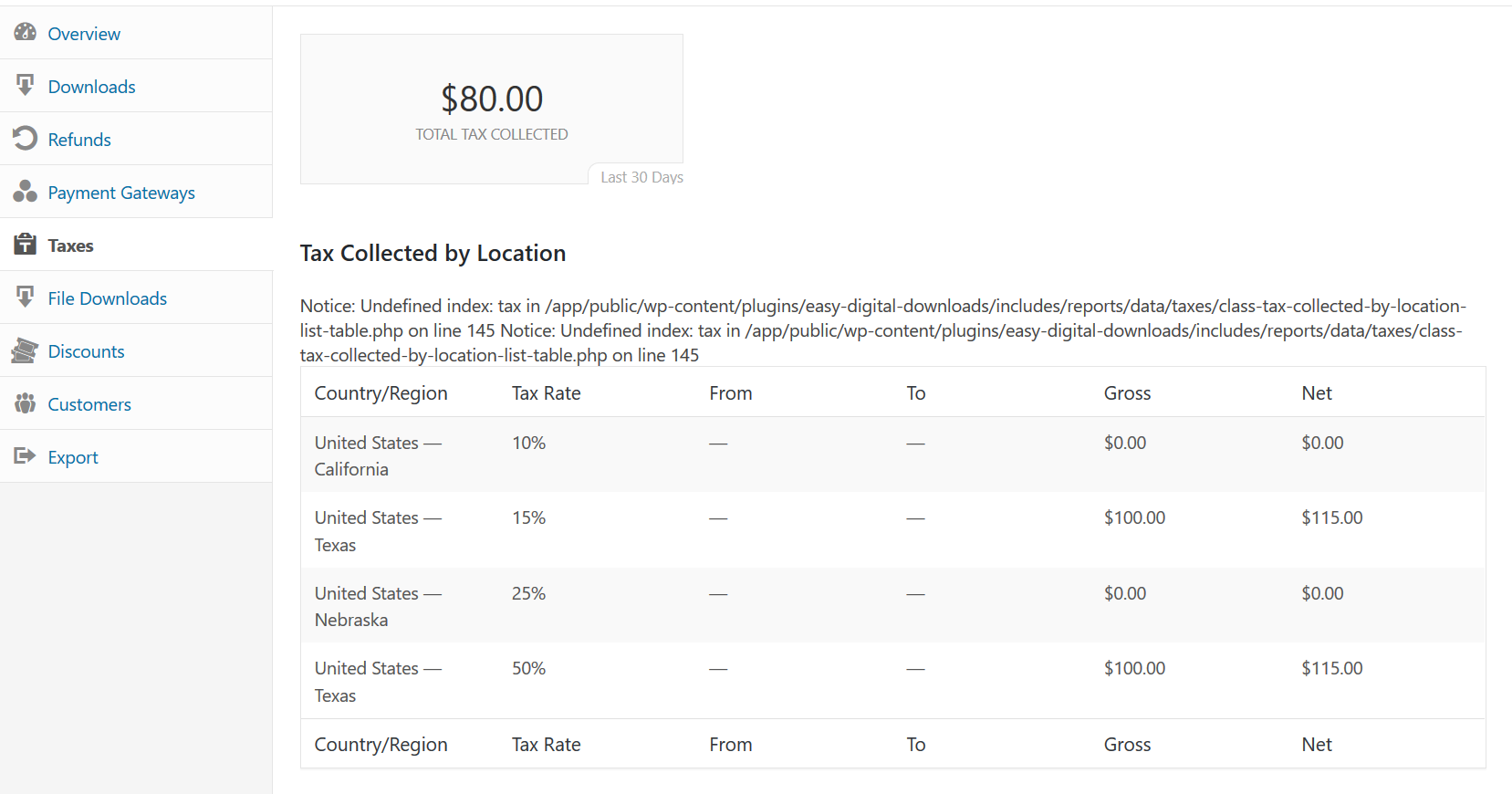
ONLY PAY ATTENTION TO THE TEXAS RATES
Notice the Net column values. As mentioned above, I completed TWO payments at the 15% tax rate, and ONE payment at the 50% tax rate. So that would be $15, $50, and $15, which is where the $80 total comes from.
Aren't the Net values wrong for those rows?
SDavisMedia
on 30 Aug 2018
I love the UI here but, unfortunately, they still won't save for me. The Add New UI works as expected now, but no data is saved (or at least shown on reload).
pippinsplugins
on 30 Aug 2018
Here we go:
WordPress database error Unknown column 'min_charge_amount' in 'field list' for query INSERT INTO wp_edd_adjustments (parent, name, code, status, type, scope, amount_type, amount, description, max_uses, use_count, once_per_customer, min_charge_amount, product_condition, start_date, end_date, date_created, date_modified, uuid) VALUES (0, 'US', '', 'active', 'tax_rate', 'region', 'percent', '10.00', 'KS', '0', '0', '0', '0.00', '', '0000-00-00 00:00:00', '0000-00-00 00:00:00', '2018-08-30 00:41:45', '2018-08-30 00:41:45', 'urn:uuid:9c358525-0f72-47b4-93cd-e5999499d59c') made by update_option, sanitize_option, apply_filters('sanitize_option_edd_settings'), WP_Hook->apply_filters, edd_settings_sanitize, apply_filters('edd_settings_taxes_sanitize'), WP_Hook->apply_filters, edd_settings_sanitize_taxes, edd_add_adjustment, EDD\Database\Query->add_item, QM_DB->query
pippinsplugins
on 30 Aug 2018
Chris advised me to open an issue about the Tax Collected by Location table issue I noticed. Here it is: https://github.com/easydigitaldownloads/easy-digital-downloads/issues/6893
SDavisMedia
on 30 Aug 2018
@pippinsplugins are you positive you have the latest database? Yesterday we said to test on clean installs since it looks like you're running an early alpha set prior to a change set.
cklosowski
on 30 Aug 2018
@cklosowski my schema matches one defined in the Adjustments schema class.
pippinsplugins
on 30 Aug 2018
Ok I don't get the error on my iMac so must have been a schema problem on my laptop.
I do, however, get a really goofy experience when editing tax rates. I know why it's happening, but it's jarring.
Each time a rate is edited, the order of the rates changes. For example, if I have two rates and I edit the first one in the list and then save the changes, the first rate is now moved to the bottom.
I understand this happens because the previous rate is saved as inactive and a new rate is created in its place, but the experience is uncomfortable. Could we have an index or order column to allow us to keep the rates the same after editing?
Also I noticed a bug. The Apply to whole country checkbox doesn't save its state.
pippinsplugins
on 30 Aug 2018
@pippinsplugins I think sorting by date modified might help here. Adding an index would require meta or another column at this point.
I'll fix up the Apply to whole country thing.
cklosowski
on 30 Aug 2018
Ready for another round of testing.
cklosowski
on 30 Aug 2018
Manually re-creating the tables fixed it.
pippinsplugins
on 3 Sep 2018
We've merged the tax-ux branch into the issue/6869 branch, so the original issue of not being able to add tax rates is resolved.
@SDavisMedia's thorough comment where he noticed the report math is wrong, is worthy of its own issue, because that definitely ain't right.
 JJJ
on 5 Sep 2018
JJJ
on 5 Sep 2018
@JJJ Indeed. The new issue is here: https://github.com/easydigitaldownloads/easy-digital-downloads/issues/6893 (forgive me if you already knew that)
SDavisMedia
on 5 Sep 2018
@SDavisMedia thanks! I'd missed it. My bad.
Everyone else, I worked ahead a bit, and merged the issue/6869 branch into release/3.0. This is a bit abnormal, but because this feature in the 3.0 branch was completely broken, it seemed like the right thing to do in this specific instance.
Leaving this issue open to get a sign-off from reviewers. 🌮
JJJ
on 5 Sep 2018
I tested out the new Tax UI that's in the release/3.0 branch and it seems to fix any issues that rose up in this issue. I'm going to close this issue now that things are resolved, we can re-open later if issues come up again.
cklosowski
on 19 Sep 2018
Related issues
 DrewAPicture
·
5Comments
SDavisMedia
·
3Comments
DrewAPicture
·
5Comments
SDavisMedia
·
3Comments
 mikeyhoward1977
·
5Comments
JJJ
·
5Comments
mikeyhoward1977
·
5Comments
JJJ
·
5Comments
 mindctrl
·
4Comments
mindctrl
·
4Comments