Eartrumpet: 2.1.6.0 Crash on startup
I updated to 2.1.6.0 and this new version silently crashes on startup, it appears for a second in Task Manager and then closes. This crash did not happen for me in 2.1.5.0.
If I can provide any other logs let me know.
Here are the event viewer logs:
.Net runtime:
Application: EarTrumpet.exe
Framework Version: v4.0.30319
Description: The process was terminated due to an unhandled exception.
Exception Info: System.ArgumentException
   at System.Globalization.RegionInfo..ctor(Int32)
   at EarTrumpet.AppSettings.IsTelemetryEnabledByDefault()
   at EarTrumpet.AppSettings.get_IsTelemetryEnabled()
   at EarTrumpet.Diagnosis.ErrorReporter..ctor(EarTrumpet.AppSettings)
   at EarTrumpet.App.OnAppStartup(System.Object, System.Windows.StartupEventArgs)
   at System.Windows.Application.OnStartup(System.Windows.StartupEventArgs)
   at System.Windows.Application.<.ctor>b__1_0(System.Object)
   at System.Windows.Threading.ExceptionWrapper.InternalRealCall(System.Delegate, System.Object, Int32)
   at System.Windows.Threading.ExceptionWrapper.TryCatchWhen(System.Object, System.Delegate, System.Object, Int32, System.Delegate)
   at System.Windows.Threading.DispatcherOperation.InvokeImpl()
   at System.Windows.Threading.DispatcherOperation.InvokeInSecurityContext(System.Object)
   at MS.Internal.CulturePreservingExecutionContext.CallbackWrapper(System.Object)
   at System.Threading.ExecutionContext.RunInternal(System.Threading.ExecutionContext, System.Threading.ContextCallback, System.Object, Boolean)
   at System.Threading.ExecutionContext.Run(System.Threading.ExecutionContext, System.Threading.ContextCallback, System.Object, Boolean)
   at System.Threading.ExecutionContext.Run(System.Threading.ExecutionContext, System.Threading.ContextCallback, System.Object)
   at MS.Internal.CulturePreservingExecutionContext.Run(MS.Internal.CulturePreservingExecutionContext, System.Threading.ContextCallback, System.Object)
   at System.Windows.Threading.DispatcherOperation.Invoke()
   at System.Windows.Threading.Dispatcher.ProcessQueue()
   at System.Windows.Threading.Dispatcher.WndProcHook(IntPtr, Int32, IntPtr, IntPtr, Boolean ByRef)
   at MS.Win32.HwndWrapper.WndProc(IntPtr, Int32, IntPtr, IntPtr, Boolean ByRef)
   at MS.Win32.HwndSubclass.DispatcherCallbackOperation(System.Object)
   at System.Windows.Threading.ExceptionWrapper.InternalRealCall(System.Delegate, System.Object, Int32)
   at System.Windows.Threading.ExceptionWrapper.TryCatchWhen(System.Object, System.Delegate, System.Object, Int32, System.Delegate)
   at System.Windows.Threading.Dispatcher.LegacyInvokeImpl(System.Windows.Threading.DispatcherPriority, System.TimeSpan, System.Delegate, System.Object, Int32)
   at MS.Win32.HwndSubclass.SubclassWndProc(IntPtr, Int32, IntPtr, IntPtr)
   at MS.Win32.UnsafeNativeMethods.DispatchMessage(System.Windows.Interop.MSG ByRef)
   at System.Windows.Threading.Dispatcher.PushFrameImpl(System.Windows.Threading.DispatcherFrame)
   at System.Windows.Threading.Dispatcher.PushFrame(System.Windows.Threading.DispatcherFrame)
   at System.Windows.Application.RunDispatcher(System.Object)
   at System.Windows.Application.RunInternal(System.Windows.Window)
   at System.Windows.Application.Run(System.Windows.Window)
   at EarTrumpet.App.Main()
And Application error:
Faulting application name: EarTrumpet.exe, version: 2.1.6.0, time stamp: 0x5e52ed0a
Faulting module name: KERNELBASE.dll, version: 10.0.18362.628, time stamp: 0x54734dee
Exception code: 0xe0434352
Fault offset: 0x00113db2
Faulting process id: 0x2444
Faulting application start time: 0x01d5eb01f3c68962
Faulting application path: C:\Program Files\WindowsApps\40459File-New-Project.EarTrumpet_2.1.6.0_x86__1sdd7yawvg6ne\EarTrumpet\EarTrumpet.exe
Faulting module path: C:\WINDOWS\System32\KERNELBASE.dll
Report Id: bcd35dc7-8be2-499a-a88a-87abe03ad0bc
Faulting package full name: 40459File-New-Project.EarTrumpet_2.1.6.0_x86__1sdd7yawvg6ne
Faulting package-relative application ID: EarTrumpet
 Newbcake
All 19 comments
Yikes. Looking into this now.
 riverar
on 24 Feb 2020
riverar
on 24 Feb 2020
I'd like to add that I tried it on a different computer and did not experience the crash. So it might be something specific to my PC/configuration, not sure how to troubleshoot further myself.
For completeness sake here is my OS information:
My PC: Windows 10 Version 1909 (OS Build 18363.657)
Original install Was W7, updated to 8, 8.1 and finally W10
The other computer I tested it on has the same OS Version + OS Build but is a 3 month old fresh 1903 install that was updated to 1909.
Newbcake
on 24 Feb 2020
@Newbcake Can you open a PowerShell window and provide the output of Get-Culture?
riverar
on 24 Feb 2020
Here you go:
PS C:\WINDOWS\system32> Get-Culture

LCID             Name             DisplayName
----             ----             -----------
1033             en-US            English (United States)
@Newbcake How about the output of New-Object System.Globalization.RegionInfo 1033?
Also, can you run this in a command prompt and provide the output? It's just a quick test program I put together that prints out CultureInfo.CurrentCulture.LCID and its associated TwoLetterISORegionName.
culture_diag.zip
riverar
on 24 Feb 2020
PS C:\Users\Neal> New-Object System.Globalization.RegionInfo 1033


Name                         : US
EnglishName                  : United States
DisplayName                  : United States
NativeName                   : United States
TwoLetterISORegionName       : US
ThreeLetterISORegionName     : USA
ThreeLetterWindowsRegionName : USA
IsMetric                     : False
GeoId                        : 244
CurrencyEnglishName          : US Dollar
CurrencyNativeName           : US Dollar
CurrencySymbol               : $
ISOCurrencySymbol            : USD
And
PS Z:\Downloads> Z:\Downloads\culture_diag.exe
3072

Unhandled Exception: System.ArgumentException: Customized cultures cannot be passed by LCID, only by name.
Parameter name: culture
   at System.Globalization.RegionInfo..ctor(Int32 culture)
   at A.Main(String[] args)
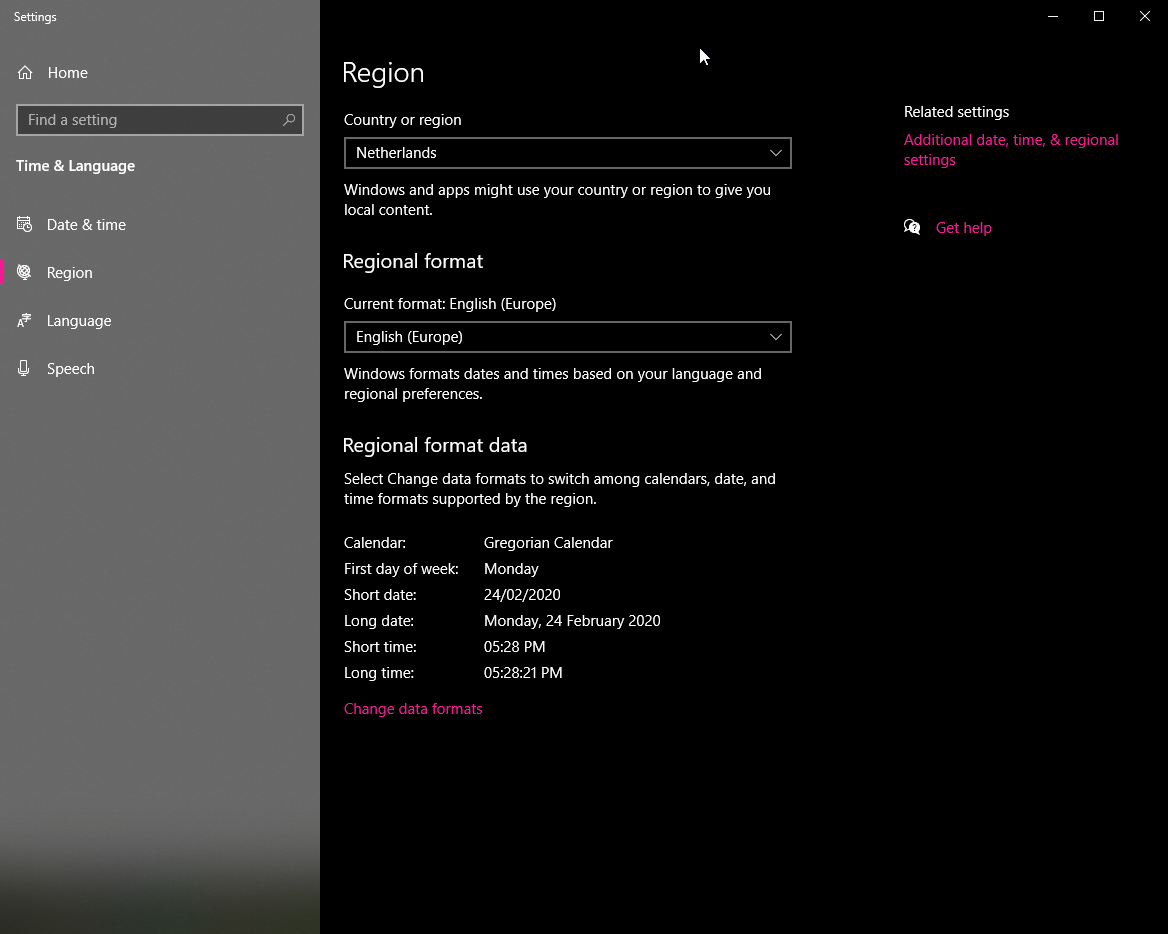
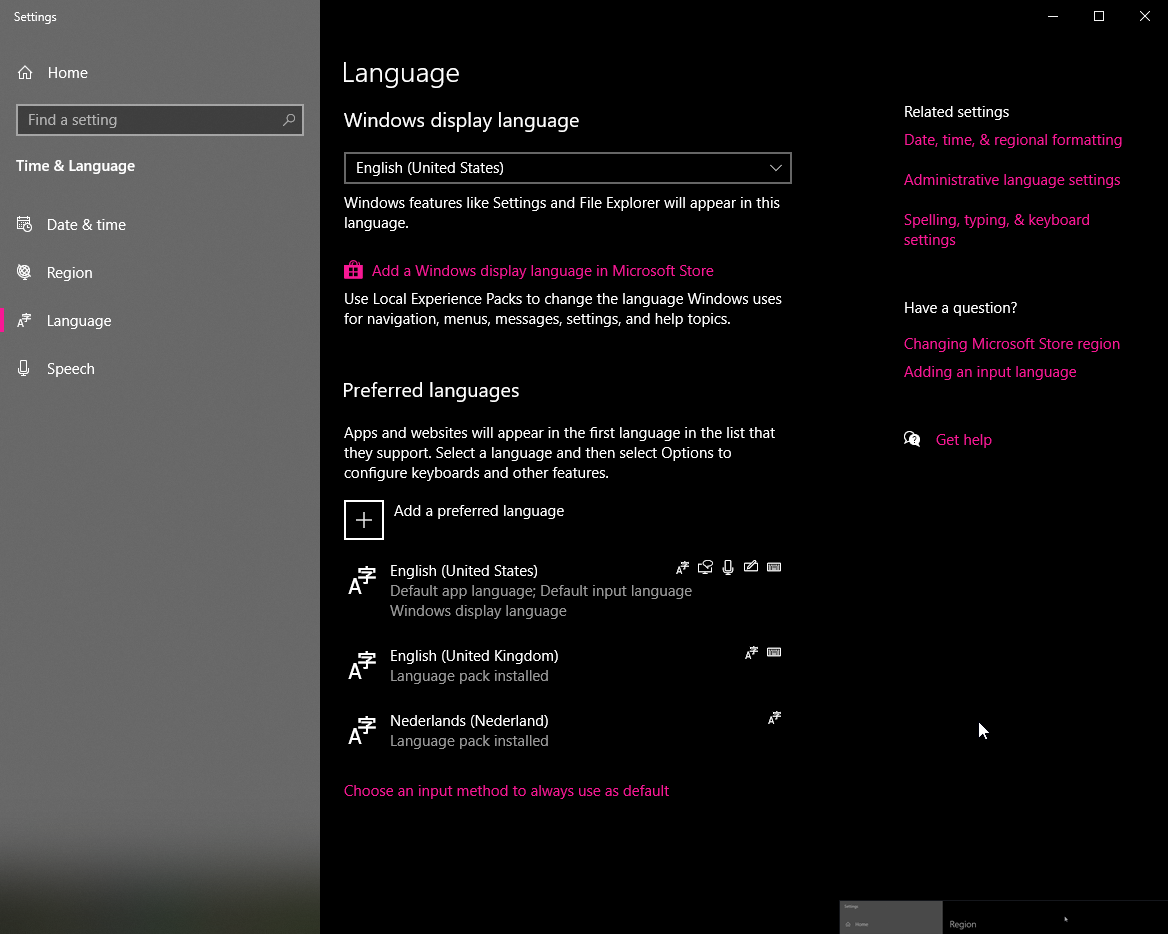
@Newbcake Thanks for your patience. Can you open Start, type Language Settings, press Enter, and take a screenshot of both the Region and Language areas in Settings? (TIP: You can quickly Alt-PrintScreen then paste directly into GitHub.)
riverar
on 24 Feb 2020
Newbcake
on 24 Feb 2020
@Newbcake Great, thanks. Here's one more test executable that should validate the fix I'm about to put in. It should output NL.
riverar
on 24 Feb 2020
It does not output NL 🤔
PS Z:\Downloads> Z:\Downloads\culture_diag2.exe
150
How about culture_diag3.zip? I'm working on reproducing this here as well.
riverar
on 24 Feb 2020
That also outputs 150, if there is anything I can do to assist I'd be happy to.
PS Z:\Downloads> Z:\Downloads\culture_diag3.exe
150
Thanks @Newbcake, will get this into the Store asap, should hit your machine in a few hours.
For our notes: Was able to reproduce in a VM using screenshots above + time format customization to include AM/PM suffix. While RegionInfo.CurrentRegion _handles_ these customizations, it returns a non-two-letter result when accessing TwoLetterISORegionName which is undesirable. So we'll switch to the newer WinRT API (available on 10240+).
riverar
on 24 Feb 2020
Happy to help, many thanks @riverar!
Newbcake
on 24 Feb 2020
@Newbcake If you don't mind uninstalling EarTrumpet, would be great if you could validate this dev build works on your machine (https://install.eartrumpet.app/dev/EarTrumpet.Package.appinstaller)
riverar
on 24 Feb 2020
I can confirm that that dev build launches as expected.
Newbcake
on 24 Feb 2020
Update: Store is still chewing on our update for some reason. Sigh.
riverar
on 25 Feb 2020
Another update: Store is still taking their time on certifying our 2.1.7.0 update.
riverar
on 26 Feb 2020
Hit the store on my end, thanks for the quick fix!
Newbcake
on 26 Feb 2020
Related issues
 CosimoMatassini
·
4Comments
CosimoMatassini
·
4Comments
 bramborman
·
3Comments
bramborman
·
3Comments
 neoOpus
·
4Comments
neoOpus
·
4Comments
 Tonio78370
·
5Comments
Tonio78370
·
5Comments
 paolo257428
·
3Comments
paolo257428
·
3Comments