Eartrumpet: Two EarTrumpet tray icons after waking up from sleep or hiberation
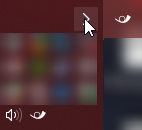
Installed via Microsoft Store.
Started happening recently, possibly related to "Fixed tray icon disappearing when the Windows Shell crashes/restarts" in 2.1.4.0?
Edit: Right clicking any of the icons and selecting "Exit" closes both, opening EarTrumpet again correctly displays only one icon.
 martinsstuff
All 22 comments
If possible (I'm assuming but haven't confirmed yet this repro's frequently with hibernation and no other factors) can you Settings -> General -> About -> Collect troubleshooting data and share it? The specific error code will be interesting.
 davuxcom
on 10 Aug 2019
davuxcom
on 10 Aug 2019
I can confirm the bug. I have the Windows sound icon disabled and the Ear Trumpet icon enabled. After waking the computer from sleep, there is an additional icon in the system tray. For each additional sleep/wake cycle another icon appears in the tray. See image below.

Here is the troubleshooting data from Ear Trumpet:
tmpEE9F.tmp.txt
 wcgriffyn
on 15 Aug 2019
wcgriffyn
on 15 Aug 2019
I've also seen this recently a couple times.
 MahdiGhiasi
on 15 Aug 2019
MahdiGhiasi
on 15 Aug 2019
@wcgriffyn If you continue to see this regularly, could you please do the wake/hibernate cycle and then very quickly after the second icon appears export the EarTrumpet log? Your log has the past hour or so but the key events aren't there as expected.
We think we understand the issue but were unable to reproduce locally.
davuxcom
on 15 Aug 2019
Interestingly I haven't had this happen since I opened this issue even after rebooting on multiple occasions and sleeping/hibernating for varying amounts of time (I didn't do anything to try and fix it, it just stopped happening).
However I had #407 happen a few times, I'll keep an eye on that and also try to post logs when/if it happens again.
martinsstuff
on 16 Aug 2019
I just noticed that what I experience about this issue has a slight difference with what described in the first post. When the second EarTrumpet icon appears, click/right-click on either of the icons does nothing. (clicking on it does not open the volume pane and right clicking on it does not open the context menu)
MahdiGhiasi
on 16 Aug 2019
@wcgriffyn If you continue to see this regularly, could you please do the wake/hibernate cycle and then very quickly after the second icon appears export the EarTrumpet log? Your log has the past hour or so but the key events aren't there as expected.
We think we understand the issue but were unable to reproduce locally.
I've attached a log from right after the PC wakes.
wcgriffyn
on 17 Aug 2019
I had up to three icons

all of them functional
first debug file after some time after sleep, second one (log2.txt) immediately after sleep
probably if i sleep one more time it will create another one
i thought it have something to do with Bluetooth headphones, but i didn't connected it to USB this time and it still created another icon
i don't know if it related, but i also sometimes have bug when icon disappear at all, (but i guess recently i had only duplicates bug), while process was active, and to resurrect icon i was forced to kill process and restart it.
ps
also, if i exit from eartrumpet by normal means, only icon i used to exit will disappear, and another two became ghost that will disappear when i move cursor over them. It mean that those icons are instances of trayicon from one process (somehow) - no process duplicates.
pps.
and one time I'm noticed that one icon shown me that root has ~80 volume and other had 100.
ppps.
i have bunch of sound devices
realtek speakers
razer surround speakers
usb headphones
and Bluetooth headphones
little update
apparently if explorer.exe was restarted icon duplicates disappear
 SilentPrayeCG
on 20 Aug 2019
SilentPrayeCG
on 20 Aug 2019
Here is the relevant part of the log file from when it happened to me just now:
00:20:49.248 UI ShellNotifyIcon Update NIM_MODIFY Failed: 1460
00:20:49.250 UI ShellNotifyIcon Update NIM_ADD Failed (first attempt) 1008
00:20:49.266 UI ### ShellNotifyIcon Update NIM_ADD Failed: 1008 ###
00:20:49.266 UI ShellNotifyIcon Update NIM_SETVERSION Failed: 1460
00:20:49.816 UI WindowsTaskbar Current: Location=Left, AutoHide=False, Taskbar=854730, Size=[Left=0,Top=0,Right=107,Bottom=1440], Monitor=Screen[Bounds={X=0,Y=0,Width=3440,Height=1440} WorkingArea={X=107,Y=0,Width=3333,Height=1440} Primary=True DeviceName=\\.\DISPLAY5
00:20:52.291 UI WindowsTaskbar Current: Location=Left, AutoHide=False, Taskbar=854730, Size=[Left=0,Top=0,Right=107,Bottom=1440], Monitor=Screen[Bounds={X=0,Y=0,Width=3440,Height=1440} WorkingArea={X=107,Y=0,Width=3333,Height=1440} Primary=True DeviceName=\\.\DISPLAY5
00:20:57.618 UI ShellNotifyIcon Update NIM_MODIFY Failed: 2147500037
00:21:05.074 UI ShellNotifyIcon ShowContextMenu
00:21:05.160 UI ShellNotifyIcon ContextMenu.Opened
00:21:06.888 UI SettingsWindow .ctor
00:21:07.093 UI ShellNotifyIcon ContextMenu.Closed
Thanks @martinsstuff we're working on this right now.
If you're okay with dumping a list of active programs running, can you do us a favor and open a command prompt, execute tasklist /m >%UserProfile%\Desktop\eartrumpet_proc_mod_dump.txt and email that to [email protected]?
If not, that's okay too. We have a similar log/repro we can work with.
Thanks, we have enough data.
 riverar
on 25 Aug 2019
riverar
on 25 Aug 2019

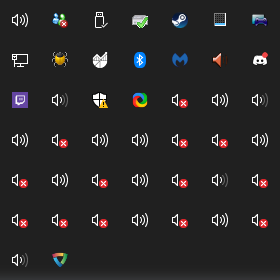
What do I win
 BreadBreadington
on 26 Aug 2019
BreadBreadington
on 26 Aug 2019
 TheEssem
on 22 Sep 2019
TheEssem
on 22 Sep 2019
Is any more data needed? I have this issue pretty consistently.
 nimand
on 21 Oct 2019
nimand
on 21 Oct 2019
What's the status on this? To this day I am experiencing this issue. :)
 dominikpflegerl
on 8 Nov 2019
dominikpflegerl
on 8 Nov 2019
No additional data needed, we're working on it! It's a complex problem that involves both the Windows Shell and EarTrumpet.
riverar
on 11 Nov 2019
I also have two icons, and they're both not the same in their tooltip:


 ElvenSpellmaker
on 27 Nov 2019
ElvenSpellmaker
on 27 Nov 2019
I'm having this also, but for me the most annoying is that when I re-run the icon appears at the start of the icons so I have to keep dragging it back to the far right where I want.
Hope you find the cause soon.
 Taomyn
on 29 Nov 2019
Taomyn
on 29 Nov 2019
We're aware of the cause (see https://github.com/File-New-Project/EarTrumpet/issues/404#issuecomment-552290070) bear with us, will be fixed in the next update.
riverar
on 29 Nov 2019
I'm also still running into this issue every so often
 MammothJerk
on 11 Jan 2020
MammothJerk
on 11 Jan 2020
We're aware of the cause (see #404 (comment)) bear with us, will be fixed in the next update.
Sorry to bump an old thread, is there a timeframe for this next release, or is it easy enough that I can build it from source?
 CoreParadox
on 30 Jan 2020
CoreParadox
on 30 Jan 2020
@CoreParadox Sadly I have to perform a localization pass and add a now-required privacy policy link to the Settings area, otherwise Microsoft Store will reject the next update. This has slowed down update release.
We have compilation documentation for EarTrumpet, it's relatively easy. https://github.com/File-New-Project/EarTrumpet/blob/master/COMPILING.md
riverar
on 30 Jan 2020
Closing, fixed.
riverar
on 7 May 2020
Related issues
 vertigo220
·
5Comments
vertigo220
·
5Comments
 audunn
·
8Comments
audunn
·
8Comments
 ChGGse
·
6Comments
ChGGse
·
6Comments
 Navroza
·
9Comments
Navroza
·
9Comments
 MortenManden
·
8Comments
MortenManden
·
8Comments
Most helpful comment
What do I win