Eartrumpet: Some app icons are missing (default EXE icon)
When you click on taskbar to open app, the animation is not smooth, it's lagging I would say. Moreover, some apps are missing icons.
Windows 1903 here.
 ufolud
All 9 comments
Are all of your apps showing a default EXE icon? Do you have a screenshot?
We've had one report of this and a reboot fixed it, could you please give that a try?
 davuxcom
on 12 Jun 2019
davuxcom
on 12 Jun 2019
I have this issue till updating to 1903. Some exe icons are missing, eg. Discord or Spotify. It happens randomly to random apps
ufolud
on 13 Jun 2019
Are all of your apps showing a default EXE icon? Do you have a screenshot?
We've had one report of this and a reboot fixed it, could you please give that a try?
I have tried this, and reboot worked couple of days ago, but since then all icons have been missing and reboot has not helped.
Win 10 1903 update
edit: I forgot to mention that missing icons started to happen after I upgraded to 1903, which was couple weeks ago.
For me bars seem be decently smooth, could be a bit better.
 nancomerian
on 18 Jun 2019
nancomerian
on 18 Jun 2019
To loop back to @davuxcom's questions:
- Are all of your apps showing a default EXE icon?
- Do you have a screenshot?
Thanks, we're monitoring this one.
 riverar
on 18 Jun 2019
nancomerian
on 19 Jun 2019
riverar
on 18 Jun 2019
nancomerian
on 19 Jun 2019
Flyout show animation is not always smooth #391
This issue will track the default EXE icons for apps
davuxcom
on 22 Jun 2019
In case it is of interest to someone, after 4th reinstall in span of 20 days I got icons to work this time. App was updated to latest version all the time.
nancomerian
on 7 Jul 2019
Can confirm that this is still an issue.
Screenshot
Win10 1903
EarTrumpet 2.1.4.0 from windows store.
Some of the icons that are missing:
Battle.net launcher
Spotify
Discord
If I dump some info it looks like "IconPath" etc are correct.
 gr3ger
on 6 Oct 2019
gr3ger
on 6 Oct 2019
I would like to add that I have been experiencing this issue too. Reboots do not seem to change anything.
OS: Windows 10 Home
Version: 1909
Build: 183631198
EarTrumpet:
Version: 2.1.7.0 from Windows store
Screenshot:
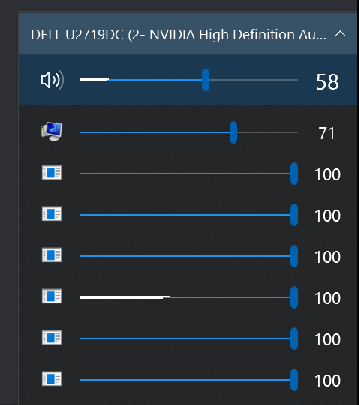
Apps in order of the screenshot:
Discord
Plex
Spotify
Mozilla Firefox
Steam
Have there been any solutions to this bug or should I try uninstalling/reinstalling?
 erasmus95
on 21 Nov 2020
erasmus95
on 21 Nov 2020
Related issues
 NitroFrost
·
7Comments
NitroFrost
·
7Comments
 BearTM
·
7Comments
BearTM
·
7Comments
 rampofox
·
7Comments
rampofox
·
7Comments
 cynr1c
·
7Comments
cynr1c
·
7Comments
 CosimoMatassini
·
4Comments
CosimoMatassini
·
4Comments