Eartrumpet: Error: "An invalid name request was made. The name requested cannot be retrieved at this time."
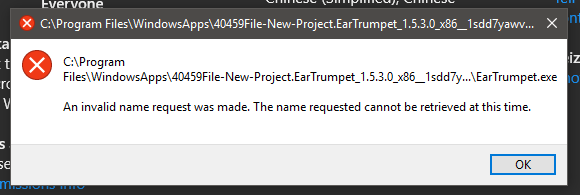
I think it started after the last windows update. Tried reinstalling it but it still comes up.
 serfnuts
All 26 comments
Have the same error as well. I have had the last windows update for about two weeks but this didn't happen until today.
When downloading from here a version 1.3.2.0 that it works without a problem so I think it may be because of some recent update to the app in the Windows app store
 wheeeper
on 1 Jun 2018
wheeeper
on 1 Jun 2018
Do you see any related errors in Event Viewer for the following nodes? (Ensure View > Show Analytic and Debug Logs is checked)
- Application
- System
- Applications and Services Logs > Microsoft > Windows > AppModel-Runtime
- Applications and Services Logs > Microsoft > Windows > AppModel-State
- Applications and Services Logs > Microsoft > Windows > Apps
- Applications and Services Logs > Microsoft > Windows > AppXDeployment
 riverar
on 1 Jun 2018
riverar
on 1 Jun 2018
So I've found 2 errors in AppModel-Runtime
1.
Event ID: 216
0x801F0005: Cannot create the Desktop AppX container for package 40459File-New-Project.EarTrumpet_1.5.3.0_x86__1sdd7yawvg6ne because an error was encountered configuring the runtime.
ErrorCode: 2149515269
2.
Event ID: 208
0x801F0005: Cannot create the process for package 40459File-New-Project.EarTrumpet_1.5.3.0_x86__1sdd7yawvg6ne because an error was encountered while configuring runtime. [LaunchProcess]
Error code: 2149515269
Weirdly enough, sometimes the app starts up. I was using the computer for some time until I tried to run the app again and it started. After restart it just showed the same error code again. Then I singed in and out again (without restart) and now it 'works' just fine. Weird
wheeeper
on 1 Jun 2018
Microsoft has confirmed this bug, nice catch! Should be fixed in an update soon. Will update you when I have more.
riverar
on 1 Jun 2018
Any workaround?
 drujd
on 5 Jun 2018
drujd
on 5 Jun 2018
I requested one from Microsoft but looks like it's a fatal issue. I'll ping them again.
riverar
on 5 Jun 2018
For me, it worked when I started the computer and this error message popped up just to sign out and in again. Since I wrote about this issue I had to do this once.
wheeeper
on 5 Jun 2018
I get this same error with EarTrumpet and the couple other store apps I have set to auto-run when first starting up my PC after leaving it off for any significant amount of time. Waiting a few minutes sometimes works, but other times (like today), it's hit or miss. EarTrumpet started just fine, but the other apps will not start, showing this error instead. Signing out and back in still shows the error upon their first attempt to auto-run, but manually running them afterword works.
According to this blog post about the same issue with a different app, a tweet from Microsoft Lead Program Manager Stefan Wick acknowledges this bug on 5/24, and he states a fix will be in an upcoming servicing patch for 1803 (tweet is here).
 thefowles1
on 21 Jun 2018
thefowles1
on 21 Jun 2018
Thanks @thefowles1!
riverar
on 21 Jun 2018
@riverar my pleasure; I just hope MS gets this patch out soon... now I cannot start any of the installed apps, even repairing the installation and signing out/back in.
Should have waited before updating to 1803...
thefowles1
on 23 Jun 2018
Hello,
I got the same problem after applying update KB4284848.
I have tried to reboot and to just log out and in again but got the same problem. Have also tried to reinstall the application.
I found the same errors in the event-log as @thefowles1 did.
 john-arvid
on 1 Jul 2018
john-arvid
on 1 Jul 2018
I don't think I have KB4284848 on my system; I don't see it in "installed updates" in my control panel, nor in my update history in the Windows Update center (in fact, I have far fewer updates showing in my control panel than what would show in Win7; I don't know if either will show my full history in Win10). I will download it now to see if it installs.
I do, however, see one very incrementally close - KB4284835 - installed on my system. I went to MS's support page for it and found this:

I'm unsure if this is KB update is related, but it seems to be with KB4284848 involved.
Also, checking in on the previously linked tweet, I found that a timeframe was given for the patch -- "later this summer".
Edit: my system did _not_ have KB4284848, as it is installing as I type this. Next time I receive these errors, I'm going to uninstall KB4284835 and see if that is related.
thefowles1
on 1 Jul 2018
Following up: received the error, uninstalled KB4284848 and KB4284835; rebooted; still receiving the error.
I suppose now we wait for the patch.
thefowles1
on 2 Jul 2018
The problem is fixed for me in 17134.112. Try uninstalling EarTrumpet, deleting all EarTrumpet-related folders and then reinstalling EarTrumpet. Also the problem has a workaround: You have to set security descriptions of the EarTrumpet folder in WindosApps and/or EarTrumpet executable.
drujd
on 2 Jul 2018
My PC updated when I booted it this morning, to what presume is also 17134.112. Still received the errors, but a workaround is good to know. Unfortunately, I can't access my WindowsApps folder, despite being the sole user/administrator of my PC. I'm being denied access to it, so I cannot get in to set security descriptions.
thefowles1
on 4 Jul 2018
iam facing the same problem with 1803 and installed KB4284848 and the mentioned methods dont work for me :(
 blubbsy
on 8 Jul 2018
blubbsy
on 8 Jul 2018
@blubbsy if you read the previous entries, you'll see that KB4284848 is unrelated to this problem. The issue lies with something that was changed in 1803, and MS knows the source and is fixing it in an upcoming patch, hopefully later this summer.
thefowles1
on 8 Jul 2018
There's no fix available for this issue at this time. Still waiting for more information from Microsoft.
riverar
on 8 Jul 2018
@theflowles1 ahh sorry, i misunderstood for what the patch is. :(
blubbsy
on 9 Jul 2018
[Had issues with HALO 5 Local Server Microsoft Store Installed App Error Message "an invalid name request was made" ]
Not sure if any one has found it out, for me, after an hour of the error coming up & trying quick fixes like the ones above, on our main PC I went into (default location)C:\Program Files\WindowsApps\Microsoft.Halo5LocalDS_1.1483.49020.2_x64__8wekyb3d8bbwe & found the EXE file and went into permissions
via
Right Click halo5server.exe >Properties[Bottom] >Security [TAB]>Advanced [Button Bottom Right]>In the Permissions [TAB should default open on]>Click the Add [Button]>Select a Principle[Highlighted Underlined top left]>Advanced [button]> Find Now [Button]>Scroll to the bottom Double Click Users>OK[Button]> Tick the box Full Control {Make sure Allow in the TAB norm Default}>OK>OK>Apply or just OK
Magically my App started working, even better then my laptop that is connected to the same network and didn't have this error message. ever. I just couldn't get the server to show up on my XboxOne but that's another issue for another day. I have 1803 installed no patch fix to help me anyways - didn't have app installed prior.
I hope it's easy to read and helps people out if they have just given up already. Also this could work for similar Microsoft Apps installed via the Store.
Permissions seem to be an ongoing problem with Win10 I've had an unrelenting battle setting numerous files to my account just to view them and they where never hidden or Read Only or special Share/Security settings applied.
 Kristaki
on 18 Jul 2018
Kristaki
on 18 Jul 2018
It's my understanding this isn't a permission issue. I'll ask for an update on the availability of this patch, standby.
riverar
on 18 Jul 2018
Update from Microsoft: "The issue has been fixed in an upcoming update in late July or August. It has also been fixed in current Windows Insider (Fast) builds where you can see the fix today."
riverar
on 18 Jul 2018
Update from Microsoft:
Should be patched next Patch Tuesday (August 7th) but you can download the patches now to try them out:
- RS4 https://support.microsoft.com/en-us/help/4340917/windows-10-update-kb4340917
- RS3 https://support.microsoft.com/en-us/help/4338817/windows-10-update-kb4338817
- RS2 https://support.microsoft.com/en-us/help/4338827/windows-10-update-kb4338827
- RS1 https://support.microsoft.com/en-us/help/4338822/windows-10-update-kb4338822
riverar
on 27 Jul 2018
WU already installed KB4340917, no Insider / Release Preview. But I did not experience the issue since 17134.112.
drujd
on 27 Jul 2018
Can confirm, KB4340917 has appeared to corrected the issue with all UWP apps affected by the bug. System build for me is 17134.191.
thefowles1
on 13 Aug 2018
Closing this bug. If anyone has any further issues with this and installed the Windows patches above, please let us know. Thanks!
riverar
on 11 Jan 2019
Related issues
 CosimoMatassini
·
4Comments
CosimoMatassini
·
4Comments
 prettyvoid
·
4Comments
prettyvoid
·
4Comments
 bramborman
·
3Comments
bramborman
·
3Comments
 cynr1c
·
7Comments
cynr1c
·
7Comments
 BearTM
·
7Comments
BearTM
·
7Comments
Most helpful comment
I get this same error with EarTrumpet and the couple other store apps I have set to auto-run when first starting up my PC after leaving it off for any significant amount of time. Waiting a few minutes sometimes works, but other times (like today), it's hit or miss. EarTrumpet started just fine, but the other apps will not start, showing this error instead. Signing out and back in still shows the error upon their first attempt to auto-run, but manually running them afterword works.
According to this blog post about the same issue with a different app, a tweet from Microsoft Lead Program Manager Stefan Wick acknowledges this bug on 5/24, and he states a fix will be in an upcoming servicing patch for 1803 (tweet is here).