E107: Select box styling issue in FF Quantum and Chrome
The drop-down menus display differently after the Firefox upgrade, causing some text to be unreadable due to a change of background color to gray and white for the optgroup labels.
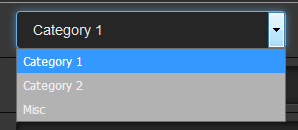
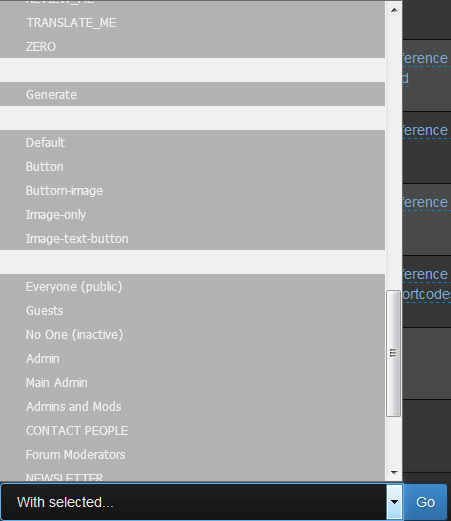
I'm looking for CSS suggestions/solutions so that the background color and test color remains dark, as it appears in its original (unselected) form:

 CaMer0n
All 4 comments
In bootstrap-dark.min.css - On line 1479 - remove background:rgba(0,0,0,.3).
.breadcrumb,.darkwell,.form-control,.hero-unit,.progress,.uneditable-input,code,input[type=date],input[type=time],input[type=datetime-local],input[type=month],input[type=text],input[type=password],input[type=datetime],input[type=week],input[type=email],input[type=url],input[type=tel],input[type=color],input[type=number],input[type=search],pre,select,textarea{box-shadow:0 1px 0 rgba(255,255,255,.1),0 1px 7px 0 rgba(0,0,0,.8) inset;background:rgba(0,0,0,.3)}
As for the white backgrounds - same css file - line 24
button,input,optgroup,select,textarea{color:inherit;font:inherit;margin:0;}
Add a background to it should change the white background to another color
 LaocheXe
on 13 Dec 2017
LaocheXe
on 13 Dec 2017
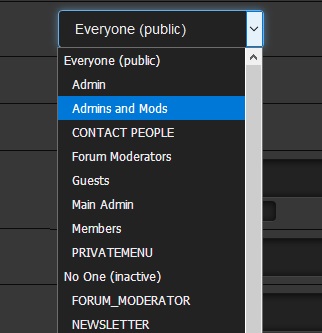
Grr LaocheXe is fast 👍 ... was experimenting.... changing the LAST value (.3) is sufficient as test so far give. (personal taste which value where 255 is black)
 tgtje
on 13 Dec 2017
tgtje
on 13 Dec 2017
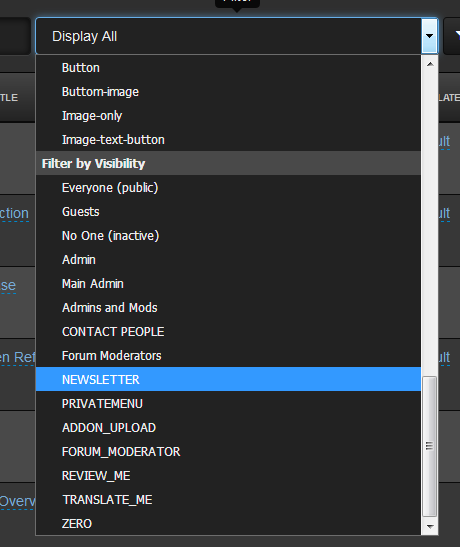
Thank you! Looks like it was some left-over css from the original darkstrap theme (bootstrap 2)
Here's what I have now...
CaMer0n
on 13 Dec 2017
CSS leftovers can be real headache... 👍
 rica-carv
on 14 Dec 2017
rica-carv
on 14 Dec 2017
Related issues
 realmontazeri
·
5Comments
realmontazeri
·
5Comments
 Norwayman
·
3Comments
Norwayman
·
3Comments
 MaDDoG9x9
·
4Comments
MaDDoG9x9
·
4Comments
 Jimmi08
·
3Comments
Jimmi08
·
3Comments
 BillyBoy0823
·
4Comments
BillyBoy0823
·
4Comments