E107: question: time for database queries
Hi, maybe this localhost problem or develop mode, but this time for executing queries looks too much:

and a bit later:

 Jimmi08
All 27 comments
It might also be related to the database table size...
If the table has a huge amount of records, it's slower to execute....
 rica-carv
on 13 Nov 2017
rica-carv
on 13 Nov 2017
@rica-carv on localhost there is only one record
Jimmi08
on 13 Nov 2017
If it's a local machine, might be some hidden process working in the background...
Antivirus, backup, etc...
Have you tryed with a online server to see if it happens also?
rica-carv
on 13 Nov 2017
That was point of question. How this is possible on localhost - other queries was normal. Just to e107_online was so slow.
Online debug looks differently (both was php7)

Why is on localhost looking for user_id =0 ? I am logged in.
Jimmi08
on 13 Nov 2017
Just guessing, but might be a localhost mysql server related issue.
It's indeed weird why in localhost your logged id is 0 and on live site is 1....
rica-carv
on 14 Nov 2017
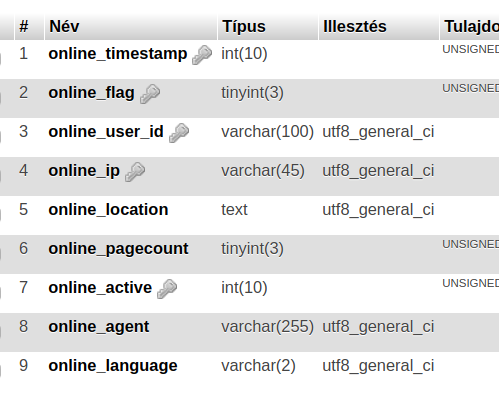
By default, only online_ip has indexing. You need to add more indexes manually. Add indexing to all the fields you use in query conditions. In your case, add indexing to online_user_id and online_timestamp.
ALTER TABLE `e107_online` ADD INDEX(`online_user_id`);
ALTER TABLE `e107_online` ADD INDEX(`online_timestamp`);
You will experience significant acceleration in case of page loading time.
@CaMer0n I think we need to add more indexes in the default SQL file (core_sql.php). Without these indexes e107 can be really slow.
 lonalore
on 14 Nov 2017
lonalore
on 14 Nov 2017
If I remember correctly, I also applied these indexes when I created the e107projects.com. Node.js plugin uses the online table, and it was a bit slow.
lonalore
on 14 Nov 2017
Yes, I remembered well... my table also has extra indexes:
lonalore
on 14 Nov 2017
Thank you! Merged! 👍
 CaMer0n
on 14 Nov 2017
CaMer0n
on 14 Nov 2017
Thank you, but you merged my other PR, not the PR for this issue. :D
lonalore
on 14 Nov 2017
haha! You're right. I should be careful when having 2 windows open. :-)
CaMer0n
on 14 Nov 2017
@Jimmi08 Did this fix it? For me it brings it down from 5 msec from 3 msec.
CaMer0n
on 15 Nov 2017
before:

on homepage:

after update:

on homepage:

Jimmi08
on 15 Nov 2017
Could you please provide avarage values instead of the current ones? For example "the average of 10 query times" before / after.
lonalore
on 15 Nov 2017
Btw @Jimmi08 what do you use for banchmarking query times?
lonalore
on 15 Nov 2017
@lonalore e107 firefox addon debugger analyze SQL queries
Jimmi08
on 15 Nov 2017
@Jimmi08 Did this fix it? For me it brings it down from 5 msec to 3 msec.
CaMer0n
on 15 Nov 2017
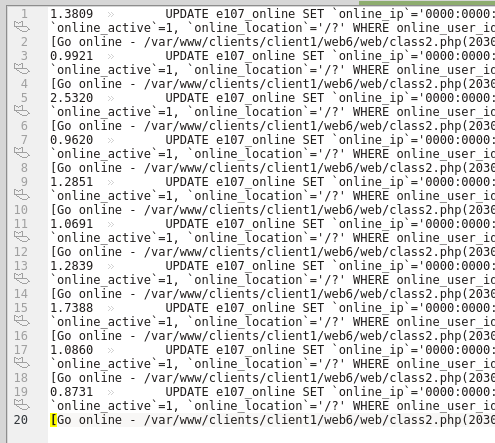
I did a quick banchmark, and unfortunately, I have to say that it's slower with indexes. Interesting... :/
Before update (avg 1,3203):
After update (avg 1,3694):
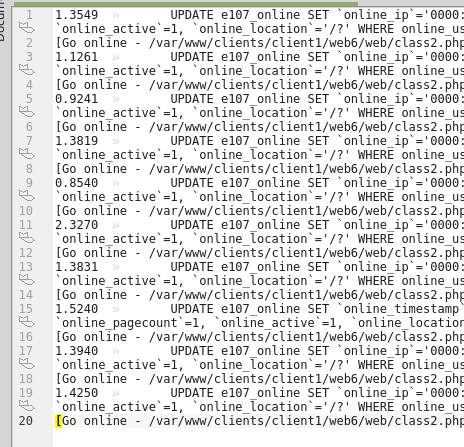
The diff is ~0,049.
lonalore
on 15 Nov 2017
Thanks @lonalore , at the least I am happy that someone else got that result too, so I'm not going crazy after all ! haha
CaMer0n
on 15 Nov 2017
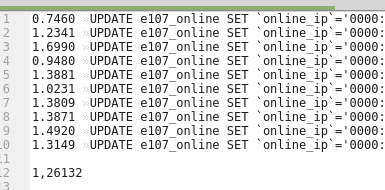
I made new banchmark (on the same website the previous banchmarks were made on) with indexing suggested by @fwhcat on Gitter, and this is the best so far.
KEY online_ip_user_id (online_ip, online_user_id),
Results (avg ~1,261)
lonalore
on 9 Dec 2017
Thank you guys.
Jimmi08
on 9 Dec 2017
Thanks @lonalore and @Jimmi08. Glad I could help with that :)
 schrodinger72
on 9 Dec 2017
schrodinger72
on 9 Dec 2017
@lonalore @fwhcat It appears this change has been disastrous for performance on one of the sites I manage. User tracking had to be disabled entirely. Problem appears to be with 'update' and 'delete'. I have added additional 'Mark-Time' entries to troubleshoot this.
CaMer0n
on 13 Jan 2018
@CaMer0n @lonalore @Jimmi08 @fwhcat Where are we on this issue? Can it be closed? Are there still issues open?
 Moc
on 16 Jan 2019
Moc
on 16 Jan 2019
@Moc I believe it requires further testing.
CaMer0n
on 31 Jan 2019
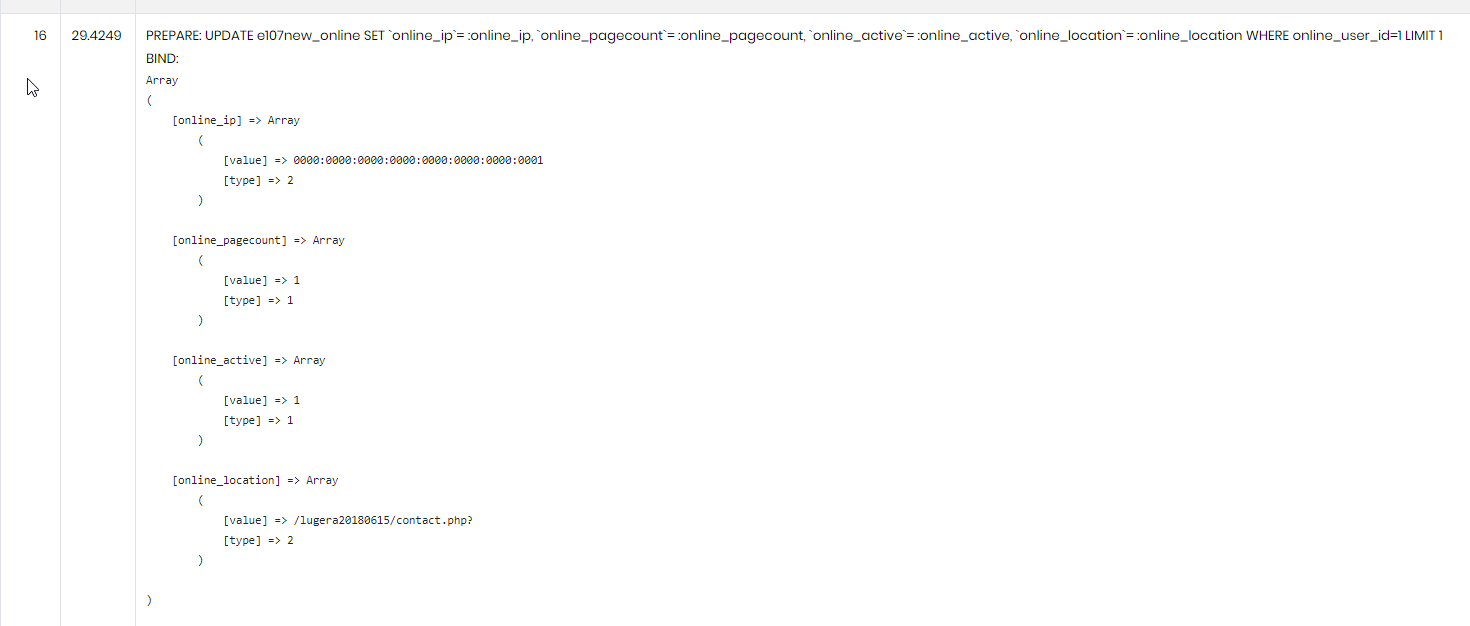
Hi, after update to latest GitHub, localhost version became visibly slower. I noticed this:

Jimmi08
on 18 Feb 2019
@Moc I would close this one.
Jimmi08
on 1 Aug 2019
Related issues
 BillyBoy0823
·
4Comments
BillyBoy0823
·
4Comments
 chory
·
4Comments
Jimmi08
·
3Comments
rica-carv
·
5Comments
chory
·
4Comments
Jimmi08
·
3Comments
rica-carv
·
5Comments
 Norwayman
·
3Comments
Norwayman
·
3Comments