Dynamo: Wish: DS shortcut for creating dictionaries with syntax {keys:vals}
If this issue is with Dynamo for Revit, please post your issue on the Dynamo for Revit Issues page.
If this issue is not a bug report or improvement request, please check the Dynamo forum, and start a thread there to discuss your issue.
Dynamo version
2.0.0 stable
Operating system
Win 7
What did you do?
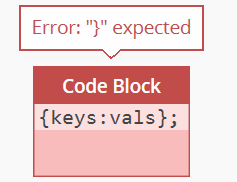
Typed {keys,vals} in a codeblock and expected to be able to define a dictionary with variables instead of typing DesignScript.Builtin.Dictionary.ByKeysValues(keys,vals);
What did you expect to see?
a dictionary.
What did you see instead?
(Fill in here)
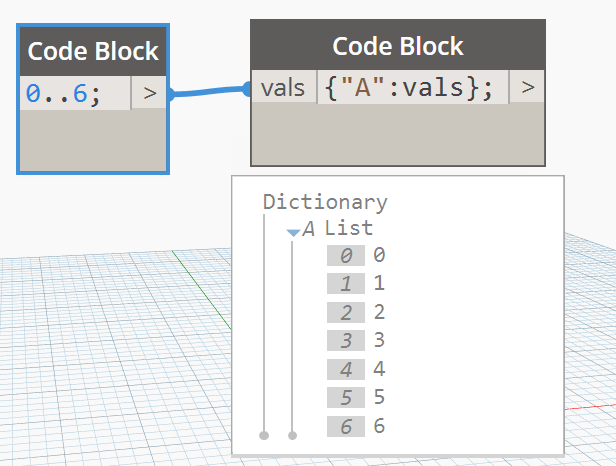
But the values of a dictionary can be made a variable:
 josols
All 14 comments
@aparajit-pratap Can you please comment? @Racel fyi.
 jnealb
on 17 Apr 2018
jnealb
on 17 Apr 2018
So the bigger question here is: are string the only type supported for dictionary keys? In theory any type could be used.
 ksobon
on 18 Apr 2018
ksobon
on 18 Apr 2018
@ksobon , @pboyer gave a detail response to my query of non-string key's located here:
(https://github.com/DynamoDS/Dynamo/issues/8497#issuecomment-361332513)
 Amoursol
on 18 Apr 2018
Amoursol
on 18 Apr 2018
So I am guessing the answer is we are not supporting any other Type for dictionary keys because it can confuse people. I might not entirely agree with that, but let it be. @kronz do we close this?
ksobon
on 18 Apr 2018
@ksobon also I believe the thought process was that complicates the implementation, and lowers its maintainability for a feature we are not sure a large number of users will take advantage of.
 mjkkirschner
on 18 Apr 2018
mjkkirschner
on 18 Apr 2018
For me this was not about using strings as dictionary keys. I'm fine about that. But, for me, and others as well, the shortcut in Dynamo 1.x for dictionaries, ie dict[keys]=vals was powerful and easy to use. Could it not be possible to have variables as keys, but only allow the variable to be a string?
{keys:vals} would be so much easier to use than DesignScript.Builtin.Dictionary.ByKeysValues(keys,vals)...
josols
on 18 Apr 2018
@mjkkirschner completely understood. That's why I am saying I am game with us just saying string is the only type supported.
@josols that's a valid concern. So long as the variable was of string type in my opinion you should be able to define a dictionary like you tried. @mjkkirschner do you agree? The reason I am saying that is because that would be a pattern of syntax consistent with how DS dynamically defines variables for all other methods.
ksobon
on 18 Apr 2018
There is rationale in the PR by @pboyer for the current behavior. https://github.com/DynamoDS/Dynamo/pull/8551
 gregmarr
on 18 Apr 2018
gregmarr
on 18 Apr 2018
@gregmarr The PR description states that it's no longer supported, but it doesn't explain why that would be the case.
ksobon
on 18 Apr 2018
simplifying the parser and eliminating the complexities of interaction with other language features (notably replication), this approach makes our initialization syntax essentially identical to JSON.
gregmarr
on 18 Apr 2018
That's not to say that we can't revisit this in the future, but that's why it is the way it is right now.
gregmarr
on 18 Apr 2018
@josols @ksobon we have experimented with this idea and found that it could lead to confusing results when a syntax like {keys : vals} interferes with other language features of DesignScript like replication. The following example was one such experiment (note that this was before the list [] syntax changes):
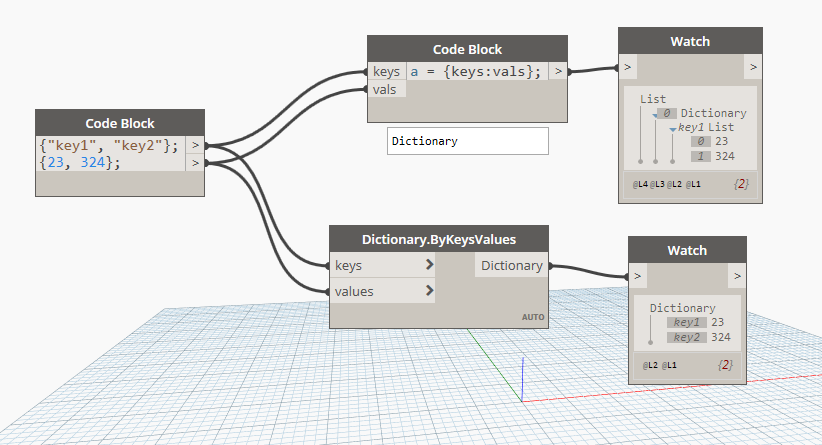
This produced a result where: [ { "key1" : [ 23, 324 ] } ] which was hard to reason about and it also differed from the UI node result.
Then there could be other confusing cases like this simple statement: a = ["foo", "bar"]; b = { a : "baz" }. What would one expect this result to be.
We finally concluded that it would not be very useful unless we actually went to the extent of supporting arbitrary expressions and adding replication guide syntax etc. to the mix, not just identifiers, and we didn't want to go the route of supporting arbitrary expressions for the sake of simplicity.
We _could_ extend dictionary keys to support arbitrary expressions in the future but we will also have to ensure that the interaction with other language features is consistent and intelligible at the cost of adding complexity (not to mention the time and effort invested implementing this) rather than making the system a little less powerful and simple to understand. Further, there is always an alternate way to address this by using the Dictionary.ByKeysValues(keyList, valueList) method, which is not that much of a stretch.
 aparajit-pratap
on 18 Apr 2018
aparajit-pratap
on 18 Apr 2018
@aparajit-pratap that's a great explanation and a good example. I think it makes sense to limit it to strings for now.
ksobon
on 18 Apr 2018
Yep, excellent explanation. I’ll close for now.
josols
on 18 Apr 2018
Related issues
 JarodSchultz
·
5Comments
JarodSchultz
·
5Comments
 ThomasMahon
·
3Comments
ThomasMahon
·
3Comments
 askgrkumar
·
4Comments
askgrkumar
·
4Comments
 mccrone
·
8Comments
mccrone
·
8Comments
 johnpierson
·
10Comments
johnpierson
·
10Comments
Most helpful comment
@josols @ksobon we have experimented with this idea and found that it could lead to confusing results when a syntax like

{keys : vals}interferes with other language features of DesignScript like replication. The following example was one such experiment (note that this was before the list[]syntax changes):This produced a result where:
[ { "key1" : [ 23, 324 ] } ]which was hard to reason about and it also differed from the UI node result.Then there could be other confusing cases like this simple statement:
a = ["foo", "bar"]; b = { a : "baz" }. What would one expect this result to be.We finally concluded that it would not be very useful unless we actually went to the extent of supporting arbitrary expressions and adding replication guide syntax etc. to the mix, not just identifiers, and we didn't want to go the route of supporting arbitrary expressions for the sake of simplicity.
We _could_ extend dictionary keys to support arbitrary expressions in the future but we will also have to ensure that the interaction with other language features is consistent and intelligible at the cost of adding complexity (not to mention the time and effort invested implementing this) rather than making the system a little less powerful and simple to understand. Further, there is always an alternate way to address this by using the
Dictionary.ByKeysValues(keyList, valueList)method, which is not that much of a stretch.