Dxvk: DXVK installed, but wine still using wine3d.
Graphics Card: Nvidia 1080
Linux: Arch Linux (latest)
All additional drivers required installed. Atleast all the one's I can find in the docs.
Trying to run 32bit game.
The install process went smooth. the dlls were properly added to my wine-prefix.
However when I run my game with wine under that prefix in the system32 folder.
0009:fixme:d3d:wined3d_guess_card No card selector available for card vendor 0000 (using GL_RENDERER "llvmpipe (LLVM 10.0.0, 256 bits)").
Am I missing something. Should I move the dlls directly into the folder containing the game instead of the sys32 folder? Is this because my graphics card is not recognized?
Any help tremendously appreciated!
 Bug-Reaper
All 21 comments
Did you install manually or using the dxvk-bin package in the AUR? Did you run setup_dxvk install afterwards?
 guihkx
on 20 Apr 2020
guihkx
on 20 Apr 2020
I grabbed the AUR and ran setup_dxvk install afterwards. The dlls were copied into my the system32 folder of the correct wine prefix. Thanks so much for the quick reply
Bug-Reaper
on 20 Apr 2020
Checking winecfg:
d3d10core.dll
d3d11.dll
d3d9.dll
dxgl.dll
Are all set to run (native).
Bug-Reaper
on 20 Apr 2020
Is there a step I missed in between installing the AUR and running setup_dxvk install ? Or should that have worked?
Bug-Reaper
on 20 Apr 2020
It should have worked, as far as I know. I too have a NVIDIA GPU and I'm on Arch as well, so... Are you sure you have the correct video driver installed and the 32-bit libraries as well? Check with:
$ pacman -Qi nvidia lib32-nvidia-utils
If you get something like error: package 'nvidia' was not found, then you have to install it. By the way, what game are you trying to run?
guihkx
on 20 Apr 2020
I have both of the packages you mentioned installed with the latest version. As well as the two other Vulkan packages suggested by the Vulkan Arch Linux Wiki page:
sudo pacman -S nvidia lib32-nvidia-utils vulkan-icd-loader lib32-vulkan-icd-loader[sudo] password for saint-llama:
warning: nvidia-440.82-6 is up to date -- reinstalling
warning: lib32-nvidia-utils-440.82-1 is up to date -- reinstalling
warning: vulkan-icd-loader-1.2.135-1 is up to date -- reinstalling
warning: lib32-vulkan-icd-loader-1.2.135-1 is up to date -- reinstalling
I'm trying to run a maplestory client (v83) for a private server.
Bug-Reaper
on 20 Apr 2020
Grabbed the vulkan-tools package as well.
Running vulkaninfo returns:
==========
VULKANINFO
==========
Vulkan Instance Version: 1.2.135
Followed by a crapton of other details. Seemingly indicating vulkan is properly installed.
Bug-Reaper
on 20 Apr 2020
If Vulkan wasnt properly installed the game would just crash instead of falling back to WineD3D. Make sure you're using the correct prefix for launching the game and that your overrides are correct.
 K0bin
on 20 Apr 2020
K0bin
on 20 Apr 2020
I am 100% sure I'm using the correct wine prefix. See this log where I both install and run the application in the same set of commands:
[saint-llama@hubs MapleRoyals]$ WINEPREFIX=~/.wineDidos setup_dxvk install
wine: configuration in L"/home/saint-llama/.wineDidos" has been updated.
removed '/home/saint-llama/.wineDidos/dosdevices/c:/windows/system32/dxgi.dll'
'/usr/share/dxvk/x32/dxgi.dll' -> '/home/saint-llama/.wineDidos/dosdevices/c:/windows/system32/dxgi.dll'
removed '/home/saint-llama/.wineDidos/dosdevices/c:/windows/system32/d3d9.dll'
'/usr/share/dxvk/x32/d3d9.dll' -> '/home/saint-llama/.wineDidos/dosdevices/c:/windows/system32/d3d9.dll'
removed '/home/saint-llama/.wineDidos/dosdevices/c:/windows/system32/d3d10core.dll'
'/usr/share/dxvk/x32/d3d10core.dll' -> '/home/saint-llama/.wineDidos/dosdevices/c:/windows/system32/d3d10core.dll'
removed '/home/saint-llama/.wineDidos/dosdevices/c:/windows/system32/d3d11.dll'
'/usr/share/dxvk/x32/d3d11.dll' -> '/home/saint-llama/.wineDidos/dosdevices/c:/windows/system32/d3d11.dll'
[saint-llama@hubs MapleRoyals]$ WINEPREFIX=~/.wineDidos WINEARCH=win32 wine MapleRoyals.exe
0009:fixme:heap:RtlSetHeapInformation 0x110000 0 0x32f90c 4 stub
0009:fixme:d3d:wined3d_guess_card No card selector available for card vendor 0000 (using GL_RENDERER "llvmpipe (LLVM 10.0.0, 256 bits)").
And you're sure that MapleRoyals (whatever that is) even uses D3D9, 10 or 11?
K0bin
on 20 Apr 2020
As mentioned previously, overrides seem to be set correctly as well:
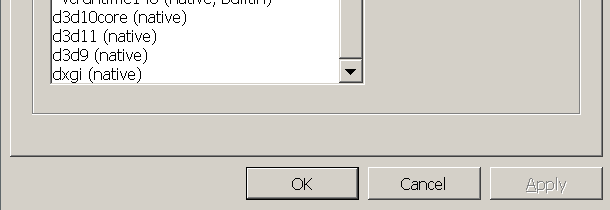
I am 100% sure this game uses d3d9 and d3d11. Again, thanks for the speedy help.
Bug-Reaper
on 20 Apr 2020
Did you install the 32 bit version of DXVK too? Looks like it just put files into system32 which is the directory for 64bit dlls (I know it seems weird).
K0bin
on 21 Apr 2020
Which game are we talking about specifically?
If the game uses D3D8 or older, then it will not work with DXVK.
 doitsujin
on 21 Apr 2020
doitsujin
on 21 Apr 2020
I think the DXVK AUR is responsible for installing both 32bit and 64bit dlls. Is there actually a different 32bit version of DXVK or an alternate process to setup_dxvk install which is specific for 32bit binaries?
The game is maplestory gameclient (v83). It is confirmed to use directx9 and directx11. I can do a dll dump in my windows VM to confirm this further I think?
Bug-Reaper
on 21 Apr 2020
Just to be sure this isn't related to the game itself, can you download and run this small binary that uses D3D9 and see if DXVK loads?
Run it with:
$ DXVK_HUD=full wine fr-041_debris.exe
guihkx
on 21 Apr 2020
Yea of course! The exe you provided ran with no issue at like 120FPS the entire time. So it seems my game is part of the problem. Is there anything else I can do to force my game to run vulkan?
Bug-Reaper
on 21 Apr 2020
I tried running this MapleStory game on my computer, but since I don't know how it works, I couldn't get it past the launcher window, because it crashes after I click the "start game" button. I downloaded it from here.
I just wanted to be sure this game isn't using D3D8 or DirectDraw, but I can't get it to work.
Anyway, there is this awesome tool called DXWrapper, that uses d3d8to9, which translates D3D8 calls to D3D9, so it should work with DXVK, as I've used it with some old game before...
guihkx
on 21 Apr 2020
@guihkx Thank you so much for all the help! I will investigate the DXWrapper utility you mention!
I apologize, I should have been more specific! I'm not trying to get the official maplestory client running. Instead I'm trying to get a client working for a private server which runs an old version of maplestory.
Link to the installer is here if you want to try it out.
https://mapleroyals.com/?page=download
You will need to set up a 32bit wine prefix and install Visual C++ 2015 via winetricks. Additionally, you'll need to place 2 dlls into the system32 folder of said 32bit wine prefix. Attaching the dlls to this post for convenience. One dll replaces a dll already installed by wine and the other one is not provided by wine or any winetricks.
There was an older version of the game client for this private server which did have working wine install instructions.
https://mapleroyals.com/forum/threads/how-to-play-mapleroyals-in-linux-using-wine.22254/
You can see this old client very clearly used directx9,11.
Though the game client has been updated since then, I believe directx9 and directx11 are still in use. I feel it is unlikely that the client pivoted to an older version of directx or alternate graphics lib. However, that is of course not impossible.
I am in the process of checking the game client .exe with process explorer on a windows VM. This should confirm the presence or lack of directx9/10/11 dlls. My VM is painfully slow, but stay tuned.
Bug-Reaper
on 21 Apr 2020
Thanks for the instructions! I'll give it a try later. But hopefully you can figure it out until then.
guihkx
on 21 Apr 2020
As suspected, the game uses D3D8. I don't know if there's an in-game setting to change it to D3D9, but the default one is definitely D3D8:
$ WINEDEBUG="+timestamp,+pid,+tid,+loaddll" DXVK_HUD=full WINEARCH=win32 wine MapleRoyals.exe 2>&1 | grep -i d3d
57480.768:0008:0009:trace:loaddll:load_so_dll Loaded L"C:\\windows\\system32\\wined3d.dll" at 0x7c1a0000: builtin
57480.768:0008:0009:trace:loaddll:load_so_dll Loaded L"C:\\windows\\system32\\D3D8.DLL" at 0x7c300000: builtin
57486.215:0008:002f:fixme:d3d:state_linepattern_w Setting line patterns is not supported in OpenGL core contexts.
Additionally, the game always freezes for me after 30-40 seconds, so I couldn't even create a character. :/
However, I can also confirm that using DXWrapper with d3d8to9 enabled, works:

Here's how:
- Download the latest DXWrapper.zip from here.
- Extract the
Stub/d3d8.dllfile to the game's main folder. - Also extract
dxwrapper.dllanddxwrapper.inito the same folder. - Open
dxwrapper.iniwith any text editor - Search for
D3d8to9and set its value to1. - Save the file.
- Use
winecfgto add a native override ford3d8.dll. Alternatively, you can run the game with:
$ WINEDLLOVERRIDES="d3d8.dll=n" wine MapleRoyals.exe
Let me know if it works for you.
guihkx
on 21 Apr 2020
Ohhhhh man, thank you so much!
I was able to confirm your assertion that directx8 was being used and I was able to get the game to run with vulkan via DXWrapper d3d8 -> d3d9. A very cool trick I'm sure will come in handy in the future.
I was pretty sure that this upgrade would be the one that got that crash 30-60seconds in to stop happening. A real shame too because the game runs perfectly smooth up until that abrupt crash (even if you manage to login and start playing).
Not sure what to do next, I've eliminated all of the errors and am not getting any fixme's around the crash time. But hey, at least now if I do ever get it to run I can enjoy it with the full power of VULKAN!
I also learned a ton about wine/vulkan and it's totally fascinating.
Thanks everyone who contributed, especially @guihkx ! I really appreciate you taking the time to look into this and help me out. This is an amazing project <3
Bug-Reaper
on 22 Apr 2020
Related issues
 mozo78
·
5Comments
mozo78
·
5Comments
 arabcian
·
3Comments
arabcian
·
3Comments
 jekstrand
·
4Comments
jekstrand
·
4Comments
 EnigmaRaptor
·
5Comments
EnigmaRaptor
·
5Comments
 artivision
·
4Comments
artivision
·
4Comments
Most helpful comment
As suspected, the game uses D3D8. I don't know if there's an in-game setting to change it to D3D9, but the default one is definitely D3D8:
Additionally, the game always freezes for me after 30-40 seconds, so I couldn't even create a character. :/
However, I can also confirm that using DXWrapper with d3d8to9 enabled, works:
Here's how:
Stub/d3d8.dllfile to the game's main folder.dxwrapper.dllanddxwrapper.inito the same folder.dxwrapper.iniwith any text editorD3d8to9and set its value to1.winecfgto add a native override ford3d8.dll. Alternatively, you can run the game with:$ WINEDLLOVERRIDES="d3d8.dll=n" wine MapleRoyals.exeLet me know if it works for you.