Dxvk: Monster Hunter World weird reflection on objects
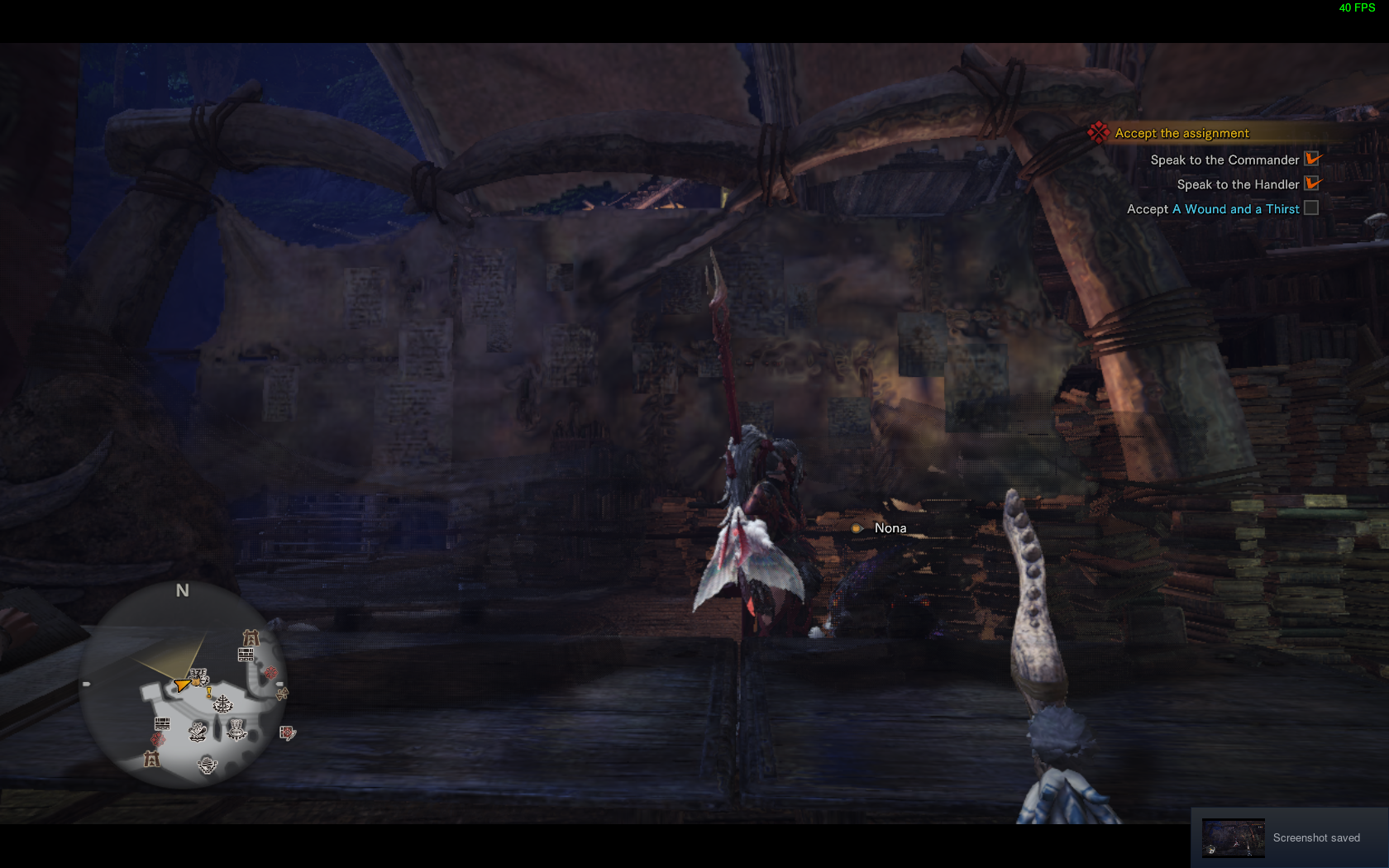
The game has some weird metallic looking objects when using DXVK. disabling ingame setting z-prepass fixes some of the objects look when close to the camera but others stay bugged
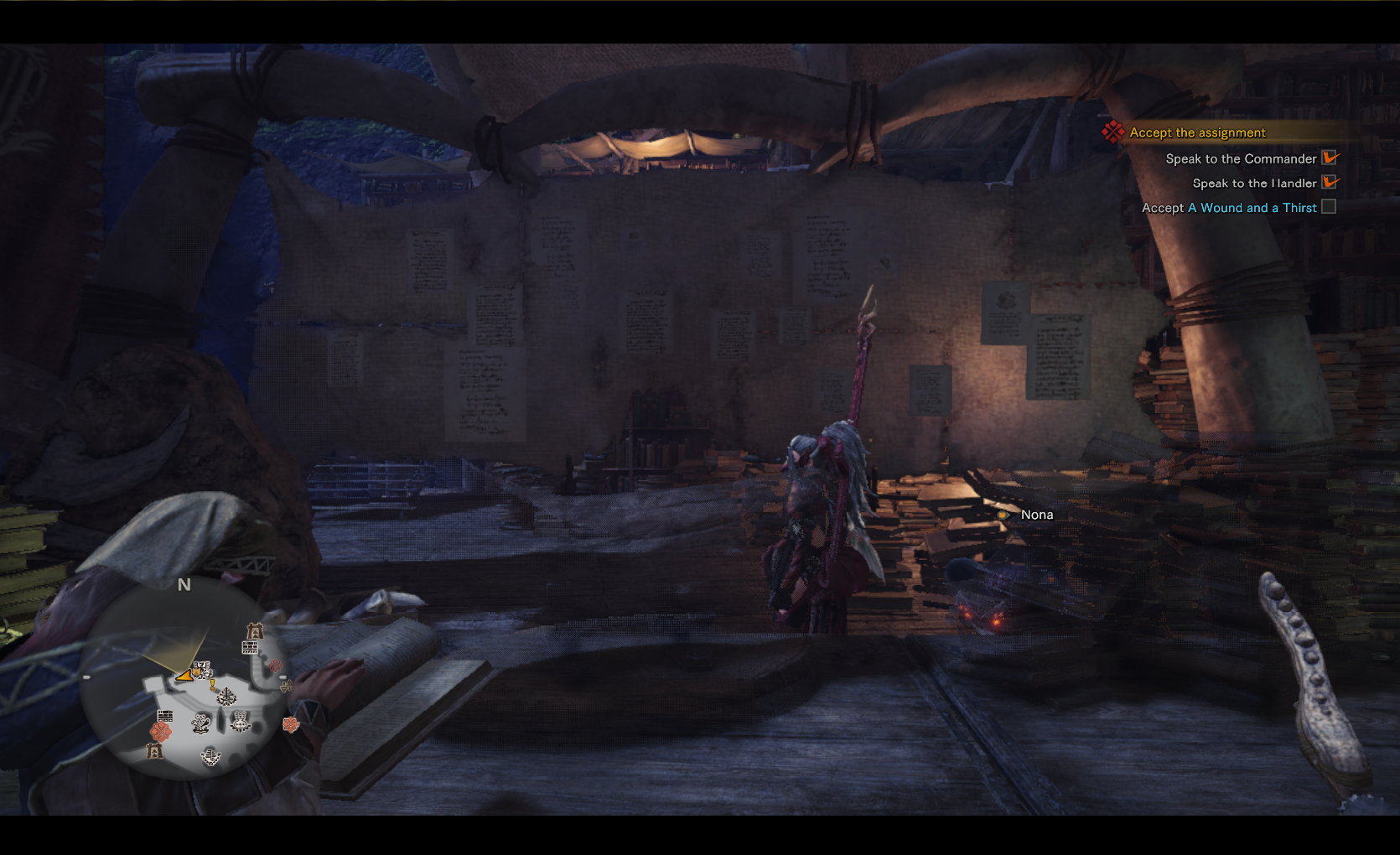
Recorded an apitrace of the game on windows 7 with native d3d11, the trace reproduces the bug on linux with dxvk (noticeable in the red sign on the back and the wooden floor)
here is a comparison of the game on windows and proton:
- Windows: https://www.youtube.com/watch?v=7QctglngEk4
- Proton: https://www.youtube.com/watch?v=WPXIl5cOhls
This bug is present on both wine+dxvk and proton.
Software information
Monster Hunter World
high settings
System information
- GPU: AMD R9 270
- Driver: Mesa-git
- Wine version: Proton 3.16-1
- DXVK version: Proton's 0.81
Apitrace file(s)
it is more noticeable in the red sign on the back and the wooden floor
Log files
- d3d11.log: MonsterHunterWorld_d3d11.log
- dxgi.log: MonsterHunterWorld_dxgi.log
 BlazeKl
All 12 comments
Someone complained about this before and it seems to happen only on RADV, so I tagged it accordingly.
I have a very hard spotting the issue in the apitrace though, can you take a screesnhot showing what it's supposed to look like? Edit: It renders correctly on the Windows Vulkan driver, so I have a reference point.
 doitsujin
on 15 Oct 2018
doitsujin
on 15 Oct 2018
Here it is another example if you need it:
Windows:
DXVK:
BlazeKl
on 15 Oct 2018
Bad news, while I can reproduce the problem, I cannot actually debug it right now because Renderdoc refuses to work.
doitsujin
on 15 Oct 2018
don't worry, the game is still pretty playable rn so no need to hurry. I hope you can get renderdoc working
BlazeKl
on 15 Oct 2018
Dropping in to confirm the issue.
RX580 Mesa-git.
I've also tried on mesa 18.2 and tried different proton releases. I honestly wasn't sure if it was a driver issue, DXVK issue, or some combination. I would have mentioned it a couple of weeks ago but I was busy tracking down my stutter issue that was apparently from using TearFree.
 urmamasllama
on 19 Oct 2018
urmamasllama
on 19 Oct 2018
Apparently this is an old LLVM regression, it appears to render fine on LLVM 6.
doitsujin
on 4 Dec 2018
tried the first 6.0.0 llvm package from arch archives and compiled mesa with it, but it still renders incorrectly
BlazeKl
on 5 Dec 2018
Just wanted to add that I have tested this one pretty thoroughly. I've seen it using LLVM6, 7, 8. Mesa versions from 18.1.1 to current git (19.0?).
- GPU: R9 Fury
- Driver: Mesa-git (PPA: Padoka/mesa)
- Kernel: 4.20RC5
- Wine: Proton 3.16-5
- DXVK: (TODO: Double check most recent)
- Distro: Kubuntu 18.10 (Have also tested U18.04, Arch)
I've been messing with all sorts of different Mesa packages since SteamPlay was released, and there have only been 2 consistencies that whole time- Monster Hunter World will ALWAYS launch (no idea why, but it really always does), and it will always have this metallic issue.
No hurry, but glad this is still being looked at. If anyone wants any specific software configurations tested, I've got no issue playing around with stuff. I really doubt it's hardware related, but I'll have a Vega 64 here soon. If things change, I'll be sure to shout.
 ZyxionQuiksilver
on 14 Dec 2018
ZyxionQuiksilver
on 14 Dec 2018
Vega 64 has the same issues (I knew this wasn't hardware, but, hey, why not report on it). Nice FPS though!
ZyxionQuiksilver
on 21 Dec 2018
I found the root cause of the reflection issue, here's the workaround for Mesa and LLVM 7&8 https://patchwork.freedesktop.org/series/60376/ and the LLVM 9 fix is here https://reviews.llvm.org/D61313
 hakzsam
on 7 May 2019
hakzsam
on 7 May 2019
@hakzsam mesa patch worked, will test the llvm 9 patch on the weekend when I have time for compiling. thanks for looking into it
BlazeKl
on 8 May 2019
Fixed with LLVM r361008 (LLVM 9+) and fixed inside Mesa for LLVM 7&8, see https://cgit.freedesktop.org/mesa/mesa/commit/?id=d7501834cd86f9ec0b7c3dea17448dc523e36390
hakzsam
on 17 May 2019
Related issues
 t14462
·
4Comments
t14462
·
4Comments
 AuroransSolis
·
3Comments
AuroransSolis
·
3Comments
 SzDavidHUN
·
3Comments
SzDavidHUN
·
3Comments
 knuxyl
·
5Comments
knuxyl
·
5Comments
 EnigmaRaptor
·
5Comments
EnigmaRaptor
·
5Comments
Most helpful comment
Fixed with LLVM r361008 (LLVM 9+) and fixed inside Mesa for LLVM 7&8, see https://cgit.freedesktop.org/mesa/mesa/commit/?id=d7501834cd86f9ec0b7c3dea17448dc523e36390