With this amdvlk update https://github.com/GPUOpen-Drivers/llpc/commit/70ec075a21e28de6cfe5585bf67ad51f57c82eda DXVK no longer immediately crashes when using the driver. Here are some results of some tests I ran.
Edit1: Tested more games. Changed Naruto Shippuden: Ultimate Ninja Storm 4 to broken.
Games that I didn't notice any issues:
Batman Arkham Knight
Batman Arkham City
Thief
The Vagrant
Dying Light
Games that had issues:
Naruto Shippuden: Ultimate Ninja Storm 4 - Freezes during the start of some story missions. Fixed with AMDVLK 2.0.60
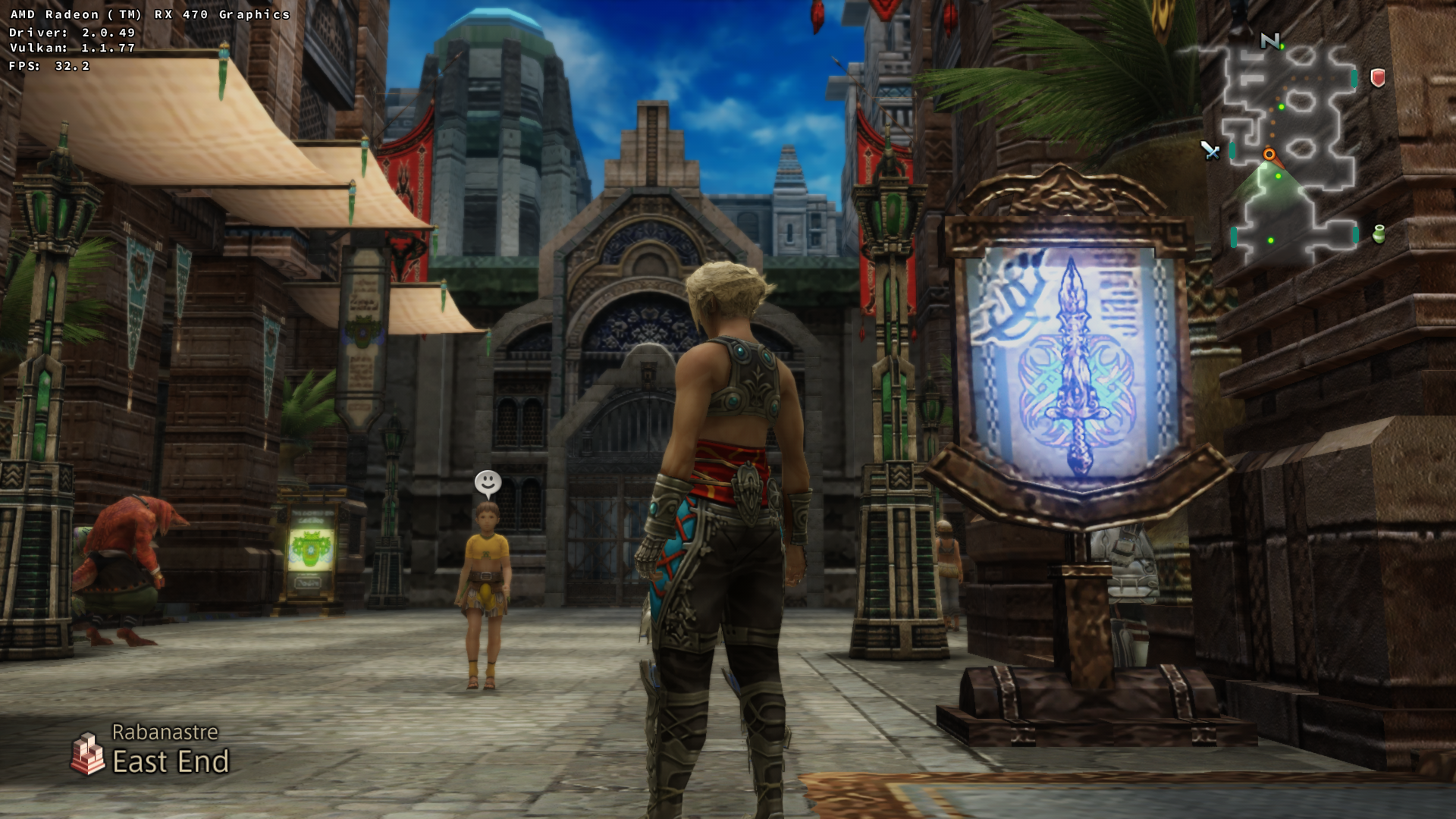
Final Fantasy XII The Zodiac Age - MSAA issue Fixed with AMDVLK 2.0.60
with MSAA

no MSAA
The Witcher 3 - Issues with water, and turning on the Hair effects causes my computer to freeze up needing a hard reboot. Fixed with AMDVLK 2.0.60

Killer Instinct - Freezes when entering a match or the benchmark mode, needing a hard boot to resolve. Fixed with AMDVLK 2.0.60
Just Cause 3 - Freezes during startup, needed a hard boot to resolve. Fixed with AMDVLK 2.0.60
Skyrim Special Edtion - Graphical glitches

 gusthe
All 29 comments
Very cool results! Do you happen to have any comparisons performance-wise between AMDVLK and Mesa/RADV?
 Mushoz
on 19 Aug 2018
Mushoz
on 19 Aug 2018
I ran a quick test for performance with the Arkham knight bench.
AMDVLK
Min:39
Max:80
Average:59
RADV
Min:35
Max:80
Average:58
This was the second run test results for both to rule out shader caching. With AMDVLK it's caching shaders every time I run the game. So RADV really wins this easily. Does AMDVLK not have on disk shader caching?
The other games I tried seemed close to the same in performance minus the shader caching in a few.
gusthe
on 19 Aug 2018
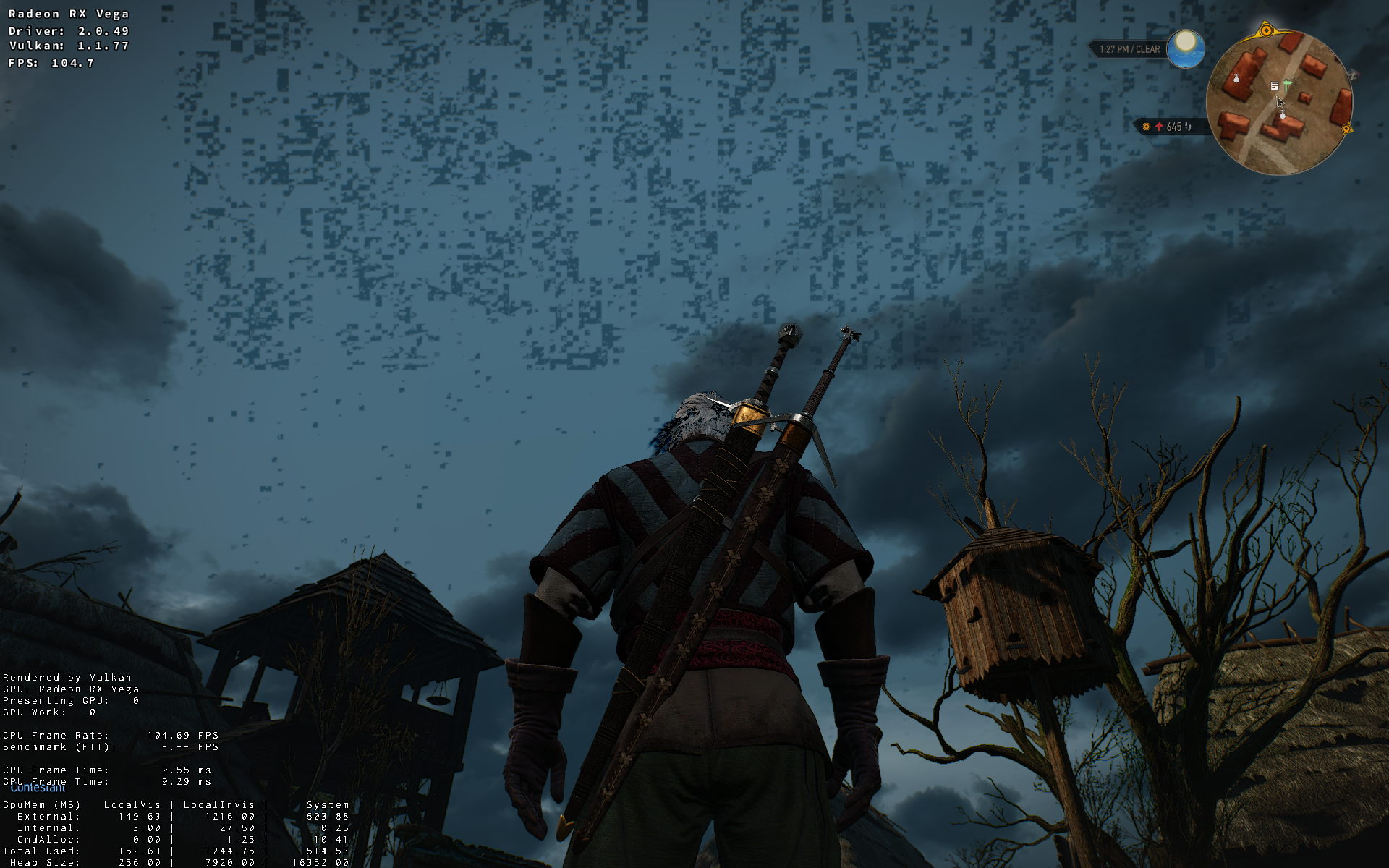
The Witcher 3 has distortions:
 shmerl
on 19 Aug 2018
shmerl
on 19 Aug 2018
Performance is very similar to radv:
amdvlk:

radv:

shmerl
on 19 Aug 2018
Pinging relevant AMD people in the discussion. @JacobHeAMD @jinjianrong @amdrexu
 libcg
on 21 Aug 2018
libcg
on 21 Aug 2018
Thanks very much for trying AMDVLK with the games. We will continue to fix the remaining issues.
Regarding "Does AMDVLK not have on disk shader caching?", you could enable caching to disk by adding a runtime setting "ShaderCacheMode,2" (refer to https://github.com/GPUOpen-Drivers/AMDVLK#runtime-settings)
 jinjianrong
on 21 Aug 2018
jinjianrong
on 21 Aug 2018
Hello @jinjianrong I can notice severe shader compile based stuttering compared to radv on my machine. It's pretty bad on Tomb Raider 2013 for example. radv itself also stutters but is often smoother. I hope there is something which can be done about this.
 zenyd
on 21 Aug 2018
zenyd
on 21 Aug 2018
On AMD Raven and Arch Linux amdvlk works better, than radv 18.3dev + llvm8.0svn. For example NieR Automata hangs on start with radv, but works fine with amdvlk. Many 32 bit games (Beast Battle Simulator, Bio Inc Redemption and other) crashes with radv, but woks with amdvlk. BattleTech hangs in menu with radv, but works with amdvlk. Raft runs fine for both amdvlk and radv. Grey Goo crashes on start with amdvlk.. and crashes when gameplay starts with radv.
 VadikLeshy
on 13 Sep 2018
VadikLeshy
on 13 Sep 2018
@VadikLeshy have you filed a Mesa bug report about that? On Raven it seems to be in a rather rough shape at the moment, but it would be great to raise some awareness of the issue.
 doitsujin
on 13 Sep 2018
doitsujin
on 13 Sep 2018
I don't even know where this bug is. Games works with amdvlk, so this problem is not a kernel bug, but both mesa and llvm are suspected. Also it's not a single bug. I think crashes of 32 bit games may be not related to gpu hangs. But it _can_ be related for some reason.
VadikLeshy
on 13 Sep 2018
If a game works on amdvlk but not on radv, you should file a Mesa bug here.
doitsujin
on 13 Sep 2018
Thanks. I will report my problem as one bug, I think.
VadikLeshy
on 13 Sep 2018
@VadikLeshy, please post a link to the ticket here, it will help other people to provide more info to Mesa3D.
 yurikoles
on 13 Sep 2018
yurikoles
on 13 Sep 2018
Bug about 32 bit crashes:
https://bugs.freedesktop.org/show_bug.cgi?id=107914
VadikLeshy
on 13 Sep 2018
Is anyone doing nightly builds of AMDVLK? I can't manage to compile it on my system, and would like to check the progress on this.
 aqxa1
on 19 Sep 2018
aqxa1
on 19 Sep 2018
To answer my own question, the builds here worked for me (although I needed to update glibc): https://copr.fedorainfracloud.org/coprs/tkov/amdvlk/builds/
aqxa1
on 7 Oct 2018
After the latest update of AMDVLK to version 2.0.60 I only now have the issue with Skyrim Special Edtion. Everything else has been fixed.
gusthe
on 27 Oct 2018
Just tested The Witcher 3 with latest amdvlk release (v-2018.Q4.3) which supposedly should have enabled VK_EXT_transform_feedback and should have improved performance for Vega. It hard hangs the game in the start menu (I have to do Alt+SysRq / REISUB). Reported for amdvlk here.
Correction: amdvlk does not yet support transform feedback. It was a false announcement by Phoronix. Nevertheless the hang happens so far. According to amdvlk developers it runs well with their internal newer code, so may be next release will fix it.
shmerl
on 5 Dec 2018
As of the 2019.Q2.3 AMDVLK release I'm getting within 1.5fps of RADV on the Miami Benchmark of Hitman 2. 37.1 with RADV, 35.75 with AMDVLK. In-game, both look and feel the same. Using everything built from yesterday's git master branches with tk-glitch's proton-tkg and wine-tkg.
Both RADV and AMDVLK have the same odd graphical bug if you look at a light source through multiple translucent surfaces. A good test and way to trigger that bug is in the free level Hawke's Bay -- on the 2nd floor next to the bedroom, turn and look towards the light in the pool room through the balcony and the pool room glass wall. That may deserve it's own bug report since it's reproducible with any Vulkan implementation on my RX 580.
The current/latest Ubuntu AMDVLK-Pro is unusable with Hitman 2...it renders stuff, but it's very choppy. Since the other two work just fine, it's likely not a DXVK issue as well since The Witness (DX11) plays perfect in-game with both RADV and AMDVLK using DXVK and has the same choppy thing Hitman 2 does with AMDVLK-Pro.
On a side-note, dxvk-ags built with the 5.0 version successfully initializes according to Hitman 2's console output with both RADV and AMDVLK. Thanks for pushing that 5.0 version. Console output shows a setdisplaymode error, but since that's related to HDR and I don't have an HDR setup I think that means it's working just fine.
 skeevy420
on 14 May 2019
skeevy420
on 14 May 2019
Both RADV and AMDVLK have the same odd graphical bug if you look at a light source through multiple translucent surfaces.
Is that really a driver/dxvk bug or is that just some issue with the game?
doitsujin
on 14 May 2019
Both RADV and AMDVLK have the same odd graphical bug if you look at a light source through multiple translucent surfaces.
Is that really a driver/dxvk bug or is that just some issue with the game?
I'm not sure. I don't have a Windows installation to test it. I do have access to the PS4 version so I can see if it occurs there tonight.
EDIT: PS4 version has the same flickering in the same spot, just not as bad; I assume due to its lowered graphical settings.
skeevy420
on 14 May 2019
AMDVLK makes Elite: Dangerous waaaay too bright. RADV renders the game pretty well, but has some odd stutters occasionally.
AMDVLK screenshots attached.


 clee
on 6 Jul 2019
clee
on 6 Jul 2019
@clee any chance you can upload a Renderdoc capture of the game with amdvlk?
doitsujin
on 6 Jul 2019
@clee any chance you can upload a Renderdoc capture of the game with amdvlk?
No idea how to do that. Got a tutorial link handy?
clee
on 6 Jul 2019
Latest amdvlk with Sapphire Pulse RX 5700 XT produces such result for TW3:

shmerl
on 27 Oct 2019
AMDVLK makes Elite: Dangerous waaaay too bright. RADV renders the game pretty well, but has some odd stutters occasionally.
AMDVLK screenshots attached.
This was root caused to an AMDVLK bug, which has now been fixed. Thanks for reporting the issue @clee !
 noahfredriks
on 2 Dec 2019
noahfredriks
on 2 Dec 2019
2400G
amdvlk-32bit-2019.Q4.3_1
Linux 5.3.15_1
mesa-19.2.7_3

Titan quest, DXVK says UNKNOW GPU even if i supply it name form vulkaninfo
 kodkuce
on 13 Dec 2019
kodkuce
on 13 Dec 2019
FIFA 20 grass render issues on AMDVLK 2.0.121:

It renders perfect on RADV 19.2.99:

System information:
- GPU: RX 580
- Driver: AMDVLK 2.0.121
- Wine TkG 5.0-rc1
- DXVK 1.5
Apitrace file: https://drive.google.com/open?id=1Ry2PFvlNgmN3jhQRYNDT7OiWFWz5j1LN
Log files:
 stumts
on 18 Dec 2019
stumts
on 18 Dec 2019
Titan quest, DXVK says UNKNOW GPU even if i supply it name form vulkaninfo
The GPU Name is provided by libdrm, if it's missing amdvlk will always output UNKOWN GPU.
And for the 15DD device id of the 2400G (itself rev C6) only a few embedded revisions are in libdrm
https://gitlab.freedesktop.org/mesa/drm/blob/master/data/amdgpu.ids
 Berobad
on 19 Dec 2019
Berobad
on 19 Dec 2019
Related issues
 fls2018
·
4Comments
fls2018
·
4Comments
 7oxicshadow
·
3Comments
7oxicshadow
·
3Comments
 yusdacra
·
4Comments
yusdacra
·
4Comments
 HunterCZ122
·
4Comments
HunterCZ122
·
4Comments
 jekstrand
·
4Comments
jekstrand
·
4Comments
Most helpful comment
This was root caused to an AMDVLK bug, which has now been fixed. Thanks for reporting the issue @clee !