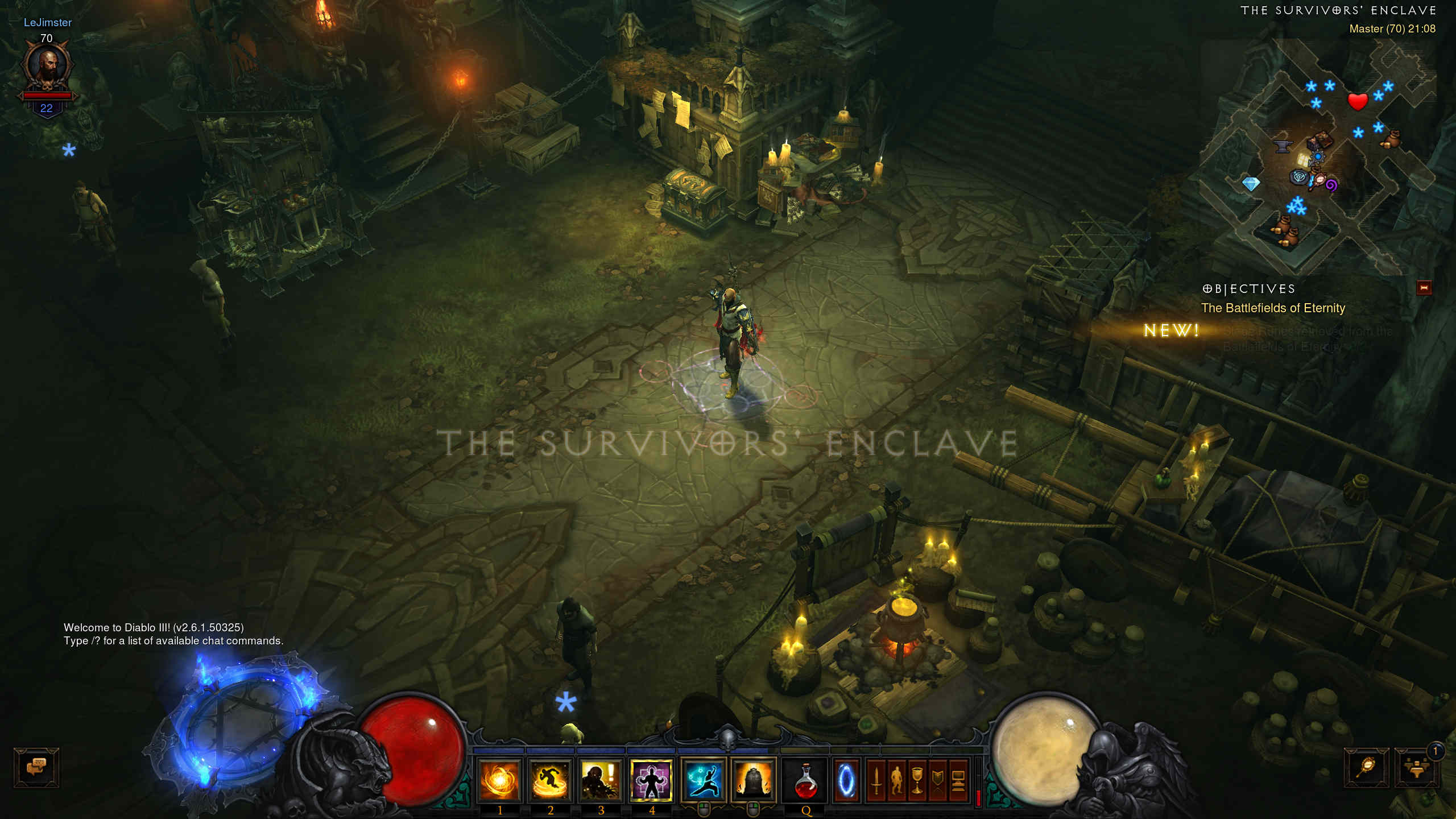
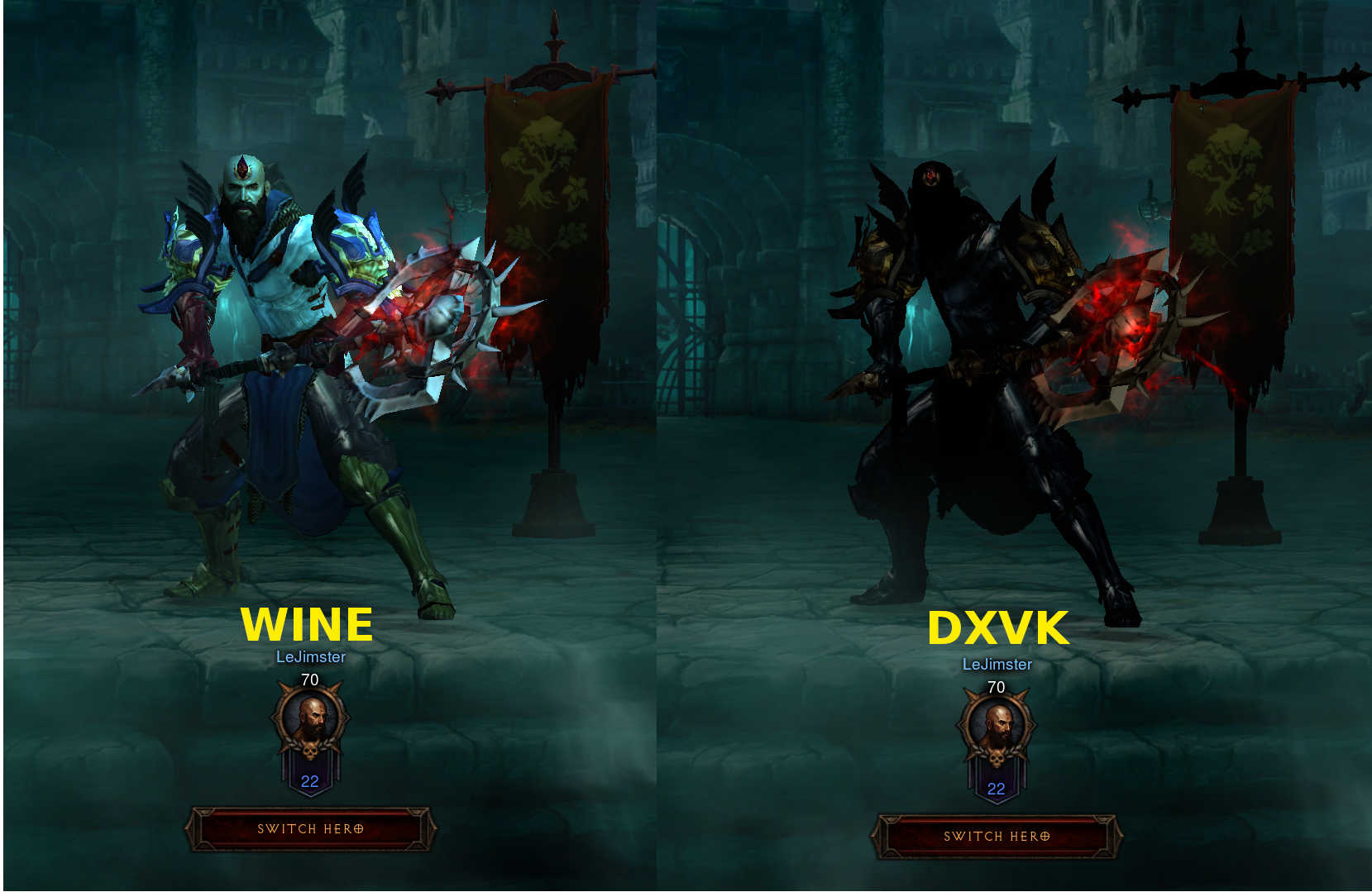
All characters appear dark/unlit in the menus and in-game.
Software information
Diablo III x64
Everything on high/1440p
System information
- GPU: Vega 56
- Driver: Mesa 18.2.0-devel (git-26ddc4f9e1)
- Wine version: wine-staging-nine 3.8-1
- DXVK version: 20180513.516d7f0-1
Apitrace file(s)
- I couldn't get a trace, not sure if I'm doing something wrong, sorry..
Log files
DXVK_LOG_LEVEL was set to debug
- d3d11.log: Diablo III64_d3d11.log
- dxgi.log: Diablo III64_dxgi.log
Screenshots
- DXVK:

- Wine:
 LeJimster
All 12 comments
@LeJimster, as I see it is in Wine that does not work the shadow mapping at all, but in works in DXVK.
 Kerrung
on 13 May 2018
Kerrung
on 13 May 2018
@Kerrung - Wine looks correct to me, it's consistent with how it looked when I used to play it on Windows and it looks the same in d3d9 mode. Maybe my screenshot wasn't clear enough. Here's a side by side from the menu.
LeJimster
on 13 May 2018
I'm aware of this bug but I won't be able to fix it without an apitrace, sorry.
 doitsujin
on 14 May 2018
doitsujin
on 14 May 2018
I try to get an apitrace for a few hours last night but it just makes small 2.5k trace files with unhandled exceptions in the log window. Anybody got a clue how I can get a trace?
LeJimster
on 14 May 2018
I try to get an apitrace for a few hours last night but it just makes small 2.5k trace files with unhandled exceptions in the log window. Anybody got a clue how I can get a trace?
@LeJimster, try it on Windows, but you need to do this without using DXVK.
Kerrung
on 14 May 2018
@Kerrung I tried it on windows, but it doesn't write any trace files at all! I did manage to get a wine trace when I used apitrace trace wine "Diablo III64.exe" -launch, but I'm not sure thats helpful.
LeJimster
on 14 May 2018
I tried it on windows, but it doesn't write any trace files at all! I did manage to get a wine trace when I used apitrace trace wine "Diablo III64.exe" -launch, but I'm not sure thats helpful.
@LeJimster, in order to create a trace, run "wine apitrace.exe trace -a dxgi YOURGAME.exe".
DO NOT use DXVK together with apitrace! You need the Windows version of apitrace, not GNU/Linux native version.
Kerrung
on 14 May 2018
@Kerrung Sorry for the confusion once again, yes I have been doing that for the last 2 days. I used the apitrace windows binaries from the official site and run them through wine exactly how you wrote it, but with -launch at the end to skip the launcher and go directly to the game. I tried this on Windows 10 as well but it doesn't produce any trace files. I am not the only person to attempt this, another user opened bug #37 but struggled to get a trace aswell.
I've tried tracing the 32-bit Diablo III.exe with the 32-bit apitrace and 64-bit Diablo III64.exe with the 64-bit apitrace windows binaries, the same issue. I'm using a clean wine prefix with no DXVK installed for the trace.
LeJimster
on 14 May 2018
The problem with this game is that it tries to bind a VK_IMAGE_VIEW_TYPE_2D_ARRAY in to a binding slot that expects a VK_IMAGE_VIEW_TYPE_CUBE_ARRAY. Fixing this issue will require a large rewrite on how image views are handled and won't be fixing this (for now) since we can't get a working apitrace yet.
 ZeroFault
on 14 May 2018
ZeroFault
on 14 May 2018
I use to have Diablo III, then blizzard revoked my copy because it was Russian with English language files (apparently I'm an illegal hacker). Otherwise I'd do a trace, then again I'm Nvidia hardware atm.
What I would suggest is booting into windows and attempting a apitrace from there.
 jarrard
on 15 May 2018
jarrard
on 15 May 2018
This branch should fix the issue: https://github.com/doitsujin/dxvk/tree/image-view-fixes
doitsujin
on 24 May 2018
Tested that branch and it appears to have fixed the issue from the testing I've just done. Many Thanks =)
LeJimster
on 24 May 2018
Related issues
jarrard
·
58Comments
 FurretUber
·
51Comments
FurretUber
·
51Comments
 mozo78
·
56Comments
mozo78
·
56Comments
 nickfaces
·
110Comments
doitsujin
·
65Comments
nickfaces
·
110Comments
doitsujin
·
65Comments
Most helpful comment
This branch should fix the issue: https://github.com/doitsujin/dxvk/tree/image-view-fixes