Dvc.org: yarn: lots of errors when running dev app; can't test locally
This is on master branch just now. I'm on windows though. I run yarn and then:
UPDATE: Jump to https://github.com/iterative/dvc.org/issues/1100#issuecomment-608704285
λ yarn develop
yarn run v1.22.4
$ gatsby develop
success open and validate gatsby-configs - 0.642s
success load plugins - 1.489s
success onPreInit - 0.021s
success initialize cache - 0.015s
success copy gatsby files - 0.288s
success onPreBootstrap - 0.014s
success createSchemaCustomization - 0.341s
success source and transform nodes - 0.539s
success building schema - 0.454s

 ERROR #85923  GRAPHQL

There was an error in your GraphQL query:

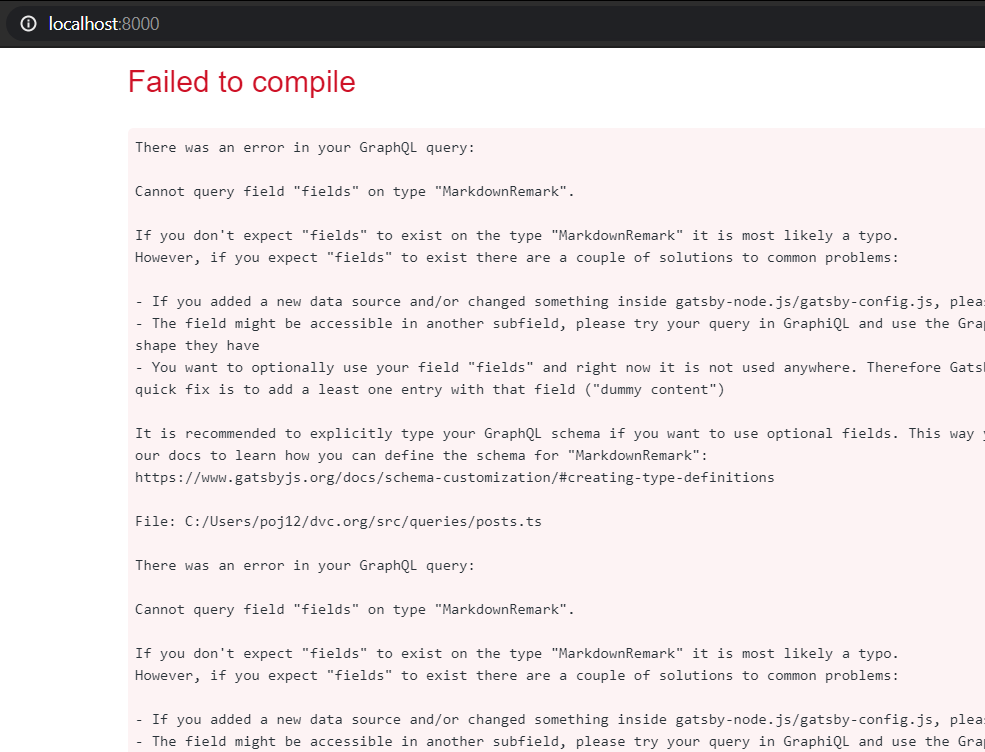
Cannot query field "fields" on type "MarkdownRemark".

If you don't expect "fields" to exist on the type "MarkdownRemark" it is most likely a typo.
However, if you expect "fields" to exist there are a couple of solutions to common problems:

- If you added a new data source and/or changed something inside gatsby-node.js/gatsby-config.js, please try a restart of your development server - The field might be accessible in another subfield, please try your query in GraphiQL and use the GraphiQL explorer to see which fields you can query and what shape they have
- You want to optionally use your field "fields" and right now it is not used anywhere. Therefore Gatsby can't infer the type and add it to the GraphQL schema. A quick fix is to add a least one entry with that field ("dummy content")

It is recommended to explicitly type your GraphQL schema if you want to use optional fields. This way you don't have to add the mentioned "dummy content". Visit our docs to learn how you can define the schema for "MarkdownRemark":
https://www.gatsbyjs.org/docs/schema-customization/#creating-type-definitions

File: gatsby-node.js:66:24


 ERROR #11321  PLUGIN

"gatsby-node.js" threw an error while running the createPages lifecycle:

Cannot query field "fields" on type "MarkdownRemark".


  GraphQLError: Cannot query field "fields" on type "MarkdownRemark".

  - graphql-runner.js:53 GraphQLRunner.validate
    [dvc.org]/[gatsby]/dist/query/graphql-runner.js:53:44

  - graphql-runner.js:78 GraphQLRunner.query
    [dvc.org]/[gatsby]/dist/query/graphql-runner.js:78:25

  - graphql-runner.js:21
    [dvc.org]/[gatsby]/dist/bootstrap/graphql-runner.js:21:37

  - gatsby-node.js:66 Object.exports.createPages
    C:/Users/poj12/dvc.org/gatsby-node.js:66:24

  - api-runner-node.js:256 runAPI
    [dvc.org]/[gatsby]/dist/utils/api-runner-node.js:256:37

  - api-runner-node.js:375 Promise.catch.decorateEvent.pluginName
    [dvc.org]/[gatsby]/dist/utils/api-runner-node.js:375:15

  - debuggability.js:384 Promise._execute
    [dvc.org]/[bluebird]/js/release/debuggability.js:384:9

  - promise.js:518 Promise._resolveFromExecutor
    [dvc.org]/[bluebird]/js/release/promise.js:518:18

  - promise.js:103 new Promise
    [dvc.org]/[bluebird]/js/release/promise.js:103:10

  - api-runner-node.js:374
    [dvc.org]/[gatsby]/dist/utils/api-runner-node.js:374:12

  - util.js:16 tryCatcher
    [dvc.org]/[bluebird]/js/release/util.js:16:23


failed createPages - 0.203s
success createPagesStatefully - 0.257s
success onPreExtractQueries - 0.004s
success update schema - 0.062s

 ERROR #85901  GRAPHQL

There was an error in your GraphQL query:

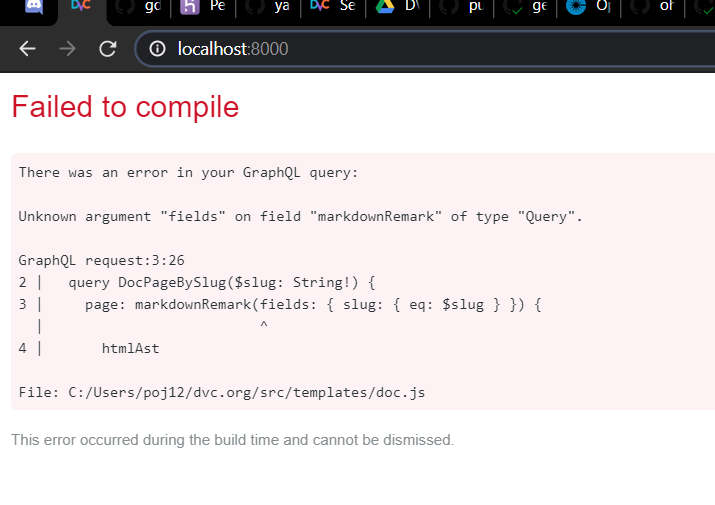
Unknown argument "fields" on field "markdownRemark" of type "Query".

GraphQL request:3:26
2 |   query DocPageBySlug($slug: String!) {
3 |     page: markdownRemark(fields: { slug: { eq: $slug } }) {
  |                          ^
4 |       htmlAst

File: src\templates\doc.js:36:26

failed extract queries from components - 0.503s
success write out requires - 0.162s
success write out redirect data - 0.039s
success Build manifest and related icons - 0.120s
success onPostBootstrap - 0.176s
⠀
info bootstrap finished - 10.463 s
⠀
success run queries - 0.225s - 7/7 31.11/s


——————————————————————————————————————————————————————————————————————————————————————————————————————————————————————————————————————————————————7 pages                                                             In Progress                                                            website
What am I doing wrong?
 jorgeorpinel
All 22 comments
On the browser I get this error screen (200 code though):
jorgeorpinel
on 30 Mar 2020
I have the same problem with yarn build but seems to work on Heroku e.g. https://dashboard.heroku.com/apps/dvc-landing-1095-gxpubiooiy6vx/activity/builds/a42b7eae-5f2c-49e6-aed1-56999c5685ac 🤷♂ I'll be doing sanity checks on PR review apps for now.
jorgeorpinel
on 30 Mar 2020
p.p.s. clearly I'm missing something related to GraphQL or its config. But I can't see any info on that in README or docs contrib guide. Jelp
jorgeorpinel
on 30 Mar 2020
@jorgeorpinel from the error text I can understand that it cant find these fields: https://github.com/iterative/dvc.org/blob/master/gatsby-node.js#L76-L78
We add them before at https://github.com/iterative/dvc.org/blob/master/gatsby-node.js#L53-L57
onCreateNode runs before createPage so you should have them already. Question is why they don't exists. Just to be sure that this is not a cache problem, can you try to remove .cache folder?
@pavelgrinchenko If this is not a cache problem, can you take a look at it too?
 iAdramelk
on 30 Mar 2020
iAdramelk
on 30 Mar 2020
I agree with @iAdramelk. Seems it's cache related problem. But instead of removing .cache folder I can suggest run gatsby clean which also removes public folder to be sure that all necessary files will be deleted.
@jorgeorpinel Let me know if it's not solve problem
 pavelgrinchenko
on 30 Mar 2020
pavelgrinchenko
on 30 Mar 2020
Good to know about gatsby clean! Unfortunately neither rm -rf .cache/ nor yarn gatsby clean solve this for me 🙁
So this is not a problem on your systems? What Os do you guys use?
jorgeorpinel
on 31 Mar 2020
@jorgeorpinel Removed .cache, public and node_modules and made clean install and build to be sure. Works for me without a problem. (Mac OS X 10.15.3)
iAdramelk
on 31 Mar 2020
Fetched and pulled latest code from master now that blog is merged, removed all those folders, ran yarn, and tried again. Similar results 🙁
λ rm -rf node_modules/ .cache/ public/
λ y
yarn install v1.22.4
...
Done in 81.41s.
λ y develop
yarn run v1.22.4
$ gatsby develop
 ERROR #85923  GRAPHQL

There was an error in your GraphQL query:

Cannot query field "fields" on type "MarkdownRemark".

...

File: gatsby-node.js:98:30

 ERROR #11321  PLUGIN

"gatsby-node.js" threw an error while running the createPages lifecycle:

Cannot query field "fields" on type "MarkdownRemark".

  GraphQLError: Cannot query field "fields" on type "MarkdownRemark".
...

failed extract queries from components - 1.715s
...
and though the server runs, I get a similar error report on the browser:
jorgeorpinel
on 3 Apr 2020
@jorgeorpinel could you share your exact environment please? is it WSL? could you also try to do a fresh git clone? check that no extra global JS libraries are installed?
 shcheklein
on 4 Apr 2020
shcheklein
on 4 Apr 2020
Not WSL. Just Git Bash (with Cmder).
Did try a fresh clone in another location: same problem unfortunately.
jorgeorpinel
on 4 Apr 2020
p.s. it works on WSL actually, but it's painfully slow to build the .cache/
30+ seconds in:
[======================      ]   30.045 s 150/190 79% run queries
[                            ]   29.985 s 24/1165 2% Generating image thumbnails
1 min+ in:
success run queries - 36.256s - 190/190 5.24/s
[=                           ]   60.676 s 54/1165 5% Generating image thumbnails
Well past 10 min later:
success run queries - 36.256s - 190/190 5.24/s
[=================           ]   677.883 s 736/1165 63% Generating image thumbnails
Finally it finished and ran the local server after almost 20 min. It's fast to run after the initial cache build.
jorgeorpinel
on 5 Apr 2020
First run with cache warming is slow, yes. On my mac it usually takes 5 min. Maybe WSL adds some extra slowness as it's not native. What config do you have?
pavelgrinchenko
on 6 Apr 2020
Hi, not sure what you mean by which config 🙂
It takes 10 min + on every Heroku build as well at Generating image thumbnails — see https://dashboard.heroku.com/apps/dvc-org/activity
But anyway, this issue is more about not being able to run yarn develop on native Windows. Again, I'm using Git Bash (Cmder) and haven't tried other terminals, but I'm guessing Command Prompt, Power Shell, cygwin, etc. may have the same problem. Why would Windows have those problems with GraphQL? Strange...
At the time what I have to do to work around this and be able to test locally is to have the repo checked out also in my WSL env, fetch and pull and then run it. But this way I can't see my work-in-progress changes, only committed and pushed versions (unless I manually copy changed files over to the WSL file system just for this reason).
I cannot work directly on WSL because of incompatibility with VSCode...
Windows is just a dead end 🚫
jorgeorpinel
on 6 Apr 2020
I'm about a configuration of your PC =) I tried set up on my win pc and I even can't install packages. Yarn always hangs on last step > building fresh packages. Do you have such problem?
pavelgrinchenko
on 6 Apr 2020
Nope, I don't have that problem. I use the console emulator we recommend in our docs: Cmder (default shell, Git Bash). Installed latest Node LTS with an official release installer, everything else from cmd line, same as Linux. What's your setup?
jorgeorpinel
on 6 Apr 2020
@jorgeorpinel I found reason! Fix here fix-fields-on-windows. Can you try it copy manually and confirm that all works fine now while it's not merged?
pavelgrinchenko
on 6 Apr 2020
I was about to say that you can actually make it work with WSL apparently, by navigating to the regular windows file system (found in /mnt/c/...) and running both yarn and yarn develop from there. But yes, your fix is better and works. Makes sense too: the ol' Windows backslash does it again!
The image thumb gen was much faster on native Windows as well: aroudn 6 min for me.
Thanks @pavelgrinchenko!
jorgeorpinel
on 6 Apr 2020
p.s. feel free to request my review on the PR that fixes this. I can merge it.
jorgeorpinel
on 6 Apr 2020
Fixed in #1109
jorgeorpinel
on 6 Apr 2020
I'm just seeing this now when I run yarn develop:
pathContext is deprecated. Please use pageContext instead. For migration instructions, see https://gatsby.dev/pathContext
Check the following files:
⠀
node_modules.wsl/gatsby/cache-dir/commonjs/page-renderer.js
node_modules.wsl/gatsby/cache-dir/commonjs/static-entry.js
node_modules.wsl/gatsby/cache-dir/page-renderer.js
node_modules.wsl/gatsby/cache-dir/static-entry.js
node_modules.wsl/gatsby/dist/commands/develop.js
Is that expected?
jorgeorpinel
on 6 Apr 2020
I didn't see this warning before and I can't find pathContext usage in our code, only in the generated files in the .cache folder. So while all works as expected I think we can ignore this warning
pavelgrinchenko
on 6 Apr 2020
Yeah never mind about that, I think it was my bad. node_modules.wsl was a backup I made of the node mods dir created from WSL 😋
jorgeorpinel
on 6 Apr 2020
Related issues
 nisarhassan12
·
3Comments
nisarhassan12
·
3Comments
 utkarshsingh99
·
3Comments
jorgeorpinel
·
4Comments
utkarshsingh99
·
3Comments
jorgeorpinel
·
4Comments
 lunasdejavu
·
4Comments
jorgeorpinel
·
4Comments
lunasdejavu
·
4Comments
jorgeorpinel
·
4Comments