Dvc.org: cmd ref: better explain GDrive in `remote add`
In the URL like
gdrive://root/some/path
it's not 100% clear if root is a predefined and is always here (expect for shared folders of course), how do I get path (be more explicit how to find it for people with GUI experience)
btw, is path case sensitive?
Also, in case of a shared drive path can be skipped?
More context:
https://discordapp.com/channels/485586884165107732/563406153334128681/665786272312459304
Also, let's better explain the OAuth credentials management:
https://discordapp.com/channels/485586884165107732/563406153334128681/666993445830787122
 shcheklein
All 7 comments
More context/explanation:
E: The problem was
dvc remote add myremote gdrive://root/my-dvc-root
so you do not need to type anything after Google drive root folder.
Seems like the user was talking about https://dvc.org/doc/command-reference/remote/add, inside the Click for Google Drive expandable section:
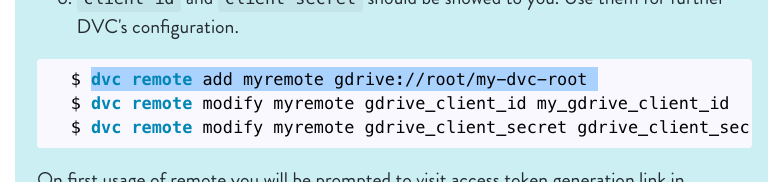
He's suggesting the /my-dvc-root part is not necessary.
I: yep, and you can do
dvc remote add -d myremote gdrive://root/my-dvc-rootto set it as a default...
E: OK, just making clear, what is../my-dvc-rootafter root part?
If I am not wrongrootis your folder
I: I think gdrive://root is a predefined prefix for any folder in your GDrive
then you just specify a path inside -gdrive://root/path/inside/gdrive/to/store/files
E: when I remove/path/...and use onlygdrive://23ADN67363BSJHAS(just an example link https://drive.google.com/drive/folders/23ADN67363BSJHAS) then I could create a remote
And goes on to suggest that the shared drive example in the same doc section,
dvc remote add myremote gdrive://0AIac4JZqHhKmUk9PDA/my-dvc-root
also doesn't need the path (/my-dvc-root) after the directory ID.
So, we'll need to try these options to determine what is correct, before changing docs.
 jorgeorpinel
on 12 Jan 2020
jorgeorpinel
on 12 Jan 2020
It's also confusing how to know when a drive is shared or not or what we mean why "shared drive". At first glance it looks like root in the normal example is the same as the directory ID in the shared drive example.
jorgeorpinel
on 12 Jan 2020
root in the normal example is the same as the directory ID in the shared drive example.
@jorgeorpinel yes, that's more or less how I understand this.
when I remove /path/... and use only gdrive://23ADN67363BSJHAS (just an example link https://drive.google.com/drive/folders/23ADN67363BSJHAS) then I could create a remote
this part - I still don't get it.
hopefully @MaxRis can shed some light here?
shcheklein
on 12 Jan 2020
I've used others remotes docs as example to create doc for gdrive. But, yes, it makes sense to explain URL construction rules in details ( for others remotes as well, looks like ).
root - is an alias of user's topmost Google Drive directory (it is always available).
remote url can be just gdrive://root, but in this case DVC will put all files just in the topmost directory of Google Drive. I don't think that this is a good solution for most of the users.
That's why the doc suggest to create subdirectory my-dvc-root. So, following explanation
I: I think gdrive://root is a predefined prefix for any folder in your GDrive
then you just specify a path inside - gdrive://root/path/inside/gdrive/to/store/files
is the correct one :)
btw, is path case sensitive?
Will need to check this. Good question.
Also, in case of a shared drive path can be skipped?
Remote URL can contain just ID of the remote folder:
gdrive://23ADN67363BSJHAS
Since shared drive can't be accessed via root alias (shared drive is not mounted under topmost user's directory), the only known way (known for me) to access shared drive is by ID of remote folder.
If needed, user also can specify additional nested directories inside remote folder referenced by ID:
gdrive://23ADN67363BSJHAS/path/inside/gdrive/to/store/files
It's also confusing how to know when a drive is shared or not or what we mean why "shared drive".
"Shared drive" section in doc was created with users in mind who look how to use "Team Drives", which are mounted as "shared drives" into Google Drive "user space".
Usually user should know if she/he wants to use shared drive or just his own drive.
Currently, DVC, for example, handles gdrive://23ADN67363BSJHAS remote URL and for DVC there is no difference if remote directory with ID 23ADN67363BSJHAS located at shared or personal drive.
 maxhora
on 13 Jan 2020
maxhora
on 13 Jan 2020
GDrive URL construction template:
gdrive://[root|FOLDER_ID][path/inside/gdrive/to/store/files]*
maxhora
on 13 Jan 2020
Woa so it's pretty complex... Any chance we can just simplify the description in our docs and point users to some Google documentation page where GDrive URL construction is explained?
jorgeorpinel
on 14 Jan 2020
@jorgeorpinel I'm going to try to create PR into docs to address current issues.
Will let you know
maxhora
on 14 Jan 2020
Related issues
 lunasdejavu
·
4Comments
lunasdejavu
·
4Comments
 dashohoxha
·
4Comments
dashohoxha
·
4Comments
 efiop
·
5Comments
efiop
·
4Comments
efiop
·
4Comments
efiop
·
5Comments
efiop
·
4Comments
efiop
·
4Comments