Dvc.org: get-started: dvc run: command not found on Windows
I have been working through the getting started portion of this project but have run into a snap at this part
I have setup the data and src tree as described:
.
├── data
│   ├── data.xml
│   └── data.xml.dvc
├── requirements.txt
└── src
    ├── evaluate.py
    ├── featurization.py
    ├── prepare.py
    └── train.py
but when I run:
dvc run -f prepare.dvc \
          -d src/prepare.py -d data/data.xml \
          -o data/prepared \
          python src/prepare.py data/data.xml
I get:
Running command:
        python ./src/prepare.py ./data/data.xml
The system cannot find the path specified.
ERROR: failed to run command - stage 'prepare.dvc' cmd python ./src/prepare.py ./data/data.xml failed

Having any troubles?. Hit us up at https://dvc.org/support, we are always happy to help!
But I am able to run the following successfully
python src/prepare.py data/data.xml
I am not sure what exactly is wrong here. Thanks for any help
 SpicySyntax
All 19 comments
@SpicySyntax hi! let's try to reproduce and help you out here. Can you give a little bit more details - what OS do you use? Windows/Linux/Mac?
 shcheklein
on 12 Jul 2019
shcheklein
on 12 Jul 2019
Sure @shcheklein!
windows 10.0.16299
Python 3.6.8 :: Anaconda, Inc. (Miniconda)
pip 19.0.3
I am using GitBash to run the commands
SpicySyntax
on 12 Jul 2019
Hi @SpicySyntax !
Could you please run
dvc run -f prepare.dvc \
          -d src/prepare.py -d data/data.xml \
          -o data/prepared -v \
          python src/prepare.py data/data.xml
(notice, I've added -v)
and show us the log?
 efiop
on 13 Jul 2019
efiop
on 13 Jul 2019
@SpicySyntax Also, I've noticed that the command in your logs differs a little bit, so I wonder if there was a typo somewhere.
efiop
on 13 Jul 2019
@SpicySyntax Also, could you please show dvc version output? It contains a bit more info than the version itself.
To test that typo suspicion, could you try running
dvc run -f prepare.dvc -d src/prepare.py -d data/data.xml -o data/prepared python src/prepare.py data/data.xml
as a single line?
efiop
on 13 Jul 2019
More context: https://discordapp.com/channels/485586884165107732/565699007037571084/599335950665121813
shcheklein
on 14 Jul 2019
@SpicySyntax was not able to reproduce it. I tried to use GiBash + miniconda. Both dvc run and dvc repro -s prepare.dvc work fine for me. Can you give us more context here please? Windows setup is tricky - a lot of moving parts and we need to see how specifically bash, conda, windows PATH are set for you.
shcheklein
on 21 Jul 2019
@efiop
DVC Version output
dvc version
DVC version: 0.51.2
Python version: 3.6.8
Platform: Windows-10-10.0.16299-SP0
Binary: False
Cache: reflink - False, hardlink - True, symlink - False
Filesystem type (cache directory): ('NTFS', 'D:\\')
Filesystem type (workspace): ('NTFS', 'D:\\')
Verbose output from one line command
dvc run -f prepare.dvc -d src/prepare.py -d data/data.xml -o data/prepared -v python src/prepare.py data/data.xml
DEBUG: Trying to spawn '['c:\\users\\nick.purcell\\appdata\\local\\continuum\\miniconda3\\python.exe', '-m', 'dvc', 'daemon', '-q', 'updater']'
DEBUG: Spawned '['c:\\users\\nick.purcell\\appdata\\local\\continuum\\miniconda3\\python.exe', '-m', 'dvc', 'daemon', '-q', 'updater']'
DEBUG: PRAGMA user_version;
DEBUG: fetched: [(3,)]
DEBUG: CREATE TABLE IF NOT EXISTS state (inode INTEGER PRIMARY KEY, mtime TEXT NOT NULL, size TEXT NOT NULL, md5 TEXT NOT NULL, timestamp TEXT NOT NULL)
DEBUG: CREATE TABLE IF NOT EXISTS state_info (count INTEGER)
DEBUG: CREATE TABLE IF NOT EXISTS link_state (path TEXT PRIMARY KEY, inode INTEGER NOT NULL, mtime TEXT NOT NULL)
DEBUG: INSERT OR IGNORE INTO state_info (count) SELECT 0 WHERE NOT EXISTS (SELECT * FROM state_info)
DEBUG: PRAGMA user_version = 3;
DEBUG: Skipping copying for 'D:\POC\DVC\example-get-started\data\prepared\test.tsv', since it is not a symlink or a hardlink.
DEBUG: Skipping copying for 'D:\POC\DVC\example-get-started\data\prepared\train.tsv', since it is not a symlink or a hardlink.
DEBUG: SELECT count from state_info WHERE rowid=?
DEBUG: fetched: [(2,)]
DEBUG: UPDATE state_info SET count = ? WHERE rowid = ?
DEBUG: PRAGMA user_version;
DEBUG: fetched: [(3,)]
DEBUG: CREATE TABLE IF NOT EXISTS state (inode INTEGER PRIMARY KEY, mtime TEXT NOT NULL, size TEXT NOT NULL, md5 TEXT NOT NULL, timestamp TEXT NOT NULL)
DEBUG: CREATE TABLE IF NOT EXISTS state_info (count INTEGER)
DEBUG: CREATE TABLE IF NOT EXISTS link_state (path TEXT PRIMARY KEY, inode INTEGER NOT NULL, mtime TEXT NOT NULL)
DEBUG: INSERT OR IGNORE INTO state_info (count) SELECT 0 WHERE NOT EXISTS (SELECT * FROM state_info)
DEBUG: PRAGMA user_version = 3;
DEBUG: Removing output 'data\prepared' of 'prepare.dvc'.
DEBUG: Removing 'data\prepared'
Running command:
        python src/prepare.py data/data.xml
DEBUG: Computed stage 'prepare.dvc' md5: 'ed8f290985048ecfe88fcc6d7c959b1b'
The system cannot find the path specified.
DEBUG: SELECT count from state_info WHERE rowid=?
DEBUG: fetched: [(2,)]
DEBUG: UPDATE state_info SET count = ? WHERE rowid = ?
ERROR: failed to run command - stage 'prepare.dvc' cmd python src/prepare.py data/data.xml failed
------------------------------------------------------------
Traceback (most recent call last):
  File "c:\users\nick.purcell\appdata\local\continuum\miniconda3\lib\site-packages\dvc\command\run.py", line 53, in run
    outs_persist_no_cache=self.args.outs_persist_no_cache,
  File "c:\users\nick.purcell\appdata\local\continuum\miniconda3\lib\site-packages\dvc\repo\scm_context.py", line 4, in run
    result = method(repo, *args, **kw)
  File "c:\users\nick.purcell\appdata\local\continuum\miniconda3\lib\site-packages\dvc\repo\run.py", line 69, in run
    stage.run(no_commit=no_commit)
  File "c:\users\nick.purcell\appdata\local\continuum\miniconda3\lib\site-packages\dvc\stage.py", line 863, in run
    self._run()
  File "c:\users\nick.purcell\appdata\local\continuum\miniconda3\lib\site-packages\dvc\stage.py", line 820, in _run
    raise StageCmdFailedError(self)
dvc.stage.StageCmdFailedError: stage 'prepare.dvc' cmd python src/prepare.py data/data.xml failed
------------------------------------------------------------

Having any troubles?. Hit us up at https://dvc.org/support, we are always happy to help!
@shcheklein
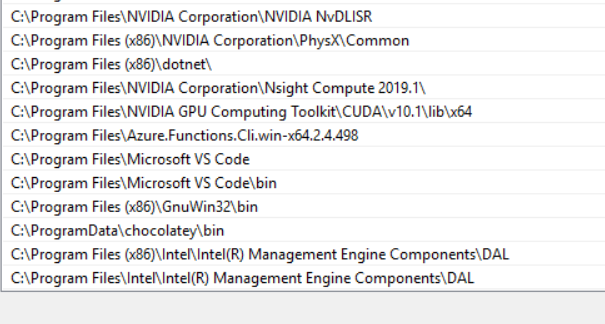
User Path Environment variable

System Path Environment variable
pt1:

pt2:
Thanks
SpicySyntax
on 22 Jul 2019
@SpicySyntax Hm, weird. Let's try something smaller, so it is easier to pinpoint what went wrong. Try running these commands:
python --version
dvc run python --version
and
where python
dvc run where python
Note I updated the following (still obtained the same error as above):
Python 3.7.3
pip 19.2
conda 4.7.10
@efiop Here is the requested output
Nick.Purcell@Naou22002 MINGW64 /D/POC/DVC/example-get-started (master)
$ python --version
Python 3.7.3
(.env)
Nick.Purcell@Naou22002 MINGW64 /D/POC/DVC/example-get-started (master)
$ dvc run python --version
Running command:
        python --version
The system cannot find the path specified.
Python 3.7.3
ERROR: failed to run command - stage 'Dvcfile' cmd python --version failed

Having any troubles?. Hit us up at https://dvc.org/support, we are always happy to help!
(.env)
Nick.Purcell@Naou22002 MINGW64 /D/POC/DVC/example-get-started (master)
$ where python
D:\POC\DVC\example-get-started\.env\Scripts\python.exe
C:\Users\Nick.Purcell\AppData\Local\Continuum\miniconda3\python.exe
(.env)
Nick.Purcell@Naou22002 MINGW64 /D/POC/DVC/example-get-started (master)
$ dvc run where python
Running command:
        where python
The system cannot find the path specified.
D:\POC\DVC\example-get-started\.env\Scripts\python.exe
C:\Users\Nick.Purcell\AppData\Local\Continuum\miniconda3\python.exe
ERROR: failed to run command - stage 'Dvcfile' cmd where python failed

Having any troubles?. Hit us up at https://dvc.org/support, we are always happy to help!
(.env)
@SpicySyntax that's interesting. It looks like it's running the command, the issue is happening somewhere inside? I'm not sure yet and I don't know how to reproduce it.
Btw, it looks like conda is not activated. Can you try to run conda activate?
Also, can you try to remove data.dvc and run dvc add data.xml? To see if it creates the file at all. To make sure that's all related to running the command.
shcheklein
on 23 Jul 2019
@shcheklein I obtained the following results using the anaconda prompt.
conda activate
This got rid of the multiple python paths seen above.
I deleted data.xml.dvc. And recreated it with
# This now passes
dvc add data.xml
And this did not seem to fix anything.
Running the commands from I obtained @efiop seen here:
(base) D:\POC\DVC\example-get-started>python --version
Python 3.6.8 :: Anaconda, Inc.

(base) D:\POC\DVC\example-get-started>dvc run python --version
Running command:
        python --version
The system cannot find the path specified.
Python 3.6.8 :: Anaconda, Inc.
ERROR: failed to run command - stage 'Dvcfile' cmd python --version failed

Having any troubles?. Hit us up at https://dvc.org/support, we are always happy to help!

(base) D:\POC\DVC\example-get-started>dvc init
ERROR: failed to initiate dvc - '.dvc' exists. Use '-f' to force.

Having any troubles?. Hit us up at https://dvc.org/support, we are always happy to help!

(base) D:\POC\DVC\example-get-started>where python
C:\Users\Nick.Purcell\AppData\Local\Continuum\miniconda3\python.exe

(base) D:\POC\DVC\example-get-started>dvc run where python
Running command:
        where python
The system cannot find the path specified.
C:\Users\Nick.Purcell\AppData\Local\Continuum\miniconda3\python.exe
ERROR: failed to run command - stage 'Dvcfile' cmd where python failed

Having any troubles?. Hit us up at https://dvc.org/support, we are always happy to help!
The origin command executed as follows:
(base) D:\POC\DVC\example-get-started>dvc run -f prepare.dvc -d src/prepare.py -d data/data.xml -o data/prepared python src/prepare.py data/data.xml
Running command:
        python src/prepare.py data/data.xml
The system cannot find the path specified.
ERROR: failed to run command - stage 'prepare.dvc' cmd python src/prepare.py data/data.xml failed

Having any troubles?. Hit us up at https://dvc.org/support, we are always happy to help!

(base) D:\POC\DVC\example-get-started>dvc run -f prepare.dvc -d src/prepare.py -d data/data.xml -o data/prepared -v python src/prepare.py data/data.xml
DEBUG: Trying to spawn '['c:\\users\\nick.purcell\\appdata\\local\\continuum\\miniconda3\\python.exe', '-m', 'dvc', 'daemon', '-q', 'updater']'
DEBUG: Spawned '['c:\\users\\nick.purcell\\appdata\\local\\continuum\\miniconda3\\python.exe', '-m', 'dvc', 'daemon', '-q', 'updater']'
DEBUG: PRAGMA user_version;
DEBUG: fetched: [(3,)]
DEBUG: CREATE TABLE IF NOT EXISTS state (inode INTEGER PRIMARY KEY, mtime TEXT NOT NULL, size TEXT NOT NULL, md5 TEXT NOT NULL, timestamp TEXT NOT NULL)
DEBUG: CREATE TABLE IF NOT EXISTS state_info (count INTEGER)
DEBUG: CREATE TABLE IF NOT EXISTS link_state (path TEXT PRIMARY KEY, inode INTEGER NOT NULL, mtime TEXT NOT NULL)
DEBUG: INSERT OR IGNORE INTO state_info (count) SELECT 0 WHERE NOT EXISTS (SELECT * FROM state_info)
DEBUG: PRAGMA user_version = 3;
DEBUG: Skipping copying for 'D:\POC\DVC\example-get-started\data\prepared\test.tsv', since it is not a symlink or a hardlink.
DEBUG: Skipping copying for 'D:\POC\DVC\example-get-started\data\prepared\train.tsv', since it is not a symlink or a hardlink.
DEBUG: SELECT count from state_info WHERE rowid=?
DEBUG: fetched: [(3,)]
DEBUG: UPDATE state_info SET count = ? WHERE rowid = ?
DEBUG: PRAGMA user_version;
DEBUG: fetched: [(3,)]
DEBUG: CREATE TABLE IF NOT EXISTS state (inode INTEGER PRIMARY KEY, mtime TEXT NOT NULL, size TEXT NOT NULL, md5 TEXT NOT NULL, timestamp TEXT NOT NULL)
DEBUG: CREATE TABLE IF NOT EXISTS state_info (count INTEGER)
DEBUG: CREATE TABLE IF NOT EXISTS link_state (path TEXT PRIMARY KEY, inode INTEGER NOT NULL, mtime TEXT NOT NULL)
DEBUG: INSERT OR IGNORE INTO state_info (count) SELECT 0 WHERE NOT EXISTS (SELECT * FROM state_info)
DEBUG: PRAGMA user_version = 3;
DEBUG: Removing output 'data\prepared' of 'prepare.dvc'.
DEBUG: Removing 'data\prepared'
Running command:
        python src/prepare.py data/data.xml
DEBUG: Computed stage 'prepare.dvc' md5: 'ed8f290985048ecfe88fcc6d7c959b1b'
The system cannot find the path specified.
DEBUG: SELECT count from state_info WHERE rowid=?
DEBUG: fetched: [(3,)]
DEBUG: UPDATE state_info SET count = ? WHERE rowid = ?
ERROR: failed to run command - stage 'prepare.dvc' cmd python src/prepare.py data/data.xml failed
------------------------------------------------------------
Traceback (most recent call last):
  File "c:\users\nick.purcell\appdata\local\continuum\miniconda3\lib\site-packages\dvc\command\run.py", line 53, in run
    outs_persist_no_cache=self.args.outs_persist_no_cache,
  File "c:\users\nick.purcell\appdata\local\continuum\miniconda3\lib\site-packages\dvc\repo\scm_context.py", line 4, in run
    result = method(repo, *args, **kw)
  File "c:\users\nick.purcell\appdata\local\continuum\miniconda3\lib\site-packages\dvc\repo\run.py", line 69, in run
    stage.run(no_commit=no_commit)
  File "c:\users\nick.purcell\appdata\local\continuum\miniconda3\lib\site-packages\dvc\stage.py", line 863, in run
    self._run()
  File "c:\users\nick.purcell\appdata\local\continuum\miniconda3\lib\site-packages\dvc\stage.py", line 820, in _run
    raise StageCmdFailedError(self)
dvc.stage.StageCmdFailedError: stage 'prepare.dvc' cmd python src/prepare.py data/data.xml failed
------------------------------------------------------------

Having any troubles?. Hit us up at https://dvc.org/support, we are always happy to help!
@SpicySyntax could you check if this link helps in your case by any chance https://superuser.com/questions/727316/error-in-command-line-the-system-cannot-find-the-path-specified ?
shcheklein
on 25 Jul 2019
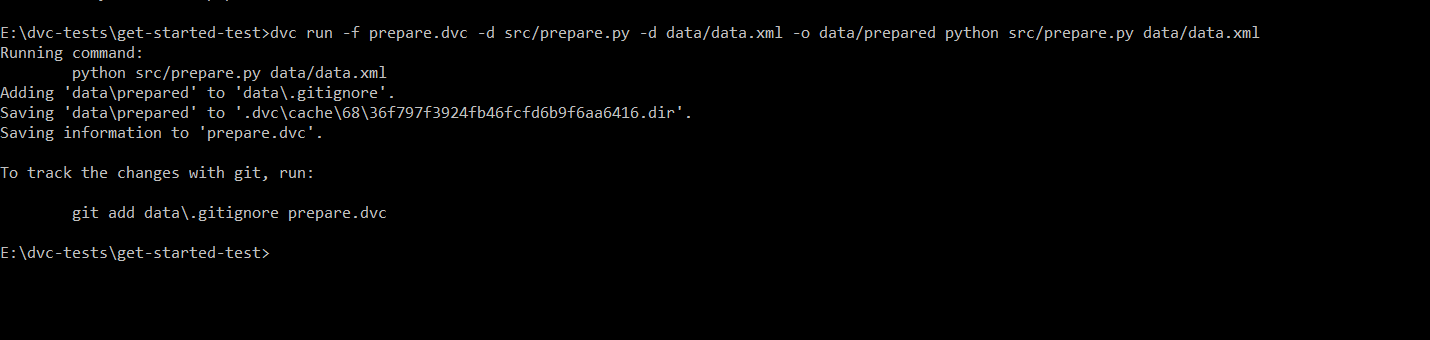
@SpicySyntax will you try to execute the command by specifying the absolute path to the files.
I also use Windows machine but I am unable to reproduce the issue. It works fine on my machine.
 ryokugyu
on 25 Jul 2019
ryokugyu
on 25 Jul 2019
@ryokugyu same problem with absolute path.
 elepherai
on 29 Jul 2019
elepherai
on 29 Jul 2019
@elepherai could you share your output, especially with -v flag. Could you please try the link above that I shared - https://superuser.com/questions/727316/error-in-command-line-the-system-cannot-find-the-path-specified ?
shcheklein
on 29 Jul 2019
@shcheklein Thanks! The method in your link works.
elepherai
on 30 Jul 2019
@elepherai glad that it helped. Closing it for now since it looks like it's not a DVC problem.
shcheklein
on 30 Jul 2019
@shcheklein The Link you sent me fixed the issue I was facing. Thanks!
SpicySyntax
on 31 Jul 2019
Related issues
 algomaster99
·
4Comments
algomaster99
·
4Comments
 pared
·
4Comments
efiop
·
3Comments
pared
·
4Comments
efiop
·
3Comments
 jorgeorpinel
·
3Comments
efiop
·
4Comments
jorgeorpinel
·
3Comments
efiop
·
4Comments
Most helpful comment
@elepherai glad that it helped. Closing it for now since it looks like it's not a DVC problem.