Dunst: Add option to align icon/text vertically
In it's current state (v1.3.0), dunst seems to vertically center the icon and text. I personally find this irritating and would prefer to align them to the top of the notification.
The following graphics demonstrate/clarify the idea with a) an icon smaller than the text and b) a much larger icon than the text.
Center alignment (current behaviour)
┌───────────────────┐  |  ┌───────────────────┐
│      first line   │  |  │ ####              │
│  #   second       │  |  │ ####  one line    │
│      third line   │  |  │ ####              │
└───────────────────┘  |  └───────────────────┘

Top alignment
┌───────────────────┐  |  ┌───────────────────┐
│  #   first line   │  |  │ ####  one line    │
│      second       │  |  │ ####              │
│      third line   │  |  │ ####              │
└───────────────────┘  |  └───────────────────┘

Bottom alignment
┌───────────────────┐  |  ┌───────────────────┐
│      first line   │  |  │ ####              │
│      second       │  |  │ ####              │
│  #   third line   │  |  │ ####  one line    │
└───────────────────┘  |  └───────────────────┘
Would it be possible to implement such alignment? I would much appreciate it.
 chronus7
All 5 comments
Agreed, I can totally understand why people would be driven nuts by a limitation in the current release like this. For future readers who are looking for a solution to this problem, here's a workaround hack you can use. Basically, what you do is trick dunst into preserving the leading/trailing whitespace in your string by using a "pseudo" space character. This way, you can vertically top-align or bottom-align your notification text.
Before the hack:
notify-send "🎵 ~Now playing~ 🎵" "$SONG_TITLE\n$ALBUM_NAME"

After the hack:
# NOTE!!! The "space" at the end is actually the Unicode symbol '\u3000'
notify-send "🎵 ~Now playing~ 🎵" "$SONG_TITLE\n$ALBUM_NAME\n\n\n "
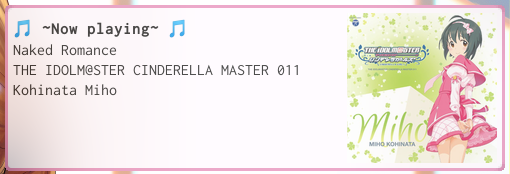
Good luck! Here's a video demo of it in action
 Nagayoshi-dev
on 29 Apr 2019
Nagayoshi-dev
on 29 Apr 2019
Hi, is there any possibility this will be taken up any time soon ?
been really looking forward to this since a while..
 kushraj
on 22 Jan 2020
kushraj
on 22 Jan 2020
Unfortunately, I do not have enough time to dedicate to proper dunst development other than bugfixing for the time being. However if anyone wants to step up to implement this I'd gladly accept a PR, and I'm obviously still active here if there are any questions.
Most of the positioning work is done in render_content so if anyone wants to implement it that's the place to start.
 tsipinakis
on 22 Jan 2020
tsipinakis
on 22 Jan 2020
Most of the positioning work is done in render_content so if anyone wants to implement it that's the place to start.
Uh, this looks intriguing. I hacked at it shortly and it looks promising. Will try to have another shot at it on the weekend. Thanks for the pointer :)
chronus7
on 23 Jan 2020
Implemented with #684!
tsipinakis
on 30 Jan 2020
Related issues
 existme
·
4Comments
existme
·
4Comments
 k80w
·
7Comments
k80w
·
7Comments
 progandy
·
4Comments
progandy
·
4Comments
 adihrustic
·
3Comments
adihrustic
·
3Comments
 catzybluphish
·
6Comments
catzybluphish
·
6Comments
Most helpful comment
Implemented with #684!