Ds4windows: Bluetooth connects, no input; Battery display/recognition wrong
My DS4Windows setup suddenly started having this problem:
When connected through Bluetooth, the controller is recognized as connected, but battery displays 0 percent, lightbar shuts off, and controller readings show every input as basically dead.


This is what the readings _should_ normally look like, since the sticks on my DS4 are a bit off - not to mention all the tilt and gyro data constantly present.
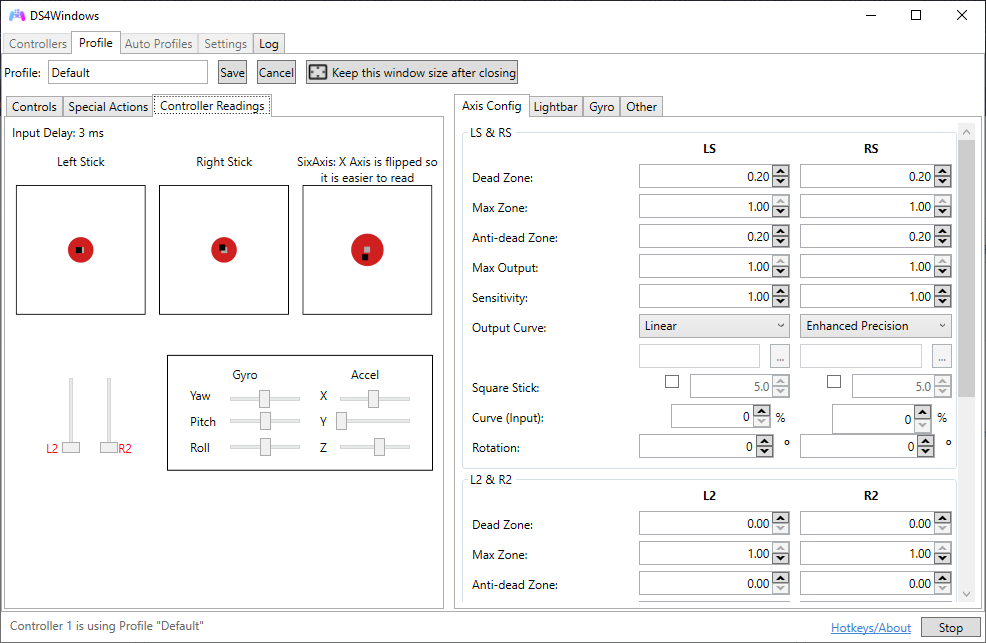
Also, when connected through USB, battery percentage shows "100%+", regardless of charge level. This issue exists on both USB 2.0 and 3.0 connections.
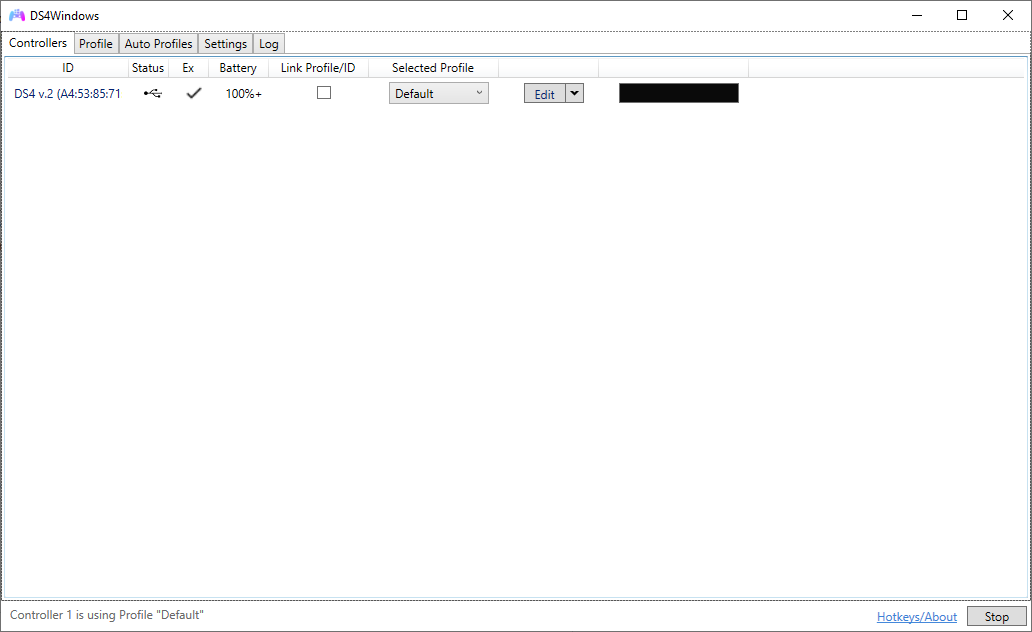
I checked the logs, but it just seems to treat the BT connection as just a controller with empty battery.

At first, I thought there's something wrong with my controller, but I tried the old version by Jay2Kings, and turns out everything's working fine there.


Here are the logs from the v2 Device Detect Debug:
DS4Windows_v2_BT_log.txt
DS4Windows_v2_USB_log.txt
 DrakosAmatras
All 11 comments
Forgot to mention a few things:
This was tested on Windows 10, version 1903, OS build 18362.720.
I've tested the issue on:
- Progressively updated old version, up to v2
- Fresh v1.7
- Fresh v1.7 updated to v2 through the separate (fixed?) Updater
And the problems persist all the same. I've also repaired, and then full clean plus reinstalled ViGEmBus. Even wiped the ghosted HID controller devices with Device Remover, just in case. No difference regardless. Only the old v1.4 is working correctly at the moment.
DrakosAmatras
on 19 Mar 2020
The following error is considered fatal in normal DS4Windows. DS4Windows will keep trying to read packets in the input thread but never be able to update any controller information. The Jays2Kings version did not perform CRC32 checking.
03/19/2020 16:48:17: DEBUG: performDs4Input. WARNING. A4:53:85:71:83:F3 crc32 check of BT input packet failed. btInputReport type0=17 type2=0
03/19/2020 16:48:17: DEBUG: performDs4Input. WARNING. A4:53:85:71:83:F3 crc32 check of BT input packet failed. btInputReport type0=17 type2=0
03/19/2020 16:48:17: DEBUG: performDs4Input. WARNING. A4:53:85:71:83:F3 crc32 check of BT input packet failed. btInputReport type0=17 type2=0
03/19/2020 16:48:17: DEBUG: performDs4Input. WARNING. A4:53:85:71:83:F3 crc32 check of BT input packet failed. btInputReport type0=17 type2=0
03/19/2020 16:48:17: DEBUG: performDs4Input. WARNING. A4:53:85:71:83:F3 crc32 check of BT input packet failed. btInputReport type0=17 type2=0
03/19/2020 16:48:17: DEBUG: performDs4Input. WARNING. A4:53:85:71:83:F3 ignoring repeating crc32 check failure. Continuing to accept input packets. btInputReport type0=17 type2=0
 Ryochan7
on 19 Mar 2020
Ryochan7
on 19 Mar 2020
I see. Is there anything I need to fix on my end?
DrakosAmatras
on 19 Mar 2020
What is the polling frequency ("poll rate") of BT in DS4Windows settings? Try to tweak that value if it makes any difference. Some BT chipsets are more easily overflooded than others.
Try without other BT devices near by.
If you have Jay2Kings version still installed and ScpToolkit with BT support then it may cause problems when other BT devices and apps try to use the same BT receiver. ScpToolkit does something very unffocial tricks with the BT stack driver layer in Windows.
However, the strange thing is that USB connection has also issues. Usually at least USB connection works if BT doesn't. Try using different USB cable (I have several mobile phone cables which can chrage DS4 gamepad but the cable doesn't carry over all data packets).
 mika-n
on 19 Mar 2020
mika-n
on 19 Mar 2020
I have two different Bluetooth USB dongles of different chipsets, and one of them is dedicated to my DualShock 3 controllers; it hasn't been used in months anyhow. DualShock 4 connects to my PC through my second "vanilla" dongle, and the issues started only a few days ago without me changing anything about it, so I'm not sure if it's the dongle driver conflict.
As far as software goes, I use DS4Windows for the most part, and in some cases ReWASD - but never at the same time, since there could be exclusivity conflicts. Steam likes to wrestle over exclusivity of controller when running its games, but if I start DS4W beforehand, it seems to retain exclusivity.
Different versions of DS4W on my PC are in separate folders, and all of them are portable folders (aside from the common profile folder, of course). Could that still cause conflicts? I downloaded v1.4 again only today.
I moved the vanilla BT dongle to a different port (in the same USB hub) and tried connecting the controller; same problem as before. Changing the polling rate did not change anything.
USB connection is, at the moment of testing, showing different battery readings:
- "45%+" through USB 2.0
- "63%+" through USB 3.0
For reference, v1.4 shows battery at 50%. I don't know if this is relevant or not; putting the data here, just in case.
DrakosAmatras
on 20 Mar 2020
Okay, so as you've mentioned, I tried to narrow down the possible sources of conflict by going through the recent program installations. I did install a bunch of games recently, but it's a bit uncharacteristic for a game installation to mess with controller drivers - which led my attention to reWASD.
I haven't been using reWASD for several weeks now, and only a few days ago did I boot it up again to update it - once. But turns out it has a background service that keeps running, which maintains controller connections alive even when the main application is turned off. Sure enough, stopping that process makes the BT connection to DS4W work properly again.
I can't remember if that reWASD service existed before the latest update (5.3.0), since I never used it and DS4W at the same time - and DS4W seems background-free when I close it (or, at least I can't find any service with its name in the list in Task Manager).
So I tinkered a bit further with reWASD options, and guess what - it _is_ a conflict issue after all. Turning off its own exclusivity option makes the BT connection work as before. I was thrown off because DS4W didn't display its usual red-text conflict message in the bottom bar, and just "successfully" connects the controller despite the background process already holding on to it. (Maybe it didn't detect a conflicting application because there was no active application taking hold of the controller? Just a very uneducated guess on my part.)
Summary: reWASD's background service was the culprit maintaining the exclusivity settings even when the main application isn't on. It can be fixed by:
- disabling the service, which you'd need to enable again if you wanna use reWASD (Task Manager > Services > reWASDService > Stop)
- or more effectively, disabling the exclusivity option in the main app (General > Hide physical controller when virtual one is created > Uncheck)
Exiting all reWASD tray agents might help too, since it creates one tray icon for every controller unless you specify not to.
DrakosAmatras
on 20 Mar 2020
Never played around with reWASD. Seen a couple of videos (Mass Effect 2 one in particular) and it did not look good to me. Nice GUI but the end result looks unplayable based on their footage.
Ryochan7
on 20 Mar 2020
As a mapper, it's good enough for me. Its main appeal really is the visually explanatory GUI. If only it could recognize the DualShock 4 touch pad in a more sophisticated manner than "pad click" and "corner touch".
Anyhow, its background process restarts upon PC reboot, so I made a scheduled task turning it off every time I log on. Once I find out whether/how I could turn it on with application launch and off with application exit, I'd be using those too.
Thank you and mika-n for the replies. I first posted this issue mainly to have it on reference in case someone else encountered the same issue. But I suppose not many people are geeky enough to try multiple mappers.
DrakosAmatras
on 20 Mar 2020
You can start and stop background Win services by a command line command (may require "Run as Adminisrator" option to work through UAC prompts):
sc stop "serviceNameGoesHere"
sc start "serviceNameGoesHere"
(Note! Service name is not always the same as service display name you see in services.msc list. Double click the service and you can see both the display name AND the actual service name).
If you set the service in SERVICES.MSC controlPanel list with "manual started" instead of "automatically started" option then you could have a CMD script in a desktop to start the service and a game. When the game exists the script could shutdown the service.
mika-n
on 20 Mar 2020
Thank you! I've set the service to Manual start; I'm guessing this is effectively the same as the scheduled task I cooked up.
But I don't know my way around command line and scripts. Is there a way to bind those start/stop commands so that the background service turns off alongside the reWASD main application? I know some command line stuff can be added through an EXE's Properties, so I'm guessing that can facilitate a simultaneous launch (although that's not vital as reWASD gives me a prompt to turn it on anyway). Simultaneous turnoff is something I don't know how to do.
DrakosAmatras
on 20 Mar 2020
A script to monitor process run/stop events isn't that complex to do and starting and stopping a background service is "one line code". But, if you want to have a nice GUI (and potentially do something more complex monitoring rules) then there are both commercial and freeware tools to monitor system events and then do custom operations.
KiwiMonitor is a freeware (basic version) which might do what you want:
https://www.kiwimonitor.com/kiwi_application_monitor.php
Basic rules:
run an application when the selected application starts
run an application when the selected application end
An application here can be a "real application" or your own BAT/CMD script which starts or stops background service (the "one line" code shown in earlier post).
mika-n
on 20 Mar 2020
Related issues
 Okami23
·
6Comments
Okami23
·
6Comments
 zardini123
·
7Comments
zardini123
·
7Comments
 pralima87
·
4Comments
pralima87
·
4Comments
 khanghugo
·
4Comments
khanghugo
·
4Comments
 grysor
·
4Comments
grysor
·
4Comments
Most helpful comment
A script to monitor process run/stop events isn't that complex to do and starting and stopping a background service is "one line code". But, if you want to have a nice GUI (and potentially do something more complex monitoring rules) then there are both commercial and freeware tools to monitor system events and then do custom operations.
KiwiMonitor is a freeware (basic version) which might do what you want:
https://www.kiwimonitor.com/kiwi_application_monitor.php
An application here can be a "real application" or your own BAT/CMD script which starts or stops background service (the "one line" code shown in earlier post).