Ds4windows: Feutre: Audio Mapper for controller dualsock 4
will be great to get audio in the controller , now I install DS4Windows I see the driver been installed but no sound on windows or the controller
 DemonRem
All 19 comments
You can have audio using the usb cable (I think) and with Sony usb wireless dongle (confirmed), but it is not implemented using a generic bluetooth adapter.
 diogocalgaro
on 2 Jan 2018
diogocalgaro
on 2 Jan 2018
I have a Sony wireless adapter connected with my Bluetooth adapter one for control the controller himself and the second one for the sound if you want I will upload photo to show you
DemonRem
on 2 Jan 2018
The Sony adapter can do both, controller and sound. I'm using one for couple months.
Just to be clear: I'm using an in-ear headset with mic plugged in the controller jack, so the Sony dongle handles both. But I'm not sure if is possible to use an bluetooth headset with it.
diogocalgaro
on 2 Jan 2018
I am not sure how feasible it would be to have headphone support while connected via Bluetooth. I think other people have tried to make it work in the past with no success. As it is now, you have to either use the Sony USB Wireless Adapter or use a DS4 v2 connected via USB in order to have access to the headphone jack; the DS4 v1 does not expose the headphone jack while connected via USB.
 Ryochan7
on 9 Jan 2018
Ryochan7
on 9 Jan 2018
Hi
I have the same issue with OP but on USB connection.
While I only connect DS4 to my PC by USB, connect my headphone jack to DS4, the audio and microphone works well (for example playing music) and no problems.
But once I launched DS4Windows, the audio will just broken immediately, then no sound anymore but only some stranger noise if I click on windows sound volume mix bar.(USB3.0 or USB2.0 port no different).
The function of the controller(works as xbox360 controller) works well though.
If I close DS4Windows and then unplug and plug USB cable to PC again, the audio over DS4 headphone jack will back and working again, until I launch DS4Windows.
I am using latest version 1.4.108x64 but also tried old version 1.4.104x64, still the same issue.
My OS version is Windows 10 1709(16299.192) x64, my DS4 is new ,I just bought it. I think it is DS4v2 since the audio feature via USB works well if not launching DS4windows.
According to this thread, it seems the audio feature should work well on DS4Windows if I have DS4v2 and USB, if I am not misunderstanding anything on this thread.(Sorry but my mother language is not English.)
So I decided to report the issue.
By the way this is my settings:
https://i.imgur.com/sH45zvy.jpg
https://i.imgur.com/ysuRC1K.jpg
https://i.imgur.com/rpbFIOX.jpg
And thanks for developing DS4Windows.
 arkhillneo
on 13 Jan 2018
arkhillneo
on 13 Jan 2018
@arkhillneo did you check the volume of the controller device, on "Playback devices" screen, after open DS4Windows?
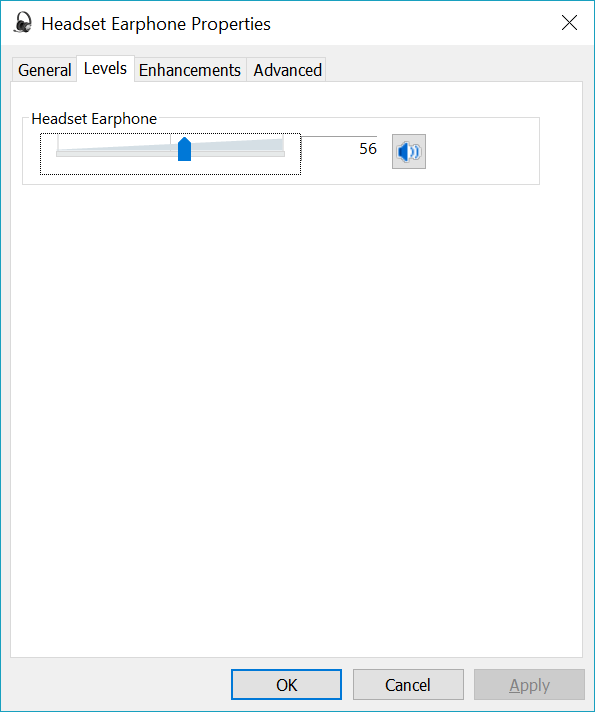
I know it seens silly, but sometimes I forgot the simple things.
Also, do you have InputMapper installed in your machine? I used to have this exactly same issue with it.
Finally, to confirm if your controller is v2, just check the model on the back of it. It should be CUH-ZCT2* (the last digit is the region, the number 2 is the important thing here).
diogocalgaro
on 14 Jan 2018
Hi
Thanks for reply.
Yes I checked it , it is normal. Even I have volume to 100% still not works.
https://i.imgur.com/tJs3580.jpg
After launched DS4Windows I test the sound here too, no success, it became a strange noise while playing testing sound.
https://i.imgur.com/PLa2vGt.jpg
My DS4 is CUH-ZCT2G.
Also I do not use InputMapper.
arkhillneo
on 14 Jan 2018
I will have to look into this. This functionality was checked while working on version 1.4.104 when a callback started being used to detect changes in volume level rather than trying to grab the current volume level for the device each poll. Headphone functionality worked then and nothing else has really changed that should affect that functionality.
Ryochan7
on 15 Jan 2018
This has been tested using a DS4 v2 via a USB connection and a DS4 v1 using the Sony Wireless Adapter. Audio works fine for both configurations before and after DS4Windows is launched. Volume changes propagate fine as well. One difference is that the output volume level is much lower while DS4Windows is running as opposed to when the DS4 is first connected to Windows and using DirectInput mode.
Ryochan7
on 15 Jan 2018
@Ryochan7
Hi, I have tested it again and again, still once DS4Windows launched, the sound form DS4 broken.
Is there any way I can do to clarify the issue source? Or the DS4 I bought is a fault device?
By the way this is my DS4:
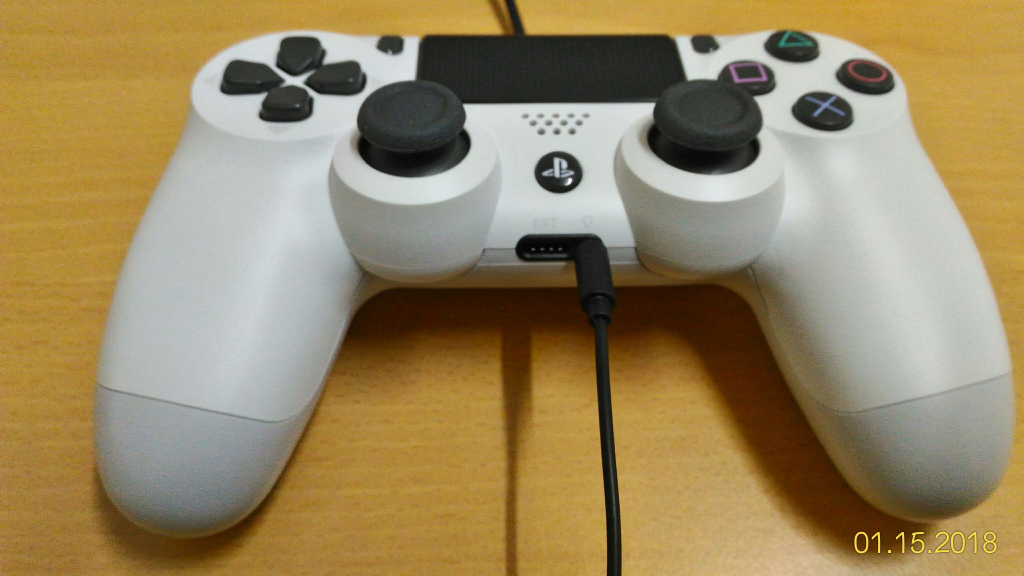
arkhillneo
on 15 Jan 2018
Can you post a screenshot with the list of Playback audio devices on your system? Maybe looking into the Device Manager entry for the audio device would be helpful as well. Looking at your screenshots, it looks like localized text might be the problem. Currently, the device name is used to try to identify the audio device for the DS4. For the DS4 v2, the device name of "Headset Earphone (Wireless Controller)" is the search text used. I am guessing that the device name that is retrieved while searching for devices is different so no audio device is found. The output volume level of the controller would be 0 in that case.
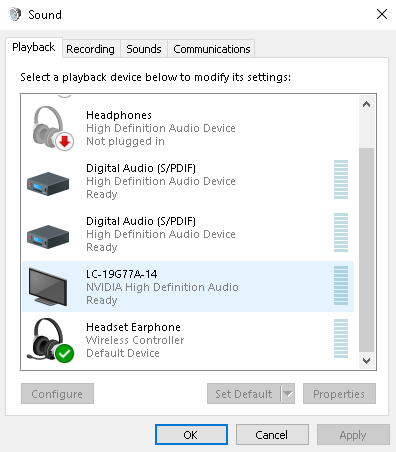
Ryochan7
on 15 Jan 2018
@Ryochan7
Hi
Thanks for look at this. The screen shot is following.
Also,I just test it in the VM on a clean Win10 , but the same result(start DS4Windows and sound broken, it seems always at 0 volume.)
But strange thing is , I go back and tested old Jays2Kings's version(1.4.52) and when it's DS4Windows is running, the audio works fine. So with the old DS4Windows I have no problem with audio. The same result on VM.
(But it has some bug on bt battery usage showing and no maintain anymore so I will use new version.)
This is my system's(Japanese UI)
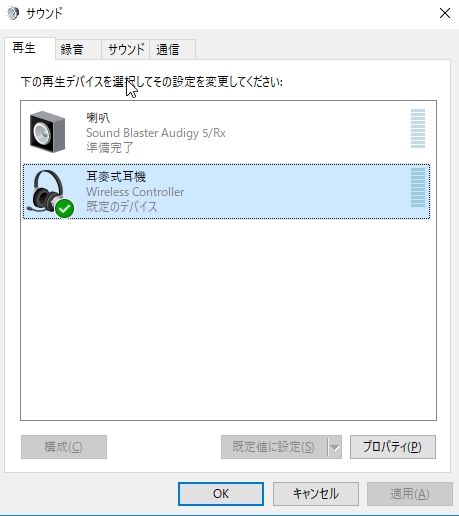
This is VM(Traditional Chinese UI)
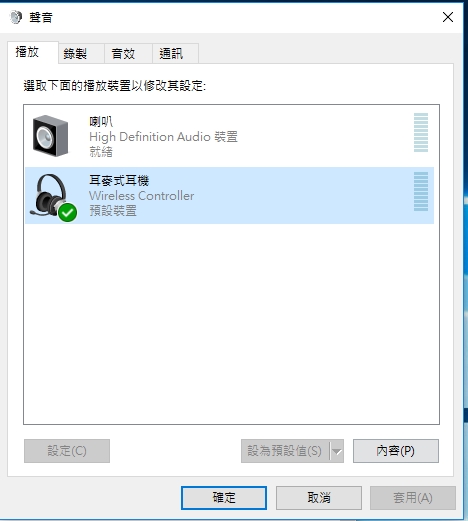
EDIT:
This Device Manage on my system:
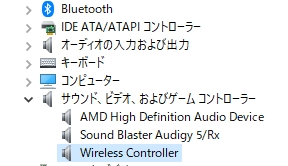
arkhillneo
on 15 Jan 2018
Also ,
When the issue happened, I find out I can do this to restore audio without unplug and plug:
1.Press Stop to stop DS4Windows. At this time the audio still not work.
2.Then I adjust the volume a little again , then audio back. So I wonder it maybe forced set stay at 0 volume while DS4Windows is running.
arkhillneo
on 15 Jan 2018
I will try it again on an default English Windows10 VM but need some times to download and install the ISO.
If I have any found I will report back.
arkhillneo
on 15 Jan 2018
@Ryochan7
Hi
You are right, the localized text caused the issue on some non-English Windows OS.
I can confirm that on an English Win10 audio works fine with new DS4Windows.
It would be nice if this issue can be fix.
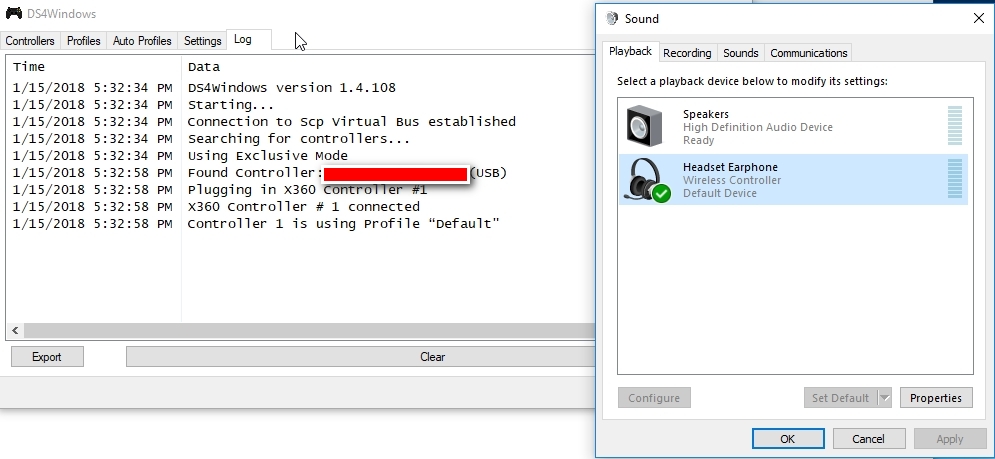
arkhillneo
on 15 Jan 2018
Thanks for the update. I will look into updating the DS4Audio class to check a device based on some other property than Device Friendly Name.
Ryochan7
on 15 Jan 2018
@Ryochan7
Never mind. It seems when I re-connect DS4 to PC and the volume adjustment issue fixed.
It seems only happened on first time I launch DS4Windows.
Now everything is working. Sorry I should test it more time.
Hi,
Thanks for fixing the audio issue on non-English Windows OS. With 1.4.109 the audio of my DS4 is working on Japanese locale system.
And another bug report:
The volume adjustment seems still broken, so whatever I set(even set to 0~100), it keeps sticking at a strange default volume(never following user adjustment) on non-English Windows OS system.
I tested 1.4.109 on English Windows OS and this new issue does not happen on it, so once again the localized OS caused issue but this time happened on volume adjustment.
arkhillneo
on 16 Jan 2018
I am not sure how feasible it would be to have headphone support while connected via Bluetooth. I think other people have tried to make it work in the past with no success.
 mirh
on 19 Jan 2018
mirh
on 19 Jan 2018
Found a possible problem related to this issue. The device search string has been changed to not depend on the string format as much.
https://github.com/Ryochan7/DS4Windows/releases/download/v1.4.120/DS4Windows_1.4.120_x64.zip
Ryochan7
on 4 Jun 2018
Related issues
 CarissaIsWierd
·
7Comments
CarissaIsWierd
·
7Comments
 Okami23
·
6Comments
Okami23
·
6Comments
 khanghugo
·
4Comments
khanghugo
·
4Comments
 zardini123
·
7Comments
zardini123
·
7Comments
 teeedubb
·
8Comments
teeedubb
·
8Comments