Ds4windows: Xbox controller #1 failed. Using DInput only mode
This keeps happening every time I try to connect.
This doesn't happen on Inputmapper at all (but I would much rather use this).
I've tried uninstalling and reinstalling drivers, re-installing SCP driver and pretty much everything else I can think of.
I'm on Windows 7.
EDIT:
I can get it to work temporarily by re-installing SCP driver, rebooting, and then
connecting the controller via bluetooth or cable BEFORE starting DS4Windows (it has to be connected to the computer before DS4Windows is running, or it will fail again).
HOWEVER, it will end up failing again on one of the next few connection attempts, regardless.
EDIT2:
I can also get it to work temporarily by reinstalling the SCP driver using the folder created by Inputmapper. When I use InputMapper's "Virtual Bus Driver" folder after having stopped DS4Windows, it will temporarily fix it without having to reboot, however it will still fail again on one of the next few connection attempts, and I have to run the SCP Driver from Inputmapper again to fix it again, and again, and again.
 reecespieces
All 81 comments
same here. latest version is no good.
 shinra358
on 10 Nov 2017
shinra358
on 10 Nov 2017
The issue doesn't seem to re-appear in Version 1.4.96
I re-installed SCP Driver and used DS4Windows Version 1.4.96, and it has yet to fail after multiple disconnects and reconnects and rebooting.
For motion controls in Cemu, I overwrote DS4Windows Version 1.4.96 with this: https://github.com/rajkosto/DS4Windows/releases/tag/v1.4.94-patch1
The latest version of the rajkosto patch will re-introduce the issue (because it has been patched for DS4Windows version 1.4.97) so make sure to get the version patched for DS4Windows v1.4.94 and it will work fine.
reecespieces
on 10 Nov 2017
I am looking at the diff between version 1.4.96 and 1.4.97. The only change that I can see that would have the closest chance to making a difference is how toggling the Hide DS4 Controller option is handled.
https://github.com/Ryochan7/DS4Windows/commit/ed09317f149fef04c6546380072b8f1b4bb3302c
 Ryochan7
on 11 Nov 2017
Ryochan7
on 11 Nov 2017
If a change was made to fix this, it's still not working in newest update. BT nor wired. This time, reinstalling scp isn't even temperarily fixing it anymore.
shinra358
on 11 Nov 2017
No change has been made recently. I don't know what is wrong. I might have to get Windows 7 on a VM and try it there. Either that or I need someone to debug DS4Windows on their system and let me know what is causing the problem.
Ryochan7
on 11 Nov 2017
I had to revert back to 1.4.92.
1.4.96 didnt work for me like the other user.
On Nov 11, 2017 2:15 PM, "Travis Nickles" notifications@github.com wrote:
No change has been made recently. I don't know what is wrong. I might have
to get Windows 7 on a VM and try it there. Either that or I need someone to
debug DS4Windows on their system and let me know what is causing the
problem.—
You are receiving this because you commented.
Reply to this email directly, view it on GitHub
https://github.com/Ryochan7/DS4Windows/issues/147#issuecomment-343687505,
or mute the thread
https://github.com/notifications/unsubscribe-auth/ADy0Mz7rj-ETqa3nTdATzwjfJtPyIMkCks5s1fJHgaJpZM4QY49H
.
shinra358
on 11 Nov 2017
So I went and updated the program one by one manually while turning the previous program off first before doing so. Now they all work. So I'm guessing now it has something to do with how the updater updates the program now. Because last night I couldn't get any of them to work after .92 when I used the updater each time.
shinra358
on 11 Nov 2017
scratch that, it idled off by itself and now it wont work anymore (like one of the other threads say). Now I have to start from .92 again and wait for each to idle to see which one it messes up at after idling off. I'll do that later xD
Related:
https://github.com/Ryochan7/DS4Windows/issues/107
https://github.com/Ryochan7/DS4Windows/issues/105
https://github.com/Ryochan7/DS4Windows/issues/120
^I see now that these are all the same problem which really has nothing to do with steam. Every person has mentioned the word reconnect or similar. Something doesn't quite work right when turning back on from idling. The problem is in the auto shut off.
shinra358
on 11 Nov 2017
Okay, found a possible culprit. Starting at .96, afterplugging triggers the UAC prompt for some reason if you just normal manually start ds4windows. Versions before, do not. This is the first version I also see a language folder in as well so maybe that links to that. So that was my issue when I tested out .96. Right clicking and starting as admin fixed the issue. But the problem is, I never had to do that in prev versions. My options are set to let task manager handle the program in ds4windows.
After .96, xinput never works again after an idle timeout and sometimes even before that. So the OP is right about the last working version.
May I suggest adding all the fixes from .98 and above to .96 then do a release. And then add each fix from .97 one by one until we see which fix breaks the program?
shinra358
on 11 Nov 2017
It's probably worth mentioning that 1.4.96 works OK for me because I don't use the idle timeout feature.
According to user OptimalJew in #105, idle timeout does cause the issue to re-appear in 1.4.96,
but it works fine if you don't use idle timeout.
reecespieces
on 12 Nov 2017
.96 resumed to work after idle timeout for me. Didn't on .97 and up.
shinra358
on 12 Nov 2017
Can confirm that for me, with 1.4.96, idle disconnect _sometimes_ works, but going through several disconnect/reconnect cycles will eventually break it, yet manually disconnecting always works. 1.4.97+ and no method of disconnecting from BT consistently works, not even the manual disconnect.
*edit
I should note that I'm always using exclusive mode.
 OptimalJew
on 12 Nov 2017
OptimalJew
on 12 Nov 2017
Adding onto what @OptimalJew said,
on 1.4.97 and newer, using a wired connection and disconnecting by unplugging the cable also does not consistently work. Bluetooth and wired connection will both fail to show the XBOX controller upon reconnecting after being disconnected for a bit.
reecespieces
on 12 Nov 2017
I am not sure about uploading that many builds but here are a few extra builds from commits between 1.4.96 and 1.4.97 that might pose problems. The second build is more useful as a comparison to the third build.
Commit: https://github.com/Ryochan7/DS4Windows/commit/957ad3b1d5f23aa2af89053aeb366b4c39578f2d
https://drive.google.com/open?id=1B00OxGdwzCDJoj7zr5wrWQxJZ8TuMvUR
Commit: https://github.com/Ryochan7/DS4Windows/commit/0c303a091a2f6d05337844eed2f27f690a3f98bb
https://drive.google.com/open?id=1me0oXU1Asr86tnckJ6DL_dc1WSiiuGGU
Commit: https://github.com/Ryochan7/DS4Windows/commit/ed09317f149fef04c6546380072b8f1b4bb3302c
https://drive.google.com/open?id=1YUXA5KzfAy4uOtaQHwKMlvrisgUGTdPm
Ryochan7
on 12 Nov 2017
I made some minor tweaks to the current code. Maybe someone can give it a try as well.
Commit: https://github.com/Ryochan7/DS4Windows/commit/de8934f7abde4832caf6ba0204673e43f2999544
https://drive.google.com/open?id=1oKI7S0FfbWlQLlkihlDytXeNmwQZ8usb
Ryochan7
on 12 Nov 2017
957ad3b works. Tested about 5 times. Worked every time.
0c303a0 no good.
ed09317 no good.
de8934f no good.
shinra358
on 12 Nov 2017
Okay. Let's try these. These builds should cover all the commits in between already tested points (957ad3b - 0c303a0).
https://github.com/Ryochan7/DS4Windows/commit/b1cd3a76e94bfc88116e72333aa82b5ea857be74 "First acceptable version of gyro calibration support" https://drive.google.com/open?id=1B00OxGdwzCDJoj7zr5wrWQxJZ8TuMvUR
https://github.com/Ryochan7/DS4Windows/commit/73450834bcd00656a23b2ebac3d061924053bf81 "Remove unused field" https://drive.google.com/open?id=1NroVOVShZRBO4TU6QMT7if40Rki0YQFh
https://github.com/Ryochan7/DS4Windows/commit/320c3ee6f60f0eb3961e8f154b0de94ac1810270 "Make sure to add device serial to HashSet when DS4Device instance is created" https://drive.google.com/open?id=17jOL69tXjGmh3NAnVrqxDJ7q3gz-pS4v
https://github.com/Ryochan7/DS4Windows/commit/d1e0be33de5c3e41d8847da4aa313d83ec646034 "Fix calibration report id for BT" https://drive.google.com/open?id=1v6Rt4_npOSnkNsREG6s727fsAuGoyBQg
https://github.com/Ryochan7/DS4Windows/commit/3a091328050bd04c570cbea8093f0be037fc0e20 "Fix reading calibration report values. Take connection type into account" https://drive.google.com/open?id=1TsG0iCTRewerX2dtnjvqpc5dcXobL6ZS
https://github.com/Ryochan7/DS4Windows/commit/0df84e1fbac2dbdfaa8f5d3da6ed7d3ff33ccb87 "Refresh calibration data when pairing to or disconnecting a device from the Sony dongle" https://drive.google.com/open?id=1doW4vFd8rsv6PQKRSB-rIuQkQ1B_ai2K
https://github.com/Ryochan7/DS4Windows/commit/036cfcb34d71aac7f5f8cf451315ddff76ac288f "Use refresh calibration method when creating DS4Device instance" https://drive.google.com/open?id=1KnVPDpjOM06vsU5ypzx7uVQXRomI06Lv
Ryochan7
on 13 Nov 2017
I was able to break 957ad3b within a couple of BT connection cycles, and with the removal of the 'uninstall vbus driver' option, I had to go to a different version to fix it.
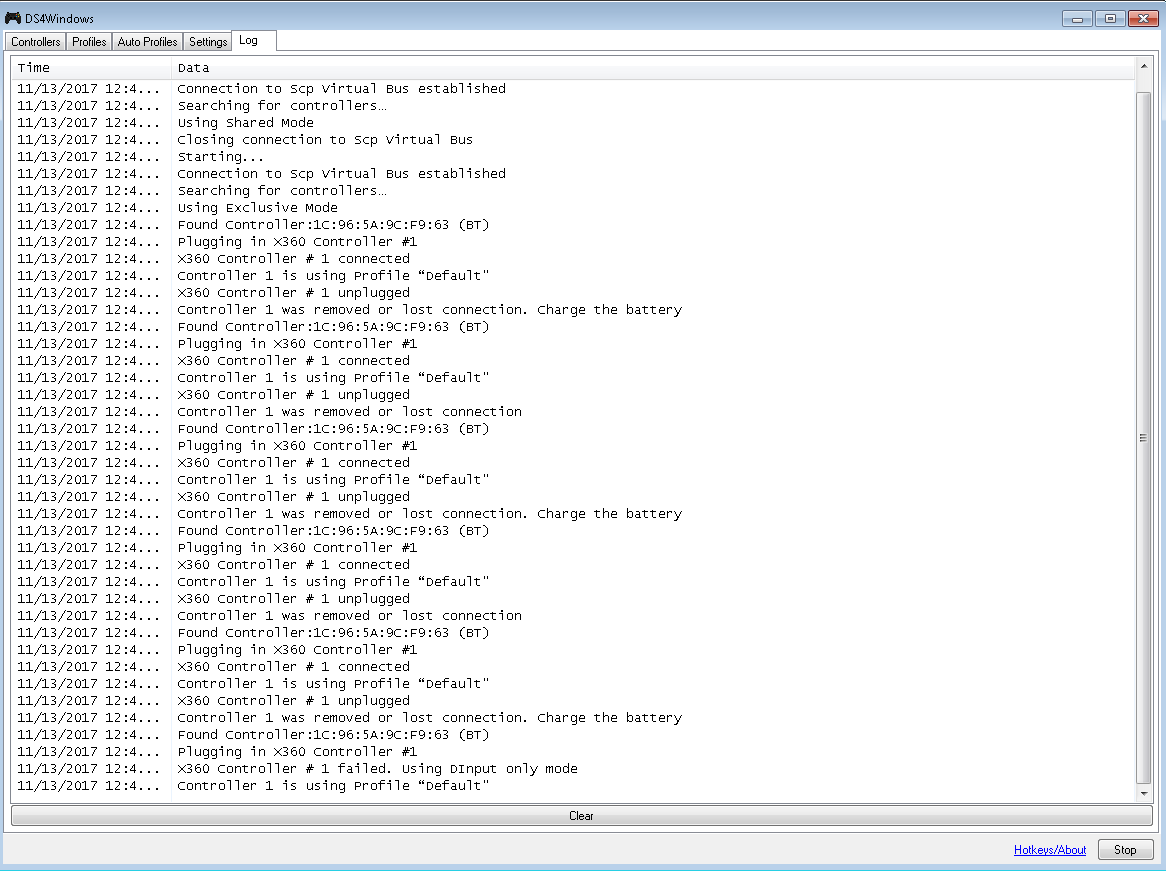
As a comparison, I tested 1.4.96 and did 30 rapid BT connection cycles without issue, then for the hell of it tried 1.4.100, and not surprisingly, I couldn't make it through a single connection cycle.
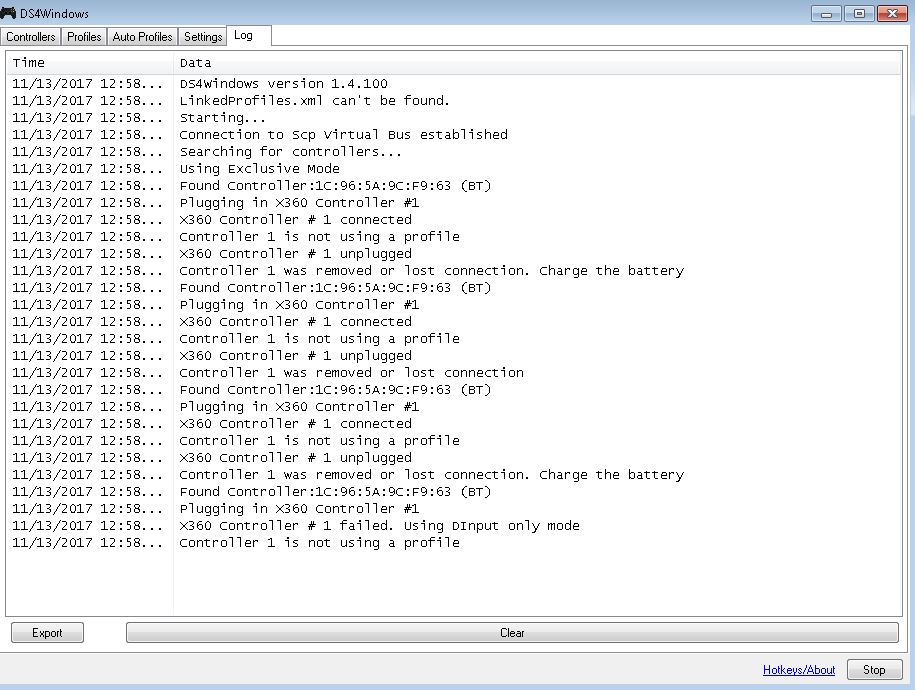
Let me know if you'd like me to try the other builds. I do appreciate you trying to fix this.
OptimalJew
on 13 Nov 2017
b1cd3a7 No good.
7345083 No good.
320c3ee No good.
shinra358
on 13 Nov 2017
If b1cd3a7 does not work then you can probably stop. That was the next commit after 957ad3b.
Ryochan7
on 13 Nov 2017
I was about to type something like that xD
My body wasn't ready...
shinra358
on 13 Nov 2017
The next test is to see if the change in locking strategy is causing the problem. This build is a minimal change to add a new lock around report writing. It is not equivalent to how locking was being performed in 1.4.96. That will probably be tried later although the old locking strategy impacted the input thread significantly. Even these changes have introduced input lag.
https://drive.google.com/open?id=1UaHysBqX0gMZkZTEk2TIdmlios1mnrQT
Ryochan7
on 14 Nov 2017
No dice on my end.
log.txt
OptimalJew
on 14 Nov 2017
Same here. Not working on resuming from idle timeout.
shinra358
on 15 Nov 2017
That kills that idea. I will have to create a diff of what I am working on now and start back from the version 1.4.96 code.
Ryochan7
on 15 Nov 2017
Only reimplemented a secondary lock. Based on 957ad3b1d5f23aa2af89053aeb366b4c39578f2d
https://drive.google.com/open?id=1YdSt22MjGJjnbdL6TNFJEAUq2gqLXnwh
Ryochan7
on 22 Nov 2017
Results with testing that version and manually disconnecting/reconnecting over and over.
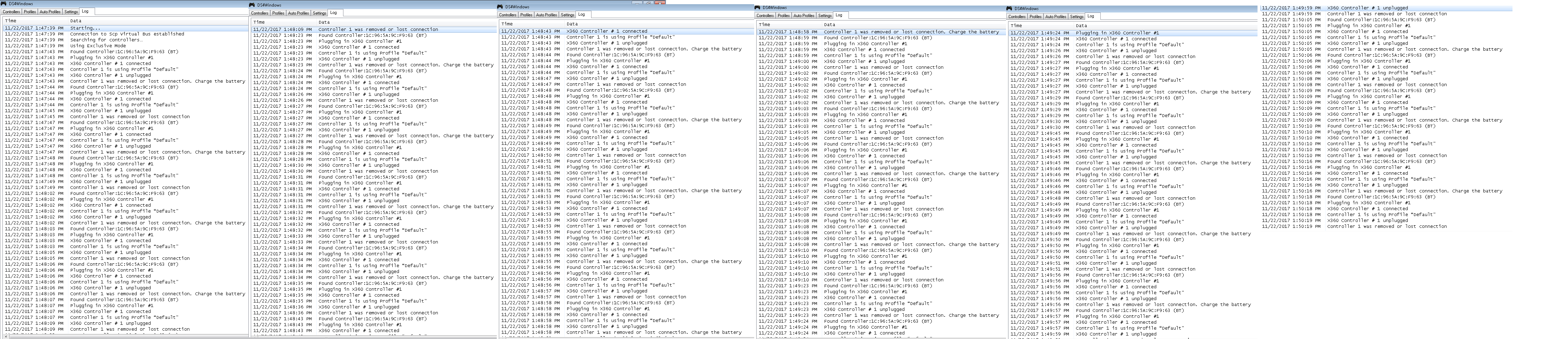
It appears to at least be on-par with *1.4.96, which is great.
*edit
Named the wrong version, apparently I had Retroarch on the brain.
OptimalJew
on 22 Nov 2017
Works for me as well. Even after idle disconnect.
shinra358
on 22 Nov 2017
Whatever you did with the bluetooth mode has to be done with the wired mode as well. Because a shoddy usb cord can still break the program. This is still a problem with wired mode (even without the idle disconnect [idle light off when plugged]).
shinra358
on 25 Nov 2017
updater needs to give the option to restart as admin. Not being the admin, controller doesn't work. So I'd manually have to restart in admin which is a pain because there is no go to folder option in the notification tray icon.
new update breaks wireless again...
manual xinput port has to go! needs to be automatic. We keep having these wireless problems every update. Have to rummage through all the xinput port settings to find a working one. Usually out of all the options, only 1 works! Annoying.
shinra358
on 27 Jan 2018
timeout bug is also back.
shinra358
on 27 Jan 2018
The easiest way around having the updater launch with the relevant privileges is to update the program to use a command line switch to specify whether the runas verb should be used when launching DS4Windows. Unfortunately, I do not have wireless nor timeout problems with the most recent release.
I would rather not do this early but maybe you can try to use the current ViGEm implementation on your system and see if that fares better. I will only support the usage of ViGEm version 1.14.3.0 (latest) but older versions of ViGEm might work as well. Also, I would recommend that you disable the Scp Virtual Bus Driver device in Device Manager before testing ViGEm.
https://drive.google.com/open?id=1TMB70uSduoRo2wFWK0jFv-AOV17kFVmy
Ryochan7
on 27 Jan 2018
"The easiest way around having the updater launch with the relevant privileges is to update the program to use a command line switch to specify whether the runas verb should be used when launching DS4Windows."
Yep.
"Unfortunately, I do not have wireless nor timeout problems with the most recent release."
No doubt about it, it's there again. And both wireless and wired get broken when it idle times out until I un-install and reinstall the scpdrivers. Again, windows 7 user here. I'm not seeing things xD
I can't even revert back to the version I was using before because my backup of it is gone because it doesn't do backups in a convenient way :(
I don't even remember what version it even was...
When using vigem, do I uninstall scp first or does it matter?
shinra358
on 27 Jan 2018
You do not have to uninstall Scp Virtual Bus Driver when using ViGEm. I would recommend that you disable the Scp Virtual Bus Driver device (located under System devices) in Device Manager before testing ViGEm although it is not necessary.
Ryochan7
on 27 Jan 2018
How do i install vigem w the download you have provided? There is no
installer.
On Jan 27, 2018 12:57 PM, "Travis Nickles" notifications@github.com wrote:
You do not have to uninstall Scp Virtual Bus Driver when using ViGEm. I
would recommend that you disable the Scp Virtual Bus Driver device (located
under System devices) in Device Mananger before testing ViGEm although it
is not necessary.—
You are receiving this because you commented.
Reply to this email directly, view it on GitHub
https://github.com/Ryochan7/DS4Windows/issues/147#issuecomment-361002181,
or mute the thread
https://github.com/notifications/unsubscribe-auth/ADy0M7pQ-T54Lix7p0H8DW7Rbaax-SBbks5tO2OJgaJpZM4QY49H
.
shinra358
on 27 Jan 2018
You have to follow the installation procedure mentioned on the ViGEm Wiki in order to install it. The small installer helper that I am working on just puts these commands into one PowerShell script that is launched from a GUI.
Ryochan7
on 27 Jan 2018
Whaaaaat???
*dies *
shinra358
on 27 Jan 2018
I went all the way back to the version that we had that big discussion on that we found worked. I went back to that version and it no longer works anymore! I haven't did a windows update in a year. I noticed that the ds4 driver prompt will come up after reinstalling the scp drivers. I noticed that ds4windows will say that it's downloading. So I'm assuming it's getting a new version each time.
If so, there's the problem. Do you know which version of the scpdrivers we were using during that discussion on Nov 22nd? It makes no since how they were working that day when there have been 0 system changes since then and now they no longer work as before. This is the only thing that can be wrong (the scp drivers being updated). I was always under the assumption that we were using an old version of the drivers. This messes up alot :(
shinra358
on 27 Jan 2018
The version of the Scp Virtual Bus Driver (1.0.0.103) has never changed throughout the development of this fork. As for the driver prompt possibly coming up even after the Scp Virtual Bus is installed, I had similar issues happen when working on the test installer program for ViGEm and HidGuardian. Unfortunately, the information from WMI gets cached and only updates so often as seen even when using PowerShell; usually the information updates every few minutes. There is a chance that the information used for device checking will be out of date and there is nothing that can be done about it. Using the lower level SetupAPI functions will likely be required for a more thorough check but I cannot find a package to make the process possible.
Ryochan7
on 27 Jan 2018
Found out how to perform the check using SetupAPI functions. Luckily, most of what was needed was already available in the NativeMethods class.
Ryochan7
on 28 Jan 2018
I had to double check and confirm. Elevated privileges do carry over between programs. As long as the DS4Updater program is launched as the administrator, it will open DS4Windows with elevated privileges. I am not sure why you would want to run DS4Windows as a normal user, launch DS4Updater.exe, and then have the updater re-launch DS4Windows as the administrator. At that point, DS4Windows should just be set to always launch as the administrator.
Ryochan7
on 28 Jan 2018
I dnt. This program is just giving me problems and I was just throwing
ideas out to double check to see if they can be resolved.
On Jan 28, 2018 5:27 PM, "Travis Nickles" notifications@github.com wrote:
I had to double check and confirm. Elevated privileges do carry over
between programs. As long as the DS4Updater program is launched as the
administrator, it will open DS4Windows with elevated privileges. I am not
sure why you would want to run DS4Windows as a normal user, launch
DS4Updater.exe, and then have the updater re-launch DS4Windows as the
administrator. At that point, DS4Windows should just be set to always
launch as the administrator.—
You are receiving this because you commented.
Reply to this email directly, view it on GitHub
https://github.com/Ryochan7/DS4Windows/issues/147#issuecomment-361102033,
or mute the thread
https://github.com/notifications/unsubscribe-auth/ADy0M7qDbTm-GauUO8Nkuuu7v86if5tTks5tPPREgaJpZM4QY49H
.
shinra358
on 29 Jan 2018
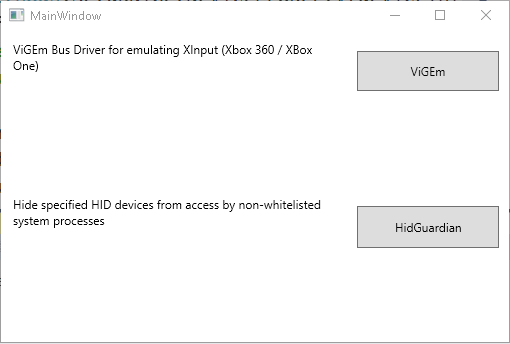
This will probably be a mistake but I can throw out a less than half-baked program for installing ViGEm. The program has been somewhat tested and it works on my machine. It is currently linked to ViGEm 1.14.3.0 and HidGuardian 1.14.0.0. The program is set to only be able to run as the administrator. Also, the HidGuardian installation process replaces the AffectedDevices value in the registry. Make sure to backup your list if you have HidGuardian installed already and you updated your local copy.
http://ryochan7.xyz/ds4windows/test/DriverInstaller_Test_20180131.zip
Ryochan7
on 31 Jan 2018
Changed test driver installer. New version uses modal dialogs for each installer routine and the AffectedDevices list will only be written if one does not exist in the registry already.
http://ryochan7.xyz/ds4windows/test/DriverInstaller_Test_20180218.zip
Ryochan7
on 18 Feb 2018
Don't know if that's supposed to solve the BT Disconnect > BT Reconnect = dinput only issue, but I'm still able to consistently reproduce that with those drivers on 1.4.111.
OptimalJew
on 18 Feb 2018
Regular DS4Windows does not use ViGEm yet so version 1.4.111 cannot be used to test that. I had linked to a version of DS4Windows that was set up to use ViGEm instead of ScpVBus a while ago in this thread; I think the test build is based on version 1.4.109 but I cannot remember. At this point, I am waiting on a new release of ViGEm that includes a couple of changes that I proposed before ViGEm will be used in DS4Windows instead of ScpVBus; the changes have been included in the new ViGEm repository.
https://drive.google.com/open?id=1TMB70uSduoRo2wFWK0jFv-AOV17kFVmy
Ryochan7
on 19 Feb 2018
Checked the patch and built an updated test build that uses ViGEm.
http://ryochan7.xyz/ds4windows/test/DS4Windows_ViGEmTest_x64_20180218.zip
Ryochan7
on 19 Feb 2018
Now we're getting somewhere. With ViGEm and HIDGuardian installed from your earlier link, along with your updated test build, I was able to complete dozens of bluetooth connection cycles without failing and getting locked into dinput mode.
OptimalJew
on 19 Feb 2018
I installed your 20180218 version and now it's not working anymore. The controller light is constantly white and I can't use it for anything. Any suggestion? I didn't make a registry backup, so yeah... my mistake there.
 BibleBeliever
on 19 Feb 2018
BibleBeliever
on 19 Feb 2018
@BibleBeliever You used http://ryochan7.xyz/ds4windows/test/DriverInstaller_Test_20180218.zip to install ViGEm, right?
OptimalJew
on 19 Feb 2018
Yes, that's exactly right. I am really left in great admiration since it's
not working at all.
Is there a way to uninstall ViGEm and Hid? I may have to reinstall my Windows now... -_-
BibleBeliever
on 19 Feb 2018
@BibleBeliever Device Manager > System Devices > right click 'Hidguardian Virtual Device' > Uninstall, repeat for 'Virtual Gamepad Emulation Bus'.
OptimalJew
on 19 Feb 2018
Thanks for that, but the white light is still there. This is quite annoying... any other ideas?
BibleBeliever
on 19 Feb 2018
Sounds an awful lot like #127. The best I can do is recommend you check through that issue and see if any of the prospective solutions help until Ryochan is able to get back to you.
OptimalJew
on 19 Feb 2018
Thanks, man. I guess I'm just gonna fresh install my Windows. 😆
BibleBeliever
on 19 Feb 2018
I just uninstalled my Windows, reinstalled, the issue is still there. This is driving me insane.
Wait, it works now! I had to do another gimmick, this time disconnecting the controller, closing DS4Windows and reconnecting the controller by removing it from device manager and reconnecting. This is tedious work, man!
BibleBeliever
on 19 Feb 2018
ive been unable to get wired mode to work for quite some time. the light
just stays a glowing yellow/orange when plugged in.
On Mon, Feb 19, 2018 at 3:51 PM, AleksKreeshawn notifications@github.com
wrote:
I just uninstalled my Windows, reinstalled, the issue is still there. This
is driving me insane.—
You are receiving this because you commented.
Reply to this email directly, view it on GitHub
https://github.com/Ryochan7/DS4Windows/issues/147#issuecomment-366799910,
or mute the thread
https://github.com/notifications/unsubscribe-auth/ADy0M-eifZ2_UY2m7PAZkWfB6_gONr_Tks5tWd7WgaJpZM4QY49H
.
shinra358
on 28 Feb 2018
working better so far. will updating switch back to the normal version or
will the vigem version still be there?
On Tue, Feb 27, 2018 at 10:29 PM, Quan Chi shinra35888@gmail.com wrote:
ive been unable to get wired mode to work for quite some time. the light
just stays a glowing yellow/orange when plugged in.On Mon, Feb 19, 2018 at 3:51 PM, AleksKreeshawn notifications@github.com
wrote:I just uninstalled my Windows, reinstalled, the issue is still there.
This is driving me insane.—
You are receiving this because you commented.
Reply to this email directly, view it on GitHub
https://github.com/Ryochan7/DS4Windows/issues/147#issuecomment-366799910,
or mute the thread
https://github.com/notifications/unsubscribe-auth/ADy0M-eifZ2_UY2m7PAZkWfB6_gONr_Tks5tWd7WgaJpZM4QY49H
.
shinra358
on 10 Mar 2018
Updating will switch it back to the normal version. The normal version is still using Scp Virtual Bus Driver. You would have to have the test executable stored elsewhere or stored with a different name in the same DS4Windows folder. The plan is to start using ViGEm in the main version starting with version 1.5. Besides needing to work on the driver installer more, I am waiting for an updated version of ViGEm to be released with some optimizations before using ViGEm by default.
Ryochan7
on 11 Mar 2018
New test build based on DS4Windows version 1.4.115
http://ryochan7.xyz/ds4windows/test/DS4Windows_ViGEmTest_x64_20180311.zip
Ryochan7
on 12 Mar 2018
Good job! I had no issue with the driver installer and the ViGEm test version. I just gave a quick spin to good old R-Type in Mame and didn't feel any more input lag than usual. I'll have to check timings a bit further with a game like Bayonetta.
 Ryusennin
on 12 Mar 2018
Ryusennin
on 12 Mar 2018
That test build seems to work fine.
Only thing I noticed was that if I enable run at startup as a program, than it will connect my controller as player 2 instead of player 1. Restarting DS4Windows fixes it.
Although, enabling run at startup as a task works perfectly, so it isn't a big deal.
Would it be too much to ask for a test version with the UDP server from #228 that also uses ViGEm instead of SCP?
reecespieces
on 13 Mar 2018
After encountering problems with refactoring the DInput only option when saving profiles, I decided to no longer rely on the status returned from the plug and unplug methods of the bus. Even if false is returned immediately from the methods, it seemed like the operation would still complete quickly. I am pushing a test build out there to see if this helps the people that have problems with DS4Windows going into DInput only mode unintentionally.
http://ryochan7.xyz/ds4windows/test/DS4Windows_Test_x64_20180321.zip
Ryochan7
on 22 Mar 2018
More changes. I found the reason why I encountered the initial problem while refactoring the code.
http://ryochan7.xyz/ds4windows/test/DS4Windows_Test_x64_20180321_2.zip
Ryochan7
on 22 Mar 2018
aaaaaaand it's back to acting up. no issues with http://ryochan7.xyz/ds4windows/test/DS4Windows_ViGEmTest_x64_20180311.zip
shinra358
on 25 Mar 2018
I am finally making an attempt to not be so lazy and I got a Windows 7 VM running; it only took 4 months to get around to it. I could not get Bluetooth connections working in VMWare Player but it worked in VirtualBox. One problem that I noticed right off the bat is that Windows gives DS4Windows an old invalid file handle when attempting to reconnect so a rapid plug and unplug occurs. I encountered similar behavior when working on fixing suspend and resume behavior. That problem can cause ScpVBus to keep a hold of a controller slot. Disabling and re-enabling the Scp Virtual Bus Device seems to be enough on my installation to get access to the slot again.
Another big problem that people have mentioned before is regarding having to unpair and repair the DS4 almost every time. The controller will reconnect fine if it is reconnected within a few seconds after disconnecting. Otherwise, getting a controller to sync without repairing requires unplugging the Bluetooth dongle and plugging it back into a USB port before attempting to reconnect the DS4 to the dongle.
I will have to see what I can do about debugging these problems but I think I can safely blame Microsoft for the headaches.
Ryochan7
on 25 Mar 2018
The only change made with this build is that the delay before starting the hotplug routine has been increased. The delay is now 1.5 seconds whereas before it was 500 ms. Based on my testing, even when Windows messes up, the delay is enough for ScpVBus to keep working fine.
http://ryochan7.xyz/ds4windows/test/DS4Windows_Test_x64_20180325.zip
Ryochan7
on 25 Mar 2018
This was a solution by j2k in the past. It wasn't enough to solve the issue
completely. But I'm sure something else is coming to solidify the action.
Also, I've switched over to vigem
On Sun, Mar 25, 2018 at 5:51 AM, Travis Nickles notifications@github.com
wrote:
The only change made with this build is that the delay before starting the
hotplug routine has been increased. The delay is now 1.5 seconds whereas
before it was 500 ms. Based on my testing, even when Windows messes up, the
delay is enough for ScpVBus to keep working fine.http://ryochan7.xyz/ds4windows/test/DS4Windows_Test_x64_20180325.zip
—
You are receiving this because you commented.
Reply to this email directly, view it on GitHub
https://github.com/Ryochan7/DS4Windows/issues/147#issuecomment-375958108,
or mute the thread
https://github.com/notifications/unsubscribe-auth/ADy0M-qYfLTOrL2sMVbsq3z6c69xU1Nyks5th2iRgaJpZM4QY49H
.
shinra358
on 26 Mar 2018
Made a change to output the first output report earlier and check if it succeeded before adding a device to the main list.
http://ryochan7.xyz/ds4windows/test/DS4Windows_Test_x64_20180326.zip
Ryochan7
on 26 Mar 2018
2nd controller takes 1st controller's profile. Also, turning off and restarting, you will have to choose another xinput port because the controller sometimes won't work. Light turn on with sound = work. Light turn on with no sound = not work.
this is with vigem still.
Also, we need an uninstaller for your installer program.
shinra358
on 3 Apr 2018
The 2nd controller taking the profile of the 1st can be fixed by running at startup as a task instead of as a program, at least it did for me.
You can uninstall ViGEM by removing the ViGEM device from the device manager.
reecespieces
on 3 Apr 2018
Luckily uninstalling ViGEm is fairly easy. Uninstalling HidGuardian is trickier for a user to do without a utility like devcon. I had made an uninstall routine for the two drivers and here is a build with that change. The utility will check if the driver is installed when launching a wizard and then offer the option to uninstall if the driver is detected.
http://ryochan7.xyz/ds4windows/test/DriverInstaller_Test_20180402.zip
I don't think I have encountered a problem with the 2nd controller using the 1st controller's assigned profile. Could the Linked Profiles system be causing issues here? That was the only time I remember a similar issue occurring.
Ryochan7
on 3 Apr 2018
when reinstalling, do i have to have the controller plugged in with a cord
in order for wired mode to work? Wired mode hasnt worked for me in a long
time.
On Tue, Apr 3, 2018 at 3:01 AM, Travis Nickles notifications@github.com
wrote:
Luckily uninstalling ViGEm is fairly easy. Uninstalling HidGuardian is
trickier for a user to do without a utility like devcon. I had made an
uninstall routine for the two drivers and here is a build with that change.
The utility will check if the driver is installed when launching a wizard
and then offer the option to uninstall if the driver is detected.http://ryochan7.xyz/ds4windows/test/DriverInstaller_Test_20180402.zip
I don't think I have encountered a problem with the 2nd controller using
the 1st controller's assigned profile. Could the Linked Profiles system be
causing issues here? That was the only time I remember a similar issue
occurring.—
You are receiving this because you commented.
Reply to this email directly, view it on GitHub
https://github.com/Ryochan7/DS4Windows/issues/147#issuecomment-378148676,
or mute the thread
https://github.com/notifications/unsubscribe-auth/ADy0M9zL940DbBDzb0yf4NZRJobibGSGks5tkx4vgaJpZM4QY49H
.
shinra358
on 3 Apr 2018
Is your controller permanently disabled? Maybe you should check the Device Manager for HID-compliant game controller devices when the controller is plugged in just to make sure. If there is a little down arrow icon shown then the device has to be re-enabled in order for programs to be able to use it.
Ryochan7
on 4 Apr 2018
when i plug any controller in, it's just the yellow light that slowly flashes. nothing that shows a wired controller ever shows up.
shinra358
on 4 Apr 2018
I really hope someday there will be a tool to auto uninstall all older libraries (HidGuardian and SCP) when ViGem becames the default.
 vico93
on 4 Apr 2018
vico93
on 4 Apr 2018
Updated to the latest vigem build (http://ryochan7.xyz/ds4windows/test/DS4Windows_ViGEmTest_x64_20180311.zip) and started getting weird behavior with controls when connected with bluetooth. Almost 'sticky' with the sticks, where games would sometimes stop registering that I had let go of an analog stick and would continue moving the camera in that direction for a few seconds. Switched over to wired, and while the sticky controls went away, I started getting intermittent disconnect > reconnects anywhere from 10 minutes apart, to 40+ minutes apart.
Tomorrow I'll roll back to the previous vigem build which I hadn't had any of those issues with and see if they persist.
OptimalJew
on 10 Apr 2018
That random disconnect issue has been reported before but I cannot duplicate the problem on my end. Bluetooth works fine and I played Euro Truck Simulator 2 using a USB connection for about an hour with no problems.
Ryochan7
on 10 Apr 2018
This forum topic might be related.
Ryochan7
on 10 Apr 2018
Rolling back to (http://ryochan7.xyz/ds4windows/test/DS4Windows_ViGEmTest_x64_20180218.zip) solved the intermittent wired disconnect>reconnects.
OptimalJew
on 11 Apr 2018
Non of the ports worked for me in the latest vigem version so I switched back to: http://ryochan7.xyz/ds4windows/test/DS4Windows_ViGEmTest_x64_20180218.zip
And instantly starts working again.
shinra358
on 14 Apr 2018
Related issues
 CarissaIsWierd
·
7Comments
CarissaIsWierd
·
7Comments
 pralima87
·
5Comments
pralima87
·
5Comments
 mindah0
·
4Comments
mindah0
·
4Comments
 vicvis
·
4Comments
vicvis
·
4Comments
 bison3
·
5Comments
bison3
·
5Comments