Dropzone: "Add More Button " or a "+" icon when there are already some images in dropzone
I think Dropzone should have an option to show "Add More Button " or a "+" icon when there are already some images in dropzone so that user can understand that he is still able to add more files by clicking here or droping files here. As a developer We know that you are still able to add files, but not all the users are aware of this.
This button should only appear when there are some files in dropzone.
 prabhs226
All 42 comments
You may like to create custom template and made button like i did then js to attach and detach this clickable button

 kavin-90
on 7 Dec 2016
kavin-90
on 7 Dec 2016
@kavin-90 can you send me the code, how attached this button
prabhs226
on 7 Dec 2016
here is my whole code
Dropzone.autoDiscover = false;
$("#compose-photo").dropzone({
paramName: "file",
hiddenInputContainer: "#file-uploader .addfile",
autoProcessQueue: false,
addRemoveLinks : true,
renderMethod: "prepend",
dictDefaultMessage: "Add Photo",
previewsContainer: "#file-uploader",
clickable : "#file-uploader .addfile",
previewTemplate: "<div class=\"pic dz-preview dz-file-preview\">\n  <div class=\"dz-image\"><img data-dz-thumbnail /></div>\n  <div class=\"dz-details\">\n    <div class=\"dz-size\"><span data-dz-size></span></div>\n    <div class=\"dz-filename\"><span data-dz-name></span></div>\n  </div>\n  <div class=\"dz-progress\"><span class=\"dz-upload\" data-dz-uploadprogress></span></div>\n  <div class=\"dz-error-message\"><span data-dz-errormessage></span></div>\n  <div class=\"dz-success-mark\">\n    <svg width=\"54px\" height=\"54px\" viewBox=\"0 0 54 54\" version=\"1.1\" xmlns=\"http://www.w3.org/2000/svg\" xmlns:xlink=\"http://www.w3.org/1999/xlink\" xmlns:sketch=\"http://www.bohemiancoding.com/sketch/ns\">\n      <title>Check</title>\n      <defs></defs>\n      <g id=\"Page-1\" stroke=\"none\" stroke-width=\"1\" fill=\"none\" fill-rule=\"evenodd\" sketch:type=\"MSPage\">\n<path d=\"M23.5,31.8431458 L17.5852419,25.9283877 C16.0248253,24.3679711 13.4910294,24.366835 11.9289322,25.9289322 C10.3700136,27.4878508 10.3665912,30.0234455 11.9283877,31.5852419 L20.4147581,40.0716123 C20.5133999,40.1702541 20.6159315,40.2626649 20.7218615,40.3488435 C22.2835669,41.8725651 24.794234,41.8626202 26.3461564,40.3106978 L43.3106978,23.3461564 C44.8771021,21.7797521 44.8758057,19.2483887 43.3137085,17.6862915 C41.7547899,16.1273729 39.2176035,16.1255422 37.6538436,17.6893022 L23.5,31.8431458 Z M27,53 C41.3594035,53 53,41.3594035 53,27 C53,12.6405965 41.3594035,1 27,1 C12.6405965,1 1,12.6405965 1,27 C1,41.3594035 12.6405965,53 27,53 Z\" id=\"Oval-2\" stroke-opacity=\"0.198794158\" stroke=\"#FFFFFF\" fill-opacity=\"0.816519475\" fill=\"#32A336\" sketch:type=\"MSShapeGroup\"></path>\n      </g>\n    </svg>\n  </div>\n  <div class=\"dz-error-mark\">\n    <svg width=\"54px\" height=\"54px\" viewBox=\"0 0 54 54\" version=\"1.1\" xmlns=\"http://www.w3.org/2000/svg\" xmlns:xlink=\"http://www.w3.org/1999/xlink\" xmlns:sketch=\"http://www.bohemiancoding.com/sketch/ns\">\n      <title>Error</title>\n      <defs></defs>\n      <g id=\"Page-1\" stroke=\"none\" stroke-width=\"1\" fill=\"none\" fill-rule=\"evenodd\" sketch:type=\"MSPage\">\n<g id=\"Check-+-Oval-2\" sketch:type=\"MSLayerGroup\" stroke=\"#FFFFFF\" stroke-opacity=\"0.198794158\" fill=\"#ff0000\" fill-opacity=\"0.816519475\">\n  <path d=\"M32.6568542,29 L38.3106978,23.3461564 C39.8771021,21.7797521 39.8758057,19.2483887 38.3137085,17.6862915 C36.7547899,16.1273729 34.2176035,16.1255422 32.6538436,17.6893022 L27,23.3431458 L21.3461564,17.6893022 C19.7823965,16.1255422 17.2452101,16.1273729 15.6862915,17.6862915 C14.1241943,19.2483887 14.1228979,21.7797521 15.6893022,23.3461564 L21.3431458,29 L15.6893022,34.6538436 C14.1228979,36.2202479 14.1241943,38.7516113 15.6862915,40.3137085 C17.2452101,41.8726271 19.7823965,41.8744578 21.3461564,40.3106978 L27,34.6568542 L32.6538436,40.3106978 C34.2176035,41.8744578 36.7547899,41.8726271 38.3137085,40.3137085 C39.8758057,38.7516113 39.8771021,36.2202479 38.3106978,34.6538436 L32.6568542,29 Z M27,53 C41.3594035,53 53,41.3594035 53,27 C53,12.6405965 41.3594035,1 27,1 C12.6405965,1 1,12.6405965 1,27 C1,41.3594035 12.6405965,53 27,53 Z\" id=\"Oval-2\" sketch:type=\"MSShapeGroup\"></path>\n</g>\n      </g>\n    </svg>\n  </div>\n</div>",
RemoveLinkTemplate: "<div class=\"remove\" data-dz-remove><i class=\"icon-cross\"></i></div>",

init: function() {
var submitButton = document.querySelector("#post-create .post-btn");
myDropzone = this; // closure

submitButton.addEventListener("click", function() {
myDropzone.processQueue(); // Tell Dropzone to process all queued files.
});

}
});
Html
<form action="{{ @home_url }}/ajax/posting/photo" method="post" enctype="multipart/form-data" role="form" id="compose-photo" class="dropzone">
<div id="file-uploader">
<div class="addfile">
<span class="add-file dz-message" data-toggle="tooltip" title="Add Photo"><i class="glyphicon glyphicon-plus"></i>
<div class="fallback">
<input name="photo" id="chose-photo" multiple="" type="file">
</div>
</span>
</div>
</form>
@kavin-90 I think i need to see where you implemented this then it will be much easier to understand.
as I added this template no error messages are being displayed. even I select a wrong file, I am getting the tick sign all the time. I think I need the custom css you implemented .
If you are happy, should I send you my code to you and you modify it for me.
prabhs226
on 7 Dec 2016
Sure you can send me your code
js like
init: function() {

if ($(".pic").length) > 0) {
$(".addfile").show();
} else{
$(".addfile").hide();
}

var submitButton = document.querySelector("#post-create .post-btn");
myDropzone = this; // closure

submitButton.addEventListener("click", function() {
myDropzone.processQueue(); // Tell Dropzone to process all queued files.
});
css i used
/* File Uploader */
#file-uploader{ width:100%; white-space:nowrap; overflow-x: auto; border: 1px solid #b3b3b3;}
#file-uploader .pic{ width:120px; height:120px; text-align:center; border:1px solid #000; border-radius: 5px; margin:8px; display: inline-block; vertical-align:top; position:relative; overflow:hidden;}
#file-uploader .pic img { width:120px; height:120px; text-align:center;}
#file-uploader .pic .remove{cursor: pointer; position:absolute; top:0; right: 0; width:20px; height:20px; background: #eee; z-index:1030; }
#file-uploader .pic-list{ overflow-x: scroll; overflow-y: hidden;}
#file-uploader .addfile{cursor: pointer; border: 2px dashed #32A336; border-radius: 5px; display: inline-block; width:120px; height:120px; text-align:center;  margin:8px; line-height:105px;}
#file-uploader .add-file { position: relative; overflow: hidden;  height: 48px; font-size:2em; }
#file-uploader .add-file input[type="file"]{ height: 20px; position: absolute; top: 0; right: 0; bottom:5px; margin: 0 auto; opacity: 0; cursor: pointer; width: 100%;}

Dropzone.css

/*
 * The MIT License
 * Copyright (c) 2012 Matias Meno <[email protected]>
 */
@-webkit-keyframes passing-through {
  0% {
    opacity: 0;
    -webkit-transform: translateY(40px);
    -moz-transform: translateY(40px);
    -ms-transform: translateY(40px);
    -o-transform: translateY(40px);
    transform: translateY(40px); }
  30%, 70% {
    opacity: 1;
    -webkit-transform: translateY(0px);
    -moz-transform: translateY(0px);
    -ms-transform: translateY(0px);
    -o-transform: translateY(0px);
    transform: translateY(0px); }
  100% {
    opacity: 0;
    -webkit-transform: translateY(-40px);
    -moz-transform: translateY(-40px);
    -ms-transform: translateY(-40px);
    -o-transform: translateY(-40px);
    transform: translateY(-40px); } }
@-moz-keyframes passing-through {
  0% {
    opacity: 0;
    -webkit-transform: translateY(40px);
    -moz-transform: translateY(40px);
    -ms-transform: translateY(40px);
    -o-transform: translateY(40px);
    transform: translateY(40px); }
  30%, 70% {
    opacity: 1;
    -webkit-transform: translateY(0px);
    -moz-transform: translateY(0px);
    -ms-transform: translateY(0px);
    -o-transform: translateY(0px);
    transform: translateY(0px); }
  100% {
    opacity: 0;
    -webkit-transform: translateY(-40px);
    -moz-transform: translateY(-40px);
    -ms-transform: translateY(-40px);
    -o-transform: translateY(-40px);
    transform: translateY(-40px); } }
@keyframes passing-through {
  0% {
    opacity: 0;
    -webkit-transform: translateY(40px);
    -moz-transform: translateY(40px);
    -ms-transform: translateY(40px);
    -o-transform: translateY(40px);
    transform: translateY(40px); }
  30%, 70% {
    opacity: 1;
    -webkit-transform: translateY(0px);
    -moz-transform: translateY(0px);
    -ms-transform: translateY(0px);
    -o-transform: translateY(0px);
    transform: translateY(0px); }
  100% {
    opacity: 0;
    -webkit-transform: translateY(-40px);
    -moz-transform: translateY(-40px);
    -ms-transform: translateY(-40px);
    -o-transform: translateY(-40px);
    transform: translateY(-40px); } }
@-webkit-keyframes slide-in {
  0% {
    opacity: 0;
    -webkit-transform: translateY(40px);
    -moz-transform: translateY(40px);
    -ms-transform: translateY(40px);
    -o-transform: translateY(40px);
    transform: translateY(40px); }
  30% {
    opacity: 1;
    -webkit-transform: translateY(0px);
    -moz-transform: translateY(0px);
    -ms-transform: translateY(0px);
    -o-transform: translateY(0px);
    transform: translateY(0px); } }
@-moz-keyframes slide-in {
  0% {
    opacity: 0;
    -webkit-transform: translateY(40px);
    -moz-transform: translateY(40px);
    -ms-transform: translateY(40px);
    -o-transform: translateY(40px);
    transform: translateY(40px); }
  30% {
    opacity: 1;
    -webkit-transform: translateY(0px);
    -moz-transform: translateY(0px);
    -ms-transform: translateY(0px);
    -o-transform: translateY(0px);
    transform: translateY(0px); } }
@keyframes slide-in {
  0% {
    opacity: 0;
    -webkit-transform: translateY(40px);
    -moz-transform: translateY(40px);
    -ms-transform: translateY(40px);
    -o-transform: translateY(40px);
    transform: translateY(40px); }
  30% {
    opacity: 1;
    -webkit-transform: translateY(0px);
    -moz-transform: translateY(0px);
    -ms-transform: translateY(0px);
    -o-transform: translateY(0px);
    transform: translateY(0px); } }
@-webkit-keyframes pulse {
  0% {
    -webkit-transform: scale(1);
    -moz-transform: scale(1);
    -ms-transform: scale(1);
    -o-transform: scale(1);
    transform: scale(1); }
  10% {
    -webkit-transform: scale(1.1);
    -moz-transform: scale(1.1);
    -ms-transform: scale(1.1);
    -o-transform: scale(1.1);
    transform: scale(1.1); }
  20% {
    -webkit-transform: scale(1);
    -moz-transform: scale(1);
    -ms-transform: scale(1);
    -o-transform: scale(1);
    transform: scale(1); } }
@-moz-keyframes pulse {
  0% {
    -webkit-transform: scale(1);
    -moz-transform: scale(1);
    -ms-transform: scale(1);
    -o-transform: scale(1);
    transform: scale(1); }
  10% {
    -webkit-transform: scale(1.1);
    -moz-transform: scale(1.1);
    -ms-transform: scale(1.1);
    -o-transform: scale(1.1);
    transform: scale(1.1); }
  20% {
    -webkit-transform: scale(1);
    -moz-transform: scale(1);
    -ms-transform: scale(1);
    -o-transform: scale(1);
    transform: scale(1); } }
@keyframes pulse {
  0% {
    -webkit-transform: scale(1);
    -moz-transform: scale(1);
    -ms-transform: scale(1);
    -o-transform: scale(1);
    transform: scale(1); }
  10% {
    -webkit-transform: scale(1.1);
    -moz-transform: scale(1.1);
    -ms-transform: scale(1.1);
    -o-transform: scale(1.1);
    transform: scale(1.1); }
  20% {
    -webkit-transform: scale(1);
    -moz-transform: scale(1);
    -ms-transform: scale(1);
    -o-transform: scale(1);
    transform: scale(1); } }

.dropzone,
.dropzone *,
.dropzone-previews,
.dropzone-previews * {
  -webkit-box-sizing: border-box;
  -moz-box-sizing: border-box;
  box-sizing: border-box;
}
.dropzone {
position: relative;
}
.dropzone.dz-clickable {
  cursor: pointer;
}
.dropzone.dz-clickable .dz-message,
.dropzone.dz-clickable .dz-message span {
  cursor: pointer;
}
.dropzone.dz-clickable * {
  cursor: default;
}
.dropzone .dz-message {
  opacity: 1;
  -ms-filter: none;
  filter: none;
}
.dropzone.dz-drag-hover {
  border-color: rgba(0,0,0,0.15);
  background: rgba(0,0,0,0.04);
}
.dropzone.dz-started .dz-message {
  display: none;
}
.dropzone .dz-preview,
.dropzone-previews .dz-preview {
  background: rgba(255,255,255,0.8);
  position: relative;
  display: inline-block;
  margin: 17px;
  vertical-align: top;
  border: 1px solid #acacac;
}
.dropzone .dz-preview.dz-file-preview [data-dz-thumbnail],
.dropzone-previews .dz-preview.dz-file-preview [data-dz-thumbnail] {
  display: none;
}
.dropzone .dz-preview .dz-details,
.dropzone-previews .dz-preview .dz-details {
  width: 100px;
  height: 100px;
  position: absolute;

margin: 15px 5px;
  top: 0px;
}
.dropzone .dz-preview .dz-details .dz-filename,
.dropzone-previews .dz-preview .dz-details .dz-filename {
overflow: hidden;
font-weight:bold;
}
.dropzone .dz-preview .dz-details img,
.dropzone-previews .dz-preview .dz-details img {
  position: absolute;
  top: 0;
  left: 0;
  width: 100px;
  height: 100px;
}
.dropzone .dz-preview .dz-details .dz-size,
.dropzone-previews .dz-preview .dz-details .dz-size {
  position: absolute;
bottom: 20px;
  height: 28px;
  line-height: 28px;
}
.dropzone .dz-preview.dz-error .dz-error-mark,
.dropzone-previews .dz-preview.dz-error .dz-error-mark {
  display: block;
}
.dropzone .dz-preview.dz-success .dz-success-mark,
.dropzone-previews .dz-preview.dz-success .dz-success-mark {
  display: block;
}
.dropzone .dz-preview:hover .dz-details img,
.dropzone-previews .dz-preview:hover .dz-details img {
  display: none;
}
.dropzone .dz-preview .dz-success-mark,
.dropzone-previews .dz-preview .dz-success-mark,
.dropzone .dz-preview .dz-error-mark,
.dropzone-previews .dz-preview .dz-error-mark {
  display: none;
  position: absolute;
  width: 40px;
  height: 40px;
  font-size: 30px;
  text-align: center;
  right: -10px;
  top: -10px;
}
.dropzone .dz-preview .dz-success-mark,
.dropzone-previews .dz-preview .dz-success-mark {
  color: #8cc657;
}
.dropzone .dz-preview .dz-error-mark,
.dropzone-previews .dz-preview .dz-error-mark {
  color: #ee162d;
}
.dropzone .dz-preview .dz-progress,
.dropzone-previews .dz-preview .dz-progress {
  position: absolute;
  top: 100px;
  left: 6px;
  right: 6px;
  height: 6px;
  background: #d7d7d7;
}
.dropzone .dz-preview .dz-progress .dz-upload,
.dropzone-previews .dz-preview .dz-progress .dz-upload {
  display: block;
  position: absolute;
  top: 0;
  bottom: 0;
  left: 0;
  width: 0%;
  background-color: #8cc657;
}
.dropzone .dz-preview.dz-processing .dz-progress,
.dropzone-previews .dz-preview.dz-processing .dz-progress {
  display: block;
}
.dropzone .dz-preview .dz-error-message,
.dropzone-previews .dz-preview .dz-error-message {
  display: none;
  position: absolute;
  top: -5px;
  left: -20px;
  background: rgba(245,245,245,0.8);
  padding: 8px 10px;
  color: #800;
  min-width: 140px;
  max-width: 500px;
  z-index: 500;
}
.dropzone .dz-preview:hover.dz-error .dz-error-message,
.dropzone-previews .dz-preview:hover.dz-error .dz-error-message {
  display: block;
}

.dropzone .dz-default.dz-message {
  opacity: 1;
  position: absolute;
  width: 428px;
  height: 123px;
  top: 50%;
  left: 50%;
}

.dropzone .dz-default.dz-message span {
  display: none;
}
.dropzone.dz-square .dz-default.dz-message {
  background-position: 0 -123px;
  width: 268px;
  margin-left: -134px;
  height: 174px;
  margin-top: -87px;
}
.dropzone.dz-drag-hover .dz-message {
  opacity: 0.15;
  -ms-filter: "progid:DXImageTransform.Microsoft.Alpha(Opacity=15)";
  filter: alpha(opacity=15);
}
.dropzone.dz-started .dz-message {
  display: block;
  opacity: 0;
  -ms-filter: "progid:DXImageTransform.Microsoft.Alpha(Opacity=0)";
  filter: alpha(opacity=0);
}
.dropzone .dz-preview,
.dropzone-previews .dz-preview {
  -webkit-box-shadow: 1px 1px 4px rgba(0,0,0,0.16);
  box-shadow: 1px 1px 4px rgba(0,0,0,0.16);
  font-size: 14px;
}
.dropzone .dz-preview.dz-image-preview:hover .dz-details img,
.dropzone-previews .dz-preview.dz-image-preview:hover .dz-details img {
  display: block;
  opacity: 0.1;
  -ms-filter: "progid:DXImageTransform.Microsoft.Alpha(Opacity=10)";
  filter: alpha(opacity=10);
}
.dropzone .dz-preview.dz-success .dz-success-mark,
.dropzone-previews .dz-preview.dz-success .dz-success-mark {
  opacity: 1;
  -ms-filter: none;
  filter: none;
}
.dropzone .dz-preview.dz-error .dz-error-mark,
.dropzone-previews .dz-preview.dz-error .dz-error-mark {
  opacity: 1;
  -ms-filter: none;
  filter: none;
}
.dropzone .dz-preview.dz-error .dz-progress .dz-upload,
.dropzone-previews .dz-preview.dz-error .dz-progress .dz-upload {
  background: #ee1e2d;
}

.dropzone .dz-preview .dz-error-mark span,
.dropzone-previews .dz-preview .dz-error-mark span,
.dropzone .dz-preview .dz-success-mark span,
.dropzone-previews .dz-preview .dz-success-mark span {
  display: none;
}


.dropzone .dz-preview .dz-progress .dz-upload,
.dropzone-previews .dz-preview .dz-progress .dz-upload {
  position: absolute;
  top: 0;
  left: 0;
  width: 0%;
  height: 100%;
}

.dropzone .dz-preview.dz-success .dz-progress,
.dropzone-previews .dz-preview.dz-success .dz-progress {
  display: block;
  opacity: 0;
  -ms-filter: "progid:DXImageTransform.Microsoft.Alpha(Opacity=0)";
  filter: alpha(opacity=0);
  -webkit-transition: opacity 0.4s ease-in-out;
  -moz-transition: opacity 0.4s ease-in-out;
  -o-transition: opacity 0.4s ease-in-out;
  -ms-transition: opacity 0.4s ease-in-out;
  transition: opacity 0.4s ease-in-out;
}
.dropzone .dz-preview .dz-error-message,
.dropzone-previews .dz-preview .dz-error-message {
  display: block;
  opacity: 0;
  -ms-filter: "progid:DXImageTransform.Microsoft.Alpha(Opacity=0)";
  filter: alpha(opacity=0);
  -webkit-transition: opacity 0.3s ease-in-out;
  -moz-transition: opacity 0.3s ease-in-out;
  -o-transition: opacity 0.3s ease-in-out;
  -ms-transition: opacity 0.3s ease-in-out;
  transition: opacity 0.3s ease-in-out;
}
.dropzone .dz-preview:hover.dz-error .dz-error-message,
.dropzone-previews .dz-preview:hover.dz-error .dz-error-message {
  opacity: 1;
  -ms-filter: none;
  filter: none;
}
.dropzone a.dz-remove,
.dropzone-previews a.dz-remove {
  background-image: -webkit-linear-gradient(top, #fafafa, #eee);
  background-image: -moz-linear-gradient(top, #fafafa, #eee);
  background-image: -o-linear-gradient(top, #fafafa, #eee);
  background-image: -ms-linear-gradient(top, #fafafa, #eee);
  background-image: linear-gradient(to bottom, #fafafa, #eee);
  -webkit-border-radius: 2px;
  border-radius: 2px;
  border: 1px solid #eee;
  text-decoration: none;
  display: block;
  padding: 4px 5px;
  text-align: center;
  color: #aaa;
  margin-top: 26px;
}
.dropzone a.dz-remove:hover,
.dropzone-previews a.dz-remove:hover {
  color: #666;
}
@-moz-keyframes loading {
  0% {
    background-position: 0 -400px;
  }

  100% {
    background-position: -7px -400px;
  }
}
@-webkit-keyframes loading {
  0% {
    background-position: 0 -400px;
  }

  100% {
    background-position: -7px -400px;
  }
}
@-o-keyframes loading {
  0% {
    background-position: 0 -400px;
  }

  100% {
    background-position: -7px -400px;
  }
}
@-ms-keyframes loading {
  0% {
    background-position: 0 -400px;
  }

  100% {
    background-position: -7px -400px;
  }
}
@keyframes loading {
  0% {
    background-position: 0 -400px;
  }

  100% {
    background-position: -7px -400px;
  }
}

.dropzone .dz-preview.dz-success .dz-success-mark { -webkit-animation: passing-through 3s cubic-bezier(0.77, 0, 0.175, 1); -moz-animation: passing-through 3s cubic-bezier(0.77, 0, 0.175, 1); -ms-animation: passing-through 3s cubic-bezier(0.77, 0, 0.175, 1); -o-animation: passing-through 3s cubic-bezier(0.77, 0, 0.175, 1); animation: passing-through 3s cubic-bezier(0.77, 0, 0.175, 1); }
.dropzone .dz-preview.dz-error .dz-error-mark { opacity: 1; -webkit-animation: slide-in 3s cubic-bezier(0.77, 0, 0.175, 1); -moz-animation: slide-in 3s cubic-bezier(0.77, 0, 0.175, 1); -ms-animation: slide-in 3s cubic-bezier(0.77, 0, 0.175, 1); -o-animation: slide-in 3s cubic-bezier(0.77, 0, 0.175, 1); animation: slide-in 3s cubic-bezier(0.77, 0, 0.175, 1); }
.dropzone .dz-preview .dz-success-mark, .dropzone .dz-preview .dz-error-mark { pointer-events: none; opacity: 0; z-index: 500; position: absolute; display: block; top: 50%; left: 50%; margin-left: -27px; margin-top: -27px; }
.dropzone .dz-preview .dz-success-mark svg, .dropzone .dz-preview .dz-error-mark svg { display: block; width: 54px; height: 54px; }
Ideally, I think this icon should be shown when the container/form expects multiple files. Also, if the dev selected to not display the "drop here" prompt, the icon should be shown even when there are no files queued/uploaded so that there is a visual prompt.
Both of these just need additional checks in the JS.
 anudeep3998
on 9 Dec 2016
anudeep3998
on 9 Dec 2016
@kavin-90 @anudeep3998 I achieved this by another easier and simpler method. What I did id opened the dropzone.js file and looked for the line where it adds the preview element to the dropzone . what was happening there was that it was appending the data and adding class dropzone_ready(don't remember exact. I guess it was something like this , or like ready or something else) . so what i did was that i commented that line and took the data it was appending and I used insertbefore method to insert the data before the dz-message(that help text which says drop files here to upload).
so the trick is that when you drop a file it insert preview element just before this message and add an extra class to the message. then it was all css wrt this new added class in which i just changed the size and images visibility. and its working fine. I t just took 15-20 minutes and it was ready.


prabhs226
on 16 Dec 2016
@enyo I think this issue need to be closed now.
prabhs226
on 16 Dec 2016
I still think it would be kinda cool if this was inbuilt. Grated, we can hack the source, but not everyone can, so for the library to do this by itself would be nice. It would be nice to see someone with some knowledge about what this change would influence.
anudeep3998
on 19 Dec 2016
@anudeep3998 @enyo Do everyone have right to modify the source and publish it again. I think this is not a cool way but still can help in some way. I know that I used custom design for message , so its not possible that my method is helpfull for everyone but i can add the option and this can be placed in some another section in docs
prabhs226
on 20 Dec 2016
@prabhs226 You need to fork the repo, make the changes, and issue a pull request to enyo.
anudeep3998
on 20 Dec 2016
@anudeep3998 okay, I will do this whenever I got some time .
prabhs226
on 23 Dec 2016
i can not solve this problem ,can you help me ,thanks
 chenjuewei
on 19 Jun 2017
chenjuewei
on 19 Jun 2017
@chenjuewei I am here to help you. tell me where are you stuck at
prabhs226
on 19 Jun 2017
I don't understand what you have changed,above
chenjuewei
on 19 Jun 2017
i try to change js,but can not Reach the effect
chenjuewei
on 19 Jun 2017
@chenjuewei okay that ? that was very simple. as you can see that by default the code is being appended. I just commented that line and instead inserted the preview element before the .dz-default . But the task is not finished here. Just when there is any image inserted in dropzone you will see that , that help text or whatever you say to it is gone. actually an other class (dz-started) is added to the main div or element . if you see the css it is .dz-started .dz-default{display:none} all you have to do is to change this to
`.dz-started .dz-default.dz-message {
    display: inline-block !important;
}
.dz-started .dz-default.dz-message p,
.dz-started .dz-default.dz-message h2{
    display: none;
}

.dz-started .dz-default.dz-message .add_new{
    display: none;
}
.dz-started .dz-default.dz-message .add_more{
    display: inline-block;
}
.dz-default.dz-message .add_more{
    display: none;
}
.dz-started .dz-default.dz-message {
    margin: 16px 0 0 0;
    padding: 37px 29px;
    border: 1px dashed #ccc;
    border-radius: 6px;
}`
and set dictDefaultMessage equalt to somethink like this
dictDefaultMessage: "<img class='add_new' src='/frontend/camera-black.png'><img class='add_more' src='/frontend/plus.png'><h2>Drag and drop your photos here to upload</h2><p><a href='javascript:void(0)'>Or Click here to browse for photos</a></p>",
You can modify it according to your need
prabhs226
on 19 Jun 2017
thanks, let me try again;I'm glad you answered it for me;and where are you from
chenjuewei
on 19 Jun 2017
I am from Patiala, India.
prabhs226
on 19 Jun 2017
I am thinking of working on this with a better way. like by default having an option in which that element can also have its own template. (something like)
prabhs226
on 19 Jun 2017
I don't think it's that deep, I've been in touch with this for a year,i need learn more,Thank you for your sincerity,cheer
chenjuewei
on 19 Jun 2017
@chenjuewei and where are you from? and what you do? I forgot to ask did it worked for you ?
prabhs226
on 19 Jun 2017
i am chinese ;I am a junior programmer
chenjuewei
on 19 Jun 2017
@chenjuewei in which language do you work. and i am currently in php with just 1 year experience (I just graduated last year) but want to move to java (not javascrit) can you help me in any way or suggest something
prabhs226
on 19 Jun 2017
i am currently in java,If you need help, you can find me.
chenjuewei
on 19 Jun 2017
Do you have any WeChat
chenjuewei
on 19 Jun 2017
well I actually dont use it but i can install it
prabhs226
on 19 Jun 2017
@chenjuewei can you connect with me on facebook?
prabhs226
on 19 Jun 2017
Or do you have any chat tools;So we can keep in touch, and i hope you can visit China
chenjuewei
on 19 Jun 2017
@chenjuewei I can connect on whatsapp . or facebook messenger
prabhs226
on 19 Jun 2017
let me a moment ,i can install facebook
chenjuewei
on 19 Jun 2017
My account needs to be reviewed,Maybe a day or two
chenjuewei
on 19 Jun 2017
@chenjuewei I am installing wechat just give me your detail to reach you
prabhs226
on 19 Jun 2017
cjw1115099400 this is my account
chenjuewei
on 19 Jun 2017
I think that was my favourite issue comment thread by far 😃 Nice to see that Dropzone creates new friendships.
 enyo
on 23 Jun 2017
enyo
on 23 Jun 2017
@prabhs226 I like the idea of showing a [+] icon when images are already shown. If I find the time, I'll add it to the feature list. As others have described, it's possible to implement yourself though, so it's not high priority.
enyo
on 23 Jun 2017
@enyo Better change the name to friendzone 😛😜.
Its nice to hear that you liked the idea. Yo can add an option to appear a + sign .user can have the option to modify its template.
prabhs226
on 23 Jun 2017
A simple way to do it without changing source code, if you're adding dropzone programmatically. You can even make it work with sortable.
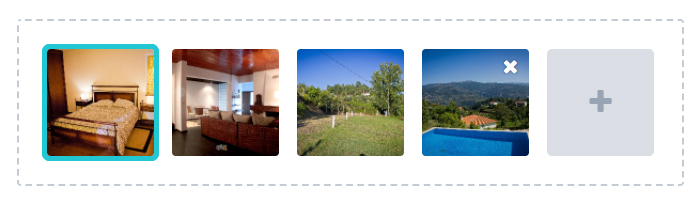
//JS code

var imageDrop = this.el.querySelector(".dropzone")
var addMoreImages = this.el.querySelector(".add-image")

//If you want sortable to work, but keep .add-image always at last
Sortable.create(imageDrop, {
    //options...
    filter: '.add-image',
    onMove: function (event) {
        return addMoreImages !== event.related;
    }
});

var dropzone = new Dropzone(imageDrop, {
    //options...
    clickable: '.add-image, .dropzone',
    init: function() {
      this.on("addedfile", function(file) {

          imageDrop.insertBefore(addMoreImages, dropzone.children)

          if(this.files.length >= this.options.maxFiles) {
              addMoreImages.classList.add("hidden")
          }
      });

      this.on("removedfile", function(file) {
          if(this.files.length < this.options.maxFiles) {
              addMoreImages.classList.remove("hidden")
          }
      });
    }
});


//HTML code

<div class="dropzone">
    <div class="images-empty-messages-holder dz-message dz-default">
        <span class="image-icon fa fa-image"/>
        <span class="drag-message">Drop images here</span>
        <span class="click-message">Or click to explore your files</span>
    </div>
    <div class="add-image dz-clickable">
        <div>
            <span class="fa fa-plus"></span>
        </div>
    </div>
</div>


//Using less

.dropzone {
    border: .12rem dashed @light-gray;
    .border-radius(.2rem);
    padding: 1rem;
    min-height: 8rem;
    cursor: pointer;
    display: flex;
    flex-wrap: wrap;
    flex-direction: row;
    position: relative;

    &.dz-started .dz-message {
        display: none;
    }

    .add-image {
        width: @image-size; //same size as dz-preview
        display: block;
        cursor: pointer;

        div {
            .size(100%, auto);
            padding-top: 100%;
            position: relative;
            display: flex;
            align-items: center;
            background-color: @very-light-gray;
            border-radius: 5px;
            text-align:center;

            span {
                position: absolute;
                top: 50%;
                .translate(0, -50%);
                width: 100%;
                color: @mid-gray;
                font-size: 1.5rem;
            }
        }
    }

    &:not(.dz-started) .add-image {
        display: none;
    }

    .dz-preview,
    .dz-image-preview {
        .user-select(none);
        width: @image-size;
        display: block;
        (...)
    }
}
 andresilvasantos
on 11 Oct 2017
andresilvasantos
on 11 Oct 2017
i have changed it ,thanks
chenjuewei
on 12 Oct 2017
can i make friends with you?wo can learn each other
chenjuewei
on 12 Oct 2017
Thanks for the update
kavin-90
on 14 Oct 2017
@andresilvasantos there is no way to implement that without using less?
 maxalmonte14
on 14 Jan 2018
maxalmonte14
on 14 Jan 2018
Related issues
 mPisano
·
18Comments
mPisano
·
18Comments
 leighsmith
·
18Comments
leighsmith
·
18Comments
 CallMeBruce
·
26Comments
CallMeBruce
·
26Comments
 nairvishal
·
18Comments
nairvishal
·
18Comments
 mfeif
·
35Comments
mfeif
·
35Comments
Most helpful comment
@kavin-90 @anudeep3998 I achieved this by another easier and simpler method. What I did id opened the dropzone.js file and looked for the line where it adds the preview element to the dropzone . what was happening there was that it was appending the data and adding class dropzone_ready(don't remember exact. I guess it was something like this , or like ready or something else) . so what i did was that i commented that line and took the data it was appending and I used insertbefore method to insert the data before the dz-message(that help text which says drop files here to upload).


so the trick is that when you drop a file it insert preview element just before this message and add an extra class to the message. then it was all css wrt this new added class in which i just changed the size and images visibility. and its working fine. I t just took 15-20 minutes and it was ready.