Prework
Dear community, thanks to Will I started to rewrite my drake workflow using dynamic branching:
Original workflow: #1293
Modified workflow to correct the DAG: #1294
First attemp to rewrite the plan using dynamic targets: #1311
Question
The problem is that now I wanted to combined dynamic with static branching and I dont know if this a good idea. The basic plan looks as follows:
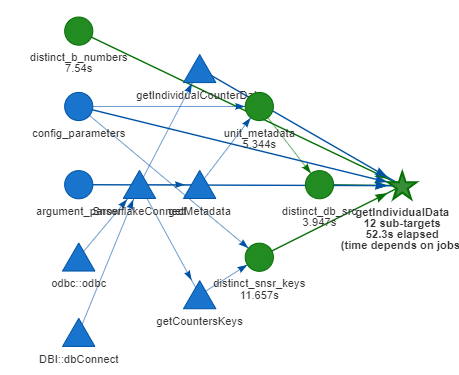
And the targets and the logs show that this works properly:
[1] "PROD Connected"
[1] "Getting lifecounterdata for XXXXXXXXX  and sensor 71 and database source 1"
[1] "Removing duplicates if we have them"
[1] "Original data has 412 rows"
[1] "Data without duplicates has 412 rows"
[1] "PROD Connected"
[1] "Getting lifecounterdata for XXXXXXXXX  and sensor 71 and database source 2"
[1] "Removing duplicates if we have them"
[1] "Original data has 384 rows"
[1] "Data without duplicates has 384 rows"
[1] "PROD Connected"
[1] "Getting lifecounterdata for XXXXXXXXX  and sensor 71 and database source 3"
[1] "Removing duplicates if we have them"
[1] "Original data has 379 rows"
[1] "Data without duplicates has 379 rows"
[1] "PROD Connected"
[1] "Getting lifecounterdata for XXXXXXXXX  and sensor 70 and database source 1"
[1] "Removing duplicates if we have them"
[1] "Original data has 412 rows"
[1] "Data without duplicates has 412 rows"
[1] "PROD Connected"
[1] "Getting lifecounterdata for XXXXXXXXX  and sensor 70 and database source 2"
[1] "Removing duplicates if we have them"
[1] "Original data has 274 rows"
[1] "Data without duplicates has 274 rows"
[1] "PROD Connected"
[1] "Getting lifecounterdata for XXXXXXXXX  and sensor 70 and database source 3"
[1] "Removing duplicates if we have them"
[1] "Original data has 379 rows"
[1] "Data without duplicates has 379 rows"
[1] "PROD Connected"
[1] "Getting lifecounterdata for XXXXXXXXX  and sensor 105 and database source 1"
[1] "Removing duplicates if we have them"
[1] "Original data has 412 rows"
[1] "Data without duplicates has 412 rows"
[1] "PROD Connected"
[1] "Getting lifecounterdata for XXXXXXXXX  and sensor 105 and database source 2"
[1] "Removing duplicates if we have them"
[1] "Original data has 384 rows"
[1] "Data without duplicates has 384 rows"
[1] "PROD Connected"
[1] "Getting lifecounterdata for XXXXXXXXX  and sensor 105 and database source 3"
[1] "Removing duplicates if we have them"
[1] "Original data has 379 rows"
[1] "Data without duplicates has 379 rows"
[1] "PROD Connected"
[1] "Getting lifecounterdata for XXXXXXXXX  and sensor 110 and database source 1"
[1] "Removing duplicates if we have them"
[1] "Original data has 412 rows"
[1] "Data without duplicates has 412 rows"
[1] "PROD Connected"
[1] "Getting lifecounterdata for XXXXXXXXX  and sensor 110 and database source 2"
[1] "Removing duplicates if we have them"
[1] "Original data has 384 rows"
[1] "Data without duplicates has 384 rows"
[1] "PROD Connected"
[1] "Getting lifecounterdata for XXXXXXXXX and sensor 110 and database source 3"
[1] "Removing duplicates if we have them"
[1] "Original data has 379 rows"
[1] "Data without duplicates has 379 rows"
■ finalize getIndividualData
However when I add the preprocessing step:
new_plan_dynamic_branch_test <- drake_plan(
  unit_metadata = getMetadata(
    environment = "PROD",
    key_directory = config_parameters$LOCAL_CONFIG$DirectoryKeyCloud_RStudio,
    operex_schema = config_parameters$SF_CONFIG$schema_name, db_src = c(1, 2, 3)
  ),
  distinct_b_numbers = c('testmachine'),
  distinct_db_src = unit_metadata$db_src %>% unique() %>% as.numeric() %>% sort(),
  distinct_snsr_keys = getCountersKeys(
    environment = "PROD",
    key_directory = config_parameters$LOCAL_CONFIG$DirectoryKeyCloud_RStudio,
    operex_schema = config_parameters$SF_CONFIG$schema_name
  ),
  getIndividualData = target(
    getIndividualCounterData(
      environment = "PROD",
      key_directory = config_parameters$RSTUDIO_CLOUD_CONF$KeyDir,
      operex_schema = config_parameters$SF_CONFIG$schema_name,
      package_b_number = distinct_b_numbers,
      counter = distinct_snsr_keys,
      db_src = distinct_db_src,
      max_forecasting_horizon = argument_parser$horizon
    ),
    dynamic = cross( # Use `dynamic =` instead of `transform =`
      distinct_b_numbers, # no tidy evaluation needed for dynamic branching
      distinct_snsr_keys,
      distinct_db_src
    )
  ),
  processingData = featureEngineering(
      raw_data = getIndividualData,
      max_forecasting_horizon = argument_parser$horizon
      )
)
It seems that the processingData target does not link automatically with the dynamic branches:
[1] "Augmenting and cleaning weekly data for XXXXXXXXXX and snsr 71 and db_src 1"
[2] "Augmenting and cleaning weekly data for XXXXXXXXXX and snsr 70 and db_src 2"
[3] "Augmenting and cleaning weekly data for BD000019U01 and snsr 105 and db_src 3"
[4] "Augmenting and cleaning weekly data for BD000019U01 and snsr 110 and db_src 1"
[1] "Creating tsibble"
[1] "Filling gaps for XXXXXXXXXX and snsr 71 and db_src 1 for not breaking training"
[2] "Filling gaps for XXXXXXXXXX and snsr 70 and db_src 2 for not breaking training"
[3] "Filling gaps for XXXXXXXXXX and snsr 105 and db_src 3 for not breaking training"
[4] "Filling gaps for XXXXXXXXXX and snsr 110 and db_src 1 for not breaking training"
My feature engineering function is as follows:
featureEngineering <- function(raw_data, max_forecasting_horizon) {

if(nrow(raw_data) >= 104) {
    print(paste0("Augmenting and cleaning weekly data for ",
                 unique(raw_data$b_number),
                 " and snsr ",
                 unique(raw_data$snsr_key),
                 " and db_src ", unique(raw_data$db_src)))

    if(max_forecasting_horizon <= 104) {

      processed_data <- raw_data %>%
        #filter(db_src != 3) %>%
        filter(n() >= 52*2) %>%
      mutate(snsr_val_clean = if_else(condition = inc_tag == 'Y', true = snsr_val, false = NA_real_)) %>%
      mutate(snsr_val_clean = na.approx(snsr_val_clean, na.rm=FALSE)) %>%
      select(-c(qlty_interp, qlty_good_ind, inc_tag, locf_tag, snsr_ts, snsr_val)) %>%
      tk_augment_timeseries_signature(.date_var = snsr_dt) %>%
      select(-c("hour", "minute", "second", "hour12", "diff", "am.pm")) %>%
      drop_na()

    } else if(max_forecasting_horizon > 104) {
      print(paste0("Augmenting and cleaning monthly data for ",
                   unique(raw_data$b_number),
                   " and snsr ",
                   unique(raw_data$snsr_key),
                   " and db_src ", unique(raw_data$db_src)))
      processed_data <- raw_data %>% filter(n() >= 12*2) %>%
      mutate(snsr_val_clean = if_else(condition = inc_tag == 'Y', true = snsr_val, false = NA_real_)) %>%
      mutate(snsr_val_clean = na.approx(snsr_val_clean, na.rm=FALSE)) %>%
      select(-c(qlty_interp, qlty_good_ind, inc_tag, locf_tag, snsr_ts, snsr_val)) %>%
      tk_augment_timeseries_signature(.date_var = snsr_dt) %>%
      select(-c("hour", "minute", "second", "hour12", "diff", "am.pm")) %>%
      drop_na()
    }

    print("Creating tsibble")


    ts_tibble <- as_tsibble(processed_data,
                            key=c(b_number, snsr_key, db_src), index = snsr_dt)

    print(paste0("Filling gaps for ", unique(raw_data$b_number),
                 " and snsr ",
                 unique(raw_data$snsr_key),
                 " and db_src ", unique(raw_data$db_src),
          " for not breaking training"))
    ts_tibble <- ts_tibble %>% fill_gaps()
    return(ts_tibble)

} else {
  print("Not enough samples to train a model for ",
        unique(raw_data$b_number),
        " and snsr ",
        unique(raw_data$snsr_key),
        " and db_src ", unique(raw_data$db_src))
}
}
Do I need to pass the dynamic parameters to the featureengineering function? Is there a way of chaining properly this 2 functions?
BR
/E
 edgBR
edgBR
All 2 comments
If you want processingData to iterate over the getIndividualData sub-targets, the processingData needs dynamic = map(getIndividualData). Otherwise, processingData will receive all the dynamic sub-targets at once, combined using vctrs::vec_c(getIndividualData). Sketch:
drake_plan(
  # ...
  getIndividualData = target(
    getIndividualCounterData(...),
    dynamic = cross(
      distinct_b_numbers,
      distinct_snsr_keys,
      distinct_db_src
    )
  ),
  processingData = target(
    featureEngineering(
      raw_data = getIndividualData,
      max_forecasting_horizon = argument_parser$horizon
    ),
    dynamic = map(getIndividualData) # New dynamic branching statement here.
  )
)
 wlandau
on 3 Sep 2020
wlandau
on 3 Sep 2020
I wanted to combined dynamic with static branching and I dont know if this a good idea.
You can definitely combine static and dynamic branching. You can think of static branching as an outer layer on top of dynamic branching. Dynamic branching is best for iterating over a large number of similar-looking targets, and static branching is best for iterating over a smaller number of targets with informative names.
Here is a sketch of a workflow that uses static branching to iterate across analysis methods and dynamic branching to iterate across simulated datasets within those analysis methods.
library(broom)
library(drake)
library(tidyverse)

method1 <- function(data) {
  lm(y ~ x, data = data) %>%
    summarize_method(data = data)
}
method2 <- function(data) {
  lm(y ~ x ^ 2, data = data) %>%
    summarize_method(data = data)
}
summarize_method <- function(fit, data) {
  fit %>%
    tidy() %>%
    mutate(rep = data$rep[1]) %>%
    filter(term == "x")
}

plan <- drake_plan(
  index = seq_len(10),
  data = target(
    tibble(x = rnorm(100), y = rnorm(100), rep = index),
    dynamic = map(index) # dynamic branching
  ),
  model = target(
    method(data),
    dynamic = map(data), # dynamic branching
    transform = map(method = c(method1, method2)) # static branching
  )
)

plot(plan)

make(plan)
#> ▶ target index
#> ▶ dynamic data
#> > subtarget data_0b3474bd
#> > subtarget data_b2a5c9b8
#> > subtarget data_71f311ad
#> > subtarget data_98cf3c11
#> > subtarget data_0a86c9cb
#> > subtarget data_cb15b01f
#> > subtarget data_8531e6ff
#> > subtarget data_28b16d75
#> > subtarget data_4edaada2
#> > subtarget data_db4b2027
#> ■ finalize data
#> ▶ dynamic model_method1
#> > subtarget model_method1_8f27d63b
#> > subtarget model_method1_b3e24635
#> > subtarget model_method1_606dcc72
#> > subtarget model_method1_aecefe4c
#> > subtarget model_method1_47cca0bb
#> > subtarget model_method1_d29f8d89
#> > subtarget model_method1_a8dfc2c2
#> > subtarget model_method1_eb6b4ecc
#> > subtarget model_method1_fe51a1fe
#> > subtarget model_method1_fe7f2826
#> ■ finalize model_method1
#> ▶ dynamic model_method2
#> > subtarget model_method2_8f27d63b
#> > subtarget model_method2_b3e24635
#> > subtarget model_method2_606dcc72
#> > subtarget model_method2_aecefe4c
#> > subtarget model_method2_47cca0bb
#> > subtarget model_method2_d29f8d89
#> > subtarget model_method2_a8dfc2c2
#> > subtarget model_method2_eb6b4ecc
#> > subtarget model_method2_fe51a1fe
#> > subtarget model_method2_fe7f2826
#> ■ finalize model_method2

readd(model_method1)
#> # A tibble: 10 x 6
#>    term  estimate std.error statistic p.value   rep
#>    <chr>    <dbl>     <dbl>     <dbl>   <dbl> <int>
#>  1 x       0.0890    0.120      0.744  0.459      1
#>  2 x      -0.106     0.112     -0.954  0.343      2
#>  3 x       0.0496    0.110      0.449  0.654      3
#>  4 x       0.0859    0.141      0.609  0.544      4
#>  5 x       0.0532    0.103      0.515  0.608      5
#>  6 x       0.185     0.101      1.83   0.0702     6
#>  7 x      -0.0381    0.0917    -0.415  0.679      7
#>  8 x       0.131     0.0998     1.31   0.193      8
#>  9 x      -0.135     0.106     -1.27   0.206      9
#> 10 x       0.0550    0.0961     0.573  0.568     10

readd(model_method2)
#> # A tibble: 10 x 6
#>    term  estimate std.error statistic p.value   rep
#>    <chr>    <dbl>     <dbl>     <dbl>   <dbl> <int>
#>  1 x       0.0890    0.120      0.744  0.459      1
#>  2 x      -0.106     0.112     -0.954  0.343      2
#>  3 x       0.0496    0.110      0.449  0.654      3
#>  4 x       0.0859    0.141      0.609  0.544      4
#>  5 x       0.0532    0.103      0.515  0.608      5
#>  6 x       0.185     0.101      1.83   0.0702     6
#>  7 x      -0.0381    0.0917    -0.415  0.679      7
#>  8 x       0.131     0.0998     1.31   0.193      8
#>  9 x      -0.135     0.106     -1.27   0.206      9
#> 10 x       0.0550    0.0961     0.573  0.568     10
Created on 2020-09-03 by the reprex package (v0.3.0)
wlandau
on 3 Sep 2020
Related issues
 krlmlr
·
44Comments
krlmlr
·
44Comments
 psadil
·
42Comments
wlandau
·
29Comments
krlmlr
·
35Comments
wlandau
·
61Comments
psadil
·
42Comments
wlandau
·
29Comments
krlmlr
·
35Comments
wlandau
·
61Comments