Draggable: Changing width in sortable
Hey guys,
first of all thanks for the great plugin, really happy that I found a drag&drop plugin working great on mobile and desktop :)
I'm using the sortable "part" of your package for a simple list, the problem is that the width of the list elements is set with width: 100%, necessary because the width of the list is changing. Now the problem is that when clicking on an item to drag it, the mirror elements gets way too big as you can see in the image below
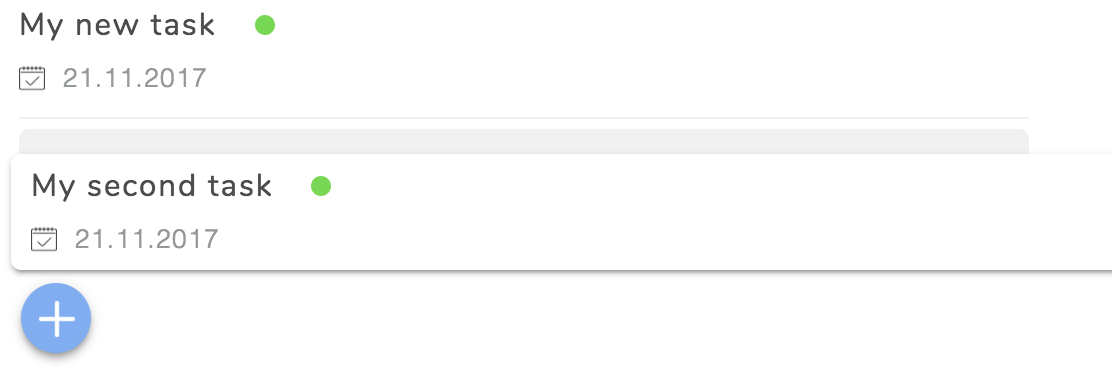
I think the problem is that the position of .draggable-mirror is set by position: fixed, as a result, width is set relative to the whole document, so 100% off the screen. Is there any solution to handle this?
 JCA42
JCA42
All 2 comments
@JCA42 Thanks for the kind words 😄
The effect you are after should be solvable using the constrainDimensions prop on the mirror. Take a look at one of the Sortable Examples provided in this repo:
You can read more in the README for the Mirror:
Apologies if this hasn't been made more clear... we are planning to invest more time into our documentation post-beta5.
Please let us know if this solves the problem!
 beefchimi
on 10 Feb 2018
beefchimi
on 10 Feb 2018
Yes, that was the parameter I was missing, thanks :) 👍
JCA42
on 12 Feb 2018
Related issues
 jarben
·
5Comments
jarben
·
5Comments
 noloop
·
5Comments
noloop
·
5Comments
 ddemaree
·
5Comments
ddemaree
·
5Comments
 AStoker
·
3Comments
AStoker
·
3Comments
 890f2151c2be69c51db72017546d00fd
·
4Comments
890f2151c2be69c51db72017546d00fd
·
4Comments
Most helpful comment
@JCA42 Thanks for the kind words 😄
The effect you are after should be solvable using the
constrainDimensionsprop on themirror. Take a look at one of the Sortable Examples provided in this repo:https://github.com/Shopify/draggable/blob/master/examples/src/content/Sortable/SimpleList/index.js#L16-L18
You can read more in the README for the Mirror:
https://github.com/Shopify/draggable/blob/1c21f18ca165383ca25ff96023de3a6583714fcb/src/Draggable/Plugins/Mirror/README.md
Apologies if this hasn't been made more clear... we are planning to invest more time into our documentation post-beta5.
Please let us know if this solves the problem!