Draggable: Sortable & Droppable together?
Me again :)
I currently have a sortable container of items. These can be switched round, reordered etc.
I also have a side bar "quick edit" menu with actions (delete, copy, etc)
I need to be able to sort the items within one container, but also have the ability to drop any of the same items onto one of the side bar actions. (E.g I drop a card on a delete button to delete that item).

I've tried instantiating sortable on the items and droppable on the actions however i'm unable to pick up and drag around the items when i do this.
Am I doing something wrong or is this functionality not possible?
Thanks
 madebyaaron
All 19 comments
@madebyaaron Thanks for your question! I think you could do this with Sortable only, by using the drag:over event to figure out which card/action you are over.
We are currently working on some examples, including sample code. In the meantime I may do a quick sample for multi column dragging, seems to be the most requested example.
I would also not recommend using two different modules (e.g. Sortable & Droppable) on the same containers or draggable elements as this may lead to unexpected behaviour. They are supposed to be used independent from each other.
 tsov
on 30 Oct 2017
tsov
on 30 Oct 2017
Great. thanks for the clarification. I'll listen for a drag: over and
drag:stop (without drag: out) to detect a drop.
Cheers!
On Mon, 30 Oct 2017 at 15:43, Max Hoffmann notifications@github.com wrote:
@madebyaaron https://github.com/madebyaaron Thanks for your question! I
think you could do this with Sortable only, by using the drag:over event
to figure out which card/action you are over.We are currently working on some examples, including sample code. In the
meantime I may do a quick sample for multi column dragging, seems to be the
most requested example.I would also not recommend using two different modules (e.g. Sortable &
Droppable) on the same containers or draggable elements as this may lead to
unexpected behaviour. They are supposed to be used independent from each
other.—
You are receiving this because you were mentioned.
Reply to this email directly, view it on GitHub
https://github.com/Shopify/draggable/issues/79#issuecomment-340485595,
or mute the thread
https://github.com/notifications/unsubscribe-auth/AHLd3vM8qBEGbJHpfTobirEdr4NfUEiFks5sxe6qgaJpZM4QJeSi
.
madebyaaron
on 30 Oct 2017
@madebyaaron Did you figure out how to solve this using Sortable? I'm trying to achieve something similar, but have gotten stuck.
 jsahlen
on 2 Nov 2017
jsahlen
on 2 Nov 2017
@jsahlen I'm working on it today. My theory should work. I'll share my example once ive done it and give you a shout.
madebyaaron
on 2 Nov 2017
@madebyaaron anything yet?
 ncovercash
on 14 Dec 2017
ncovercash
on 14 Dec 2017
Apologies. I had to move forward with react dnd to get a project finished. Im now transitioning to this (sortable). I'll post an example once complete
madebyaaron
on 16 Dec 2017
For anyone landing on this issue, I believe you can take inspiration from the Multiple Containers Example in our Examples project.
Files can be found here:
https://github.com/Shopify/draggable/tree/master/examples/src/content/Sortable/MultipleContainers
Try moving out all of the draggable list items from container two. It then turns into a "dropzone" for items to be put back in. This technically isn't using Droppable to achieve that functionality.
Closing this issue for now, but please feel free to reopen to ask further questions.
 beefchimi
on 18 Mar 2018
beefchimi
on 18 Mar 2018
omg how did i not know that doc site existed
I've just been reading over the readme.md's a few thousand times and sometimes trying to inspect the examples on the main page
I think that's what I was looking for at least!
ncovercash
on 22 Mar 2018
I tried duplicating the example and was having all sorts of issues (I'm competent, I swear!) before seeing the caveat on https://github.com/Shopify/draggable/tree/master/src/Sortable . Oh well, I guess I'll wait till the appending issue is fixed!
ncovercash
on 29 Mar 2018
I'm competent, I swear!
@smileytechguy hahaha, I believe you 🙂 Let us know if we can help with anything
before seeing the caveat
I am guessing you mean the "Currently just appends draggable elements in different containers" problem?
What behaviour do you need?
tsov
on 29 Mar 2018
@tsov the main goal I was trying to achieve with this was something like this:

Where there would be an initial form thing like this
You could add rows using the "add" button (something something UX major)

Using the form below the rows, the user can add items to these rows ("thing number" has nothing to do with the actual DOM):
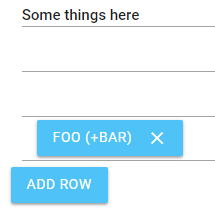
I'm looking to have it be possible to drag the items around between rows within that area, but it seemed to do some weird stuff where it would either let the user drag it to the top row, or to rows that already had items in it only, or just duplicate it all over the place.
If this shouldn't happen I can make a codepen that demonstrates this.
I basically copied the stuff from that example you linked me, minus the stuff I didn't need: (class names modified to stay sane and avoid the enterprise-level craziness they were)
var container = $(".parent-of-rows")[i];
var sortable = window.sortablee = new Draggable.Sortable($(container).find(".row").get(), {
    draggable: ".item",
});

$($(".parent-of-rows")[i]).data("sortable", sortable); // store it for later

var lastOverContainer;

sortable.on("drag:start", function(e) {
    lastOverContainer = e.sourceContainer;
}).on("sortable:sorted", function(e) {
    if (lastOverContainer === e.dragEvent.overContainer) {
        return;
    }

    lastOverContainer = e.dragEvent.overContainer;
});
And, on row addition: (the main logic is the same, just destruction of the sortable and recreation)
$(document).on("click", ".add-row-btn", function(e) {
    var container = $(...magic...);

    $(container).prev().append($("<div></div>").addClass("row"));
    // I tried something sane like .addContainer, this was a last-ditch effort to get it to work
    $(container).prev().data("sortable").destroy();

    var sortable = new Draggable.Sortable($(container).find(".row").get(), {
        draggable: ".item",
    });

    $($(".subform-entry-container")[i]).data("sortable", sortable);

    var lastOverContainer;

    sortable.on("drag:start", function(e) {
        lastOverContainer = e.sourceContainer;
    }).on("sortable:sorted", function(e) {
        if (lastOverContainer === e.dragEvent.overContainer) {
            return;
        }

        lastOverContainer = e.dragEvent.overContainer;
    });
});
@tsov Any idea what the issue could be with this?
ncovercash
on 4 Apr 2018
@smileytechguy sorry for the delay, will check this out today!
It would be amazing if you could provide a codepen that reproduces the issue, otherwise I'll try and recreate the desired behaviour 👍
tsov
on 4 Apr 2018
its cool, and i will try to make one
ncovercash
on 5 Apr 2018
https://codepen.io/anon/pen/JLavxZ Here's a pen demonstrating my issue. The issue with it not dragging back down was due to an outdated version in my code, and works in the codepen. However, I can't seem to add a row and have it recognize it.
ncovercash
on 5 Apr 2018
Whoops @tsov forgot to mention you
ncovercash
on 5 Apr 2018
@smileytechguy thanks for the codepen 👍 Here an updated version: https://codepen.io/anon/pen/WzaeQG
I noticed that line 32 in JS was adding an array of containers, so just had to change get() to get(0). Styling is always tricky, maybe @beefchimi can shed some light here on best practices.
For now I added display: flex; align-items: center; to the .row element and things line up nicely now
Hope this helps
tsov
on 5 Apr 2018
Took a look at your fork and styling seems fine to me, but @smileytechguy let me know if there is something specific you want me to look at.
beefchimi
on 5 Apr 2018
Oh that note was only there to make an excuse for the serif'ed fonts and such. That seems to have fixed the margin issue. And @tsov your fixed worked for the row addition, thanks! I didn't realize jQuery was returning a HTMLElement[] and not a HTMLElement by itself.
Thanks for the help!
ncovercash
on 5 Apr 2018
Related issues
 890f2151c2be69c51db72017546d00fd
·
4Comments
890f2151c2be69c51db72017546d00fd
·
4Comments
 noloop
·
5Comments
noloop
·
5Comments
 ddemaree
·
5Comments
ddemaree
·
5Comments
 xmatusk3
·
5Comments
xmatusk3
·
5Comments
 shuaiyaotian
·
3Comments
shuaiyaotian
·
3Comments
Most helpful comment
@jsahlen I'm working on it today. My theory should work. I'll share my example once ive done it and give you a shout.