Draft-js: Period is automatically being inserted after pressing the space bar a few times
Do you want to request a feature or report a bug?
Bug
What is the current behavior?
After typing in some text, and pressing the space bar a few times, a period will automatically be inserted into the text editor.
If the current behavior is a bug, please provide the steps to reproduce and if possible a minimal demo of the problem. You can use this jsfiddle to get started: https://jsfiddle.net/stopachka/m6z0xn4r/.
I made a screenshot here: https://cl.ly/3e9a14328309
I am only pressing the space bar to add the period.
What is the expected behavior?
Punctuation is not added unless specifically typed
Which versions of Draft.js, and which browser / OS are affected by this issue? Did this work in previous versions of Draft.js?
Draft 0.10.5
Chrome 69.0.3497.100
 jnv22
jnv22
All 4 comments
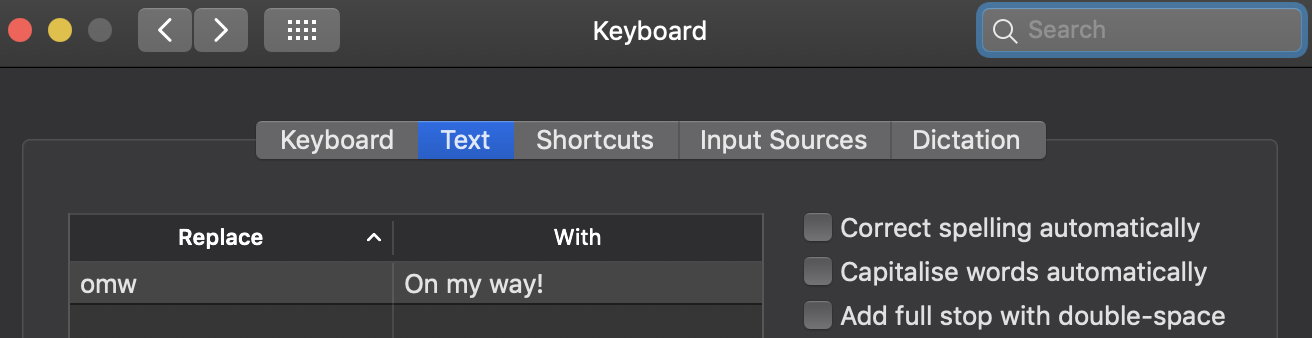
@jnv22 there is a macOS setting called "Add full stop with double-space". I would imagine you have this turned on.
In the Keyboard > Text settings:
 thibaudcolas
on 25 Oct 2018
thibaudcolas
on 25 Oct 2018
@thibaudcolas, you rock-- that did it. I was wondering why this issue was never reported 😁. But strange that it doesn't happen with other apps-- i.e. Slack. Closing!
jnv22
on 25 Oct 2018
@jnv22 @thibaudcolas : I believe this issue should be reopen as DraftJS doesn't handle the insertion of the dot in the intended manner with Chrome.
Steps to reproduce :
- Activate the Add full stop with double-space setting
- Load the fiddle : https://jsfiddle.net/stopachka/m6z0xn4r/
- In quick succession, type the a letter followed by two spaces
Observed behavior :
The inserted text is : "a . " (notice the space before the dot).
Expected behavior :
The inserted text is : "a. ", as is the case with native macOS TextViews when this setting is activated.
 Dalzhim
on 19 Dec 2018
Dalzhim
on 19 Dec 2018
@jnv22 @thibaudcolas : Sorry I might have been mistaken about wanting to reopen this issue. Apparently this bug is in Chrome's issue tracker : https://bugs.chromium.org/p/chromium/issues/detail?id=752640
Dalzhim
on 20 Dec 2018
Related issues
 B-Reif
·
3Comments
B-Reif
·
3Comments
 ufo22940268
·
3Comments
ufo22940268
·
3Comments
 abeq
·
3Comments
abeq
·
3Comments
 darklightblue
·
3Comments
darklightblue
·
3Comments
 ktjd123
·
3Comments
ktjd123
·
3Comments
Most helpful comment
@jnv22 there is a macOS setting called "Add full stop with double-space". I would imagine you have this turned on.
In the Keyboard > Text settings: