Draft-js: Content block should have method for getting list of all entity keys
Do you want to request a feature or report a bug?
Feature.
What is the current behavior?
There is no way to get a list of all entity keys in a contentblock.
What is the expected behavior?
If I got a contentblock with two entities then all examples versions of blockRenderFn will just fetch and render the first entity.
Which versions of Draft.js, and which browser / OS are affected by this issue? Did this work in previous versions of Draft.js?
All versions are affected.
What is needed is a way to get all entity keys within the block.
 tarjei
All 7 comments
Hey @tarjei, what you're describing sounds a lot like ContentBlock.findEntityRanges().
The first filter callback gets called with a CharacterMetadata instance on which you can call getEntity() to access the entity key. If that callback returns true, the second callback gets called with the character ranges' start and end.
Here's an example from my code if that helps: https://github.com/thibaudcolas/draftjs-filters/blob/28f82b478fc130b2e1f12211e952cbeea7dfcff9/src/lib/filters/entities.js#L62
 thibaudcolas
on 7 Mar 2018
thibaudcolas
on 7 Mar 2018
Hi @thibaudcolas - thanks for a quick reply!
Yes, that works, but I was thinking that it was non ideal as it felt like a convoluted way of handling the issue.
As a followup, if you don't mind, I'm wondering about how I end up in the following state.
- I got two atomic blocks, each with an entity ref ( in my case an image).
- I do some editing with the keyboard, deleting the space between the blocks.
- I now got one block of type "unstyled" that contains refs to both entities.
Is there a way for me to deny merging of the two blocks?
Kind regards,
Tarjei
tarjei
on 7 Mar 2018
If it feels too convoluted, you could also go through all the characters in the block and check whether they have an entity. This is quite low-level compared to the API you're suggesting, but might be less convoluted for your use case. See for example this code.
For your follow-up question, could you give more details as to what actions you do with the keyboard? I think what you're describing might happen when copy-pasting images – they get inserted as unstyled blocks, which might then get merged the wrong way. But as far as I know this only happens when the copy source is not Draft.js, eg. Word or a web page.
Preventing this well depends on the manipulation that achieves this. If it's a copy-paste thing, I've made helper functions to convert the blocks to atomic where appropriate as part of the onChange handler. I'm not sure how those helpers handle the case where there are multiple images in a given block though, but you could probably follow a similar route.
thibaudcolas
on 7 Mar 2018
Again, thanks for a quick followup.
The manipulation that happens is just a few backspace and then a delete. Somehow this merges two atomic blocks into one. That is what I would like to avoid - or should I expect that two blocks of the same type can and will be merged?
PS: Are you on the Draft-js slack channels?
tarjei
on 7 Mar 2018
I'm not sure this is the same problem but I can reproduce a similar problem on my test editor. It seems to be the same issue as #915, or similar. Repro:
- Insert image
- Insert image
- Place cursor on the
unstyledblock between the images - Press backspace – removes the empty
unstyledblock, cursor disappears <-- this is bad, it looks like the selection is within the atomic block even though it's set toeditable: falsein theblockRendererFn - Press delete – the image entity disappears, but the atomic block is still there. Cursor is still invisible.
It's not even necessary to be between the two images – doing those operations after a single image will produce the same result.
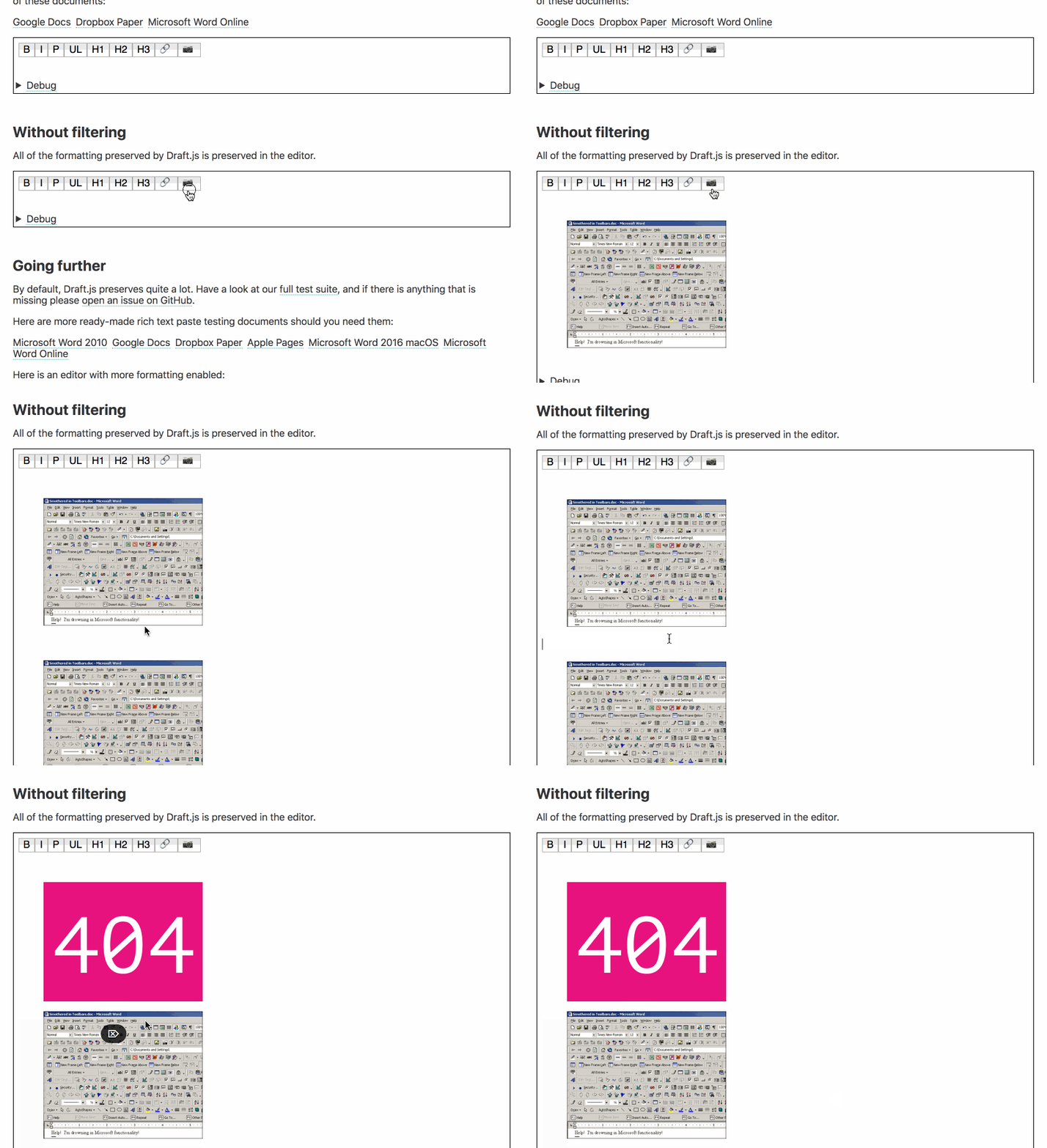
(the pink "404" is what my component displays when there is an atomic block without an entity)
Here are the blocks after those operations
{
  "blocks": [
    {
      "key": "67jqc",
      "text": "",
      "type": "unstyled",
      "depth": 0,
      "inlineStyleRanges": [],
      "entityRanges": [],
      "data": {}
    },
    {
      "key": "3vo10",
      "text": "",
      "type": "atomic",
      "depth": 0,
      "inlineStyleRanges": [],
      "entityRanges": [],
      "data": {}
    },
    {
      "key": "5i7ae",
      "text": " ",
      "type": "atomic",
      "depth": 0,
      "inlineStyleRanges": [],
      "entityRanges": [
        {
          "offset": 0,
          "length": 1,
          "key": 0
        }
      ],
      "data": {}
    },
    {
      "key": "75e0s",
      "text": "",
      "type": "unstyled",
      "depth": 0,
      "inlineStyleRanges": [],
      "entityRanges": [],
      "data": {}
    }
  ],
  "entityMap": {
    "0": {
      "type": "IMAGE",
      "mutability": "IMMUTABLE",
      "data": {
        "src": "./word-toolbars-overload.jpg"
      }
    }
  }
}
I couldn't reproduce this behavior on my production editor so I got to compare the two, and the difference is in using RichUtils.handleKeyCommand in the handleKeyCommand handler.
Looking at how this is implemented, RichUtils.handleKeyCommand does extra work in the "backspace before an atomic block" case that will delete the block:
This might be what's missing from your code as well. Could you try adding it? If you're not using handleKeyCommand already, it could look like this:
<Editor
            editorState={editorState}
            onChange={this.onChange}
            handleKeyCommand={(command) => {
              const { editorState } = this.state

              let newState = RichUtils.handleKeyCommand(editorState, command)

              if (newState) {
                this.onChange(newState)
                return "handled"
              }

              return "not-handled"
            }}
/>
Thinking through this, I don't get why RichUtils.handleKeyCommand isn't bound to the editor's handleKeyCommand by default (https://github.com/facebook/draft-js/issues/915#issuecomment-272602852). I don't see how any atomic block implementation could work without this.
Edit: I'm on the Draft.js slack, but I don't like using it for support-related things anymore. StackOverflow and this issue tracker seem way more appropriate for that.
thibaudcolas
on 7 Mar 2018
@thibaudcolas thanks a big bundle!
You give very good feedback and comments. I've added the RichUtils.handleKeyCommand now.
Regards,
Tarjei
tarjei
on 8 Mar 2018
I'm not sure this is the same problem but I can reproduce a similar problem on my test editor. It seems to be the same issue as #915, or similar. Repro:
- Insert image
- Insert image
- Place cursor on the
unstyledblock between the images- Press backspace – removes the empty
unstyledblock, cursor disappears <-- this is bad, it looks like the selection is within the atomic block even though it's set toeditable: falsein theblockRendererFn- Press delete – the image entity disappears, but the atomic block is still there. Cursor is still invisible.
It's not even necessary to be between the two images – doing those operations after a single image will produce the same result.
(the pink "404" is what my component displays when there is an atomic block without an entity)
Here are the blocks after those operations
I couldn't reproduce this behavior on my production editor so I got to compare the two, and the difference is in usingRichUtils.handleKeyCommandin thehandleKeyCommandhandler.Looking at how this is implemented,
RichUtils.handleKeyCommanddoes extra work in the "backspace before an atomic block" case that will delete the block:This might be what's missing from your code as well. Could you try adding it? If you're not using
handleKeyCommandalready, it could look like this:<Editor editorState={editorState} onChange={this.onChange} handleKeyCommand={(command) => { const { editorState } = this.state let newState = RichUtils.handleKeyCommand(editorState, command) if (newState) { this.onChange(newState) return "handled" } return "not-handled" }} />Thinking through this, I don't get why
RichUtils.handleKeyCommandisn't bound to the editor'shandleKeyCommandby default (#915 (comment)). I don't see how anyatomicblock implementation could work without this.Edit: I'm on the Draft.js slack, but I don't like using it for support-related things anymore. StackOverflow and this issue tracker seem way more appropriate for that.
thx very much, this solved my problem.
 doubaozia
on 20 Jun 2019
doubaozia
on 20 Jun 2019
Related issues
 roundrobin
·
3Comments
roundrobin
·
3Comments
 ufo22940268
·
3Comments
ufo22940268
·
3Comments
 igorpreston
·
3Comments
igorpreston
·
3Comments
 vierno
·
3Comments
vierno
·
3Comments
 abeq
·
3Comments
abeq
·
3Comments
Most helpful comment
I'm not sure this is the same problem but I can reproduce a similar problem on my test editor. It seems to be the same issue as #915, or similar. Repro:
unstyledblock between the imagesunstyledblock, cursor disappears <-- this is bad, it looks like the selection is within the atomic block even though it's set toeditable: falsein theblockRendererFnIt's not even necessary to be between the two images – doing those operations after a single image will produce the same result.
(the pink "404" is what my component displays when there is an atomic block without an entity)
Here are the blocks after those operations
I couldn't reproduce this behavior on my production editor so I got to compare the two, and the difference is in using
RichUtils.handleKeyCommandin thehandleKeyCommandhandler.Looking at how this is implemented,
RichUtils.handleKeyCommanddoes extra work in the "backspace before an atomic block" case that will delete the block:https://github.com/facebook/draft-js/blob/73e5a9c3b57116a5a01d26016964ad3ba8fe0e66/src/model/modifier/RichTextEditorUtil.js#L55-L80
https://github.com/facebook/draft-js/blob/73e5a9c3b57116a5a01d26016964ad3ba8fe0e66/src/model/modifier/RichTextEditorUtil.js#L107-L122
This might be what's missing from your code as well. Could you try adding it? If you're not using
handleKeyCommandalready, it could look like this:Thinking through this, I don't get why
RichUtils.handleKeyCommandisn't bound to the editor'shandleKeyCommandby default (https://github.com/facebook/draft-js/issues/915#issuecomment-272602852). I don't see how anyatomicblock implementation could work without this.Edit: I'm on the Draft.js slack, but I don't like using it for support-related things anymore. StackOverflow and this issue tracker seem way more appropriate for that.