Draft-js: Draft.js documentation website needs `react-page-middleware` globally installed
It appears that running the Draft.js website locally, depending on your dependency versions, will result in one of several broken states.
What we saw:
- With a fresh
git cloneof the Draft.js repository and following the instructions in https://github.com/facebook/draft-js/tree/master/website#run-the-server led to a high use of CPU and pages that were never loading - just blank. - After
rm -rf node_moduels && rm yarn.lockinside/websiteand starting fresh, this error appeared:
$ node server/server.js
module.js:529
    throw err;
    ^

Error: Cannot find module 'react-page-middleware'
    at Function.Module._resolveFilename (module.js:527:15)
    at Function.Module._load (module.js:476:23)
    at Module.require (module.js:568:17)
    at require (internal/module.js:11:18)
    at Object.<anonymous> (/Users/gmd/draft-js/website/server/server.js:13:23)
    at Module._compile (module.js:624:30)
    at Object.Module._extensions..js (module.js:635:10)
    at Module.load (module.js:545:32)
    at tryModuleLoad (module.js:508:12)
    at Function.Module._load (module.js:500:3)
error Command failed with exit code 1.
I have found that installing react-page-middleware globally fixes this, for me. Here are my action items for this:
1) With a fresh environment and no global installation of react-page-middleware, what issues arise when running the docs site locally? Please comment here.
2) Let's set the version in the website/package.json for react-page-middleware to 0.4.1 and confirm that this works.
Thanks to @GordyD for surfacing this issue!
 flarnie
All 6 comments
Maybe I'm missing something totally obvious but I've tried installing react-page-middleware globally and am encountering the same issue.
$ rm -rf ~/.config/yarn/global/node_modules/react-page-middleware/
$ ~/.config/yarn/global/node_modules/
$ yarn global add git://github.com/facebookarchive/react-page-middleware.git
Using globally installed version of Yarn
yarn global v1.2.0
warning package.json: No license field
[1/4] 🔍  Resolving packages...
[2/4] 🚚  Fetching packages...
[3/4] 🔗  Linking dependencies...
[4/4] 📃  Building fresh packages...
warning "[email protected]" has no binaries
✨  Done in 2.50s.
$ ls ~/.config/yarn/global/node_modules/react-page-middleware/
LICENSE     README.md   node_modules    package.json    polyfill    src
$ node
> const rp = require('react-page-middleware');
Error: Cannot find module 'react-page-middleware'
    at Function.Module._resolveFilename (module.js:527:15)
    at Function.Module._load (module.js:476:23)
    at Module.require (module.js:568:17)
    at require (internal/module.js:11:18)
    at repl:1:12
    at ContextifyScript.Script.runInThisContext (vm.js:50:33)
    at REPLServer.defaultEval (repl.js:239:29)
    at bound (domain.js:301:14)
    at REPLServer.runBound [as eval] (domain.js:314:12)
    at REPLServer.onLine (repl.js:440:10)
>
(To exit, press ^C again or type .exit)
>
N.B I'm able to require other globally installed npm modules through yarn so I don't think it is to do with system config.
 GordyD
on 26 Oct 2017
GordyD
on 26 Oct 2017
I will give this a look. May not find a solution but can hopefully provide some more information from my perspective. 😄
 jackyho112
on 7 Nov 2017
jackyho112
on 7 Nov 2017
Thanks @jackyho112 and @GordyD :)
flarnie
on 9 Nov 2017
I did a git clone, ran npm install at the root level of the freshly cloned project folder and then ran npm install again at the website folder. After all these steps, I did npm start at the website folder and was able to start the app fine.
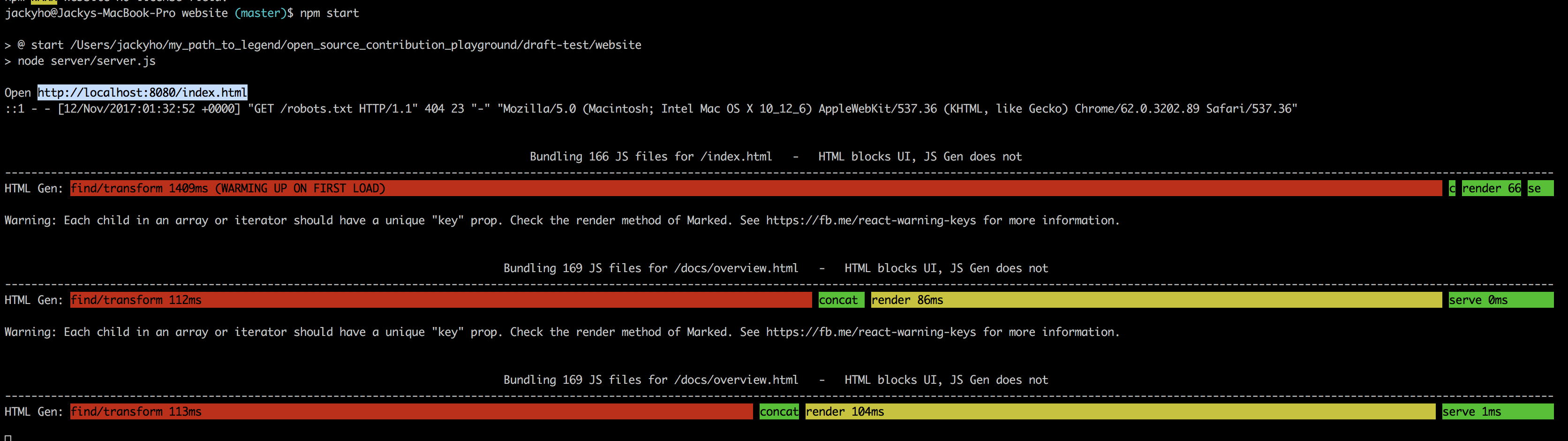
Sorry, wasn't able to reproduce the issue.
jackyho112
on 12 Nov 2017
Thanks! That is good news - I'm hoping that this was a corner case somehow triggered by @GordyD 's environment. Still would like to update the docs to a more modern tool but this makes it seem less urgent.
flarnie
on 13 Nov 2017
I believe that the migration to Docusaurus has fixed this issue. Please reopen if that is not the case :)
 niveditc
on 9 Sep 2018
niveditc
on 9 Sep 2018
Related issues
 snaerth
·
3Comments
snaerth
·
3Comments
 eessex
·
3Comments
eessex
·
3Comments
 pklavins
·
3Comments
pklavins
·
3Comments
 igorpreston
·
3Comments
igorpreston
·
3Comments
 ufo22940268
·
3Comments
ufo22940268
·
3Comments
Most helpful comment
I will give this a look. May not find a solution but can hopefully provide some more information from my perspective. 😄