Draft-js: Conflict with Grammarly chrome extension
Do you want to request a _feature_ or report a _bug_?
Bug
What is the current behavior?
When using the Grammarly extension which has 10K reviews in the google app store (with 4.5 stars), text that you type occasionally stops.
If the current behavior is a bug, please provide the steps to reproduce and if possible a minimal demo of the problem.
Using the draft.js sample site, you can see the behavior in this video: http://screencast.com/t/8xhRQz9sZt
It seems to be related to when grammarly detects an issue.
What is the expected behavior?
Not to erase text.
Which versions of Draft.js, and which browser / OS are affected by this issue? Did this work in previous versions of Draft.js?
Current version in Chrome on OS X 10.11.4
 danjstern
All 98 comments
Any updates on this, or does anybody know of a workaround? We are working on a project using Draft.js, and would like to integrate with Grammarly if possible.
It seems that Grammarly is injecting spans into the editor, wrapping any errors it finds, and this throws the editor into a state where the selection changes suddenly, and there doesn't appear to be a way to differentiate this from a normal selection.
 olmg-justin-ligman
on 31 Aug 2016
olmg-justin-ligman
on 31 Aug 2016
I got the same problem, but I see that facebook.com is using draft-js as in the "status update editor" and this editor doesn't have this problem. I figured out that on facebook.com grammarly is creating a grammarly-ghost div instead of wrapping the text in a span. Does anyone know how to achieve this?
 jonathanwilke
on 5 Sep 2016
jonathanwilke
on 5 Sep 2016
Has anyone found a workaround for this, or are there any updates?
olmg-justin-ligman
on 28 Sep 2016
I've filed a support ticket with Grammarly. I'll post any updates here.
 ghost
on 3 Oct 2016
ghost
on 3 Oct 2016
I contacted the Grammarly folks, and the support wasn't helpful at all.
At this time, due to technical incompatibility, Grammarly malfunctions on the reported pages. The only workaround is to disable Grammarly for the following pages.
I have escalated your case to the development team. I can confirm that our engineers have backlogged the issue and plan on resolving it at their earliest convenience.
Unfortunately, this will not be a quick fix and I cannot provide you with an estimated timeframe, as the developers will need some time to analyze the cause of this issue.
I pointed out that they've already solved the issue on Facebook.com, and offered a few suggestions to fix it everywhere, but I was returned the usual customer support responses.
Such a shame, because our clients love Grammarly. It wasn't pleasant telling them they can't use it.
ghost
on 16 Oct 2016
Hi, I'm a developer from Grammarly. Facebook fields are simpler because they are plain-text only. We can't easily use the same technique to support Draft.js. It's a rich-text editor.
Right now we are working on integration guidelines that will help developers of text editors to support Grammarly.
In meantime, I would love to chat with Draft.js developers to show a draft of API spec and get feedback from them. My email: [email protected]
 kigorw
on 19 Oct 2016
kigorw
on 19 Oct 2016
@kigorw - thanks for commenting on this issue!
FYI - Facebook's Notes app uses Draft.js, and even though it has issues, it doesn't mess up as bad as the example on Draft's homepage. For instance, if you type an error and wait for Grammarly to detect it, then start typing again, it doesn't change the cursor position or overwrite any characters like the example on the homepage does. I doubt this helps much but I wanted to point it out in case it did.
I would love to see these things work together, so hopefully somebody from the Draft team reaches out and you can come up with something (even a workaround would be great).
olmg-justin-ligman
on 19 Oct 2016
If Grammarly offered any sort of API it would be very easy to integrate it directly into the editor itself. I hope this happens sooner rather than later. I'm really surprised they don't offer one already.
 gdehmlow
on 2 Nov 2016
gdehmlow
on 2 Nov 2016
Hmm, this pretty much breaks the whole editor. Is there any way to detect Grammarly? I could then inform the user about the compatibility issues..
 bruinebeer
on 15 Nov 2016
bruinebeer
on 15 Nov 2016
@markpradhan You can always disable it by editor.setAttribute('data-gramm', 'false') (editor being the draft-js editor instance).
 nuc
on 15 Nov 2016
nuc
on 15 Nov 2016
@nuc it's really hard to set attributes to draft-js editor :/ can't get it to work.. is there no way to detect grammarly?
bruinebeer
on 15 Nov 2016
@markpradhan Why is it hard? For us it works well in componentDidMount like that:
  componentDidMount() {
    const { editor } = this.refs
    const draftEditor = editor.refs.editor
    draftEditor.setAttribute('data-gramm', 'false')
  }
yeah, i figured it out as well.. was just about to post it here, but your solution is more elegant :D
bruinebeer
on 15 Nov 2016
For anyone using the draft-js-plugins editor, I had to do the following to disable Grammarly:
  componentDidMount() {
    // disable Grammarly extension, incompatible with draft.js
    // https://github.com/facebook/draft-js/issues/616
    const pluginEditor = this.refs.editor;
    const draftEditor = pluginEditor.refs.editor;
    const contentEditable = draftEditor.refs.editor;
    ReactDOM.findDOMNode(contentEditable).setAttribute('data-gramm', 'false');
  }
 avk
on 29 Nov 2016
avk
on 29 Nov 2016
@kigorw could you please provide an update from Grammarly's side? Are there any plans to take an intermediate step and disable Grammarly on all Draft.js editors? Otherwise people using Grammarly on a site with a Draft.js editor seem extremely likely to lose their writing...
avk
on 29 Nov 2016
We released an update that skips all draft.js powered fields. Let me know if you still have somewhere this problem.
kigorw
on 7 Dec 2016
Looks like this was fixed on Grammerly's side, so I'm going to close this out.
 tylercraft
on 15 Dec 2016
tylercraft
on 15 Dec 2016
FYI: I am working on making the editor compatible with Grammarly, and potentially with other extensions that decorate the DOM text with extra tags for its metadata.
So far I managed to handle proper sync of selection and update on input so that editing works and it displays Grammarly suggestions properly.
As Grammarly doesn't fire onInput event while applying fixes, the editor doesn't catch such change. I plan to experiment with MutationObserver to handle this part, after which Grammarly might fully work with the editor.
The work is progress is here if anyone is interested:
https://github.com/kenticomartinh/draft-js/tree/experiments/Grammarly_demo
My questions are the following:
- Is this something that editor authors would be willing to adopt to its code if it works and is properly tested?
- Should we handle this in this issue or create a new issue for it? (As this one is about the collision, not necessarily about making Grammarly work with it)
 kenticomartinh
on 13 Sep 2017
kenticomartinh
on 13 Sep 2017
Hey @kenticomartinh,
I am the lead developer for the Grammarly extension. We were excited to see that you're working on making Draft.js compatible with Grammarly! One of our goals is to make Grammarly available everywhere on the web, and we're trying to figure out the best way to do this. Please let me know if there is any way I can be of help.
 blacktaxi
on 2 Oct 2017
blacktaxi
on 2 Oct 2017
Hi @blacktaxi,
Thanks for letting me know. I am proceeding quite slowly with this, as currently this is not our top priority so I do it more in a spare time. I expect that we will focus on that more heavily in about a month or two. I am now basically doing my homework to make sure process-based delays with 3rd parties will not delay our process if we need it.
But anyway, I think mutual cooperation could be beneficial for both of us. We use Draft editor for our Cloud-based headless CMS which targets enterprise customers so if we make it work, there is also a business opportunity for you to acquire some Premium subscriptions through that.
As I wrote above I handled the first of the two major burdens, which was syncing the selection properly in case an external tool modifies the structure of the DOM nodes. I am now experimenting with MutationObserver, but given the life-cycle of React and your extension, the received changes to DOM from both React and your extension are bulked to a single list of changes, and I am not able to extract the text change made by your extension as it is already overwriten again by React DOM sync at the time of receiving Observer callback. I will look at that more closely, but so far this option seems as a dead-end option to me.
What I believe is the main problem of how your extension applies changes is what I mentioned above. It doesn't act the same way as native browser spell-check when replacing the text, as it is not firing the on(Before)Input event. This is a problem with modern editors which use object-driven model for editing rather than native contenteditable DOM. What you should ideally do instead of replacing nodes and text in DOM is making a DOM selection, and simulate regular text input that overwrites the selection. By handling this, you should be able to support many more modern editors based on frameworks which use some kind of virtual DOM for rendering such as React does.
I am not able to effectively propose changes to your extension as I can only access its minimized JS through debug. If there was some way to be able to access your browser extension source code for experiments (preferably the Chrome version), I may be able to prepare a pull request with suggested changes for you.
One another (minor) problem that I think I noticed earlier is that even if the element has data-gramm="true" attribute, your rules to disable Grammarly for specific editors are always stronger. I believe the attribute should be stronger for such check as it is an explicit indication from developer that he/she really wants it and probably knows what he/she is doing. I bypassed it for the purpose of experiment this way https://github.com/kenticomartinh/draft-js/commit/1eff16a85df43083eb528065c799b9cb719dcfe3 but I don't believe that DraftJS authors would like such changes in their code base. This might be a show-stopper for the fix PR.
Let me know your thoughts
kenticomartinh
on 6 Oct 2017
I have made some progress with the Mutation observer prototype by altering the re-rendering conditions of the editor to not overwrite the changed made by the Grammarly extension, and it seems promising, works well at least in basic scenarios:
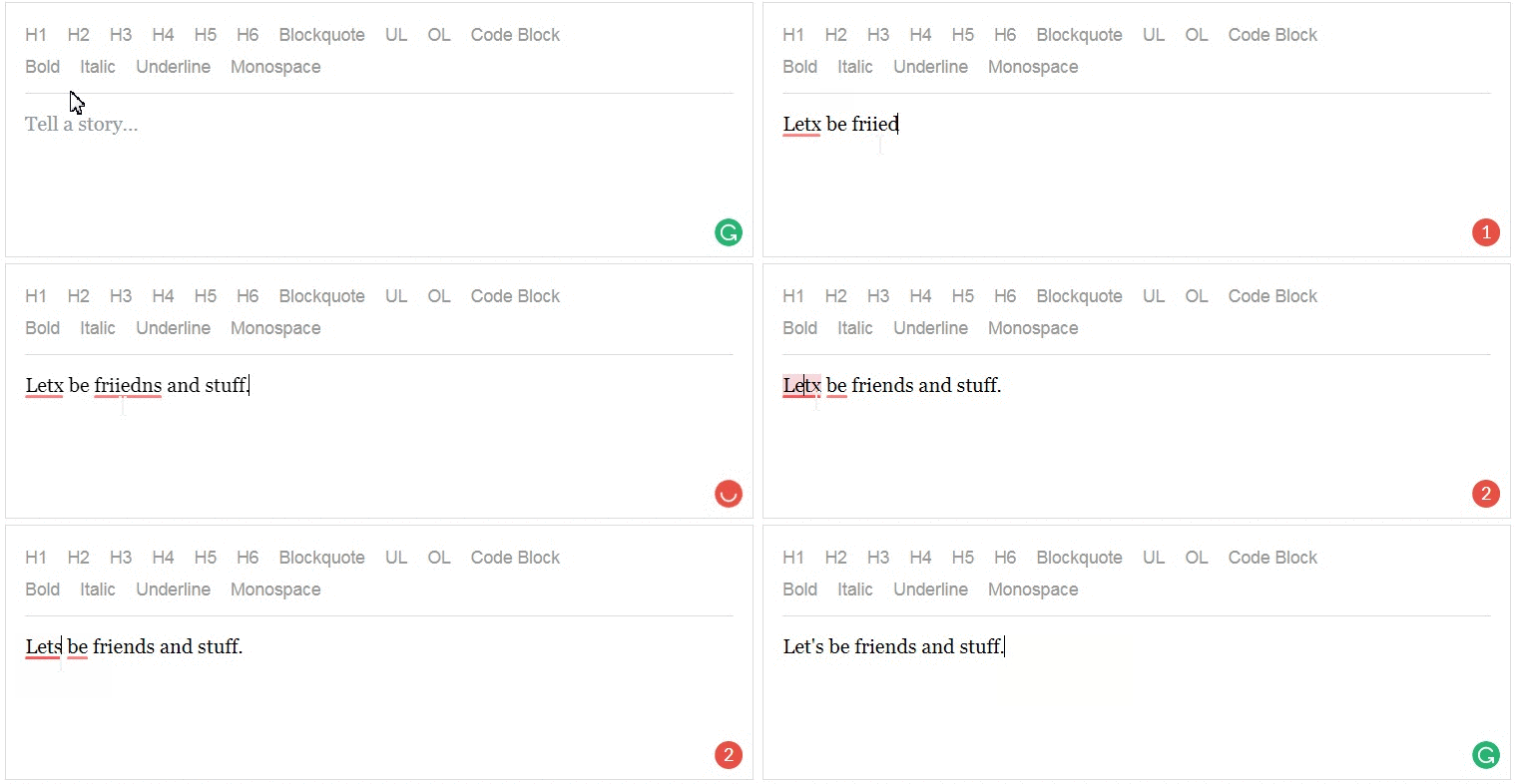
However ... I am still experiencing problems with a more complex scenario where the word is cut to multiple DOM nodes, for example in case of using various styles. Grammarly replacement removes the sub-nodes originating from React from DOM which is something that React is not expecting, and it fails trying to unmount the older version of the components that represent text nodes. That kills the editor (and whole React) consistency ...

In order to prevent this, the extension should probably not remove individual nodes when replacing text, but instead just set text of one of the nodes, and set content of other nodes to empty string. That should most likely resolve this problem. Unfortunately this is again something I am not able to effectively prototype neither I currently have idea how to bypass that from the side of the editor.
@blacktaxi any updates from your side? Have you got a chance to look at this?
kenticomartinh
on 20 Oct 2017
Although we do not use Draft.js, we took interest in this thread as we are facing similar problems with Glimmer 2. We're getting radio silence from Grammarly, unfortunately.
We blogged about the problem here: https://news.ycombinator.com/item?id=15541757
It would be useful to gather community thoughts and voice, and hopefully get some engagement from Grammarly.
 jmedwards
on 24 Oct 2017
jmedwards
on 24 Oct 2017
Grammarly released a fix which has at least solved the problems our customers were facing using our web app, which was down to a Glimmer incompatibility (and perhaps may resolved things here, for the same original incompatibility reasons?).
jmedwards
on 26 Oct 2017
Hey @kenticomartinh, thank you for your updates. Your findings seem to be interesting.
We've been actively looking into compatibility issues with rich text editors, Draft.js included, and it always comes down to Grammarly modifying somebody else's DOM. It looks like you've been able to work around some of the issues, and from the looks of it, it took you a considerable amount of effort. This likely will not scale to the multitude of existing rich text editors and new ones coming out in the future, so we took a more radical approach to see if we can limit the DOM mutations made by Grammarly to the point where they are not observable from the point of view of the rich text editor.
This work is still in early stages, but preliminary results are very promising. Particularly, I was able to integrate Grammarly underlines with Draft.js without breaking each other, although so far I've only checked the most basic case. There are already some challenges ahead with this approach that I can see, and then there's still the question of applying Grammarly replacements without directly mutating DOM. But so far this seems to be a more accessible path than patching Draft.js.
There's currently no ETA for when any of this will hit the public, but I will try to keep you updated with the latest news. I believe there is a chance that we will hit some blocker along the way and will have to revert to exploring your approach, but I think it is not likely.
Re: data-gramm="true". The latest version of Grammarly for Chrome now supports data-enable-grammarly="true" which is supposed to do exactly that. We're changing the name of the attribute because it will work differently than data-gramm and we don't want to confuse anyone. We're also keeping data-gramm for backward compatibility. Let me know if the new attribute works for you.
P.S. sorry about the slow communication from my end – I'll try to respond more quickly in the future.
blacktaxi
on 10 Nov 2017
Hey @jmedwards, glad the fix helped! That issue was also affecting other major sites made with Glimmer such as Zendesk, so thank you again for your detailed bug report.
blacktaxi
on 10 Nov 2017
@blacktaxi Thank you for the update. I agree that solving as much as possible at your side would be best for everyone. I just felt a bit in corner for a moment due to not great reputation of your company responsiveness at various forums so I was examining the options (and learning DraftJS that we use more in depth as a side effect :-)). I am glad that things are moving forward now!
When I get a chance I will try the latest version / update (reduce) my modifications if needed, and let you know if I have any more insight to share.
kenticomartinh
on 13 Nov 2017
Hey @blacktaxi, I finally tried it again with Grammarly version 14.818.1325 (from November 16), but unfortunately with no more luck in any area.
data-enable-grammarly="true" by itself is not enough, as the following part of the code returns false for valid because isCustomValidationPassed still contains the original check for DraftJS and returns false
valid = isCustomValidationPassed(el, isFbSite()) && !restricted ... ;
return {
  valid: valid,
  goodForTracking: (restrictedByCustomAttr || isFieldDisabled) && !valid
};
Anyway, I tried the behavior while keeping my "enable hack" and the behavior with DraftJS seems pretty much the same
- Clean DraftJS from master branch does not synchronize selection and cursor position properly
- With updated selection sync code that expects the leaf nodes to be split further selection works OK, but replacements still don't work at all
- With extra code that includes DOM changes observing replacements work for text without formatting, but when the text is split by formatting, Grammarly extension tampers with the DOM nodes too much and breaks the structure of the editor leafs which is hard to overcome
No more progress at my side since the last time I found this last problem.
I expect that you didn't deploy the changes you were talking about yet, did you? Do you have any ETA for that or a way how I could access your development version (minimized would suffice) to provide some better feedback?
kenticomartinh
on 29 Nov 2017
Hi @kenticomartinh,
Last time I've mentioned that we had some success integrating with Draft.js using a new, non-invasive method. We have been working in that direction and so far haven't hit any major roadblocks. Unfortunately we don't yet have an ETA for when this is going to production as there are still some unanswered questions. I think it might be better for you to wait until we fix it on our side, because I think that making Draft.js work with current Grammarly will require too much change to Draft.js itself.
blacktaxi
on 30 Nov 2017
Hey @blacktaxi, thank you for a quick answer. I just wasn't sure what was and what wasn't included in that particular Grammarly version. We will eagerly wait and look forward to it :-) If I could be of any help, just let me know.
kenticomartinh
on 30 Nov 2017
Hey, I revisit this thread every few months hoping to see a solution so that our customers can use Grammarly in our products as well. Just a friendly nudge in case progress was made but not shared in this thread yet :)
 pioul
on 23 Feb 2018
pioul
on 23 Feb 2018
Hey @pioul, @kenticomartinh – thanks for checking in!
We've been actively working on this in recent months and want to start internal testing soon. The aspiration is to make Grammarly compatible without requiring any changes to Draft.js and user code at all. So far it seems to be working, including irregular formatting where words are split across several DOM nodes. There are corner cases with replacements which I haven't quite figured out just yet.
I'll try to keep you updated in case of any important developments, but also please don't hesitate to ping back any time.
blacktaxi
on 24 Feb 2018
@blacktaxi thank you for the update. I was going to ask as well, our product managers are starting to push this on our side so we are considering options and will probably need to make some final decisions as whether to continue with Grammarly or some alternatives as a recommended solution for our clients. So any hints from your side about reaching some final state are helpful. As always, if I could be of any help, let me know.
kenticomartinh
on 26 Feb 2018
@blacktaxi that's great news - I'm more than happy to help with testing if you have a dev build to share
 rickhanlonii
on 5 Mar 2018
rickhanlonii
on 5 Mar 2018
@blacktaxi Hi there :)
Any news? we have some angry customers ..
 developerslions
on 29 Mar 2018
developerslions
on 29 Mar 2018
This is becoming a critical issue for us, our customers are escalating this issue. Do you guys have any updates on this?
 mexpolk
on 14 Apr 2018
mexpolk
on 14 Apr 2018
Hi @blacktaxi - I wonder if you've any updates on the status of this issue?
 henningmu
on 7 Jun 2018
henningmu
on 7 Jun 2018
Hi everyone, sorry for not posting any updates in a while.
The current status is that we have issues with text replacement. We're using the execCommand('insertText', false, value) method to implement Grammarly suggestion replacements, but unfortunately this seems to break Draft.js in a bad way. I would appreciate if you have any suggestions on how to properly do text replacement for Draft. If there is not such a method, then perhaps we can look into implementing a communication through a custom event – although I'm not sure whether Draft.js maintainers will buy into this sort of thing.
Otherwise the dev version of Grammarly seems to be working fine with Draft as we don't put underlines into the actual text field content anymore. So as soon as we resolve the replacement compatibility issue, we will be ready to move forward.
blacktaxi
on 8 Jun 2018
Hi @blacktaxi, thanks for the update. Is there any alpha / beta / public version of what you currently have? I can check how that helps with what I achieved earlier and see how it changes things, even debug the DraftJS side for you and see whether there is some possible bug on their side that would prevent it behave well. You may also not have problems with DraftJS in particular, but rather with how React works. Or have you been able to make it work properly with some other native React editor?
kenticomartinh
on 8 Jun 2018
If there is not such a method, then perhaps we can look into implementing a communication through a custom event
FWIW; That’d be quite useful for anyone willing to enable Grammarly on similar, but non-DraftJS libs instead of having a DraftJS-only fix ✌️
 EtienneLem
on 8 Jun 2018
EtienneLem
on 8 Jun 2018
@blacktaxi execCommand('insertText', false, value) should technically be the right way to go as I believe the browser's spellcheck context menu does call the same thing. It can potentially be a bug in draft-js itself on handling input event that is being triggered by execCommand('insertText', false, value). Can you potentially test it on other react based editor such as slate and see if the same problem happens there?
 isubasti
on 19 Jun 2018
isubasti
on 19 Jun 2018
@isubasti and @blacktaxi I have experienced the same behavior with Slate, we continue to keep Grammarly disabled in the meantime (regretfully).
mexpolk
on 20 Jun 2018
Hey @isubasti, thanks for the suggestion.
I just tried the same thing on Slate and the result is a bit better, but it still doesn't work – Slate just reverts the edit upon next input event. With Draft, it's a bit worse IMO because it looks like it worked, but then it puts Draft in a broken state where backspace no longer works and some weird nodes appear in the document. I noticed it happens with greater probability if you make an execCommand edit on a selection with mixed formatting (like one normal and one bolded word).
I think that yes, execCommand should be supported by editors like Draft and Slate, because it seems to be the most natural way to do programmatic input, at least it reads that way from the docs.
Another potential approach is to send fake clipboard events. I haven't tested this with Draft or Slate, will report later. I would like to avoid creating a special API or event handler in Draft just for this purpose as I think it would be an unnecessary burden to maintain on Draft.js side.
@kenticomartinh, I remember about your kind offer to test the new implementation in your environment, let me get back to you when we're ready to share a test build.
blacktaxi
on 20 Jun 2018
@blacktaxi I know that both slate and draft have some bugs on the inputEvent still especially on the IME/mobile keyboard so a test build would be much appreciated so that the community can fix inputEvent implementation problem. I can help on figuring things out on slate
isubasti
on 20 Jun 2018
How's this bug thread coming along? We're using Redux with ReactJS and having the same problem. the @metigy editor is custom build on that framework due to the requirements of our editor, but @blacktaxi we're really keen to resolve this and help where we can as we've been wanting to reach out to Grammarly about how we can work with you guys anyway.
We're currently looking into whether there's a way to pick up the change in the value via 3rd parties like yours and pass it back to redux somehow.
 GregBrine
on 30 Jul 2018
GregBrine
on 30 Jul 2018
Hi again @GregBrine, thank you for reaching out.
Unfortunately... I don't have any news on progress with Draft.js. It is definitely high up on our list of text editors to support, but so far we haven't been able to fix the remaining issues.
I keep this thread in my bookmarks and will remember to post any updates on the issue when available.
blacktaxi
on 30 Jul 2018
Hi @blacktaxi, I am still available and waiting to get some latest pieces of the code from you for further research of the issue on my side whenever you are ready to share it, just let me know.
kenticomartinh
on 6 Aug 2018
For anyone having this issue, we managed to solve our Grammarly problem by using the oninput event to catch the changes and feedback to redux. Works across all the browsers we care about and means we can now say we support Grammarly again.
But another question for @blacktaxi. Is there a way in JS to tell if the user has Grammarly installed and enabled? Want to use that if there is to allow us to suggest to users to try it.
GregBrine
on 15 Aug 2018
Hi @GregBrine, thanks for your suggestion. Can you give a little bit more detail on how your fix works?
Currently there is no official API/method to tell whether a user has the Grammarly extension installed.
blacktaxi
on 22 Aug 2018
Seems like Medium.com has a custom build integration developed by Medium itself. @blacktaxi can you provide us with some insights? I see that the grammar highlights are not applied to the paragraphs but that a custom HTML component is inserted in the DOM

 spacedust
on 17 Sep 2018
spacedust
on 17 Sep 2018
Hey @spacedust, that's the new Grammarly integration. We're gradually rolling it out to some sites. That DOM you mentioned is inserted by the Grammarly extension. This approach is aimed to reduce any DOM disturbances to a minimum, so that text editors like Medium and Draft can get all the control over text content. We can do the same for Draft.js fields, but there's still the unresolved issue of text modifications when users apply Grammarly suggestions. I will be taking a closer look this/next week, and will post updates if any.
blacktaxi
on 17 Sep 2018
Hi @blacktaxi, how about some temporary custom attribute that would simply (dis)allow applying fixes from the extension? Even seeing what is wrong and what is recommended would be much better for the vast majority of clients than nothing...
What could we do to be one of the "some sites" (early adopters)? Is it just about adding those new attributes, or do you somehow whitelist the sites in the extension(s)?
BTW, our Technology Partnership Product Owner, Petr Vozak, recently (few months ago) tried to contact you representatives about the possible cooperation between our companies in resolving these issues and possibly form a partnership around Kentico Cloud offering, but didn't get either positive or negative response. Would you mind checking if the e-mail got through and they decided not to pursue it, or if it possibly got lost?
kenticomartinh
on 18 Sep 2018
@blacktaxi Thanks for your quick reply. Like @kenticomartinh mentioned would it be possible to enable this new integration by using an attribute? So we can test it and seek a solution together?
spacedust
on 24 Sep 2018
Hi everyone,
I've had some interesting findings re: Grammarly vs Draft.js compatibility.
Just to recap, the issues that Draft.js has with Grammarly are:
- Grammarly inserts custom tags into the text field content, which breaks the consistency between
EditorStateand DOM- Grammarly tries to modify the text field content by mutating/inserting nodes, which may also break the
EditorState/DOM consistency. (sorry if my terminology is off, I am not too familiar with Draft.js codebase).
The new version of Grammarly that we have been testing internally (and running in production on some sites) does not insert custom tags for highlighting, so it does not suffer from issue 1). But it still does try to modify the text field content when the user clicks on a suggestion. This has changed too, as Grammarly now will use the document.execCommand API to insert text as it is _the_ way to insert content programmatically.
Testing the new Grammarly integration with Draft.js, I found that the execCommand replacement can still lead to EditorState corruption. The Grammarly replacement works similar to this:
function replaceText(range, newText) {
  const sel = document.getSelection()
  sel.removeAllRanges()
  sel.addRange(range)

  document.execCommand('insertText', false, newText)
}
I've found two issues with this:
If
rangeencompasses more than oneTextnode, theeditOnInputhandler seems to incorrectly assume the actual text of the changed node. This seems to lead it to incorrectly reconcilingEditorStateand DOM.If the text editor element is not focused at the time of the replacement, the
editOnSelecthandler might not be called or called only aftereditOnInput. If the selection does not properly propagate toEditorStateat the time of theeditOnInputhandler call, it leads to a similar result, aseditOnInputwill not have a correct caret position inEditorState. I don't know how much of this is due to dev tools stealing focus, but I think a similar thing happens when you click a Grammarly suggestion.
I've been able to (seemingly) fix issue 2) by ensuring that the Draft contenteditable div is focused before changing the selection. We will be running some more internal testing to confirm that it has helped.
As for 1), I'm not sure it can be fixed on Grammarly side. Technically, the same thing can happen with the native spellchecker, however I haven't been able to find any cases where it would make suggestions across multiple text nodes. We probably could try a work-around like dispatching a clipboard event (not sure it would work though). But as this seems to be a relatively uncommon case for Grammarly we're going to leave it as is for now.
@kenticomartinh, sorry, our support team wasn't able to find the email from Petr. The 'some sites' I've mentioned are hard-coded into the extension. These are not early adopters but rather sites that we have extensively tested to be compatible with Grammarly. At some point, the new integration will be deployed to run on all supported sites.
@spacedust, thanks for your offer, unfortunately it would be difficult to deploy the new integration in this way for now, but let me get back to you on this in the coming weeks.
blacktaxi
on 28 Sep 2018
A small update for the curious.
I've been trying to programmatically insert text into a Draft.js editor field by dispatching a clipboard 'paste' event. You would dispatch an even like than in the following manner:
function dispatchPaste(target, text) {
  const data = new DataTransfer()
  data.setData(
     // this could also be 'text/plain' -- it probably matters, but I'm not sure in which way
    'text/html',
    text
  )

  target.dispatchEvent(
    new ClipboardEvent('paste', {
      clipboardData: data,

      // need these for the event to reach Draft paste handler
      bubbles: true,
      cancelable: true
    })
  )
}
Simple enough.
However, if you want to _replace_ a portion of text, you first need to set the selection. I found that for that to work properly, you also need to:
.focus()thecontenteditableelement prior to setting the selection- yield for one event loop iteration (i.e.
setTimeout(..., 0)) before dispatching the paste event. - make sure that the selection's both anchor and focus nodes are
Textnodes.
№2 is not very scientific. I had some anecdotal evidence that without the yield the selection event might get handled after the paste event, but I didn't do extensive testing to confirm this 100%.
blacktaxi
on 1 Oct 2018
First of all thanks for these updates @blacktaxi !
Can we already test this or is it still not possible to use the "new version" of Grammarly?
spacedust
on 12 Nov 2018
Hi @blacktaxi
I am looking at the current state of the Chrome extension, trying it out in various web sites you currently explicitly support and reverse-engineer a bit. I noticed that you have a new model to highlight changes with overlays outside the DOM of the editor (which looks awesome BTW!) applied selectively to some web sites (tried primarily on Medium), but even if I enable Grammarly explicitly on DraftJS, it uses the old model with G tags inside the editor which are completely breaking it.
Would it be possible to apply the new model to DraftJS editor? At least the best effort solution. Even if the replacements are not 100% correct, it is a huge step forward that would allow us to provide you with additional insights or find ways how to get at least partial functionality. And it is also much more consistent than with current state with tottally broken editor.
What do you say?
kenticomartinh
on 10 Dec 2018
Hi @kenticomartinh, @spacedust
We currently have the new implementation rolled out for new versions of Twitter and Reddit, which use Draft.js. It works, except for some visual glitches on Reddit (underlines shown outside of the text field in some cases), due to the nature of how it is implemented. But we have a fix for this in the works. So even though new Grammarly doesn't break Draft.js anymore, and for the most part it works fine, we aren't rolling out wide support because of those visual issues. We could do it, technically, but we don't want to upset our users.
As for the timeline for this last bit, I think there's a chance it will be ready in some weeks.
@kenticomartinh, for the kentico.com CMS, is it always hosted on kentico.com or can it also be deployed in a self-hosted manner? I'm asking because if we decide to turn on the Draft.js compatibility for you we'd need to know a way to detect this context. Thanks!
blacktaxi
on 10 Dec 2018
@blacktaxi Do you have some news?
 Morbit
on 17 Dec 2018
Morbit
on 17 Dec 2018
Hi @blacktaxi
Thanks for a quick response.
Regarding "we aren't rolling out wide support because of those visual issues" ... are you saying that some people are now actively using the old version despite the fact that it may completely break the editor? Because I can't see how visual issues (but without breaking the editor) would be worse than what is already there. I would still expect that to be based on the data-grammarly-enabled attribute, so it would still be applied only to people who explicitly enable it for experimenting purposes such as myself :-)
As for Kentico Cloud which uses DraftJS, it is always running as SaaS on https://app.kenticocloud.com, so it could be easily whitelisted. You can register for 30-day Trial there if you want to try how it would work and we can easily extend it if needed.
kenticomartinh
on 17 Dec 2018
Also, if I may advise ... I recommend you to place the highlighting elements to the DOM just before the editor, not to the end of the body as you do now. That way when the editor is placed in a scrollable DIV (typical in admin UIs), you don't need to re-sync positions upon scrolling, as well as the browser does not improperly scroll non-scrollable DIVs if such content is focused (on purpose or by accident)
kenticomartinh
on 17 Dec 2018
Hi @kenticomartinh,
For the old version, we simply don't initialize in those text fields, or web site developers actively disable Grammarly by adding the data-gramm attribute.
Re: advice. Thanks! It's a good observation. Unfortunately, in many cases, it's not as simple as placing it just before the text field element. We're working on it though.
blacktaxi
on 24 Dec 2018
Hi @blacktaxi
That is what I thought, so I am still not understanding why not to switch the implementation to the new model for DraftJS and keep it disabled by default. You won't upset users who are not using it or are already upset that the current version does break the editor, you can only make it better, can't you?
Re: advice. Sure. From what I can tell based on my experience with that (we do quite similar position sync to support nested editors because DraftJS doesn't support nesting in DOM) you should need the developer to place there an empty React DIV and give you query selector for that (if they don't, place it by default to body as you do now), so you have an area where you can place your content without their React re-rendering that. Then sure the z-indexes for dialogs may cause problems, but you can keep the dialogs in body I believe as they are much more static than the highlighting. Is there anything else that you find problematic and is working differently than for the other editors you already support with the new model and positioning in body?
I would still love to get some current development version of your extension to be able to help more from the DraftJS developer community side. Now I am just guessing without the proper context.
kenticomartinh
on 27 Dec 2018
hey @blacktaxi, any way to turn on the new model from your settings? or turn off a specific
this issue is hurting our platform (https://www.wix.com/wixanswers/main)'s users
 GabiGrin
on 9 Jan 2019
GabiGrin
on 9 Jan 2019
Hey @GabiGrin, could you please apply the data-gramm="false" attribute for now? If that's not an option – let me know, we can disable Grammarly on wixanswers on our side.
blacktaxi
on 10 Jan 2019
hey @blacktaxi but that means disabling it. We want to see how to make it work :) I see you've mentioned it works - "We currently have the new implementation rolled out for new versions of Twitter and Reddit"
Can it be opened for Wix Answers as well? we prefer visual issues over not working at all.
GabiGrin
on 14 Jan 2019
Hi @blacktaxi - I'm also waiting for you enabling Grammarly fix in Wix Answers. Any news? can you enable your fix in it?
 itayg
on 27 Jan 2019
itayg
on 27 Jan 2019
Hello @blacktaxi - I'm also waiting for this fix, it's been a long time coming. Any news please? Appreciate it.
 robertstevenbrownart
on 27 Jan 2019
robertstevenbrownart
on 27 Jan 2019
Hi - this is affecting our ability to use Grammarly with Kustomer
 nd82
on 28 Mar 2019
nd82
on 28 Mar 2019
Hey there! Is there a way to integrate the Grammarly functionality into Kustomer. Currently, the support with Kustomer needs the fix to come from Grammerly.
 azniceguy85
on 2 Apr 2019
azniceguy85
on 2 Apr 2019
Hi @blacktaxi! Thanks for your responses on this issue.
Is it possible for developers to force Grammarly to work with DraftJS with something equivalent to data-gramm="true" so that we don't have to bug you to get our site whitelisted?
If not, it'd be really helpful if you could whitelist https://CommonLounge.com (we write tutorials on tech topics, and Grammarly is an integral part of our writing process!)
 anantja-in
on 5 Apr 2019
anantja-in
on 5 Apr 2019
This seems to be closed, so I created #2058
 InsertBeforeFlight
on 15 Apr 2019
InsertBeforeFlight
on 15 Apr 2019
Hi @blacktaxi, another half year passed, and still no hear from you. Is that thing ever going to be released, at least to some extent? Just give us some realistic expectations ... we won't be mad if you say you can't pull it off. It is much worse if you give hope, but not deliver in the end ...
We just need to know if it is worth waiting or if we should abandon the ship and proceed somewhere else ...
kenticomartinh
on 14 May 2019
Look at Perfect Tense. Shameless plug as I'm one of the developers of it. We have umd script that can be injected in your website that will enable grammar checking on any sort of content editable without touching/modifying user's dom.
 khpatel4991
on 20 Aug 2019
khpatel4991
on 20 Aug 2019
Hi @khpatel4991, that looks nice! Thank you for the hint. Will give it a try!
kenticomartinh
on 26 Aug 2019
Just for the record and for @khpatel4991 I spoke to Dana Stasieluk from Perfect Tense (very communicative, thumbs up), but it looks like evaluation with other than their currently supported integrations is not possible at the moment. It seems that you first need to pay as an integration partner to even access and see how / whether it is possible to integrate. They plan to release some way to allow evaluating other editors in the following weeks though.
At the same time, I am in contact with https://webspellchecker.com/wsc-proofreader/ which seems to have a similar problem as Grammarly, but seem more communicative than Grammarly and willing to solve the problems than Grammarly around the partial formatting vs. replacement problem.
The highlight and recommendations part seems to be covered by most of such solutions already, so probably the last piece of the puzzle is the replacement.
I proposed that they could expose a custom handler for the replacement so we could either use native editor API for the replacement or find a proper way how to do the replacement safer in DOM in a larger group of people by experimenting. @khpatel4991 Maybe you could consider that as well in case your solution has the same problem.
Here is a repro in case someone would be able to compensate for the inconsistency at DraftJS side (which might fix the issue for many such extensions but probably is non-trivial):
https://codepen.io/kentico_martinh/pen/BaBZdER
If there is anyone observing who would be willing to evaluate other similar solutions, it would be great https://www.makeuseof.com/tag/best-grammar-checker/
kenticomartinh
on 29 Aug 2019
The replacement issue may be related to this one, and maybe can be fixed on DraftJS side: https://github.com/facebook/draft-js/issues/2141
UPDATE: Upon second check, is deals with other (block) granularity, so while also a bug, it is a different and won't fix this one. People from WSC.net will file a new bug, as the replacement may break the editor even with native browser spellcheck
kenticomartinh
on 29 Aug 2019
@blacktaxi I'm not sure if this was mentioned or not before, but if you can send the corrections using window.postMessage from the extension's content script in a certain predefined format that might work for us? This might even work for whatever editor comes after draftjs...
How I see this working is that we send a window.postMessage({text: "stuff I just wrote"}, "Grammarly") when something was typed to the extension listener (Ex: window.addEventListener("Grammarly") and then get a response back on the event listener with the Grammarly correction and apply it to the draft content on our own.
The response from Grammarly can be a bunch of indexes/offsets with the suggested words + extra metadata for the popup:

Let me know if you're interested in discussing this further, at @gorgias we are both Chrome extension builders and we use Draftjs in our helpdesk product.
 xarg
on 30 Aug 2019
xarg
on 30 Aug 2019
@kenticomartinh Glad that you communicated with Dana. Actually DraftJS was tricky and broken until today, due to it keeping internal (react) state as if you replace textContent of the nodes directly, on re-focus it will automatically revert back to previous known editor state as it's internal state is not synced with the DOM, hence removing our correction or in some case messing up the text altogether like in codepen link you posted
I'm glad to say that we have successfully resolved the issue by manually firing events that draftjs listens to that replaces text successfully.
Attached is a link of a screencast where I successfully replace contents, change it's formatting(that too used to revert text back to original) and then undo back all the previous states of the editor.
https://drive.google.com/file/d/1Yl7lqlwJAgZ2QZ9kwd0Fvtykd8D19dSq/view?usp=sharing
Also, we do provide a trial integration credentials without any payment that can be used on a single root domain and it's all of it's subdomains. You should get back in touch with Dana for that.
Also, same issue persisted on SlateJS and it works with a similar fix
khpatel4991
on 30 Aug 2019
I proposed that they could expose a custom handler for the replacement so we could either use native editor API for the replacement or find a proper way how to do the replacement safer in DOM in a larger group of people by experimenting. @khpatel4991 Maybe you could consider that as well in case your solution has the same problem.
We did ponder on if we should use native editable APIs to modify the text, but it can get too messy too quickly with a plethora of editables and their different API signatures, keeping up with version and API changes. Currently, we have a universal adapter that handles the all editable replacements in the wild except EditorJS using 3 different strategies.
- Textarea (straightforward)
- State Bases Editable (Draft, Slate)
- Rest of Iframe or non-iframe-based content editable (Tiny, CK, Kendo, Quill, etc etc)
khpatel4991
on 30 Aug 2019
@blacktaxi I'm not sure if this was mentioned or not before, but if you can send the corrections using
window.postMessagefrom the extension's content script in a certain predefined format that might work for us? This might even work for whatever editor comes after draftjs...
Manually handling state is certainly the right way to go for state-based editables.
However, we are trying to make adding corrections seamless from an end user/dev's perspective on any editable without any overhead. God-forbid if API of editor changes or you decide to use another editable, that's tech debt for free and we certainly don't want more of that.
khpatel4991
on 30 Aug 2019
@khpatel4991 no offense, but I’m interested in what Grammarly has to say.
xarg
on 30 Aug 2019
I did email @kigorw on some advice for fixing draft and he was kind enough to steer me in the right direction.
khpatel4991
on 30 Aug 2019
Hi all,
There is no problem with replace of simple text inside the editor. It can be done by using native browsers API document.execCommand('insertText', false, 'text for replace'). Browsers use the similar API for replacing in native spellcheckers.
But when you replace text in different tags (e.g., part of the text is in the bold tag), editor starts acting in the strange ways.
To take a look at this behavior, please try the next steps:
- Go to https://draftjs.org/.
- Open the browser
console. - Type the next text in the editor:
Hello there. - Add bold markup for
tinthereword. - Select
thereword. - Go to the console and execute next function:
document.execCommand('insertText', false, 'all'). - You will see the next incorrect text:
allhere.. - Place a cursor at the end of the string.
- Press
Ctrl/Command + A(Select All). - Enter
aletter. - Take a look at the console. There will be an error -
Uncaught DOMException: Failed to execute 'removeChild' on 'Node': The node to be removed is not a child of this node.. - Now editor works incorrectly for each key press.
And this happens in all browsers.
 jalners
on 30 Aug 2019
jalners
on 30 Aug 2019
@jalners Yes that case was certainly tricky as the bolded text node was emptied and so draft would remove it. So instead of replacing the text we can fire manual Delete keyboard events and let draft take care of it internally.
Attached screencast follows your example and some more.
https://drive.google.com/file/d/1LbuNskg22lm2JNeElnSJ84k2NdD0l2_n/view?usp=sharing
khpatel4991
on 30 Aug 2019
Hi @kenticomartinh, @khpatel4991
Sorry for not responding in a while.
We have implemented support for Draft.js some time ago and used it on Twitter's new site. We didn't yet have the capacity to ship this support worldwide. I'm not sure I can answer when exactly this is going live, but it will be relatively soon.
P.S. inserting text in Draft.js works by dispatching a clipboard event. There's some trickiness around setting the selection prior to sending the event, but otherwise it's more or less straightforward.
blacktaxi
on 31 Aug 2019
Hey @blacktaxi
Is it possible to get in touch about the possibility of using the workaround for DraftJS that has been implemented for Twitter / Reddit?
We are close to completing a project that uses DraftJS as a basic text area, and a large proportion of our users use Grammarly so we are looking for a way to solve the issues discussed here.
Thanks.
 gbrady92
on 5 Sep 2019
gbrady92
on 5 Sep 2019
Fyi for folks in this thread I've found a solution which works for our case.
Backstory: I've been working on a project to switch our main reply box at www.conversocial.com to DraftJS and stumbled upon the issue outlined in this thread. Needless to say many of our existing customers are relying on Grammarly so this was basically a roadblock on our project! 😨
I spent a day digging in to the Grammarly browser extension code and discovered that if you set the attribute data-enable-grammarly="true" on the the DraftJS div having contenteditable="true" that is enough to bypass the "disable for DraftJS" check.
ie: editor.setAttribute('data-enable-grammarly', 'true');
A word of caution, as @blacktaxi says above, Grammarly + DraftJS isn't a flawless experience; however, for our use case (basically a plain text editor) it has been acceptable.
Fyi number two, it appears that Grammarly are running different (older?) code for their Firefox and Safari extensions. Those extensions give a fairly awful experience when used with DraftJS. So we're Chrome only at the moment, sadly. @blacktaxi any word on Grammarly's non-Chrome extensions getting an update?
 jamesandres
on 11 Sep 2019
jamesandres
on 11 Sep 2019
Hi all,
We're currently rolling out a change that will enable Grammarly in Draft.js fields. For now, it will be limited to only a subset of Chrome users, but we plan to ramp it up in the coming days (provided there are no issues). The update for other browsers will follow sometime soon, but I can't yet give an ETA.
blacktaxi
on 12 Sep 2019
@blacktaxi I am creating a new contentEditable editor. What should I do to support Grammarly? My implementation is less obtrusive then DraftJS, it just observes dom changes. Thank you.
 steida
on 12 Sep 2019
steida
on 12 Sep 2019
Hi guys, could you please confirm that this exact scenario works with your tools? #2171
@khpatel4991 the formatting needs to be applied only to the part of the word, not to the whole block, what you are showing always worked as far as I can tell
@blacktaxi Thank you for the update, hoping that "coming days" will be days, and not several quarters of silence as several times in the past, fingers crossed ;-)
Anyway, WProofreader people implemented PoC of a custom event which allows handling the replacement from outside by the native editor API (and prevent default behavior), and it seems to work well for us. We can even customize it any way we need which is great. You may want to consider such an option as well in case things don't go well at your side and that mentioned scenario gets problematic.
You can see it here: https://codepen.io/kentico_martinh/pen/vYBRxze
kenticomartinh
on 16 Sep 2019
Hi @kenticomartinh, all,
We've released support for Draft.js fields in Grammarly for Chrome for all users. Please let me know whether it works for you.
There's still at least the issue related to #638, #1082, but it doesn't seem to be like anything fixable on our side since it affects manual paste just the same. Regarding #2171, I can't reproduce the issue with the clipboard event method (but I can reproduce it with execCommand approach).
blacktaxi
on 20 Sep 2019
@blacktaxi Thank you for focusing on this issue. Do you have details regarding HOW to implement Grammarly in draft-js and best practices?
 ddruker
on 5 Oct 2019
ddruker
on 5 Oct 2019
Hi @blacktaxi,
Thank you for the update, looks nice and seems to work in all the normal scenarios I tried so far without crashing the editor. The only problems I noticed so far (which may be applicable also to other editors) are the following:
1) When part of the editor has contenteditable="false" (a custom rendered block), it still suggests changes to such content, see the "Simple rich text" title. I believe it shouldn't. It disappears on hover because of 2), don't worry about that part ...
2) DraftJS has this "weird best practice" to set the editor to read-only mode when you are interacting with custom blocks https://github.com/facebook/draft-js/issues/1275 (notice how text cursor disappears temporarily while hovering over the custom block in the attached GIF)
We will probably try to stop using it because nobody seems to know how it was exactly meant, and it causes additional side problems. Anyway, I wanted to tell you because it is a valid scenario in "edit on click" scenarios.
What happens in the underlying HTML is that the editor simply turns the DIV from contenteditable to contenteditable="false". Your extension doesn't seem to pick up this change back to contenteditable, and no longer provides suggestions, until you blur and focus the editor.
3) When I replace part of the text inside a commented (highlighted) region, it doesn't preserve the highlight, but that may be rather our concern (or concern of editor authors) than yours. I just wanted to mention it. I will check what exactly you do and how the editor picks it up (whether it fires our custom paste event, and maybe we will be able to fix it on our side)

kenticomartinh
on 8 Oct 2019
@blacktaxi, is it no longer possible to disable Grammarly using the data-gramm="false" attribute?
 ShannonLCapper
on 29 Oct 2019
ShannonLCapper
on 29 Oct 2019
Hi @blacktaxi,
I have some more bug reports/questions. See the attached GIF.
1) We use a global scrollbar, and individual rich text editors automatically resize to their content, but the Grammarly button is at the very bottom of each editor, which means a lot of scrolling for the user with larger contents.
Expected behavior: The Grammarly button stays on the screen.
Is there a way to make the Grammarly button sticky to the bottom of the window, so it stays on the screen?
2) When there are custom components in the editor (with contenteditable="false"), and you open the full-screen Grammarly view, they get converted to normal content (without the contenteditable attribute).
When you close it (even without making any replacements), the content gets broken, because it gets overwritten by the wrong content from Grammarly (which is irrelevant for any modern editor that is not pure HTML WYSIWYG editor).
Expected behavior: Any non-editable content stays preserved as it was before or the full-screen option is not available in case there are unsupported elements in the editor.
Is there a way to disable this full-screen option, or another way around it?
3) Grammarly doesn't seem to work with DraftJS in Safari on Mac. Is that by design?
kenticomartinh
on 1 Nov 2019
Hey @blacktaxi, all,
I can't seem to get Grammarly to show at all now. I can see it on the basic example in the site, but when I run a basic example I don't see it. Should I use a specific version? is there a prop i need to send?
If anyone can share a code they are running that works with Grammarly I'll appreciate it.
Thanks!
 dav-sap
on 4 Nov 2019
dav-sap
on 4 Nov 2019
Hi @dav-sap
If by "when I run a basic example" you mean run it locally, then same here. Grammarly seems to check explicitly for localhost and doesn't start with it. You need to make your local instance accessible through a publicly looking URL to debug it (use some proxy or reconfigure hosts and the process running it).
kenticomartinh
on 5 Nov 2019
UPDATE: I contacted the Grammarly support with this to make sure it doesn't get forgotten here. They confirmed they are aware of the issue with the full screen, but don't have any specific time frame to fix it, and recommend to just disable it until then.
I am not entirely happy with it as the solution so I am now in the process of reverse-engineering it to find a way how to hack it to work by disabling certain parts of it via CSS. Unfortunately they are not willing to share the source code to make it easier.
I will post the solution here once we test it properly.
Mar 5, 9:28 AM PST
Thanks for getting back to us.We don't think it's right to set expectations that may not be met due to shifting schedules. We definitely don't want to lead you to believe it will be fixed by a certain date when we're not actually sure when we'll be able to deliver a solution. However, we have forwarded your comments to our management team. We appreciate your feedback because it helps us improve Grammarly’s services.
In the meantime, you can add an attribute data-gramm="false" to your editor and Grammarly won't initialize in it.
kenticomartinh
on 3 Apr 2020
Related issues
 B-Reif
·
3Comments
B-Reif
·
3Comments
 eessex
·
3Comments
eessex
·
3Comments
 flarnie
·
3Comments
flarnie
·
3Comments
 pklavins
·
3Comments
pklavins
·
3Comments
 steviesama
·
3Comments
steviesama
·
3Comments
Most helpful comment
Hey @pioul, @kenticomartinh – thanks for checking in!
We've been actively working on this in recent months and want to start internal testing soon. The aspiration is to make Grammarly compatible without requiring any changes to Draft.js and user code at all. So far it seems to be working, including irregular formatting where words are split across several DOM nodes. There are corner cases with replacements which I haven't quite figured out just yet.
I'll try to keep you updated in case of any important developments, but also please don't hesitate to ping back any time.