My .gitlab-ci.yml file:
image: alaxalves/klara-api:1.5

services:
  - postgres:9.6

variables:
  PG_USERNAME: postgres
  PG_DATABASE_TEST: klara-api-test
  PG_HOST: postgres
  PG_PORT: 5432
  BUNDLE_PATH: vendor/
  RAILS_ENV: test

stages:
  - test
  - deploy

.cache: &cache
  cache:
    untracked: true
    key: "$CI_BUILD_REF_NAME"
    paths:
      - vendor/ruby

.dependencies: &dependencies
  before_script:
    - bundle install --path vendor

test:
  stage: test
  <<: *cache
  <<: *dependencies
  script:
  - bundle exec rails db:create
  - bundle exec rails db:migrate
  - bundle exec rake test
  artifacts:
    paths:
      - coverage/

rubocop:
  stage: test
  <<: *cache
  <<: *dependencies
  script:
  - bundle exec rubocop

staging:
  stage: deploy
  variables:
    HEROKU_APP_NAME: klara-api-staging
  <<: *cache
  <<: *dependencies
  script:
    - bundle exec dpl --skip_cleanup --provider=heroku --strategy=git --app=$HEROKU_APP_NAME --api-key=$HEROKU_STAGING_API_KEY
  only:
    - master

production:
  stage: deploy
  variables:
    HEROKU_APP_NAME: klara-api-prod
  <<: *cache
  <<: *dependencies
  script:
    - bundle exec dpl --skip_cleanup --provider=heroku --strategy=git --app=$HEROKU_APP_NAME --api-key=$HEROKU_PRODUCTION_API_KEY
  only:
    - tags
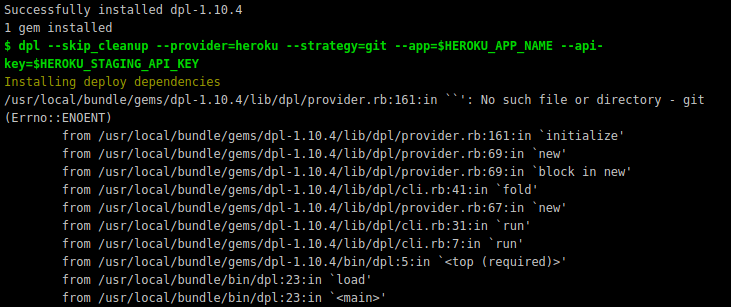
My output is:
 alaxalves
All 2 comments
Seems like I had to install git package in my docker image, and it worked!
alaxalves
on 7 Nov 2018
🎉1
👍1
apt-get install git -yqq
Helped me too
 Carsak
on 20 Nov 2019
Carsak
on 20 Nov 2019
👍1
Was this page helpful?
0 / 5 - 0 ratings
Related issues
 rodmoreno
·
3Comments
rodmoreno
·
3Comments
 Sytten
·
4Comments
Sytten
·
4Comments
 amblock
·
5Comments
amblock
·
5Comments
 jingsam
·
7Comments
jingsam
·
7Comments
 Stevoisiak
·
3Comments
Stevoisiak
·
3Comments
Most helpful comment
Seems like I had to install git package in my docker image, and it worked!