Downshift: Shouldn't scrollIntoView execute relative to menuNode?
I'm rendering the menu using PopperJS in a portal and, whenever an item is selected (all of them but the first), the page scrolls to the bottom. I suppose it's because scrollIntoView is being called relative to the root node. The structure is something like this:
<Downshift>
  {({ getRootProps }) => (
    <div {...getRootProps()}>
      <MyPopper>
        content={() => <div className="menu" {...getMenuProps()}>...items...</Menu>}
        >
        <input {...getInputProps()} />
      </MyPopper>
    </div>
  )}
</Downshift>
Does it make sense to be called relative to the rootNode? Shouldn't we pass menuNode instead?
 eliseumds
All 9 comments
Could you make a gif of the behavior? 🙂
 stipsan
on 31 Dec 2018
stipsan
on 31 Dec 2018
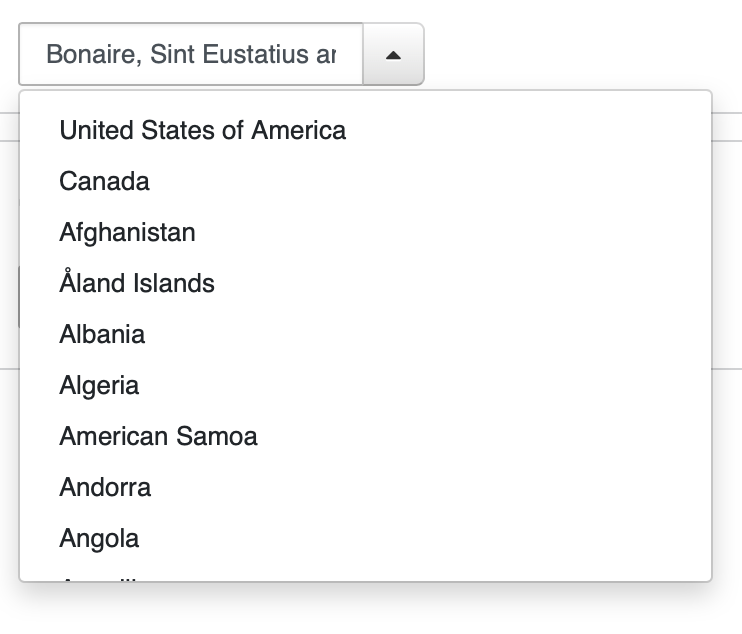
I'm running into a similar issue, I have the the menu rendered in a scrollable bootstrap Dropdown below input, which is managed by Popper. (No gif as I can't get it to scrollIntoView at all):
 bestguy
on 6 Jan 2019
bestguy
on 6 Jan 2019
Ah I got it, the portals are rendering elsewhere in the DOM so the target node do not have this._rootNode as its parent node anymore, is that right?
If changing the boundary from this._rootNode to this._menuNode doesn't break anything for the rest of our users, then I think we should make it the new default 🙂
@bestguy try if it works correctly without any boundary option set at all. If it still doesn't work I'd love to see a codesandbox.io of it and see what's up. If your portal is rendering far up in the DOM tree then no boundary defined might be the optimal setting for you.
Here's how you can override the scrolling behavior with different settings:
import Downshift from 'downshift'
// This is a dependency of downshift already
import computeScrollIntoView from 'compute-scroll-into-view'

<Downshift
  scrollIntoView={function(node, rootNode) {
    if (node === null) {
      return
    }

    const actions = computeScrollIntoView(node, {
      // Disabling boundary to test if scrolling works from Popper
      // boundary: rootNode,
      block: 'nearest',
      scrollMode: 'if-needed'
    })
    actions.forEach(({ el, top, left }) => {
      el.scrollTop = top
      el.scrollLeft = left
    })
  }}
>
  {/* your callback */}
</Downshift>
One more thing, when you don't provide a boundary option then compute-scroll-into-view should result in the same scrolling as Element.scrollIntoView with the same block and inline options in the latest versions of FireFox and Chrome.
If it doesn't, please let me know.
scrollMode isn't implemented in any browser yet but if something isn't scrolling when it should, also let me know 😄 .
stipsan
on 6 Jan 2019
If changing the boundary from this._rootNode to this._menuNode doesn't break anything for the rest of our users, then I think we should make it the new default 🙂
Honestly I thought that's what it was doing 😬
Feel free to make that change in a PR :+1:
 kentcdodds
on 6 Jan 2019
kentcdodds
on 6 Jan 2019
On it! 🏃
stipsan
on 6 Jan 2019
Thanks @stipsan for the fast reply, perhaps my issue is something else, as I am unable to scroll to view the selected item even in a non-portal situation:
https://codesandbox.io/s/wynv166o7
I assumed that when the menu is opened via the toggle button, the scrollable div would scroll to the previously selected item.
bestguy
on 6 Jan 2019
:tada: This issue has been resolved in version 3.1.10 :tada:
The release is available on:
npm package (@latest dist-tag)- GitHub release
Your semantic-release bot :package::rocket:
kentcdodds
on 6 Jan 2019
(Moved my last question to new issue: #645 )
bestguy
on 7 Jan 2019
Nice! Tks everyone! 🎉
eliseumds
on 7 Jan 2019
Related issues
 Vincent-Alibert
·
4Comments
Vincent-Alibert
·
4Comments
 yuripramos
·
4Comments
yuripramos
·
4Comments
 srishanbhattarai
·
3Comments
kentcdodds
·
3Comments
srishanbhattarai
·
3Comments
kentcdodds
·
3Comments
 glockjt
·
3Comments
glockjt
·
3Comments
Most helpful comment
:tada: This issue has been resolved in version 3.1.10 :tada:
The release is available on:
npm package (@latest dist-tag)Your semantic-release bot :package::rocket: