Downshift: Dropdown select does not work on iOS (safari)
downshiftversion: http://downshift.netlify.com/nodeversion:npm(oryarn) version:
What you did:
Tried dropdown example
What happened:
I can open dropdown by clicking button, but I can't select any other item
 vonwao
All 14 comments
This seems to also occur on Firefox/IE11 in cases where you have a root button element. Chrome works fine though.
<button>
<div class="menu">
<div class="item"> example item </div>
</div>
</button>
downshift version: 1.31.14
node version: v8.11.1
npm version: 5.6.0
EDIT: Found a solution for my specific problem: replace the button element with a div element, and add a tab index of 1 to it.
<div tabIndex="1">
<div class="menu">
<div class="item"> example item </div>
</div>
</div>
 Joroze
on 5 May 2018
Joroze
on 5 May 2018
Hey @vonwao. I've tried this on a iPhone 6 and iPhoneX on the netlify dropdown example and can't seem to reproduce the issue.
Would you mind sharing some more information about this? E.g. which iPhone.
 aMollusk
on 10 May 2018
aMollusk
on 10 May 2018
I stumbled upon the same problem. There seems to be some problems with how the blur and onClick events are triggered.
I did some digging on this issue, and the problem here is that the blur event is triggered before the onClick event. So when the menu is open we get the following state changes (in chronological order):
- Starting point.
isOpen: true - onBlur triggers
this.button_handleBlur, which runsthis.reset({ type: Downshift.stateChangeTypes.blurButton }).this.reset()setsisOpen: false - onClick handler triggers
this.toggleMenu({ type: Downshift.stateChangeTypes.clickButton })which flips the current state of isOpen, resulting inisOpen: true
I was able to reproduce this using the iPhone simulator (only tried iPhone 6) and this url: http://downshift.netlify.com/?selectedKind=Examples&selectedStory=dropdown&full=0&addons=1&stories=1&panelRight=0
I'm afraid I've not had the time to look into the internals of Downshift to find a good solution for this yet, maybe you have some ideas of how to work around this?
 alfredringstad
on 28 May 2018
alfredringstad
on 28 May 2018
I'm sorry, I don't have time to look into this myself. But I'd love for this to be fixed once and for all. iOS Safari has been a bit of a pain.
 kentcdodds
on 29 May 2018
kentcdodds
on 29 May 2018
I'm more than happy to help, but I can't reproduce this on a real iOS device.
Which emulator are you using @alfredringstad - I'll take a look if I can get one running.
As a side note: I've noticed that storybook behaves kind of strangely on iOS because of the iFrame (the white container). Ensuring that the grey menus are out of the way seems to resolve some unexpected behaviour.
aMollusk
on 30 May 2018
@aMollusk it seems to be working now for me, although there is a noticeable lag, between the time you touch an item and when it highlights and selects. I think something strange is happening here.
vonwao
on 1 Jun 2018
So I finally had some time to look into this. While I thought this was related to the original issue, I now realised that my problem might not be what @vonwao intended. If that is the case, I'm sorry for stealing this issue.
My problem exists when the toggle button is a <button> element. When I press the toggle button the first time, it opens the menu as it should. I can select other items in the list, or press anywhere else on the page to trigger the blur event and close the menu. However, if I instead press the toggle button again (so first toggle button to open, then toggle button to close), the menu stays open. This happens in Safari on iOS. I tried it out using the Xcode simulator on an iPhone 6 running iOS 9.
The problem seems to be that Safari on iOS triggers a blur event before the onClick event, if the button was manually focused. This causes, as I posted in a comment above, that the menu is first reset (isOpen = false) and then toggled (isOpen = true). I think the desired behaviour is that the menu should only be toggled (isOpen = false).
To fix this, I found a solution where we can store the blur event target and compare it to the active selection and see if it's the same element that is focused again. In that case we shouldn't trigger the blur action.
This code example would solve this problem:
  button_handleBlur = event => {
    const target = event.target; // Need to save this reference since it's not available on event when we're inside the setTimeout function
    // Need setTimeout, so that when the user presses Tab, the activeElement is the next focused element, not body element
    setTimeout(() => {
      if (
        !this.isMouseDown &&
        (this.props.environment.document.activeElement == null ||
          this.props.environment.document.activeElement.id !== this.inputId) &&
        this.props.environment.document.activeElement !== target // Make sure same element is not re-focused
      ) {
        this.reset({type: Downshift.stateChangeTypes.blurButton})
      }
    })
  }
Note that this is only a problem when the toggle button is a <button> element.
Another possible workaround (that could have some more side effects) is to use preventDownshiftDefault on the onBlur method:
<button
  {...getToggleButtonProps({
    onBlur: e => (e.preventDownshiftDefault = true) // Workaround for a Downshift bug in Safari on iOS where onBlur is wrongfully triggered before onClick
  })}
>
  Toggle button
</button>;
I'd happily create a pull request if you think my code example is a good solution for this.
alfredringstad
on 7 Jun 2018
Let's see a pull request with your suggested solution. Thank you!
kentcdodds
on 7 Jun 2018
Hi! I fell into the same issue: select doesn't work on mobile (not only iOS):
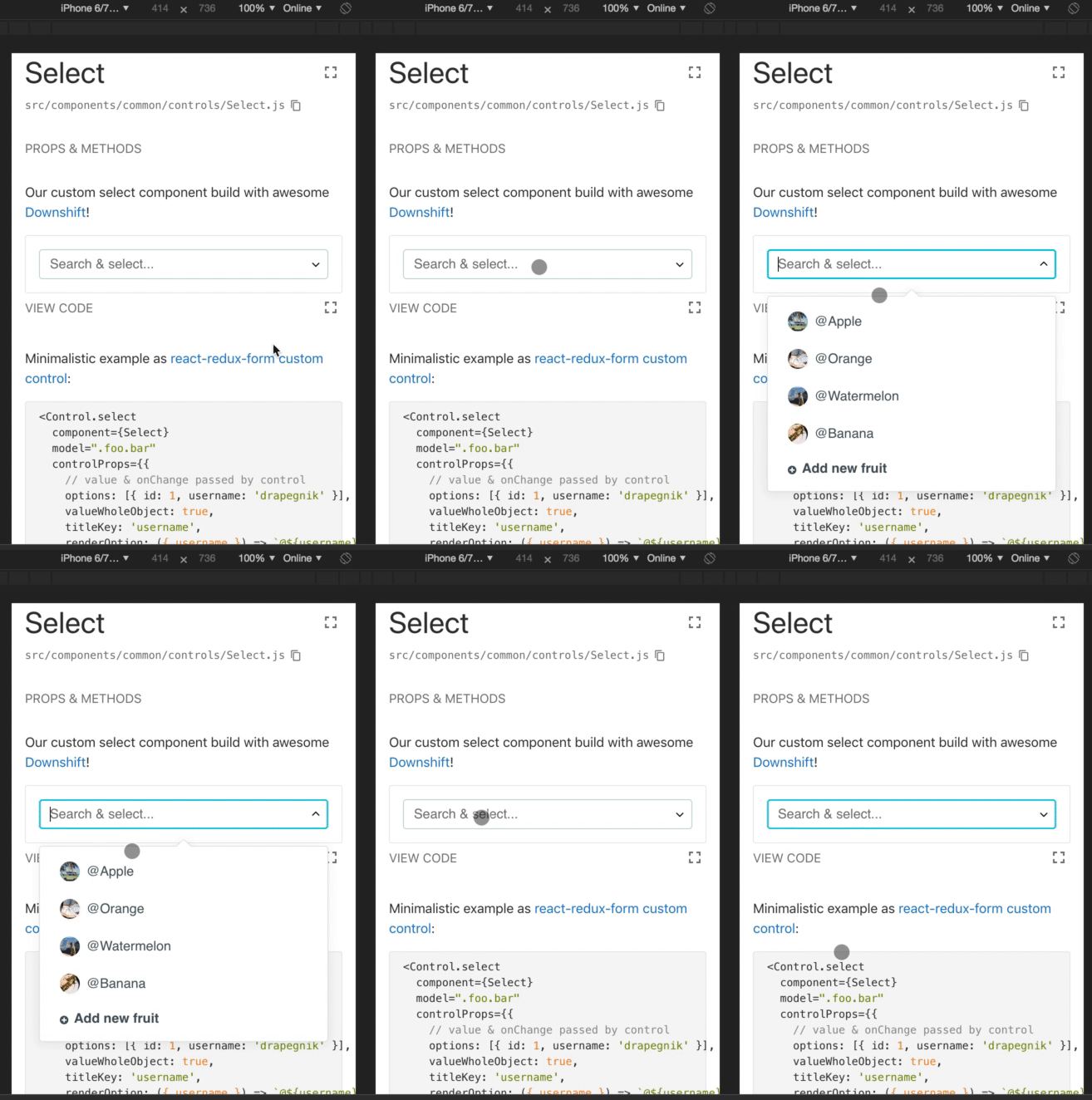
I found that it was broken in [email protected] (works for me in 1.31.10)
 Drapegnik
on 6 Aug 2018
Drapegnik
on 6 Aug 2018
Ah, now that's no good! Could you investigate what changed and caused the bug? Or was it this same thing? Does the workaround work? Would you be willing to make a PR?
kentcdodds
on 6 Aug 2018
Sorry, it was my issue: I did not use getMenuProps and targetWithinDownshift(event.target, false) return false, so it was interpreted as outside click.
Drapegnik
on 11 Aug 2018
It this an open issue? I am finding that touching anywhere in the open menu closes the menu on ios. I can repro with https://codesandbox.io/embed/2xz252nwq0 (safari and chrome) and get much the same as the video above. I.e. it's not possible to select an item, nor to scroll the list at all. In my own code I see that I get __autocomplete_touchstart__ with { isOpen: false } . This is with downshift 2.2.3 btw.
 kitfit-dave
on 2 Oct 2018
kitfit-dave
on 2 Oct 2018
Quick update: I was using (much like the material ui example) Paper as the menu container, spreading getMenuProps() - if I wrap this in a div it works as expected.
I have not had time to look at why using the Paper as the menu does not work... though I'd guess that it's due to missing refKey - they seem to have removed most of the ref stuff from material ui yes? (see https://github.com/mui-org/material-ui/issues/5532) - I'm not entirely sure how to use findDOMNode to workaround this though.
I'd say that I might have to give up trying to use material ui composite components directly and always wrap them in divs... Sorry to ramble.
kitfit-dave
on 2 Oct 2018
So this appears to be more with how downshift is (mis)used than downshift itself.
If someone would like to contribute some documentation to help people avoid using it incorrectly in this way that'd be great! But I'm going to go ahead and close this as I'm trying to clean house a bit :)
kentcdodds
on 5 Oct 2018
Related issues
 alexandernanberg
·
4Comments
alexandernanberg
·
4Comments
 GuidovdRiet
·
3Comments
GuidovdRiet
·
3Comments
 jlongster
·
4Comments
jlongster
·
4Comments
 oliverjam
·
3Comments
oliverjam
·
3Comments
 lukyth
·
3Comments
lukyth
·
3Comments
Most helpful comment
So I finally had some time to look into this. While I thought this was related to the original issue, I now realised that my problem might not be what @vonwao intended. If that is the case, I'm sorry for stealing this issue.
My problem exists when the toggle button is a
<button>element. When I press the toggle button the first time, it opens the menu as it should. I can select other items in the list, or press anywhere else on the page to trigger the blur event and close the menu. However, if I instead press the toggle button again (so first toggle button to open, then toggle button to close), the menu stays open. This happens in Safari on iOS. I tried it out using the Xcode simulator on an iPhone 6 running iOS 9.The problem seems to be that Safari on iOS triggers a blur event before the onClick event, if the button was manually focused. This causes, as I posted in a comment above, that the menu is first reset (isOpen = false) and then toggled (isOpen = true). I think the desired behaviour is that the menu should only be toggled (isOpen = false).
To fix this, I found a solution where we can store the blur event target and compare it to the active selection and see if it's the same element that is focused again. In that case we shouldn't trigger the blur action.
This code example would solve this problem:
Note that this is only a problem when the toggle button is a
<button>element.Another possible workaround (that could have some more side effects) is to use
preventDownshiftDefaulton the onBlur method:I'd happily create a pull request if you think my code example is a good solution for this.