Downshift: Browsing through the menu with shift key
downshiftversion: 1.28.0nodeversion: /npm(oryarn) version: /
Problem description:
I don't know if this is an issue or if it is intended, this is just an observation and I couldn't find a test for this use case.
When using the shift key together with arrow down while having one of the the last 5 items in the menu selected, the first item in the menu gets selected.
The same happens with arrow up, while being at the first 5 items in the menu then the last item gets selected.
To reproduce it, you use any of the codesandbox examples or one of the storybook examples.
Suggested solution:
My suggestion would be to stay at the bottom/top of the menu, or to select the 'right' item.
But again, I might be wrong :sweat_smile:
 timdeschryver
All 21 comments
It looks like this functionality is intentional based on this line here. Based on the code and in testing, it seems like holding shift skips 5 items on each down arrow. I think the idea is that this allows you to scroll through the list more quickly.
I checked other autocomplete implementations like Google and Amazon. Holding the shift key down in Google search freezes the down arrow functionality. In Amazon, it has no effect. Personally, I really like this feature, but I do think it should be added to the docs, so that users are aware of it. Side note...does this feature have anything to do with the name? Down-shift...
 austintackaberry
on 21 Feb 2018
austintackaberry
on 21 Feb 2018
@austintackaberry yea, I know it is a feature but it behaves a bit weird while being at the top or bottom of the menu.
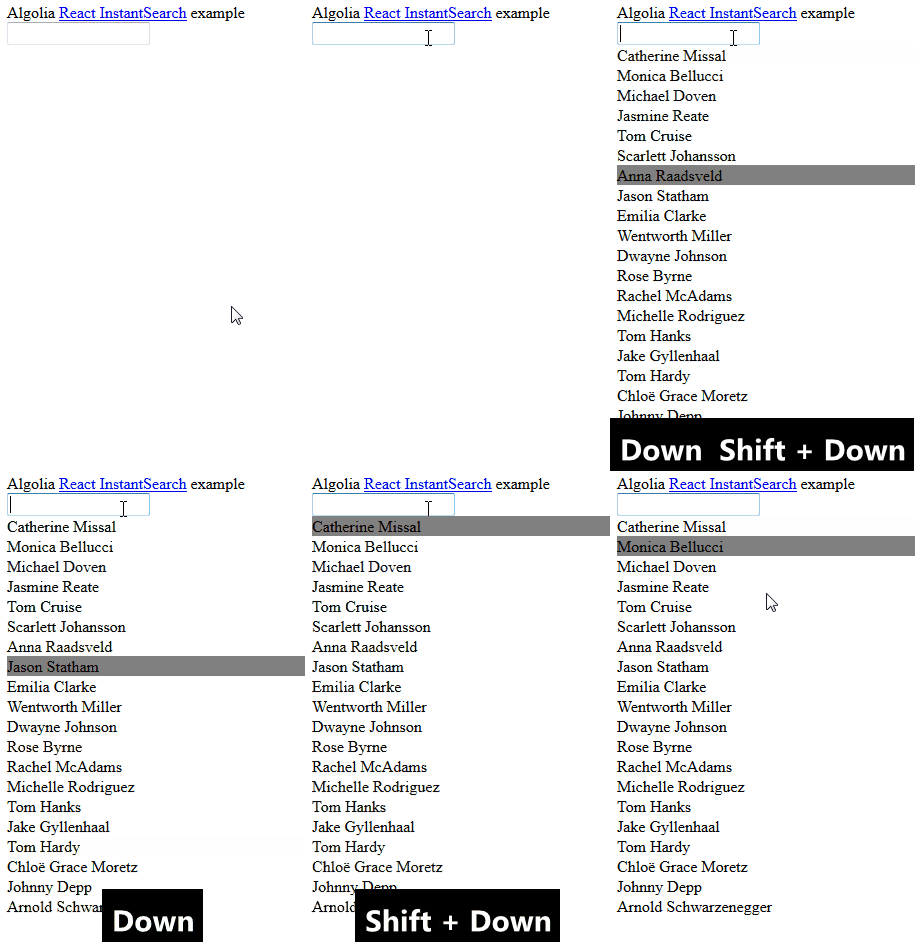
timdeschryver
on 21 Feb 2018
Sorry, I misunderstood. If I am understanding correctly, your suggested solution is:
If you're 3 items from the bottom and you press shift + down, then instead of highlighting the top item (as it does now), it highlights the bottom item.
The only issue I see with that suggestion is if you have a very long list, and you're at the bottom, but you would like to be at the top. In that case, the current usage makes more sense I believe.
What do you think about this:
If you're 3 items from the bottom and you press shift + down, then instead of highlighting the top item (as it does now), it highlights the bottom item, but if you press shift + down again (or just press down) then it takes you to the top.
austintackaberry
on 21 Feb 2018
Yes, this is by design. It's a "power-user" feature
No, this feature has nothing to do with the name "downshift" 😅
Yes, we should probably document it (any takers?)
You will be able to use the new feature being worked on for https://github.com/paypal/downshift/issues/330 to override the behavior if you don't like it.
Yes, I understand that when it goes around the top or bottom things can behave a little oddly.
No, I don't really want to change that behavior because the feature is intended to help you move around quickly, not get to a specific item.
Yes, when that new prop is implemented, you could make it do what you want.
Yes, I knew that things like this would come up and I'm feeling better and better about the fact that I didn't decide to make a one-off prop to handle the #330.
Yes, I'm responding with Yes/No sentences because I started the first two that way and it was fun.
Yes, I can be odd sometimes 🙃
 kentcdodds
on 21 Feb 2018
kentcdodds
on 21 Feb 2018
I should note that you can actually already customize this behavior by adding an onKeyDown event handler to the input in getInputProps and calling event.preventDefault() when you want to customize behavior :)
kentcdodds
on 21 Feb 2018
Side note
Hey @austintackaberry, I've noticed you've been really helpful in issues lately. Thanks so much for your help! I've added you as a collaborator on the project. Please make sure that you review the other/MAINTAINING.md and CONTRIBUTING.md files (specifically the bit about the commit messages and the git hooks) and familiarize yourself with the code of conduct (we're using the contributor covenant). You might also want to watch the repo to be notified when someone files an issue/PR. Please continue to make PRs as you feel the need (you can make your branches directly on the repo rather than your fork if you want). Thanks! And welcome to the team :)
kentcdodds
on 21 Feb 2018
Oh yeah, good point about #330! I would like to add this feature to the docs. I am happy to help; I'll read those documents and make a PR later today!
austintackaberry
on 21 Feb 2018
@kentcdodds I'm fine with everything, as long as it is intended :smile:
Thanks again!
timdeschryver
on 21 Feb 2018
I don't see a good spot to put this in the docs right now. Perhaps when the keyDownHandlers prop is added to the docs, I could add information about this functionality in that section.
austintackaberry
on 23 Feb 2018
That makes sense 👍
kentcdodds
on 23 Feb 2018
@kentcdodds, just to bring this into context with another conversation around "default behavior" in Downshift, is there a reason why jumping by 5 when holding SHIFT is seen as something "default" rather than something "custom"?
As was pointed out in the linked comment, including the user input in the list of suggestions was seen as something custom and should not be considered a "default" from Downshift's perspective. I agree with this, and you made valid points as to why.
However, looking at the issue, it feels like this "jump by 5" is also custom behavior, and I'm confused why Downshift is making this sort of decision by default on my behalf, and why I would have to implement my own "custom" behavior to remove this already non-standard functionality.
 indiesquidge
on 26 Feb 2018
indiesquidge
on 26 Feb 2018
That's fair @indiesquidge. This particular feature is something I've added to all autocomplete experiences I've implemented because I've wanted it in every autocomplete I've used. It came over naturally out of that when I copy/pasted some logic from my last autocomplete component. I didn't think there would be any harm in it considering many people are nothing but pleasantly surprised when they realize that feature exists.
Unless there's a solid use case for its removal I want to leave it in now that it's here.
kentcdodds
on 26 Feb 2018
I didn't think there would be any harm in it considering many people are nothing but pleasantly surprised when they realize that feature exists.
This is legitimate. I personally don't have a problem with it, I was more just curious about what constitutes a "default" in the eyes of Downshift. It feels as though things like this are making internal opinions about more than just what meets the standard spec, and may come as an unintuitive surprise to some (such is the case with what @tdeschryver experienced).
The only reasonable concern for this is what this issue thread has already brought up, namely, that it's a bit jarring to have it jump to the top if you are <5 items from the bottom of the list, rather than just going to the bottom item.
All that said, this is your library, so whatever you deem "default" is something the rest of us who have the pleasure of using your library should accept, and if someone really feels that strongly against it, they can fork it and change it! It's wonderful that something like Downshift exists at all 😃
indiesquidge
on 27 Feb 2018
Exactly :+1: everything you said is :100:
And if someone were to fork downshift just for this and that thing started getting traction just because this one difference, then I'd happily accept that as evidence that most people don't like this default and we can make a change. But my guess is most people don't know about this feature, and those who find out are pleasantly surprised or just remember to not hold down the shift key 🤷♂️
Either way, it probably wouldn't be a bad idea to document this in some form in the README, so I'll go ahead and leave this open. Would you like to do that @indiesquidge? If so, make sure you follow the contributing guidelines to add yourself to the contributors table for docs, PR reviewers, and question answering :)
kentcdodds
on 27 Feb 2018
it probably wouldn't be a bad idea to document this in some form in the README, so I'll go ahead and leave this open.
Sure, I'd love to contribute to Downshift by adding this to the docs :)
indiesquidge
on 27 Feb 2018
@indiesquidge it might be good to just add a section for each keyDownHandler and include this in the ArrowDown handler section
austintackaberry
on 28 Feb 2018
That's a good idea! Maybe it could be a sub-section of getInputProps that talks about the props which are returned.
kentcdodds
on 28 Feb 2018
Hey, @kentcdodds. While working on getting Downshift's default event handlers documented, I noticed a strange behavior in the ESCAPE keydown event that I wanted to run by you to see if it is expected or a bug. (If it is the latter, I can open a new issue for it.)

_You'll notice that once I've selected an item from the menu list (first debugger), even if I delete my selection and start to search for something new, if I press 'Escape' (second debugger) the "old" selection ("Tommy Lee Jones") persists, rather than the value I was typing into the input field ("em")._
indiesquidge
on 12 Mar 2018
I believe that this is intended. If you select an item, it becomes the new selectedItem. If you type some letters with the menu open, and then you hit escape, the current selectedItem should not change. It should only change if you actually select a different item.
austintackaberry
on 12 Mar 2018
@austintackaberry is correct. There are many different ways to build autocompletes and downshift's default is that a selected item must be selected. There's an example in the README for how to make the selected item be whatever the user typed. I think it's called Typeahead.
kentcdodds
on 12 Mar 2018
Thanks @indiesquidge! This has been documented :+1:
kentcdodds
on 20 Mar 2018
Related issues
 mayk93
·
3Comments
mayk93
·
3Comments
 Vincent-Alibert
·
4Comments
Vincent-Alibert
·
4Comments
 alexandernanberg
·
4Comments
alexandernanberg
·
4Comments
 the-simian
·
4Comments
the-simian
·
4Comments
 jlongster
·
4Comments
jlongster
·
4Comments
Most helpful comment
Yes, this is by design. It's a "power-user" feature
No, this feature has nothing to do with the name "downshift" 😅
Yes, we should probably document it (any takers?)
You will be able to use the new feature being worked on for https://github.com/paypal/downshift/issues/330 to override the behavior if you don't like it.
Yes, I understand that when it goes around the top or bottom things can behave a little oddly.
No, I don't really want to change that behavior because the feature is intended to help you move around quickly, not get to a specific item.
Yes, when that new prop is implemented, you could make it do what you want.
Yes, I knew that things like this would come up and I'm feeling better and better about the fact that I didn't decide to make a one-off prop to handle the #330.
Yes, I'm responding with Yes/No sentences because I started the first two that way and it was fun.
Yes, I can be odd sometimes 🙃