Downshift: Keyboard selection is rudely interrupted and overridden by auto-complete mouse-enter actions.
downshiftversion: 1.16.0nodeversion: 8.5.0npm(oryarn) version: yarn 1.0.2
Description
In any downshift configuration (at least thus far in my experience), the mouse position will fire (and select whatever is underneath it) immediately after an arrow-selecting and shift-arrow-paging event.
Replication
- Navigate to any example: http://downshift.netlify.com/?selectedKind=Examples&selectedStory=basic&full=0&down=1&left=1&panelRight=0
- Open the menu by changing the input
- Make sure there are multiple "pages" of options.
- Place your cursor over the first option in the list
- Using the down-arrow on your keyboard, navigate down the list
- As soon as your arrow-down action selects an option beyond the visible set (either by arrowing-down on the last option, or shift-arrowing-down to change the whole page) the option underneath the cursor position will subsequently be selected.
Expected
I would expect the cursor to not activate an option while using arrow navigation, unless of course, the cursor is moved.
 tannerlinsley
All 15 comments
Code origin is easy to locate: https://github.com/paypal/downshift/blob/master/src/downshift.js#L637, but the solution to this problem could be more difficult than I thought.
tannerlinsley
on 23 Oct 2017
Yep, I've seen and experienced this before. Interestingly, Google avoids this problem and hides the cursor:
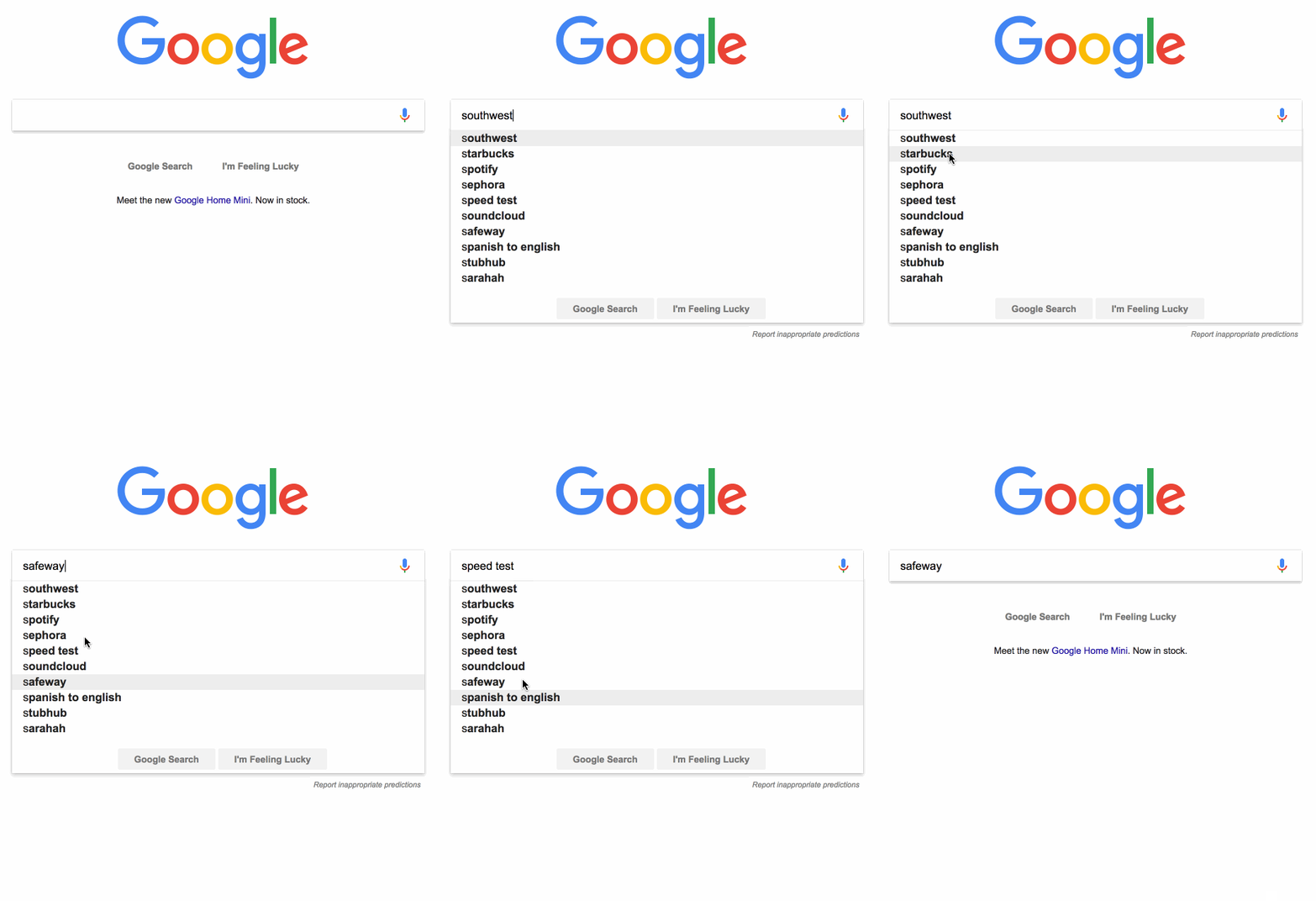
I think we could do something similar. I definitely welcome a pull request to improve this experience. I think that most folks would prefer this and others wouldn't notice if we changed this.
 kentcdodds
on 23 Oct 2017
kentcdodds
on 23 Oct 2017
As for a solution, I'm not 100% certain the best way to do it. Definitely open to ideas.
kentcdodds
on 23 Oct 2017
I'm curious if a mouse move event would fire in the same situation.
tannerlinsley
on 23 Oct 2017
That would probably bring some debouncing or cancelling issues to mind, but theoretically would work. I feel there is a simpler solution though...
tannerlinsley
on 23 Oct 2017
@kentcdodds @tannerlinsley I'll look at this tonight! I'm also developing similar component for client work so let's see what I can do.
 philipyoungg
on 24 Oct 2017
philipyoungg
on 24 Oct 2017
After thinking for a while, I think this could work (theoretically). Here's how:
- we need to add a new state. Let's call it
isArrowButtonClickedfor now. - on
componentWillMount, add event listener that binds toonkeyup. Ifthis.state.isOpenand key UP/DOWN is pressed, changethis.state.isArrowButtonClickedto true. - Similarly, on
componentWillMount, add event listener that binds toonmousemove. Ifthis.state.isOpenandthis.state.isArrowButtonClickedis true, then change it to false - Lastly, we only run the
onMouseEnterevent listener on item props ifthis.state.isArrowButtonClickedis true. https://github.com/paypal/downshift/blob/master/src/downshift.js#L637
Love to hear any improvement!
cc: @kentcdodds @tannerlinsley
philipyoungg
on 25 Oct 2017
Thanks for the idea @philipyoungg,
I'm not sure I understand the purpose of the isArrowButtonClicked... Honestly this doesn't appear to have anything to do with whether you click the toggle button or if there's even a toggle button at all...
I think that it would be easier to see solutions to this than hear it explained. Anyone can feel free to open a PR. It may not get merged right away or at all depending on how complicated it is, but that will be much more likely to get merged if it's shown in a PR rather than explained in text :)
kentcdodds
on 25 Oct 2017
@kentcdodds IsArrowButtonClicked is a state that monitors whether user pressed key up / key down while the dropdown is open.
The problem is mouse event fired when user choosing the dropdown item on arrow up / arrow down right?
The only responsibility of the state is to disable the Mouse event when the state is true.
The state will return to false as soon as user moves the Mouse.
philipyoungg
on 25 Oct 2017
Hmmm... the isArrowButtonClicked name just isn't working for me.... But feel free to open a PR and we can talk about it there.
Also, I wonder whether pointer-events could help us here.
kentcdodds
on 25 Oct 2017
/s/isArrowButtonClicked/isArrowButtonPressed
Fingers don't click :)
 cmmartin
on 30 Nov 2017
cmmartin
on 30 Nov 2017
My 2c, I think part of the naming confusion is because it's not an arrow button, but an arrow key. Button makes web developers think of <button> I think 😛.
isArrowKeyPressed?
 ibrahima
on 12 Dec 2017
ibrahima
on 12 Dec 2017
Thanks @ibrahima. Yes, I do like isArrowKeyPressed better :+1:
Still not sure I follow the suggested solution well, but a PR would help me understand I think.
kentcdodds
on 12 Dec 2017
This was mistakenly closed.
kentcdodds
on 4 Jan 2018
This was solved a while back. Forgot to close the issue.
kentcdodds
on 20 Mar 2018
Related issues
 preraksola
·
4Comments
preraksola
·
4Comments
 riax
·
4Comments
riax
·
4Comments
 srishanbhattarai
·
3Comments
srishanbhattarai
·
3Comments
 lukyth
·
3Comments
lukyth
·
3Comments
 Vincent-Alibert
·
4Comments
Vincent-Alibert
·
4Comments