Dosbox-x: ARM on Mac (Apple Silicon) build
With Apple Silicon (Mac OS 11 on ARM) now shipping, it would be great to see a build for that platform.
 cobaltjacket
All 82 comments
While a native build would be a good idea in the long run, I don't honestly think you'll see much of a performance difference between that and running dosbox-x under Rosetta 2 at this time.
 StLouisCPhT
on 22 Nov 2020
StLouisCPhT
on 22 Nov 2020
@StLouisCPhT Too late, I just bought the M1 Macbook today. I'm just getting XCode and Brew set up now. ARM Mac OS X support will begin soon.
 joncampbell123
on 22 Nov 2020
joncampbell123
on 22 Nov 2020
Works for me :)
Wait a sec, I thought homebrew was wasn't supporting ARM macOS yet. I might be mistaken but I think that'd prevent a native Apple Silicon version of dosbox-x.
StLouisCPhT
on 22 Nov 2020
Rosetta 2 allows it to run Intel binaries on ARM, which does work pretty well so far considering Thunderbird and Firefox do not yet have ARM OS X releases.
Google Chrome appears to already have an ARM OS X release.
Also true to Apple's claims, you can indeed run iPad apps on it too. At least those dumb "pull the pin" type apps from my tests.
Interestingly enough it seems Rosetta 2 is not shipped at install and it will prompt you to install Rosetta 2 the first time you try to run anything compiled for Intel.
Brew provides additional utilities that are useful to compile DOSBox-X.
joncampbell123
on 22 Nov 2020
I know, I already use dosbox & dosbox-x with Rosetta 2.
And have the iPad versions of the Hardwood series of card games installed also.
StLouisCPhT
on 22 Nov 2020
By the way, I'm told that Rosetta 2 does x86 to ARM translation on program load, not runtime emulation like the ARM Microsoft Surface does. That would mean that theoretically even if you were to run x86 DOSBox-X on M1, it probably wouldn't work with dynamic core.
joncampbell123
on 22 Nov 2020
That could be a good point. Of course, I haven't tried that option since I only use it for old 80s/90s dos games and they really don't need dynamic core performance.
StLouisCPhT
on 22 Nov 2020
@Wengier Before I can continue Mac OS X development in general I'm going to need to work out why the final link stage on OS X is failing to properly link against FreeType. Once that blocking issue is resolved, general OS X development can begin again. One issue that needs to be resolved off the top of my head is that the GUI toolkit you're using for dialog prompts and such does not successfully call up the Open and Save dialog box on OS X, such as when you do something to control where save states are stored.
joncampbell123
on 22 Nov 2020
Okay, I already have a nitpick with Big Sur: Apparently if you let it install Rosetta 2, then upgrade to the latest subversion of Big Sur, it will prompt you to install Rosetta 2 again. Why? :raised_eyebrow:
joncampbell123
on 22 Nov 2020
Ah, Brew is aware of the situation and refuses to run for ARM OS X. Interesting.
That's OK, I was developing DOSBox-X on OS X before I was aware of Brew.
joncampbell123
on 22 Nov 2020
That's what I was trying to warn you about. They don't plan ARM macOS support for several months.
Maybe a Universal Binary instead?
StLouisCPhT
on 22 Nov 2020
To ship a universal binary of DOSBox-X I would first need to know how to construct one.
Remember that DOSBox-X's .app file is constructed manually in the makefile, which is hacky, but works.
joncampbell123
on 22 Nov 2020
Okay, I already have a nitpick with Big Sur: Apparently if you let it install Rosetta 2, then upgrade to the latest subversion of Big Sur, it will prompt you to install Rosetta 2 again. Why? 🤨
This is just a theory, but since the M1 Macs ship with an older version of Big Sur, maybe the version of Rosetta 2 you downloaded was also an older version?
StLouisCPhT
on 22 Nov 2020
Congratulations. You can cause a kernel stack corruption crash by running x86 binaries of iTerm2 :laughing: :+1: Good one Apple.
Well, Rosetta 2 is probably still a bit new. They'll iron these things out probably.
joncampbell123
on 22 Nov 2020
Maybe. It doesn't tell me where it's downloading from, it just downloads it.
joncampbell123
on 22 Nov 2020
It gets better. Apparently the 11.1 builds have critical bug fixes for Rosetta 2, according to Codeweaver. So does that mean another version to download? Or are the fixes in the overall OS? I have no clue.
StLouisCPhT
on 22 Nov 2020
The lack of brew means that until they get things straightened out I'll just have to manually configure + make + sudo make install the GNU autoconf automake tools.
joncampbell123
on 22 Nov 2020
Annnnnd this is why I don't code anymore. My head is spinning @ that idea.
StLouisCPhT
on 22 Nov 2020
@StLouisCPhT Compiling GNU stuff from source makes your head spin? I've compiled an entire Linux system from source code and written a script to do it. Basic GNU tools are child's play compared to that.
joncampbell123
on 22 Nov 2020
@joncampbell123 Compiling in general makes my head spin. I haven't done any of that since 1996 and I'm way behind now.
Ironically, I was coding Metal back then. Metal/Futurevision for the Apple II series that is.
StLouisCPhT
on 22 Nov 2020
For me back then that just meant multiple Microsoft Visual C++/Visual studio project files. Writing stuff for Windows 95/98 was it's own unique form of pain :)
joncampbell123
on 22 Nov 2020
Even though I seem to be one of the few people that have never had issues with any version of Windows, I got the impression from people that Windows 95/98 themselves were a unique form of pain.
StLouisCPhT
on 22 Nov 2020
Indeed. Windows 95/98/ME despite all the layers on top still ran atop DOS. The only difference from Windows 3.x was that the layers on top would do more and more of DOS's responsibilities in 32-bit protected mode.
By the way, did you know NULL pointers were valid memory addresses in Windows 95/98? In Windows 95 in fact you could even WRITE to a NULL pointer without crashing.
Imagine the programming mistakes that hid under the rug, eh? :laughing:
joncampbell123
on 22 Nov 2020
Probably the same programming mistakes/hacks that Factor 5 put into the Rogue Squadron GameCube games but never told anyone about.
StLouisCPhT
on 22 Nov 2020
Anyway.
Download autoconf, automake, libtool.
./configure && make -j9 && sudo make install
Each one.
Done. That was easy. :)
Oops, DOSBox-X is trying to compile x86 dynamic core for ARM OS X. Well, I'll get that cleaned up. :rofl:
joncampbell123
on 22 Nov 2020
I'd be laughing on the floor if I wasn't in a serious moment playing Curse of the Azure Bonds.
StLouisCPhT
on 22 Nov 2020
Yeah, growing pains on a new platform, of course.
Initial ARM builds are probably going to have to ship with dynamic core disabled until that can be worked out.
joncampbell123
on 22 Nov 2020
@joncampbell123 What is the error message you saw for the FreeType link failure on macOS? Actually here I am also getting FreeType link failure on MinGW64, and I solved it by adding more -l options locally. I am not entirely sure if the solution applies to macOS too.
Also, since I don't have a Mac, I was never able to test the GUI toolkit on MacOS myself yet. It is certainly interesting to hear that you can run iPad apps on ARM Mac, which is certainly useful. For reasons like this I may buy a ARM MacBook to test it out too.
 Wengier
on 22 Nov 2020
Wengier
on 22 Nov 2020
I'm getting:
ld: warning: directory not found for option '-L/Users/joncampbell/src/dosbox-x/vs2015/sdlnet/linux-host/lib'
Undefined symbols for architecture x86_64:
"_FT_Done_Face", referenced from:
_TTF_CloseFont in libgui.a(sdlmain.o)
"_FT_Done_FreeType", referenced from:
_TTF_Quit in libgui.a(sdlmain.o)
"_FT_Done_Glyph", referenced from:
Find_Glyph(_TTF_Font, unsigned int, int) in libgui.a(sdlmain.o)
"_FT_Get_Char_Index", referenced from:
_TTF_GlyphIsProvided in libgui.a(sdlmain.o)
Find_Glyph(_TTF_Font, unsigned int, int) in libgui.a(sdlmain.o)
setTTFCodePage() in libgui.a(sdlmain.o)
"_FT_Get_Glyph", referenced from:
Find_Glyph(_TTF_Font, unsigned int, int) in libgui.a(sdlmain.o)
"_FT_Get_Kerning", referenced from:
TTF_SizeUTF8_Internal(_TTF_Font, char const, int, int, int, int) in libgui.a(sdlmain.o)
_TTF_RenderUTF8_Solid in libgui.a(sdlmain.o)
_TTF_RenderUTF8_Shaded in libgui.a(sdlmain.o)
_TTF_RenderUTF8_Blended in libgui.a(sdlmain.o)
_TTF_RenderUTF8_Blended_Wrapped in libgui.a(sdlmain.o)
_TTF_GetFontKerningSize in libgui.a(sdlmain.o)
_TTF_GetFontKerningSizeGlyphs in libgui.a(sdlmain.o)
...
"_FT_Glyph_Stroke", referenced from:
Find_Glyph(_TTF_Font, unsigned int, int) in libgui.a(sdlmain.o)
"_FT_Glyph_To_Bitmap", referenced from:
Find_Glyph(_TTF_Font, unsigned int, int) in libgui.a(sdlmain.o)
"_FT_Init_FreeType", referenced from:
_TTF_Init in libgui.a(sdlmain.o)
OUTPUT_TTF_Select(int) in libgui.a(sdlmain.o)
"_FT_Load_Glyph", referenced from:
Find_Glyph(_TTF_Font, unsigned int, int) in libgui.a(sdlmain.o)
"_FT_MulFix", referenced from:
TTF_initFontMetrics(_TTF_Font) in libgui.a(sdlmain.o)
"_FT_Open_Face", referenced from:
_TTF_OpenFontIndexRW in libgui.a(sdlmain.o)
"_FT_Outline_Transform", referenced from:
Find_Glyph(_TTF_Font, unsigned int, int) in libgui.a(sdlmain.o)
"_FT_Render_Glyph", referenced from:
Find_Glyph(_TTF_Font, unsigned int, int) in libgui.a(sdlmain.o)
"_FT_Select_Size", referenced from:
_TTF_OpenFontIndexRW in libgui.a(sdlmain.o)
"_FT_Set_Char_Size", referenced from:
_TTF_OpenFontIndexRW in libgui.a(sdlmain.o)
"_FT_Set_Charmap", referenced from:
_TTF_OpenFontIndexRW in libgui.a(sdlmain.o)
"_FT_Stroker_Done", referenced from:
Find_Glyph(_TTF_Font, unsigned int, int) in libgui.a(sdlmain.o)
"_FT_Stroker_New", referenced from:
Find_Glyph(_TTF_Font, unsigned int, int) in libgui.a(sdlmain.o)
"_FT_Stroker_Set", referenced from:
Find_Glyph(_TTF_Font, unsigned int, int) in libgui.a(sdlmain.o)
ld: symbol(s) not found for architecture x86_64
clang: error: linker command failed with exit code 1 (use -v to see invocation)
make[3]: * [dosbox-x] Error 1
make[2]: [all-recursive] Error 1
make[1]: [all-recursive] Error 1
make: * [all] Error 2
joncampbell123
on 22 Nov 2020
I'm looking at the configure.ac scripts to figure out why the linker is not being asked to include the FreeType library.
joncampbell123
on 22 Nov 2020
Hm, well for one, it didn't detect the FreeType library. So the bug here is that there is TTF code still using FreeType when the config.h file says not to.
78
79 /* Define to 1 to enable freetype support /
80 / #undef C_FREETYPE */
81
joncampbell123
on 22 Nov 2020
Furthermore in include/render.h there is code to define USE_TTF if not defined, with no other conditions.
So the bug here is that USE_TTF is defined when C_FREETYPE is not.
joncampbell123
on 22 Nov 2020
Latest commit now compiles with OS X for Intel x86 (should make it up to GitHub in about 1 minute).
This change means that OS X builds do not yet compile with FreeType, of course.
joncampbell123
on 22 Nov 2020
It turns out DOSBox-X is trying to compile dynrec for x86 because uname -m on Mac OS X returns "arm64" which is not recognized as ARM by the current configure.ac script.
joncampbell123
on 22 Nov 2020
@joncampbell123 There used to be conditions, because it was specific to Windows at first, but later I made it cross-platform. I will change it to #if !defined(USE_TTF) && (defined(C_FREETYPE) || defined(_MSC_VER)) in my upcoming pull request (or it won't work for Visual Studio builds).
Wengier
on 22 Nov 2020
I already changed it to !defined(USE_TTF) && defined(C_FREETYPE). If any additional conditions need to be added, go ahead.
Although for Microsoft Visual Studio, you should modify the stock config.h VS uses in the vs2015 directory and add C_FREETYPE there.
joncampbell123
on 22 Nov 2020
@joncampbell123 Sure, I will modify vs2015\config.h instead then.
Wengier
on 22 Nov 2020
@Wengier You'll avoid a lot of #ifdef complexity for VS2019 support that way.
joncampbell123
on 22 Nov 2020
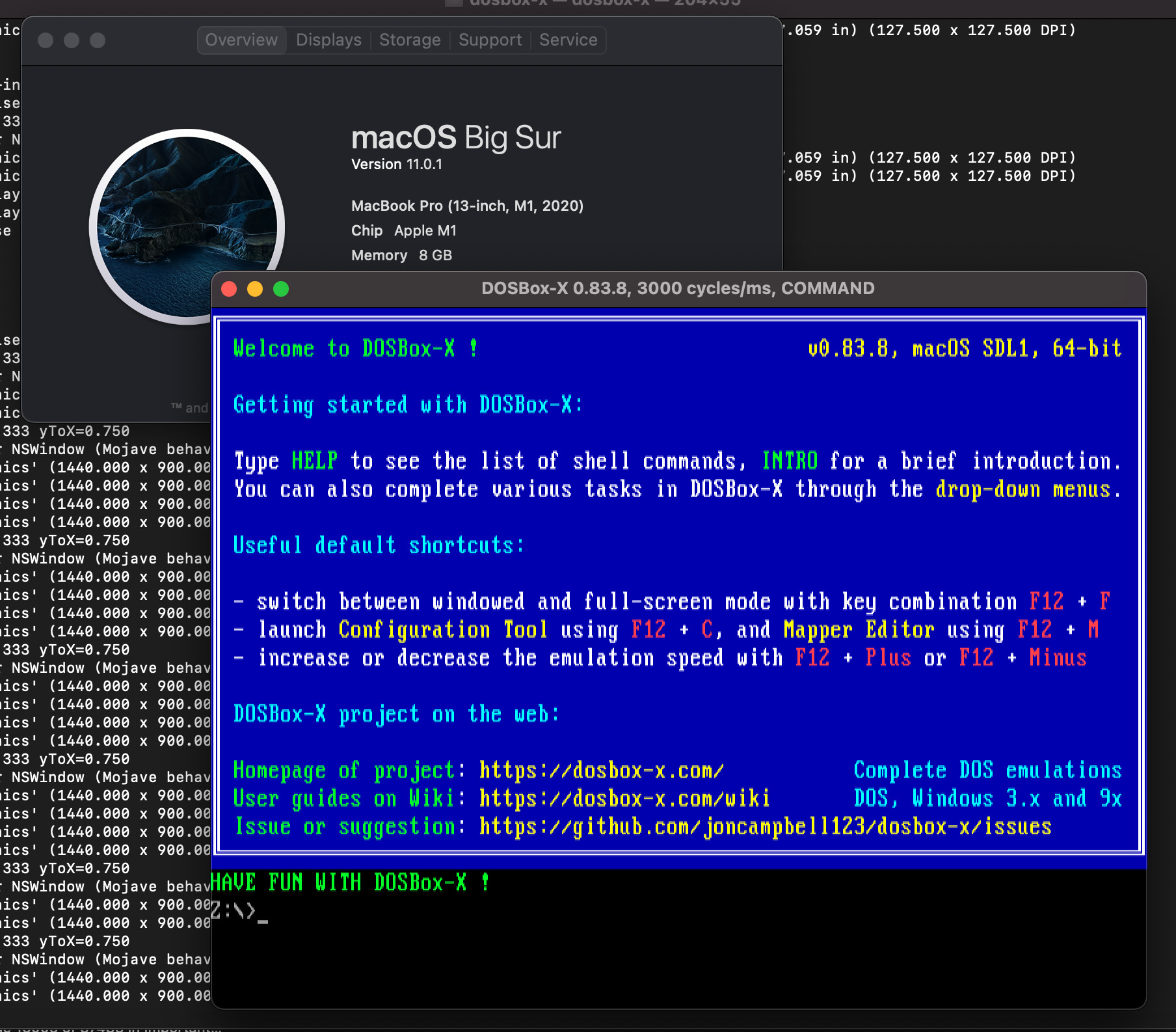
I got DOSBox-X to compile and run on ARMv8-based Mac OS X. Everything seems to work so far, except that dynamic core causes an immediate crash. The crash might be related to how dynamic core also crashes just as hard on my Raspberry Pi 4, which might just be a failure to properly detect and generate ARMv8 vs ARMv7.
ARMv8 is 64-bit ARM, ARMv7 is 32-bit. Mac OS X, obviously, is using ARMv8.
uname -m reports arm64
joncampbell123
on 22 Nov 2020
joncampbell123
on 22 Nov 2020
@joncampbell123 Great to see DOSBox-X running there! I hope I will have a ARM Mac here too.
P.S. I have already submitted the PR by now. Please check it out.
Wengier
on 22 Nov 2020
@joncampbell123
http://openjdk.java.net/jeps/391
"macOS/AArch64 forbids memory segments from being executable and writeable at the same time, a policy known as write-xor-execute (W^X)."
 grapeli
on 22 Nov 2020
grapeli
on 22 Nov 2020
I was looking at the point where it crashed in lldb and, yes, it looks like valid ARM64 code.
It's faulted as "bad access".
That would explain the crash.
Does the Raspberry Pi 4 (ARMv8), where a similar crash is observed, have the same restriction?
But then, what is Microsoft doing with the ARMv8-based Surface that allows that dynamic core to work?
EDIT: I just confirmed on the ARM-based Surface I test on, dynamic core in ARM64 builds work without crashing.
joncampbell123
on 22 Nov 2020
Does the Raspberry Pi 4 (ARMv8), where a similar crash is observed, have the same restriction?
Of course, depending on the system configuration. It can be based on GRSecurity (PaX), SELinux, Systemd with seccomp or something else.
EDIT: It doesn't have much relationship, but on ARM v8.5+ with BTI there are problems with systemd and MemoryDenyWriteExecute enabled.
systemd/issues/17368
EDIT2:
You can check with a simple test if you have W^X active.
grapeli
on 22 Nov 2020
I just pushed a commit that appears to allow dynamic core to work on ARM-based Mac OS X.
If the initial mprotect() fails, it does two quick tests to determine whether there is a W^X policy present or if it just isn't allowed to map executable at all (such as a Linux install with SELinux enabled).
If it detects W^X it keeps the map read/execute and remaps read/write only when it needs to modify cache blocks. Mac OS X seems happy with it. Although, dynrec doesn't seem to provide much of a performance gain over normal core so far according to "top"
joncampbell123
on 22 Nov 2020
Also the MIDI emulation appears unable to use the coreaudio midi synth on ARM-based OS X.
joncampbell123
on 22 Nov 2020
MIDI emulation works on 0.83.7 under Rosetta 2 with the X-Wing/TIE-Fighter games. Sounds like they changed or broke something natively.
StLouisCPhT
on 22 Nov 2020
It's possible the CoreAudio support is probably using an ancient API that Apple deprecated. Same problem that initially led to no audio output with SDL1 builds on Big Sur.
joncampbell123
on 22 Nov 2020
Makes sense, and I think I saw something along those lines in one of the What's New posts when Big Sur was in beta. Don't hold me to that though. I didn't pay as close attention this time around as I usually do.
StLouisCPhT
on 22 Nov 2020
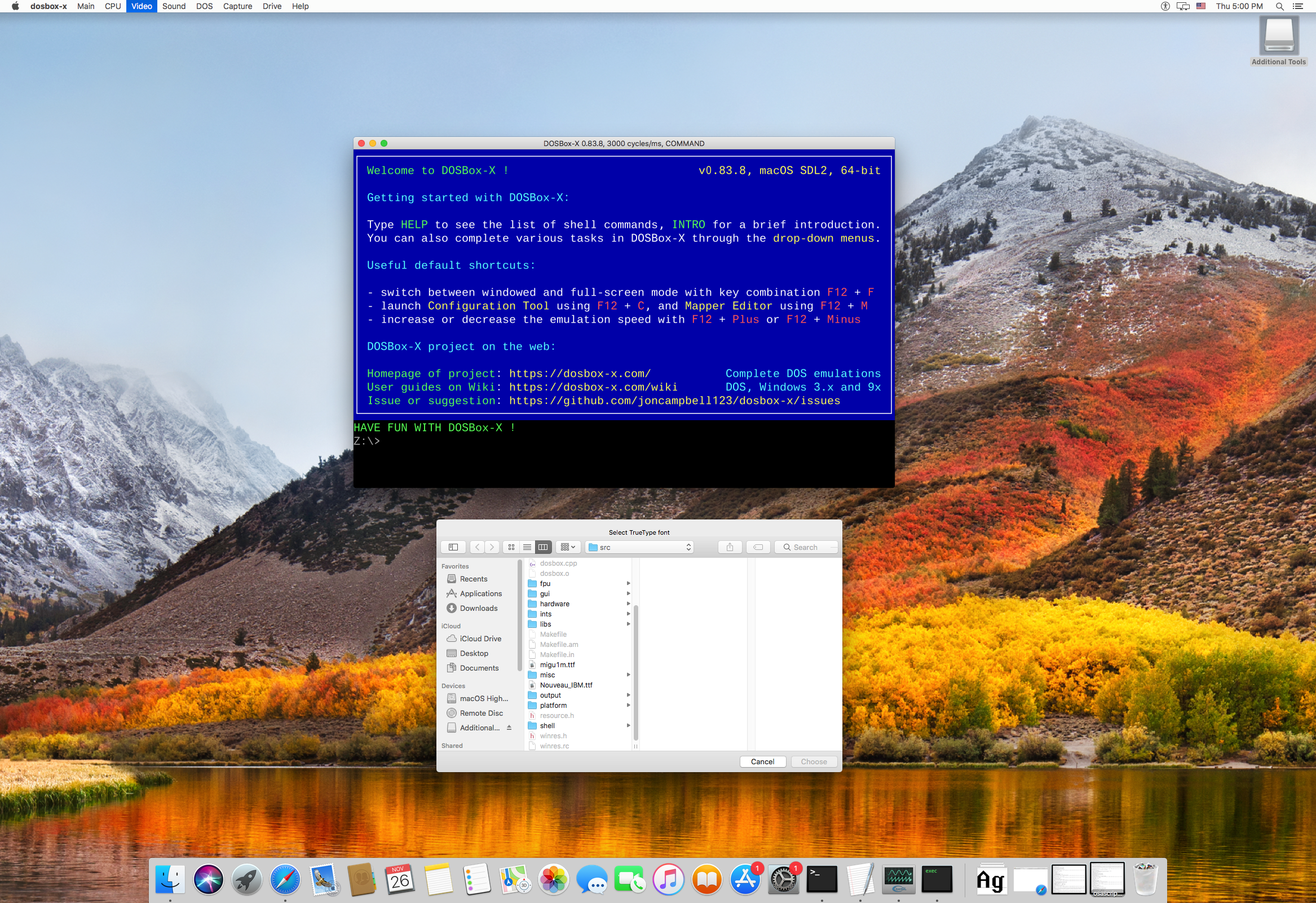
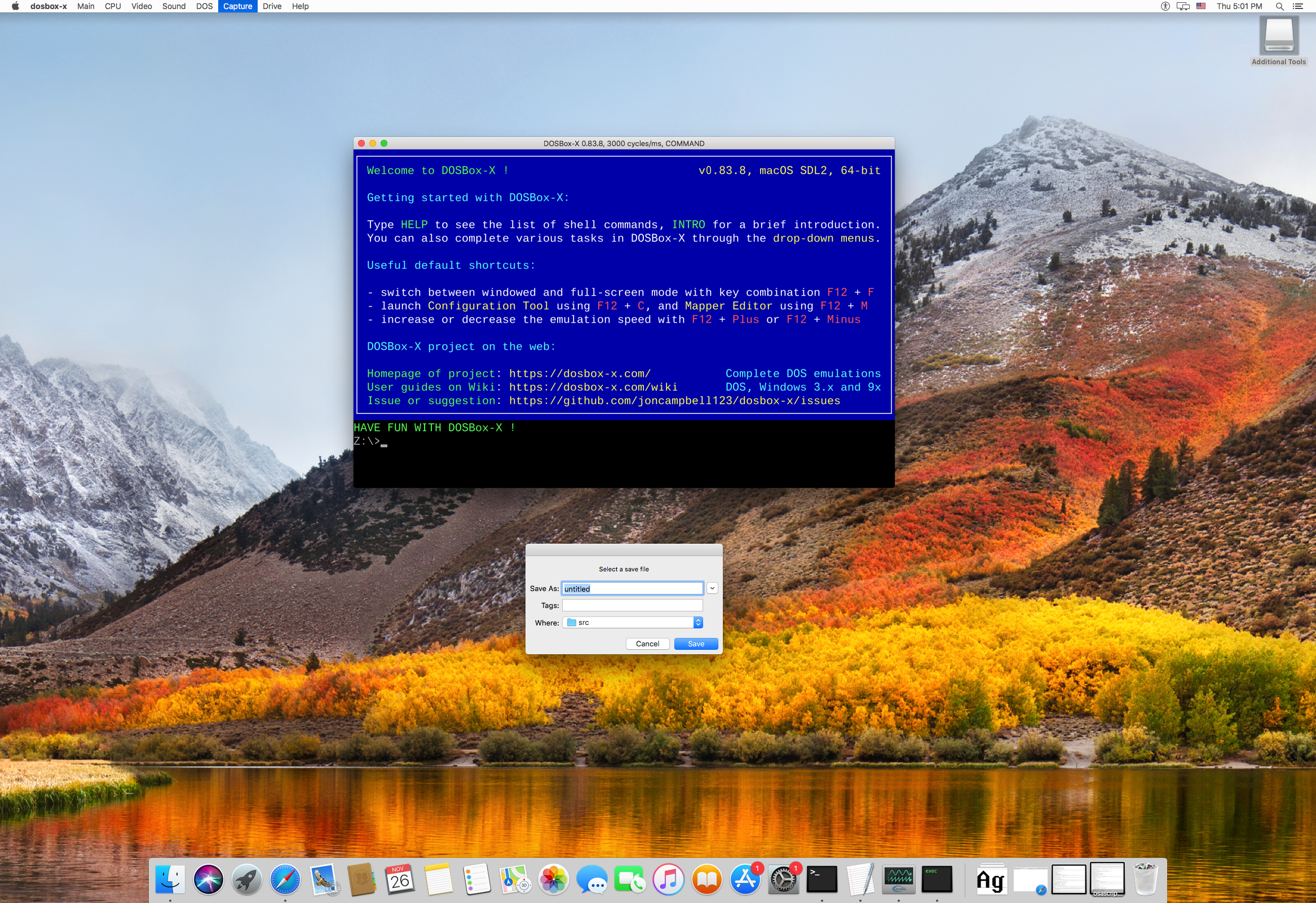
@joncampbell123 I just tested DOSBox-X in a macOS High Sierra VM, and it seems that the save/load file dialog does work fine here.
Select a TTF font file to load:
Select a save file:
Maybe it does not work for a later version, such as macOS Big Sur?
Although not the dialog box, I do find other things needed to fix for macOS.
Wengier
on 27 Nov 2020
That's quite possible, I tested it on Big Sur (and the prior version before updating).
Like the SDL1 audio issue, it's possible it's just a matter of calling old deprecated APIs that Apple has stopped supporting.
joncampbell123
on 27 Nov 2020
When I'm done stuffing down turkey with family tonight, I'll head home and pull out the Macbook to see what can be done to make it work.
joncampbell123
on 27 Nov 2020
Speaking of ARM, I had to modify the header file for the dr_mp3 decoder because VS2019 doesn't provide the ARM64 neon intrinsics (not in the way it expects). It won't compile without the modification.
joncampbell123
on 27 Nov 2020
I take it back, on my Intel Macbook, the open/save dialog boxes work just fine in the latest commit.
joncampbell123
on 27 Nov 2020
Works on ARM Macbook now, too.
Some commits ago, it didn't try the Open/Save dialogs, but went straight to prompting on the Terminal console for the path. Looks like you fixed it. :+1:
joncampbell123
on 27 Nov 2020
Meanwhile, it looks like 64-bit VS2019 builds are going to have to use dynamic core dynrec because dyn_x86 causes an immediate crash IF compiled with VS2019 in release mode.
It doesn't crash if you compile a 64-bit build with MinGW, and it doesn't crash if compiled in Debug mode in VS2019.
joncampbell123
on 27 Nov 2020
@joncampbell123 I did not specifically fix the GUI toolkit for macOS. I only tried DOSBox-X on macOS yesterday and the fix did not include the dialog box. Not sure what happened.
Meanwhile, I am not able to reproduce the crash with dyn_x86 on 64-bit VS2019 builds with the latest code. I am always using the Release builds, never the Debug builds. Tested with both SDL1 and SDL2 versions and the crash did not happen. Maybe you want to check if there is something incorrect in your 64-bit VS2019 environment?
Wengier
on 27 Nov 2020
@Wengier I doubt it, everything else compiles fine.
Also it seems SDL2 does not compile on the ARM-based Macbooks because it tries to use OpenGL ES, which that system doesn't provide apparently.
Actually, I can see where things go a bit wrong. SDL2 configure.ac assumes you're compiling for iOS (iPad, etc) if the platform is ARM-based Darwin. Hm...
joncampbell123
on 28 Nov 2020
@joncampbell123 Before the cause for the 64-bit VS2019 issue on your computer is found, perhaps we can still enable it for 64-bit VS2019 but core=dynamic will default to dyn_rec instead of dyn_x86 on 64-bit VS2019 builds for now? Apparently core=dynamic_x86 works perfectly here on my 64-bit VS2019 builds. Maybe it is caused by something like config file on your system?
Wengier
on 28 Nov 2020
@Wengier That's exactly what I did. VS2019 builds will use dynrec for 64-bit until the cause crash can be determined.
joncampbell123
on 28 Nov 2020
@joncampbell123 But if you disable C_DYNAMIC_X86 in vs2015/config.h completely then "core=dynamic_x86" will not work either. On the other hand, my method will make "core=dynamic_x86" work even if "core=dynamic" defaults to dynamic_dyn in such case.
Wengier
on 28 Nov 2020
It's designed to direct VS2019 to use dynrec only for 64-bit builds until the crash in dyn_x86 can be determined.
joncampbell123
on 28 Nov 2020
@joncampbell123 Does the dynamic_x86 core in DOSBox-X version 0.83.7 (64-bit VS2019) worked on your system? If it does, why not try to do a git bisect to find out the first commit that causes the said issue on your system?
Wengier
on 28 Nov 2020
According to the commit log, no modifications to dyn_x86 have been made since October 12th.
joncampbell123
on 28 Nov 2020
@joncampbell123 Does the issue occur because of other changes, or changes before 0.83.7? I think it definitely worked for you before since you even made the fix earlier to make 64-bit work.
Wengier
on 28 Nov 2020
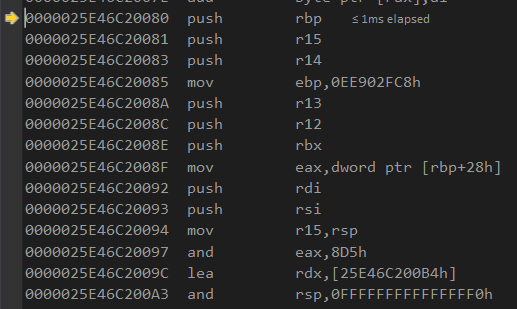
Actually I think I see the problem.
The generated code is only loading the low 32 bits of RBP and using that as a pointer.
The upper 32 bits are zero.
The generated code is trying to load the address of &cpu_regs into RBP, which according to the debugger is at a virtual address above 4GB (and therefore won't fit in 32 bits).
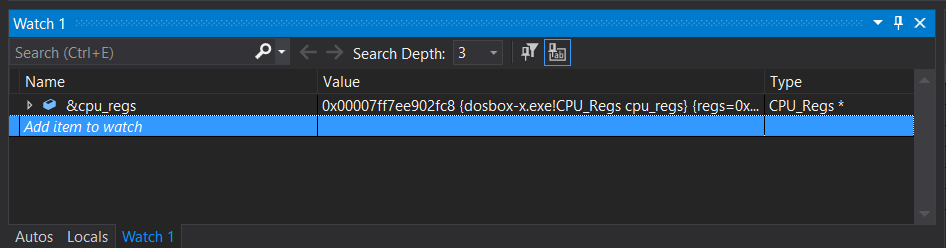
Generated code as seen in the debugger:
joncampbell123
on 28 Nov 2020
Why is VS2019 optimizing out this ptr sizeof check and blindly taking the "it's small enough to fit in 32-bits" case when clearly it's not small enough to fit?


joncampbell123
on 28 Nov 2020
It seems the typecasting there isn't enough to convince VS2019 to mask and compare, so I added an explicit mask and compare to fix the issue.
joncampbell123
on 28 Nov 2020
@joncampbell123 Great to see it now works and has been re-enabled.
Wengier
on 28 Nov 2020
I've made some changes to how dynamic core allocates it's cache.
First, I combined their allocation into one central function. Then I added support to try VirtualAlloc, mmap, memfd_create, posix_memalign, and finally malloc. Then I added code to support separate read/write vs read/execute maps, and added code to support it on Linux with memfd_create and on Mac OS X using mach_vm_remap.
I've modified (carefully!) the dynamic cores to write to the read/write pointer and execute from the read/execute pointer.
So far, the mach_vm_remap modification seems to be holding up on the ARM-based Macbooks in the "dual mapping" mode. On Intel-based Linux, it mostly works, though with some errors that need to be ironed out still.
In it's current form, the dynamic cores will use straight mmap() with read/write/execute if available, which continues to work on my Linux system.
There is a define in the common alloc header to force the dual mmap memfd case in order to test and develop it even on Linux systems with no such W^X or SELinux policy.
joncampbell123
on 1 Dec 2020
I've made the changes as minimal as possible. Any assistance in fixing any other issues is welcome.
joncampbell123
on 1 Dec 2020
@joncampbell123 Great work! Support for the dynamic core is certainly getting better and better. While I don't yet have a ARM-based Mac to test, I found that the code did not compile in Windows, so I was trying to make a PR to fix that, but I noticed that your later changes already fixed it, so my PR will only contain updates to the INSTALL.md file.
Wengier
on 1 Dec 2020
Neither ARM version will run on my M1 MBP. Both close immediately with the warning about the application being damaged and it should be moved to the trash. Usually, this is resolved by going into System Preferences > Security and allowing the app in question - but in this case neither version of the ARM release has that option.
Edit: The issue is caused by the app not being signed and notarized. A workaround is to open a terminal window in MacOS and run sudo xattr -r -d com.apple.quarantine /path/to/dosbox-x.app.
There is information on how to set up CI to notarize apps here: https://blog.zeplin.io/dev-journal-automate-notarizing-macos-apps-94b0b144ba9d
StLouisCPhT
on 2 Dec 2020
Aside from that issue, there is definitely a performance improvement, even more than the one provided by Rosetta 2.
StLouisCPhT
on 2 Dec 2020
@joncampbell123
I confirm dosbox-x with W^X restrictions under linux with systemd and seccomp is working fine. With both dynrec_x86 cpu and OpenGL output.
systemd-run --user --pty -p MemoryDenyWriteExecute=yes ./dosbox-x -set core=dynamic_x86
Fantastic job. Congratulations. Thanks a lot.
grapeli
on 2 Dec 2020
@grapeli Thank you :) For Linux, there is a #define in src/cpu/dynamic_alloc_common.h (DEBUG_LINUX_FORCE_MEMFD_DUAL_RW_X) you can uncomment to force Linux to dual mmap from a memfd to debug and test that case if your Linux distribution is otherwise as permissive as mine.
The problems with dual mapping and dynamic core were primarily issues with x86_64 and the use of RIP-relative (relative to instruction pointer) memory access in the generated code. In the modified code, the address it executes from can be different from the address it was written to (dual mapping), so RIP-relative encoding needed to compensate for that. If you don't, then Touhou Project crashes at startup and DOOM forgets how to texture map the walls and floors correctly, and other funny behavior.
joncampbell123
on 2 Dec 2020
@StLouisCPhT Nice to know Apple treats this open source project so respectfully, like it's deadly nuclear waste or something :)
joncampbell123
on 2 Dec 2020
@joncampbell123
I also tested under minijail with seccomp.
Dosbox-x works with these restrictions.
dosbox-x.policy.txt
...
mmap: 1
mprotect: arg2 in ~PROT_EXEC || arg2 in ~PROT_WRITE
memfd_create: 1
...
I run this way
minijail0 -S dosbox-x.policy -n -- ./dosbox-x -set core=dynamic_x86 -set output=opengl
I generate the seccomp policy this way.
strace -f -e raw=all -o strace.txt -- ./dosbox-x
~/src/minijail/tools/generate_seccomp_policy.py strace.txt > dosbox-x.policy
Thanks for the tip! I had just discovered Dosbox-x and tried running it on my new M1 Mac. :-( No joy. I will try your quarantine workaround later tonight. Makes sense.
This is an awesome project. Thanks to everyone contributing. I can play Redneck Rampage again with my 15 year old boy. Nice! :-)
 hcpcrose
on 2 Dec 2020
hcpcrose
on 2 Dec 2020
Neither ARM version will run on my M1 MBP. Both close immediately with the warning about the application being damaged and it should be moved to the trash. _Usually_, this is resolved by going into System Preferences > Security and allowing the app in question - but in this case neither version of the ARM release has that option.
Edit: The issue is caused by the app not being signed and notarized. A workaround is to open a terminal window in MacOS and run sudo xattr -r -d com.apple.quarantine /path/to/dosbox-x.app.
There is information on how to set up CI to notarize apps here: https://blog.zeplin.io/dev-journal-automate-notarizing-macos-apps-94b0b144ba9d
Thanks for the tip @StLouisCPhT! I had just discovered Dosbox-x and tried running it on my new M1 Mac. :-( No joy. I will try your quarantine workaround later tonight. Makes sense.
This is an awesome project. Thanks to everyone contributing. I can play Redneck Rampage again with my 15 year old boy. Nice! :-)
hcpcrose
on 2 Dec 2020
@joncampbell123
But
minijail0 -S dosbox-x.policy -n -- ./dosbox-x -set core=dynamic_x86 -set output=opengl
pmap -X $(pidof dosbox-x) | grep rwxp
7b01dd7bf000   rwxp  00000000       00:00         0      4      4      4          4         4        0              0             0              0               0    0       0      0           0
By default, minijail inserts such restrictions.
mmap: arg2 in ~PROT_EXEC || arg2 in ~PROT_WRITE
mprotect: arg2 in ~PROT_EXEC || arg2 in ~PROT_WRITE
edit: I guess that's what Mesa did, not dosbox-x.
It looks good without OpenGL.
minijail0 -S dosbox-x.policy -n -- ./dosbox-x -set core=dynamic_x86 -set output=surface
pmap -X $(pidof dosbox-x) | grep rwxp
@joncampbell123
Okay I put the minijail aside. He with the seccomp politics is extremely aggressive. It is enough to skip one system call for the program to stop working. Generating a decent one is not easy, especially with ioctl.
With systemd and W^X dosbox-x works.
grapeli
on 2 Dec 2020
Related issues
 kcgen
·
7Comments
kcgen
·
7Comments
 sduensin
·
10Comments
sduensin
·
10Comments
 diaphone0
·
14Comments
diaphone0
·
14Comments
 Corak667
·
7Comments
kcgen
·
11Comments
Corak667
·
7Comments
kcgen
·
11Comments