Dosbox-x: Improving the DOSBOX-X welcome message
Is your feature request related to a problem? Please describe.
Maybe it's time to refresh the welcome message a bit and enhance it somehow.
Initial discussion started here and continues in this dedicated issue.
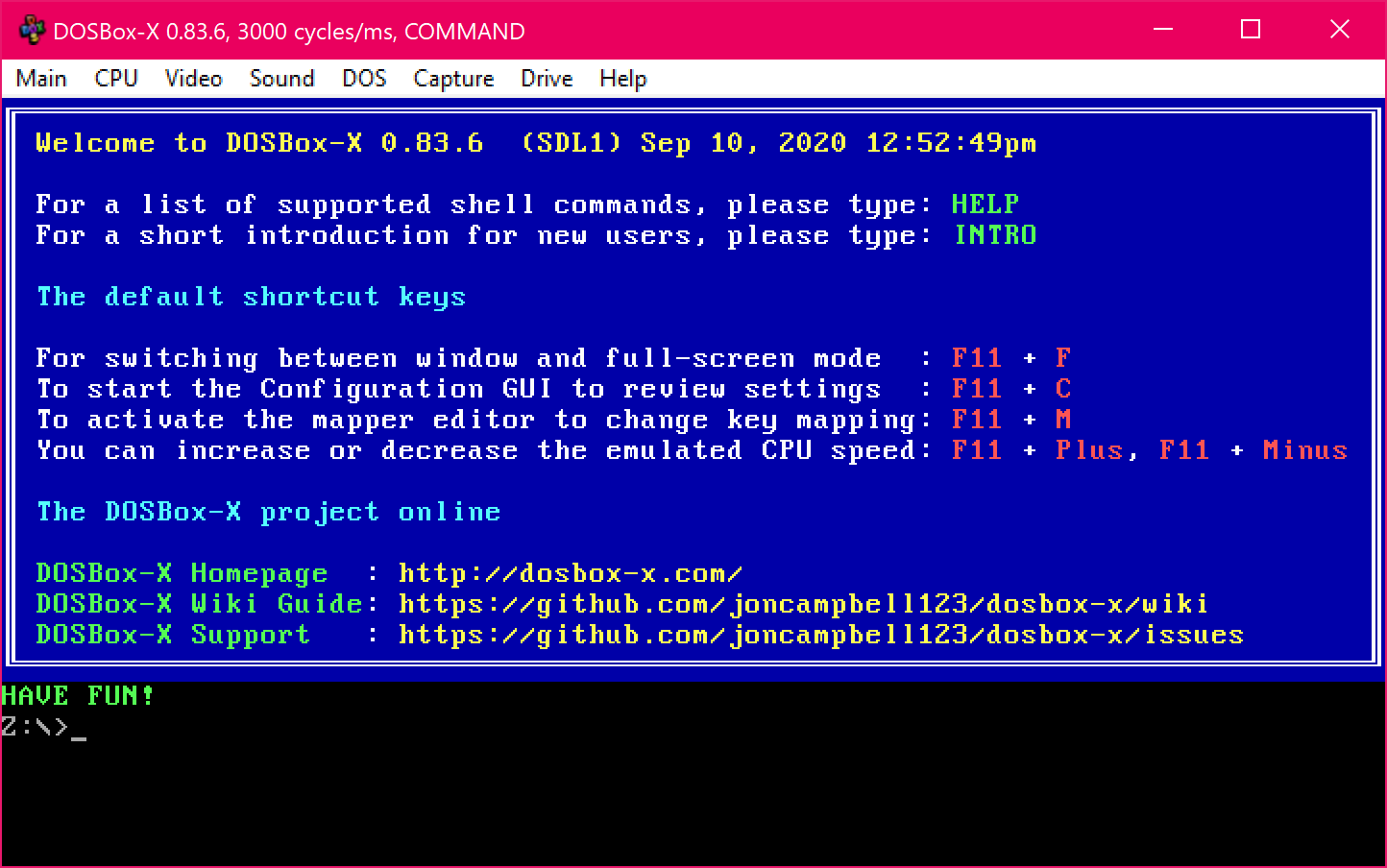
Here is the actual welcome message:
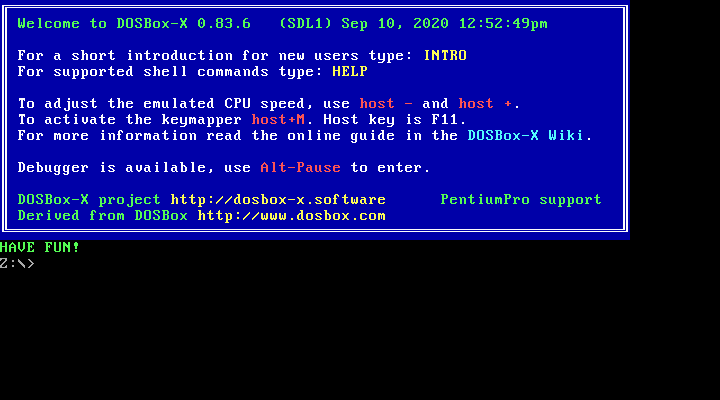
 aybe
aybe
All 27 comments
@Wengier what about this ?
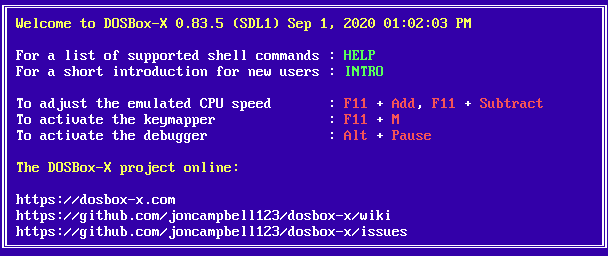
Basically,
- simpler and aligned items
- relevant urls
- host key directly baked in the welcome screen
That's pretty much what I've come with, spent most of the time finding a descent ANSI editor actually!
http://www.roysac.com/roy-tools/ansi-text-editor.html
Ensure you install SQL CE Compact in the requirements else the application will silently crash.
And here is the ANS file: DOSBOX-X.zip
aybe
on 12 Sep 2020
Now it's all a matter of taste, the original colors are pretty good IMO.
And doing the round-trip on ANSI editor allows for faster and easier testing.
aybe
on 12 Sep 2020
@aybe It is certainly better than the original one. So I will try it and make minor modifications based on it to see how it looks.
 Wengier
on 12 Sep 2020
Wengier
on 12 Sep 2020
@aybe, @rderooy and @ThePillenwerfer How about this design?
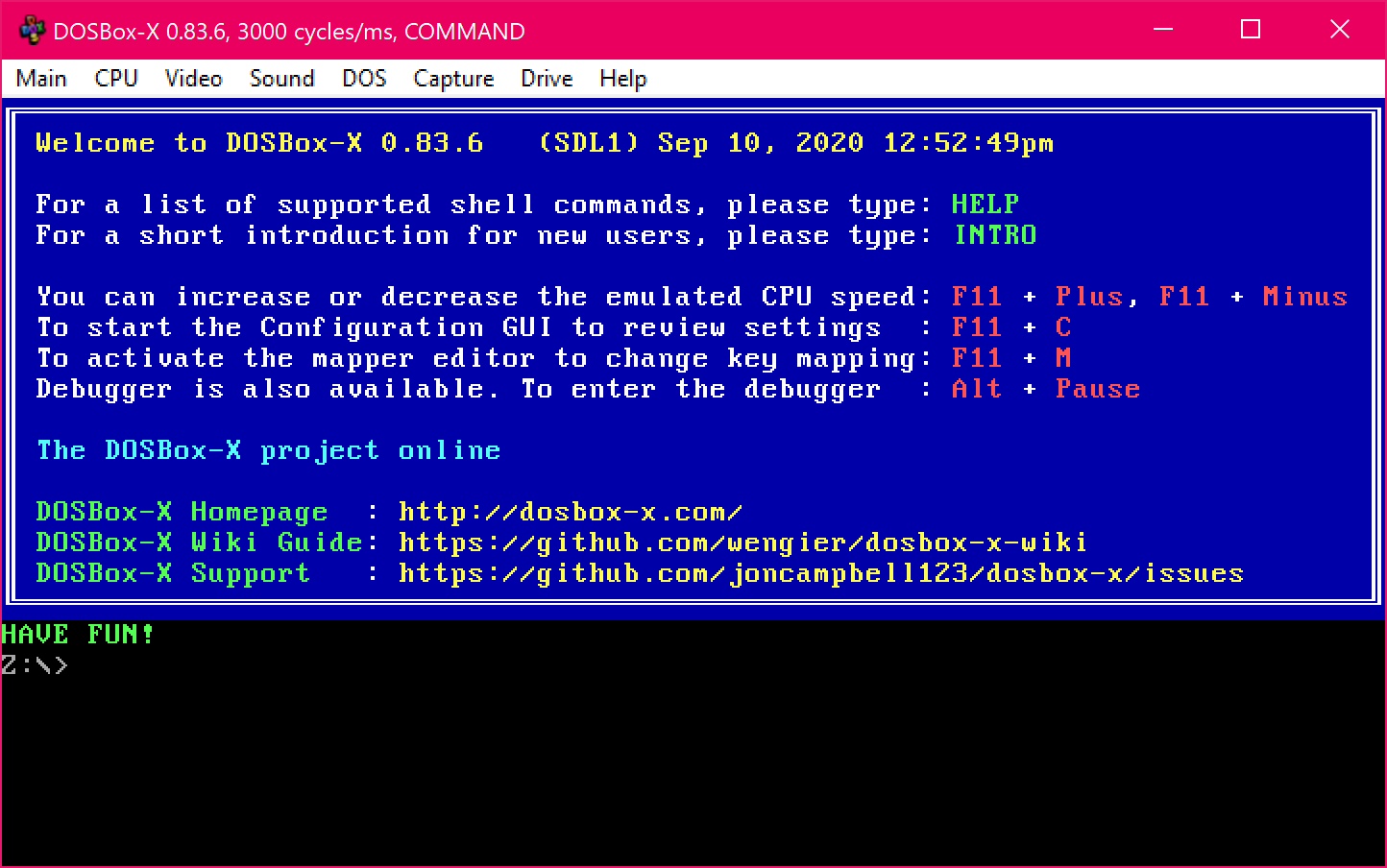
It is based on the design by @aybe above with further modifications, plus making the box 80 columns wide as @ThePillenwerfer had suggested.
Wengier
on 12 Sep 2020
That's much better.
 ThePillenwerfer
on 12 Sep 2020
ThePillenwerfer
on 12 Sep 2020
Looks fine. But I notice your pointing to the draft wiki?
 rderooy
on 13 Sep 2020
rderooy
on 13 Sep 2020
@rderooy You are certainly right and good at spotting this issue! The fixed version is now here:
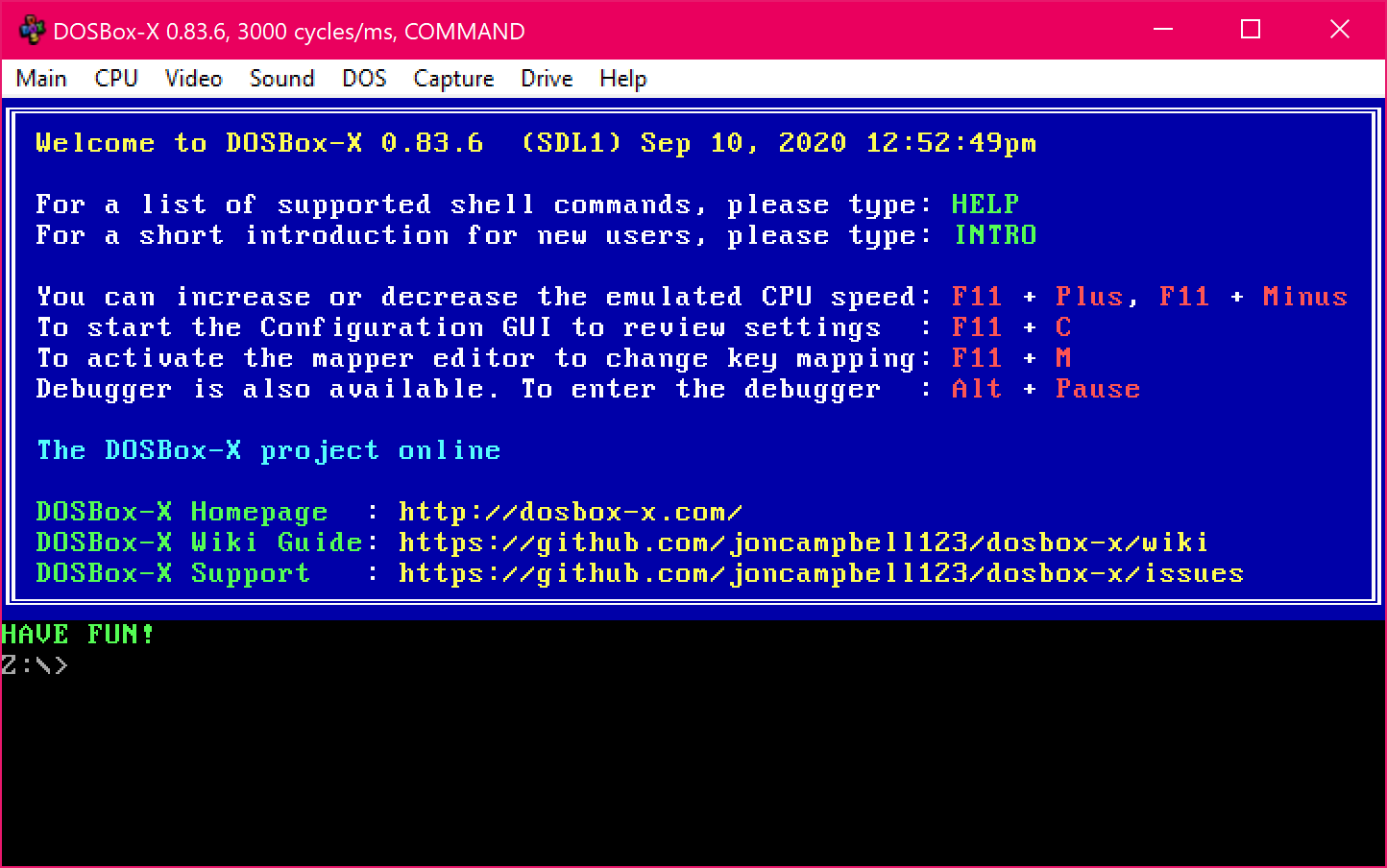
Wengier
on 13 Sep 2020
@Wengier Is it assuming those key combinations or using the code already added to print out the mapper key combination?
You may want to make more room for the key combo in case the user's mapper file is set to key combinations with longer names.
 joncampbell123
on 13 Sep 2020
joncampbell123
on 13 Sep 2020
@joncampbell123 It is certainly something to consider too. Before the modifications, the keys that are printed out in the welcome banner were hard-coded like this:
To adjust the emulated CPU speed, use host - and host +.
To activate the keymapper host+M. Host key is F11.
(Except for F11, which will be F12 in non-Windows)
In the new version, the actual "host" key will be displayed to the user (F11 in Windows and F12 otherwise) in the key combinations. But everything else remains unchanged. So basically it will print out the actual host key, but the other things are assumed just like before. A further improvement will be to print out the actual key combination for the other parts as well.
Wengier
on 13 Sep 2020
To make things easier for the moment, perhaps it can list them as "The default shortcut keys" for now.
Wengier
on 13 Sep 2020
Personally, I think the 75 columns wide was more cool 😅.
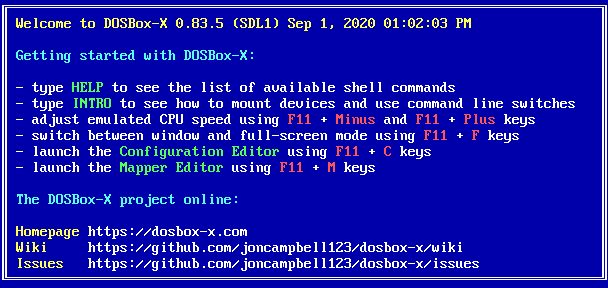
Here's my take on this but it's two lines higher now 🤷♂️...
- no more colons
- less repetition
- Configuration GUI -> Configuration Editor to be in sync with Mapper Editor
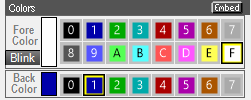
Too bad we can't use foreground colors for background, that would have allowed better coloring, especially the light blue:
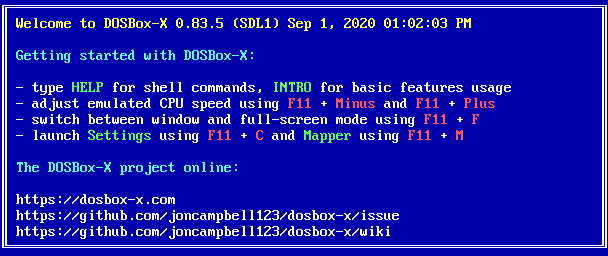
Now looking at INTRO and wondering how useful it really is, also it is bugged:
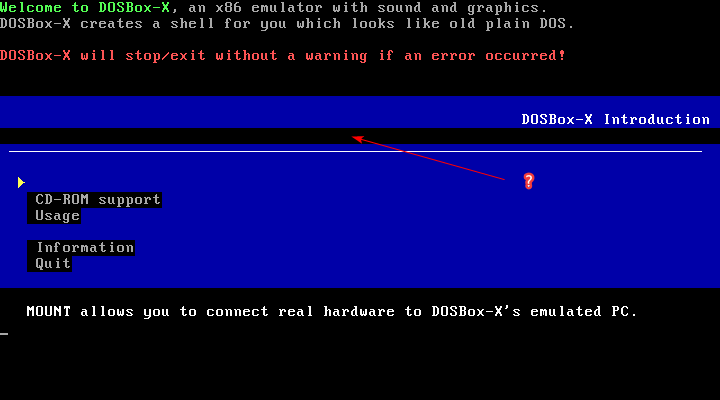
Why not favor the wiki instead ? Or rework it but it'll probably be a tedious task.
Maybe it's too much asking but, couldn't 24-bit ANSI be made a reality on DOSBox-X ? 😃
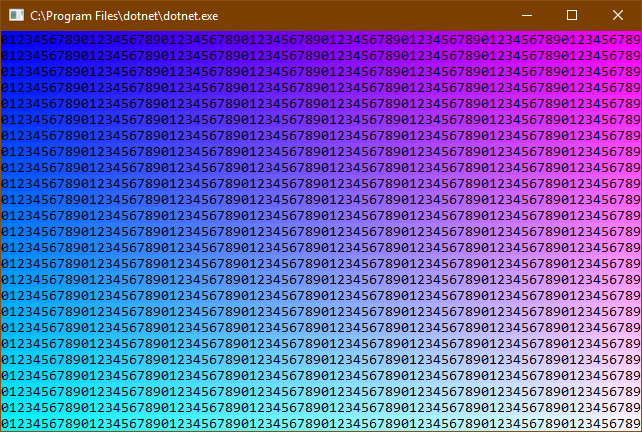
(from https://github.com/aybe/TrueColorConsole)
aybe
on 13 Sep 2020
 aybe
on 13 Sep 2020
aybe
on 13 Sep 2020
The date and time that is displayed can possibly be a little confusing. It is a fixed timestamp, but is it really useful? Especially the time.
Perhaps something like "build Sep 1, 2020"? even though also that is not necessarily correct.
rderooy
on 13 Sep 2020
Thanks for the ideas. How about this?
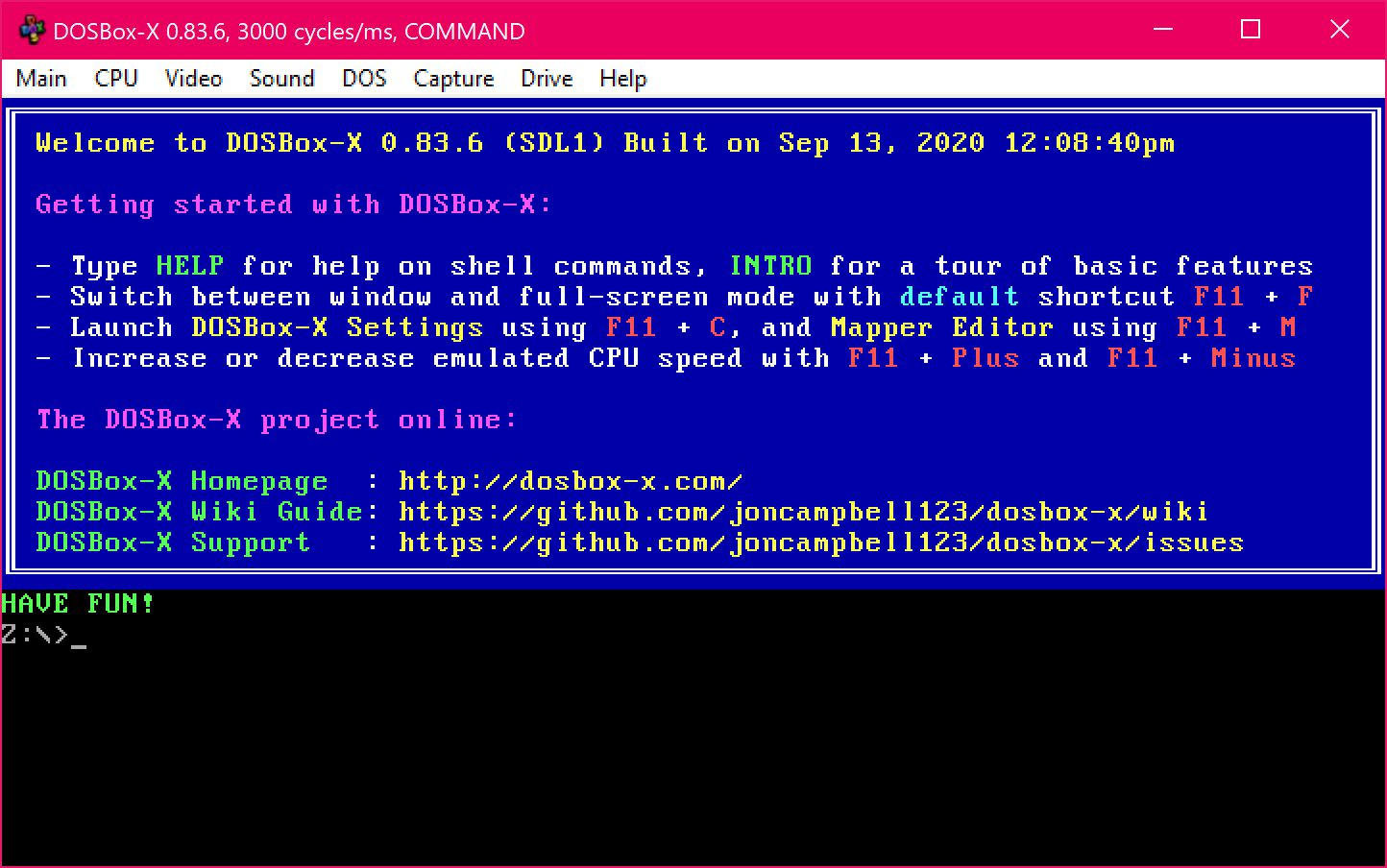
I feel that 80-columns is still better because it has a neater looking and also allows a few more text to be inside the box.
Wengier
on 13 Sep 2020
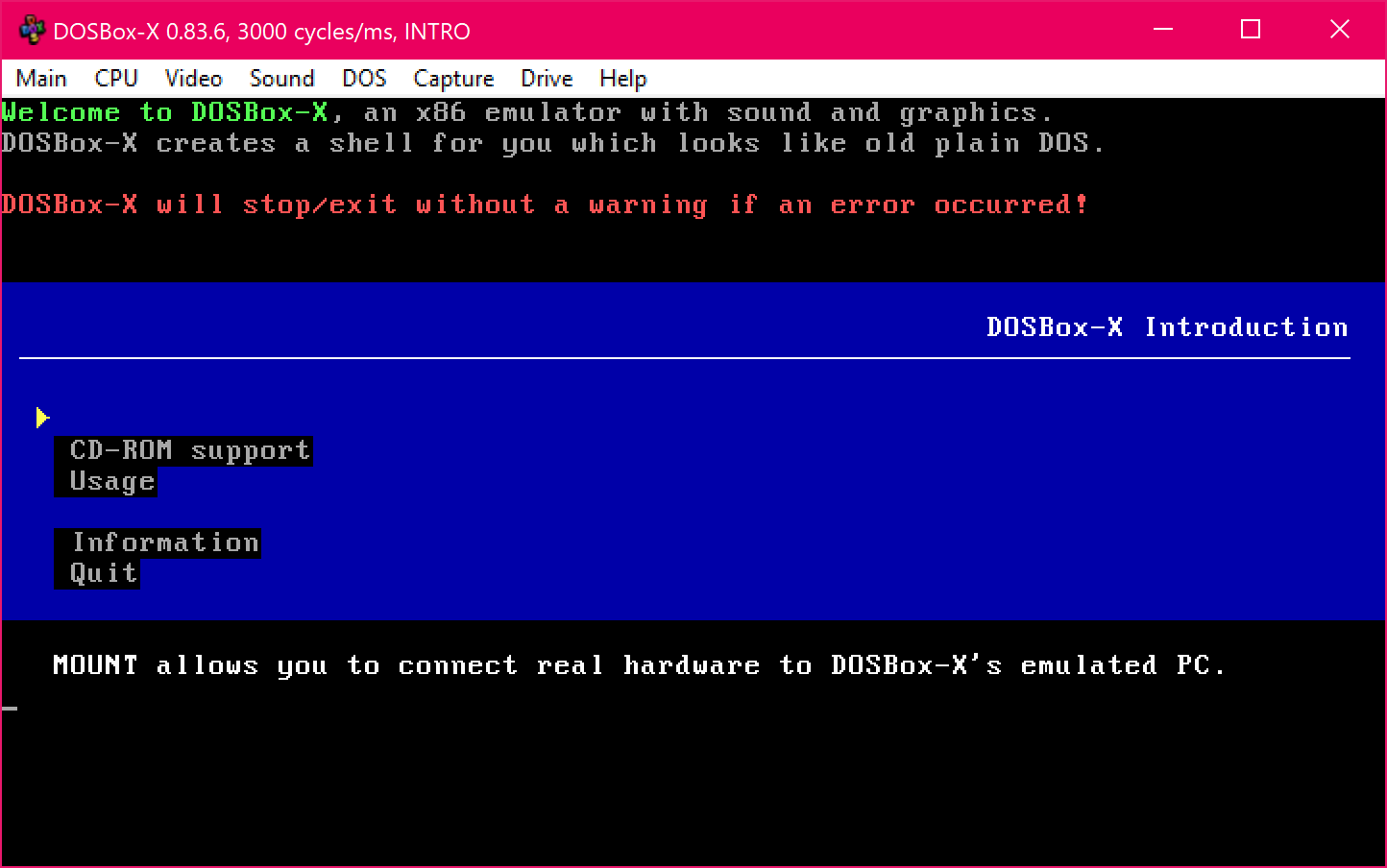
@aybe I also wondered the actual usefulness of INTRO in the past as well. In any case, I have fixed the bug you mentioned:
Wengier
on 13 Sep 2020
aybe
on 13 Sep 2020
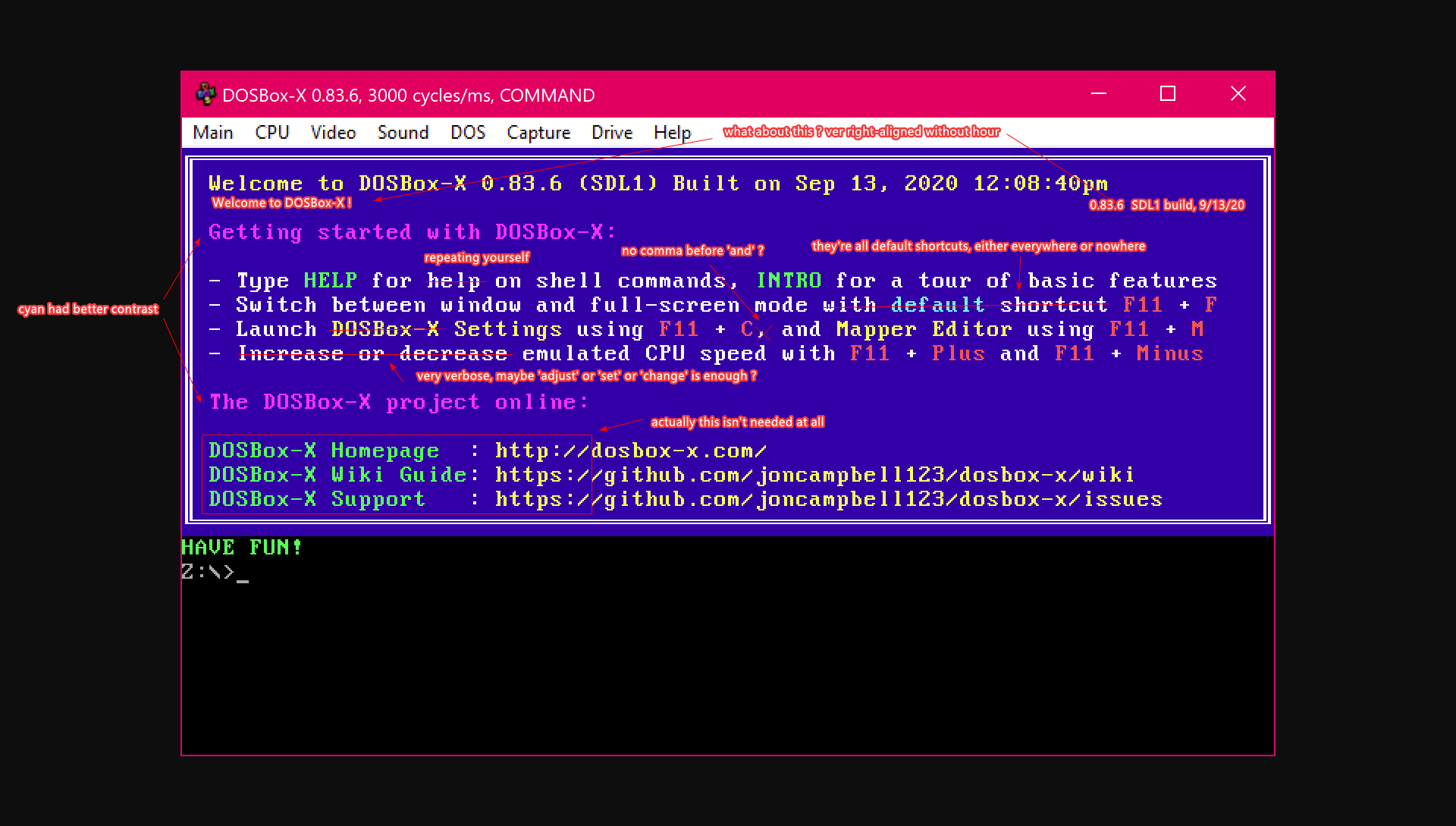
@aybe I agree with most of your suggestions. The only concerns are the following:
I think "Increase or decrease" is slightly better than "adjust" or "change" in this specific case, because it then lists F11+Plus and F11+Minus as the shortcut keys. So the user will naturally know that F11+Plus is for increasing the speed and F11+Minus is for decreasing the speed, which may make it better than "adjust" or "change" in this case.
The words "DOSBox-X Homepage" and "DOSBox-X Wiki Guide" etc will let the users know which link is for which. If you just list three links in the box the user may not have any idea about what they are for.
Using the word "Configuration GUI" instead of "Settings" will make the terms consistent in different places.
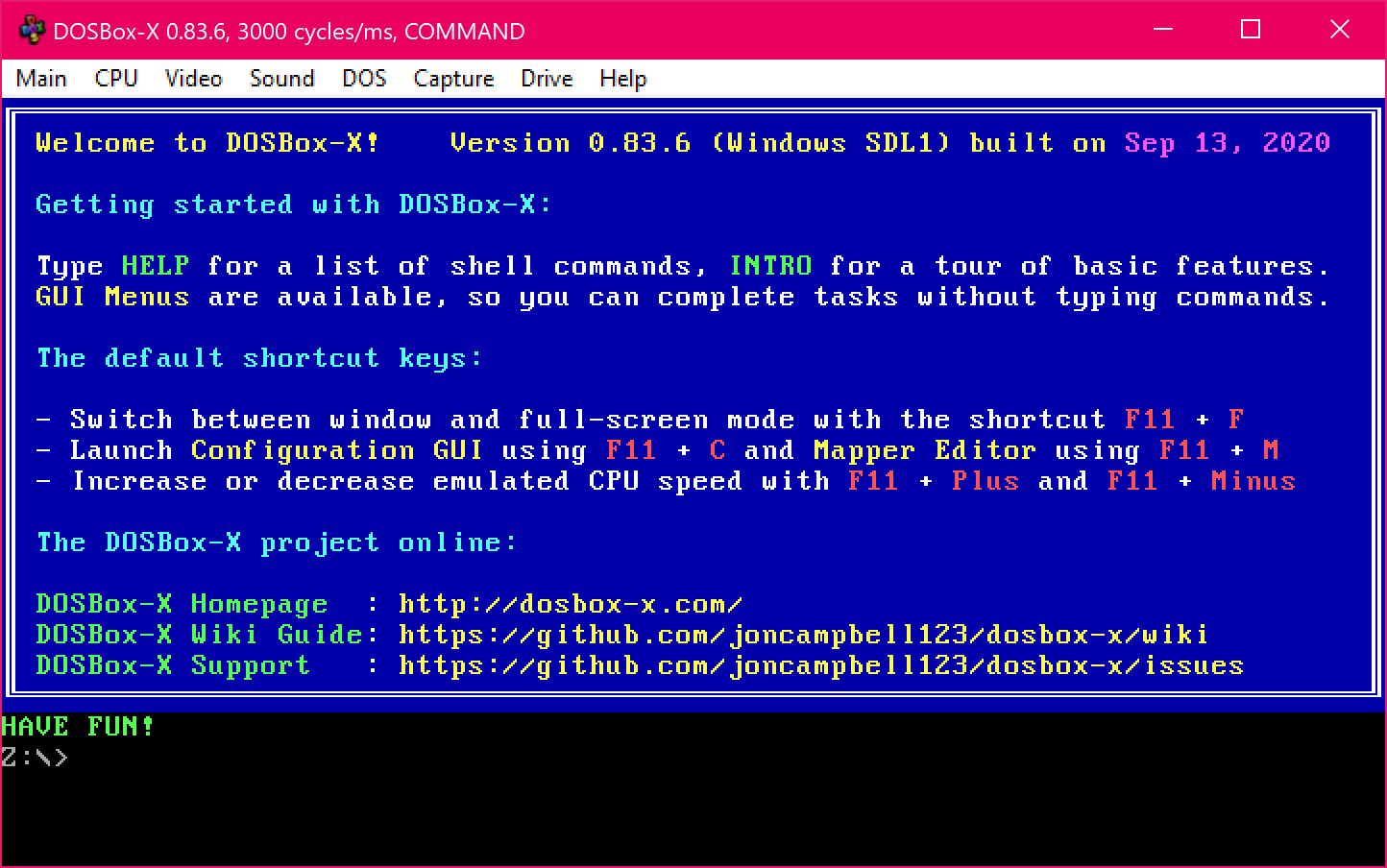
Also, I think the GUI menus are a very useful feature of DOSBox-X and should be mentioned in the box as well. So I have tried to separate the sections "Getting Started with DOSBox-X" and "The default shortcut keys". The new version will look like this:
Wengier
on 13 Sep 2020
@Wengier
80*20 layout
================================================================================
| Welcome to DOSBox-X !                            build 0.83.6, SDL1, 9/13/20 |
|                                                                              |
| Getting started with DOSBox-X:                                               |
|                                                                              |
| Type HELP to see the list of shell commands, INTRO for a brief introduction. |
| DOSBox-X can also be configured through different graphical user interfaces. |
|                                                                              |
| Useful shortcuts:                                                            |
|                                                                              |
| - switch between windowed and full-screen mode using F11 + F                 |
| - increase or decrease emulation speed using F11 + Plus and F11 + Minus      |
| - launch Configuration Editor using F11 + C and Mapper Editor using F11 + M  |
|                                                                              |
| DOSBox-X project on the web:                                                 |
|                                                                              |
| Home page : https://dosbox-x.com/                                            |
| Issues    : https://github.com/joncampbell123/dosbox-x/issues                |
| Wiki      : https://github.com/joncampbell123/dosbox-x/wiki                  |
================================================================================
- less technical terms, more litteral terms
- build string shouldn't be larger than welcome string
- bullets don't start with caps
- no more GUI, we know it's GUI, rather, it's editors !
- removed DOSBox-X repeated 3 times in a row
- little extra space before colons
Hope you'll like it :)
aybe
on 13 Sep 2020
Also I am thinking that if not F11 + C it will overflow, in this case I would just ditch the term _Editor_ entirely.
================================================================================
| Welcome to DOSBox-X !                            build 0.83.6, SDL1, 9/13/20 |
|                                                                              |
| Getting started with DOSBox-X:                                               |
|                                                                              |
| Type HELP to see the list of shell commands, INTRO for a brief introduction. |
| DOSBox-X can also be configured through different graphical user interfaces. |
|                                                                              |
| Useful shortcuts:                                                            |
|                                                                              |
| - switch between windowed and full-screen mode using F11 + F                 |
| - launch Configuration using F11 + C and Mapper using F11 + M                |
| - increase or decrease emulation speed using F11 + Plus and F11 + Minus      |
|                                                                              |
| DOSBox-X project on the web:                                                 |
|                                                                              |
| Home page : https://dosbox-x.com/                                            |
| Issues    : https://github.com/joncampbell123/dosbox-x/issues                |
| Wiki      : https://github.com/joncampbell123/dosbox-x/wiki                  |
================================================================================
I mean just be consistent with a word, either use it everywhere it applies to, or nowhere.
aybe
on 13 Sep 2020
@aybe I am fine with the design you mentioned, except for a few minor concerns, e.g.
- I am not quite a fan of a short date like 10/11/12. This makes it difficult for some users to know exactly which date it is, considering the different date formats. Dates like Sep 13, 2020 will be very clear to everyone.
- In the GUI menu it lists “Configuration GUI” and “Mapper Editor” (under “Main”). So I hope to make the terms consistent everywhere within DOSBox-X.
- I want to point out the shortcuts are the default ones (not necessarily the ones under user customization), so "Useful default shortcuts" is probably better than just "Useful shortcuts".
Wengier
on 13 Sep 2020
The updated version looks like this:
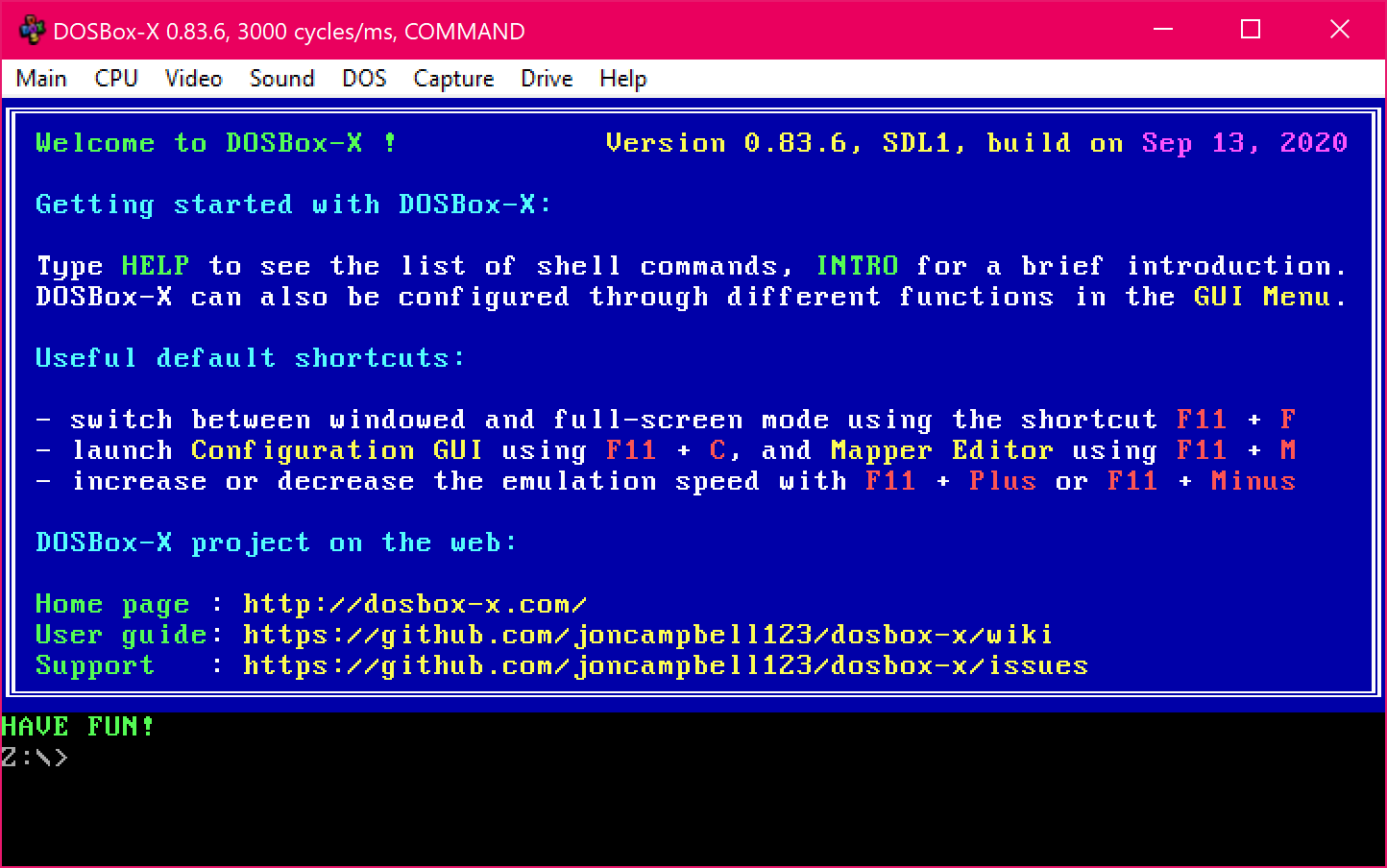
Now both lines under "Getting started with DOSBox-X" and all lines under "Useful default shortcuts" have the exactly same length, so it should look better than ever before.
Wengier
on 14 Sep 2020
Now I'll throw another rock :)
- if you look closely, the vast majority software don't even mention the build date at all
- there could be an
ABOUT.COMtelling about all the gory details of the build - the version wouldn't take more space than the welcome message, that looks weird
- when you ask about details in Issue, you don't ask for build date but for version, right ?
- there could be an
Let's be clear about GUI Menu:
- first it doesn't only consist of a menu, but also windows and buttons (lmao)
- I mean when I read
GUI MenuI find that really weird
- GUI alone is sufficient or use another term like I did previously
Useful default shortcuts:
They're not default, you've already mapped F11 to actual key, I expect this whole section to be dynamic according current configuration, or is this a mis-understanding from me ?
Also, it looks nice when they're not exactly the same width, right now it looks like a huge block.
Alternatives for ... GUI:
Configurationwindow|tool|utility,Mapperwindow|tool|utility- what about
Setup Utility,Mapper Editor?
Links:
- home page is already https, check it out
- funny, I too first did
User Guidebut it doesn't makes sense as it points to wiki
- I've also alphabetically sorted these so wiki becomes last
- as there is alignment spaces, why not an extra space for all for extra air with the colon ?
What about a blinking HAVE FUN! ?
================================================================================
| Welcome to DOSBox-X !                                           v0.83.6 SDL1 |
|                                                                              |
| Getting started with DOSBox-X:                                               |
|                                                                              |
| Type HELP to see shell commands and INTRO for a brief introduction.          |
| DOSBox-X settings can also be configured visually, see below.                |
|                                                                              |
| Useful shortcuts:                                                            |
|                                                                              |
| - switch between windowed and full-screen mode using F11 + F                 |
| - launch Setup Utility using F11 + C and Mapper Editor using F11 + M         |
| - increase or decrease emulation speed using F11 + Plus and F11 + Minus      |
|                                                                              |
| DOSBox-X project on the Internet:                                            |
|                                                                              |
| Home page : https://dosbox-x.com/                                            |
| Issues    : https://github.com/joncampbell123/dosbox-x/issues                |
| Wiki      : https://github.com/joncampbell123/dosbox-x/wiki                  |
================================================================================
Let's see if we can finally find an agreement :D
aybe
on 14 Sep 2020
Also, what does @joncampbell123 has to say about all that ? He's the project author after all :)
Any input is welcome.
aybe
on 14 Sep 2020
@aybe The current versions (either my screenshot or your revision) is already a huge improvement over the original one, so I guess most users are already fine with either one (but inputs are always welcome of course). In any case, I think it is okay to remove the build date from the welcome banner, but instead mention things like "Windows SDL1, 32-bit" instead, which are more useful details than the build date I guess. The part about 32-bit or 64-bit is very important for the Glide feature for example. The build date is still available from either the "About" menu or the VER /R command.
Also, instead of "GUI menu", I think it is perhaps better to be more specific to mention the drop-down menu. The drop-down menu is a crucial feature of DOSBox-X which is definitely worth to be mentioned. So it will read "You can also complete various tasks in DOSBox-X through the drop-down menus.".
Regarding shortcuts, F11+F for example is the default shortcut to toggle between the windowed and full-screen mode in Windows. The Wiki for instance lists [F11/F12]+F as the default shortcut key for this, which means F11+F in Windows and F12+F otherwise. The code simply maps the generic shortcut "[F11/F12]+F" to "F11+F" in Windows and "F12+F" in other platforms, so it is still the default shortcut for your platform.
Also, I agree that terms like "Configuration Tool" is a better than "Configuration GUI". So it can be changed in both the welcome banner and the drop-down menu. The command SHOWGUI can be renamed SHOWTOOL accordingly as well.
For the links, the term "Wiki" by itself can be fine, but some users may wonder what will be on the Wiki. Putting "User guide" will be make it clear that it is the user guide for DOSBox-X. Phrases like "User Guides on Wiki" will make it even clearer that this is the link for the Wiki, where you will find user guides on it.
The updated version is here:
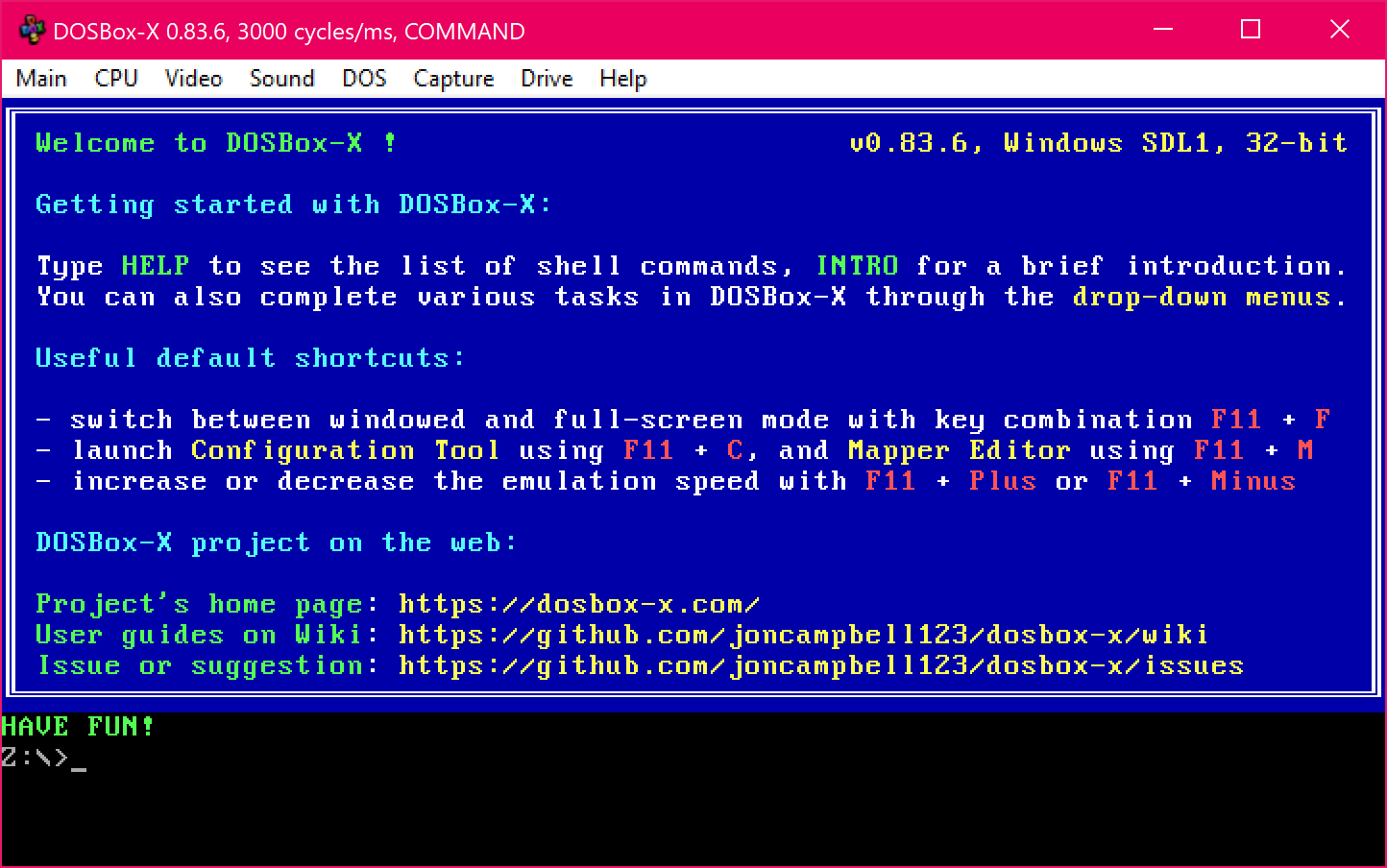
I know there can still be some further refinements for the purpose of perfecting it, but there should be no doubt it is already a tremendous improvement over the old one.
Wengier
on 14 Sep 2020
@Wengier
Ok, let's see how this new look feels over time, as you said, we advanced quite much already !
Now I'm being nostalgic about old 75 columns style 🤣
aybe
on 14 Sep 2020
With the latest changes, the welcome screen now shows "32-bit", even though the binary is most definitely 64bit.
$ file ~/bin/dosbox-x
/home/robert/bin/dosbox-x: ELF 64-bit LSB executable, x86-64, version 1 (GNU/Linux), dynamically linked, interpreter /lib64/ld-linux-x86-64.so.2, BuildID[sha1]=bd6a9402c72201ab973a7ef07ca79431d0614d4f, for GNU/Linux 3.2.0, stripped
@rderooy Please try again with the latest code.
Wengier
on 16 Sep 2020
Related issues
 sduensin
·
10Comments
sduensin
·
10Comments
 kcgen
·
7Comments
joncampbell123
·
14Comments
kcgen
·
7Comments
joncampbell123
·
14Comments
 whocares0101
·
15Comments
kcgen
·
11Comments
whocares0101
·
15Comments
kcgen
·
11Comments