Dosbox-x: severe graphics corruption in Star Trail (Sternenschweif)
Describe the bug
After going into e.g. equipment screen or any building (virtually on every change of graphics), severe graphical artifacts occur. Happens both in fullscreen & in window, regardless of output/scaler settings (tried most of the possible combinations, none helped).
To Reproduce
- Get any recent build for Windows (probably
*n*x/mac also), - Get any version of "Star Trail" - for research purposes - from e.g. https://dosspirit.net/game/realms-of-arkania-vol-2-star-trail/305 (requires creating an account via disposable email) - verified both on English Floppy & German CD version,
- Start the game, skip the intros, create any party, go into the city,
- Skip the cutscenes,
- Start experiencing glitches: all faces replaced with one, graphics "spilling over" from screen to screen (partial refresh only?), and sometimes crashes.
Expected behavior
Proper graphics without any problems.
Screenshots


Environment (please complete the following information):
- Windows 7 64-bit (probably any)
- DOSBox-X 0.82.5 up to 0.82.19 or built from src - both SDL/SDL2/native Win; 0.82.4 and previous are not affected and are working 100% OK.
- Default config
Additional context
Does not happen on neither vanilla DOSBox, Daum, ECE nor DOSBox+xBRZ for me, so it's probably related to some code custom to DOSBox-x
 FyiurAmron
All 26 comments
after tracing the source of the bug, it appeared due to https://github.com/joncampbell123/dosbox-x/commit/388fc1430bca51989b6b832dddf7a7d40e45679b - actually, doing A20GATE ON (or equivalent change in conf) works around the issue. Commenting out L1471 (XMS_EnableA20(old_a20 != 0);) also solves this problem.
FyiurAmron
on 5 Jul 2019
There are some known cases where using A20GATE ON fixes crashes with some games that work normally on DOSBox SVN.
One of the big differences between DOSBox SVN and DOSBox-X is that DOSBox SVN emulates the A20 gate only by remapping the first 64KB at the 1MB marker, while DOSBox-X emulates masking address line A20. A20 is also NOT enabled by default.
 joncampbell123
on 5 Jul 2019
joncampbell123
on 5 Jul 2019
@joncampbell123 I used
a20=fast
turn off a20 gate on boot=true
, and the issue still appeared. In fast mode, shouldn't the behaviour be functionally equivalent to vanilla DOSBox's? (at least that's what the doc's say, Emulate A20 gating by remapping the first 64KB @ 1MB boundary (fast, mainline DOSBox behavior))
FyiurAmron
on 5 Jul 2019
DOSBox-X used to have that option, but it was removed. A20 gate emulation only emulates the masking of address pin 20.
joncampbell123
on 5 Jul 2019
- it's still in the docs - https://github.com/joncampbell123/dosbox-x/blob/master/dosbox.reference.conf#L200
- what's the point of removing 'fast' A20 behaviour if it breaks game compatibility? (not to mention forcing A20 into ON state is a workaround, and even is documented so in the reference config) Also, ST worked properly on my old 80486 with HIMEM & EMM386, I recall no A20 issues at all.
FyiurAmron
on 5 Jul 2019
Emm386 and virtual 8086 based monitors work by remapping the first 64K of memory at 1MB. Real A20 gating masks off address bit 20. The fast setting is handled as an option to enable gating.
Perhaps the 64KB behavior should be re-added though, since there's a want for it.
joncampbell123
on 5 Jul 2019
I can confirm a20gate on fixes the issue.
Since there is a want for the VM86-style 64KB remap, I'll re-add it.
joncampbell123
on 5 Jul 2019
I just added code to emulate a20=fast, though a20=mask is still default.
joncampbell123
on 5 Jul 2019
verified working, closing as fixed - well, it still requires setting a20=fast, but since it's already present in most configs migrated from other DOSBox version (and documented well enough too), the issue shouldn't affect anyone, and worst case scenario they'll google it and get here :)
FyiurAmron
on 6 Jul 2019
@joncampbell123 actually, after further playing, I've found that with bleeding edge code & with a20=fast the issue with A20 can be still found, although a bit later (initially the game goes OK): if you go to the south of Gashok, (savefile downloadable from https://ufile.io/iuwx67q9) the memory is still getting corrupted (and it still works OK in other DOSBox flavours)

using A20GATE ON still works around this issue, but IMVHO this shows that the current fast A20 behaviour is not complete vs vanilla ATM.
FyiurAmron
on 6 Jul 2019
Looking up, it's a game from 1994 so likely 32-bit, which would explain why fast A20 doesn't work (it really needs RAM way above the 1MB mark), you're looking at a red herring here. I think some computers may have been dropping the A20 line toggle by this point too, but that may be too early to assume for a game.
Maybe the game expects something like himem.sys or whatever to have already taken care of that? (wild guess)
 sikthehedgehog
on 6 Jul 2019
sikthehedgehog
on 6 Jul 2019
@sikthehedgehog 1. fast A20 works properly with this game on vanilla DOSBox, on DOSBox ECE, on Daum etc. 2. AFAIK, at least some of the code is clearly 16-bit, with XMS overlay and some magic relocation tricks. No usual extender that I could track, all the routines I've disassembled are 16-bit (you can check for yourself if there's any 32-bit code there, but I find it highly unlikely). 3. The previous change by @joncambell123 providing fast A20 actually fixed most of the issues with memory corruption, so I don't understand what you mean by "red herring".
FyiurAmron
on 7 Jul 2019
The reason it works fine in the other branches is that the other branches start with the A20 gate enabled. DOSBox-X is a little more pedantic about A20 gate emulation and starts it disabled. It will enable if the XMS/EMS calls are made to do so and will temporarily enable it during EMS/XMS memcpy routines. That's the conflict.
To be honest I'm not sure what the official rules are in MS-DOS regarding when the A20 gate is on. At some point real MS-DOS needs to be examined to determine what it does exactly with the A20 gate at any time.
joncampbell123
on 7 Jul 2019
@joncampbell123 from what I recall, it's HIMEM.SYS that loads A20 gate handler (https://www.vfrazee.com/ms-dos/6.22/help/himem.sys.htm), and it actually has a multitude of routines to do so, depending on a specific machine/architecture that has been detected (that can be forced by the /MACHINE switch) and two modes of handling it, depending on /A20CONTROL. Since in vanilla DOS you have to have HIMEM.SYS loaded to access XMS, and the usual minimal DOS CONFIG.SYS included HIMEM.SYS and DOS=HIGH as well (at least up from DOS 5), I guess that xms=true, which acts kinda like a replacement of loading HIMEM.SYS device, should also mimic HIMEM.SYS behaviour in regard to its handling of A20.
FyiurAmron
on 7 Jul 2019
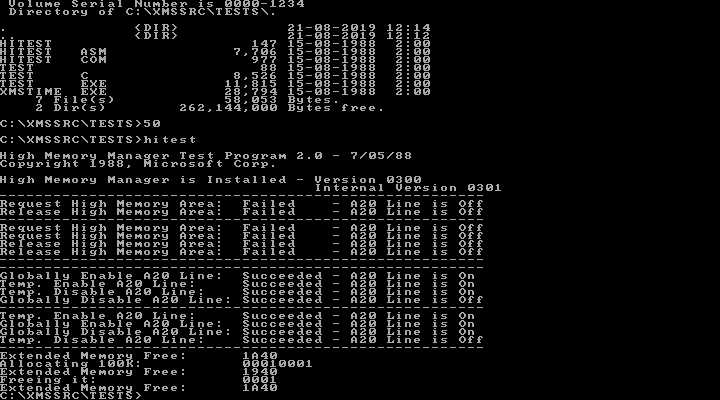
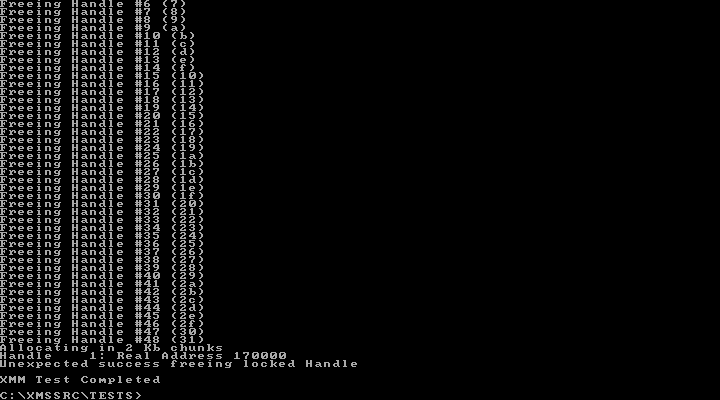
I found an old ZIP of Microsoft's extended memory dev kit that includes a test program.
Tracing XMS calls in the game, the game calls local A20 enable once, but later in the game. Most calls are either move block or lock/unlock block, most prior to the A20 enable.
Still looking into it now.
joncampbell123
on 21 Aug 2019
joncampbell123
on 21 Aug 2019
DOSBox SVN appears to leave the A20 gate off at startup as well. @FyiurAmron can you verify the latest SVN build has the same problem?
I've made a few commits that tighten up XMS emulation a bit where it violated MS XMS spec and a test program.
joncampbell123
on 21 Aug 2019
According to an MS-DOS bootdisk, if you load HIMEM.SYS by itself, the A20 gate stays off in general, however if your config.sys has DOS=HIGH,UMB in it, DOS will load itself into the HMA and A20 will stay ON by default.
You can tell if that happened if you look at FFFF:0000 in the debugger and the string "VDISK" is visible.
joncampbell123
on 21 Aug 2019
The game itself doesn't care about the HMA (doesn't appear to ask about it). It also loads a lot of stuff into HMA, directly, assuming the A20 gate is on. Only later does it turn on HMA, but at that point it's a bit late. Perhaps the developers never tested their game on a system where CONFIG.SYS did not have DOS=HIGH in it.
joncampbell123
on 21 Aug 2019
Uh.... it seems that HIMEM.SYS does not allow disabling A20 when DOS=HIGH, even if it signals success. Global A20 disable doesn't do anything.
Local A20 disable DOES do something, but INT 21h is there to enable A20 again on entry (and leave it on).
joncampbell123
on 21 Aug 2019
Since DOSBox-X by default emulates DOS with an HMA (not necessarily using it, it does say it occupies it), I think the solution here is to enable A20 on entry to INT 21h if dosbox.conf says HMA is enabled and occupied by DOS.
joncampbell123
on 21 Aug 2019
Furthermore there is code in the DOS kernel (or HIMEM.SYS hooks it?) that calls QUERY A20 and LOCAL ENABLE A20 when your program terminates.
joncampbell123
on 21 Aug 2019
The latest commit fixes emulation to always enable A20 on INT 21h, in the same manner that MS-DOS 5.0 does when HIMEM.SYS is loaded and DOS=HIGH.
The HMA and DOS in HMA behavior is default ON with DOSBox-X.
joncampbell123
on 21 Aug 2019
The idea is to fix the game by enabling A20 in the same manner that MS-DOS does. I really do think this is caused by the developer's failure to test the game on a DOS system that does not load DOS into HMA (no DOS=HIGH and DEVICE=HIMEM.SYS in CONFIG.SYS).
joncampbell123
on 21 Aug 2019
Please verify on your end, and I'll close the issue.
joncampbell123
on 22 Aug 2019
@joncampbell123 I can verify it's working perfectly now without any additional config; doing A20GATE OFF makes the problem reappear, as expected, so I can say everything is OK with the default setup.
(as a side note - the game devs didn't have to worry about no HIMEM.SYS loaded, since the game explicitly required it to work in the minimal requirements; I guess they didn't test DOS=LOW though, since it wasn't used by almost anybody by the game's release date and there was seldom any reason to do so in the first place)
_and yeah, better late than never :D_
FyiurAmron
on 22 Sep 2020
Related issues
 kcgen
·
11Comments
kcgen
·
11Comments
 Corak667
·
7Comments
Corak667
·
7Comments
 diaphone0
·
14Comments
diaphone0
·
14Comments
 bob12111
·
17Comments
kcgen
·
7Comments
bob12111
·
17Comments
kcgen
·
7Comments