Doom-emacs: Getting mspyls (microsoft python language server) running
Please visit our Discord server to ask how-to and workflow questions:
https://discord.gg/qvGgnVx -- post on Doom's issue tracker as a last resort.
What are you trying to achieve?
I am trying to get mspyls running because the standard lsp caused frequent freezes in Emacs, which made it impossible to work in medium+ sized Python projects.
What have you tried?
I activated the mspyls flag of the python module in my init.el:
(python +mspyls)
After that I ran doom sync. The Python completion then stopped working. Henrik told me in the chat to try M-x lsp-install-server and chose mspyls in the menu, however it did not show up (I tried both on my macOS Catalina and my ArchLinux):
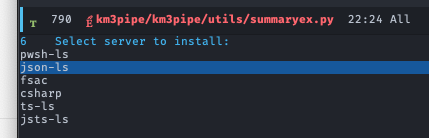
After that I checked the docs again and from https://github.com/hlissner/doom-emacs/blob/develop/modules/lang/python/README.org I got to lsp-python-ms package docs (https://github.com/emacs-lsp/lsp-python-ms). I am not sure if I have to install the package manually but I thought I'll try installing the dotnet-sdk and the language server first.
On the macOS system, I installed the dotnet-sdk via brew (brew cask install dotnet-sdk).
Finally I followed the instructions to install the Microsoft Python Language Server using dotnet. I put the directory where the executable Microsoft.Python.LanguageServer was installed and ran doom env to update my environment file.
However, it still does not seem to start any process. I am still a total noob in Emacs but it seems that the lsp-python-ms is not installed.
What did I do wrong?
I'd like to update the docs once I get this running 😉
System information
((emacs

  (version . "26.3")

  (features . "NOTIFY ACL GNUTLS LIBXML2 ZLIB MODULES THREADS")

  (build . "Oct 01, 2019")

  (buildopts "--disable-dependency-tracking --disable-silent-rules --enable-locallisppath=/usr/local/share/emacs/site-lisp --infodir=/usr/local/Cellar/emacs/26.3/share/info/emacs --prefix=/usr/local/Cellar/emacs/26.3 --with-gnutls --without-x --with-xml2 --without-dbus --with-modules --without-ns --without-imagemagick")

  (windowsys . batch)

  (daemonp . server-running))

 (doom

  (version . "2.0.9")

  (build . "HEAD -> develop 12249753e 2020-02-22 20:40:03 -0500")

  (dir . "~/.rc/doom.d/"))

 (system

  (type . darwin)

  (config . "x86_64-apple-darwin19.0.0")

  (shell . "/bin/zsh")

  (uname . "Darwin 19.2.0 Darwin Kernel Version 19.2.0: Sat Nov  9 03:47:04 PST 2019; root:xnu-6153.61.1~20/RELEASE_X86_64 x86_64")

  (path "~/.nimble/bin" "/usr/local/opt/python/libexec/bin" "~/.miniconda3/bin" "/usr/local/bin" "/usr/bin" "/bin" "/usr/sbin" "/sbin" "/opt/X11/bin" "~/.cabal/bin" "/usr/local/MacGPG2/bin" "/usr/local/sbin" "/Applications/DevDesktop/drush" "/usr/local/texlive/2016/bin/x86_64-darwin" "/Library/TeX/texbin" "~/.emacs.d/bin" "/usr/local/Cellar/emacs/26.3/libexec/emacs/26.3/x86_64-apple-darwin19.0.0"))

 (config

  (envfile . envvar-file)

  (elc-files . 0)

  (modules :completion company (ivy +fuzzy) :ui doom doom-dashboard hl-todo modeline nav-flash ophints (popup +all +defaults) treemacs workspaces :editor (evil +everywhere) file-templates multiple-cursors snippets :emacs dired electric ibuffer vc :term eshell shell term vterm :checkers syntax spell grammar :tools direnv (eval +overlay) (lookup +docsets) lsp magit :lang data emacs-lisp julia latex markdown (org +jupyter +pandoc +present) (python +mspyls) rst sh :email mu4e :app calendar :config (default +bindings +smartparens))

  (packages . "<(void-function sp-point-in-string)>")

  (elpa "n/a")

  (unpin "n/a")))
 tamasgal
All 4 comments
I spent some time on pyls recently, so I'll summarize what I've done to make it work:
There are 2 Python language servers: palantir's and microsoft's. I preferred the former one, seems to be better documented and more feature-rich.
To get them to work:
pyls
Do a pip install 'python-language-server[all]' (or omit the all if you only want the basics), then add (python +lsp) to your init.el. This worked for me without changing anything. However, if you want to change settings, you can do it by adding something like this to your config.el:
(use-package! lsp
  :init
  (setq lsp-pyls-plugins-pylint-enabled t)
  (setq lsp-pyls-plugins-autopep8-enabled nil)
  (setq lsp-pyls-plugins-yapf-enabled t)
  (setq lsp-pyls-plugins-pyflakes-enabled nil)
)
for the full range of options you can check the emacs-lsp package's lsp-pyls.el file here.
mspyls
To make this work I added (package! lsp-python-ms) to my packages.el and removed the other pyls (pip uninstall python-language-server).
The lsp mode picks up the right one without problems (or at least it did for me).
When I was switching between the two (for testing only, probably you'd stick to one), I disabled pyls by uninstalling with pip and mspyls by adding (package! lsp-python-ms :disable t). There might be better ways to do this (e.g. there's the lsp-clients-python-command variable), but I didn't care about is as I was just testing.
An additional thing is that if you're using conda environments then you'll need to change a few additional things. You'll need (python +lsp +conda) and create a .dir-locals.el file in your project with ((python-mode . ((eval . (conda-env-activate "my-env"))))) in it, so when you open a file Emacs switches to the right conda env and the lsp server is launched in it. Otherwise the linter will complain about not finding packages (as it assumes the base env). There's an ongoing discussion on this with the pyls people here on how to handle this. Currently you'll need to have pyls installed in the environment that you're linting, but mspyls works without any of that.
This went a bit beyond your questions and I'm not sure if I really answered what you wanted to know, so let me know if this doesn't work for you or ping me on Discord.
 vakker
on 25 Feb 2020
vakker
on 25 Feb 2020
(python +mspyls)
The python module has no +mspyls flag. You can get an overview of what flags a module supports in docs/modules.org. Otherwise, in :lang python's own documentation
however it did not show up (I tried both on my macOS Catalina and my ArchLinux):
You need +lsp to have LSP support for the python module. Without it, there is zero LSP support. No pyls or mspyls. M-x lsp-install-server won't list ms-python-lsp without this flag.
The module tries mspyls, then pyls. So long as mspyls is installed, it will use it.
 hlissner
on 25 Feb 2020
hlissner
on 25 Feb 2020
Thanks for both of you.
Indeed, I missed that wrong flag (+mspyls)!
Alright, it worked after lsp-install-server and choosing mspyls.
Thanks again!
tamasgal
on 26 Feb 2020
Hi, I am trying to install mspyls. But it's taking forever.
 ankitsharma07
on 18 Nov 2020
ankitsharma07
on 18 Nov 2020
Related issues
 nasoundead
·
3Comments
nasoundead
·
3Comments
 rgrinberg
·
3Comments
rgrinberg
·
3Comments
 oyarsa
·
3Comments
oyarsa
·
3Comments
 ashiklom
·
3Comments
ashiklom
·
3Comments
 pieterdd
·
3Comments
pieterdd
·
3Comments
Most helpful comment
I spent some time on pyls recently, so I'll summarize what I've done to make it work:
There are 2 Python language servers: palantir's and microsoft's. I preferred the former one, seems to be better documented and more feature-rich.
To get them to work:
pyls
Do a
pip install 'python-language-server[all]'(or omit theallif you only want the basics), then add(python +lsp)to yourinit.el. This worked for me without changing anything. However, if you want to change settings, you can do it by adding something like this to yourconfig.el:for the full range of options you can check the
emacs-lsppackage'slsp-pyls.elfile here.mspyls
To make this work I added
(package! lsp-python-ms)to mypackages.eland removed the other pyls (pip uninstall python-language-server).The
lspmode picks up the right one without problems (or at least it did for me).When I was switching between the two (for testing only, probably you'd stick to one), I disabled pyls by uninstalling with pip and mspyls by adding
(package! lsp-python-ms :disable t). There might be better ways to do this (e.g. there's thelsp-clients-python-commandvariable), but I didn't care about is as I was just testing.An additional thing is that if you're using conda environments then you'll need to change a few additional things. You'll need
(python +lsp +conda)and create a.dir-locals.elfile in your project with((python-mode . ((eval . (conda-env-activate "my-env")))))in it, so when you open a file Emacs switches to the right conda env and the lsp server is launched in it. Otherwise the linter will complain about not finding packages (as it assumes the base env). There's an ongoing discussion on this with the pyls people here on how to handle this. Currently you'll need to have pyls installed in the environment that you're linting, but mspyls works without any of that.This went a bit beyond your questions and I'm not sure if I really answered what you wanted to know, so let me know if this doesn't work for you or ping me on Discord.