Doom-emacs: [BUG] Slow scrolling/cursor movement on macOS with large window
What did you expect to happen?
Smooth performance when scrolling and moving cursor.
What actually happened?
Stuttery movement when the emacs window is maximized.
Additional details:
https://github.com/Strayer/dotfiles/tree/f6a037b/.doom.d
Video that shows the slow cursor movement:
https://youtu.be/54ozr4zPgTw
Profiler info with large window:

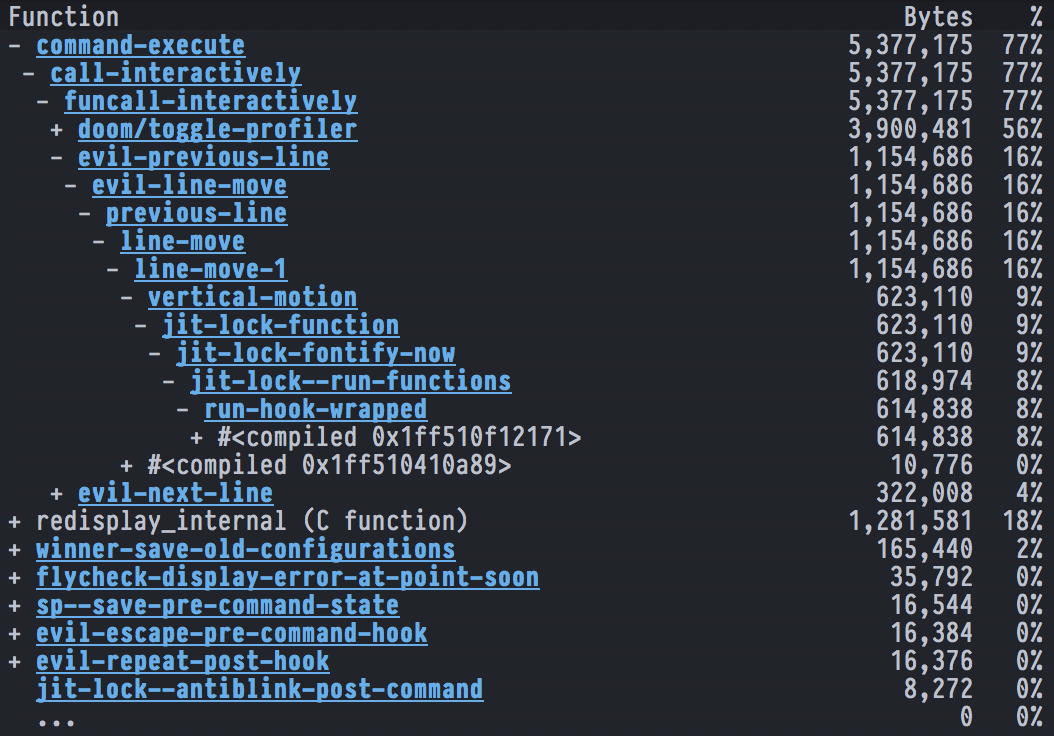
Profiler info with small window:


I'm using emacs 27 installed via homebrew:
brew install emacs-plus --HEAD --without-spacemacs-icon --with-jansson --without-multicolor-fonts
I did experience the same problem with emacs 26 too though.
System information:
((emacs

  (version . "27.0.50")

  (features . "RSVG IMAGEMAGICK GLIB NOTIFY KQUEUE ACL GNUTLS LIBXML2 ZLIB TOOLKIT_SCROLL_BARS NS MODULES THREADS JSON PDUMPER LCMS2 GMP")

  (build . "Dec 20, 2019")

  (buildopts "--disable-dependency-tracking --disable-silent-rules --enable-locallisppath=/usr/local/share/emacs/site-lisp --infodir=/usr/local/Cellar/emacs-plus/HEAD-85a60da/share/info/emacs --prefix=/usr/local/Cellar/emacs-plus/HEAD-85a60da --with-xml2 --without-dbus --with-gnutls --with-imagemagick --with-json --with-modules --with-rsvg --with-ns --disable-ns-self-contained")

  (windowsys . batch)

  (daemonp . server-running))

 (doom

  (version . "2.0.9")

  (build . "HEAD, origin/develop, origin/HEAD 6d40f30a0 2019-12-20 05:01:44 -0500"))

 (system

  (type . darwin)

  (config . "x86_64-apple-darwin19.2.0")

  (shell . "/usr/local/bin/fish")

  (uname . "Darwin 19.2.0 Darwin Kernel Version 19.2.0: Sat Nov  9 03:47:04 PST 2019; root:xnu-6153.61.1~20/RELEASE_X86_64 x86_64")

  (path "~/.local/bin" "~/.poetry/bin" "~/.cargo/bin" "~/.bin" "/usr/local/sbin" "~/Library/Android/sdk/tools" "~/Library/Android/sdk/platform-tools" "~/.asdf/shims" "~/.asdf/bin" "/usr/local/bin" "/usr/bin" "/bin" "/usr/sbin" "/sbin" "/opt/X11/bin" "/Applications/VMware" "Fusion.app/Contents/Public" "/Applications/Wireshark.app/Contents/MacOS" "/Applications/VMware" "Fusion.app/Contents/Public" "~/.local/bin" "/usr/local/Cellar/emacs-plus/HEAD-85a60da/libexec/emacs/27.0.50/x86_64-apple-darwin19.2.0"))

 (config

  (envfile . envvar-file)

  (elc-files . 0)

  (modules :completion company ivy :ui doom doom-dashboard doom-quit hl-todo modeline nav-flash neotree ophints (popup +all +defaults) vc-gutter vi-tilde-fringe window-select workspaces :editor (evil +everywhere) file-templates fold format multiple-cursors rotate-text snippets :emacs dired electric ibuffer vc :tools ansible direnv docker editorconfig (eval +overlay) flycheck (lookup +docsets) magit terraform :lang data elixir emacs-lisp erlang javascript markdown (org +dragndrop +present) php python sh web :config (default +bindings +smartparens))

  (packages "n/a")

  (elpa "n/a")))
 Strayer
All 27 comments
Possibly a duplicate of #1301.
This is a general and common Emacs and MacOS issue, unfortunately: https://www.reddit.com/r/emacs/comments/d2n2wh/emacs_is_slow_on_macos/. Both are very prone to redisplay slowness like this.
You could try disabling line numbers with (setq display-line-numbers-type nil) and switching to our light modeline (but changing modeline to (modeline +light) in ~/.doom.d/init.el).
Perhaps this might help too:
(add-to-list 'default-frame-alist '(inhibit-double-buffering . t))
Also try another font. Emacs seems to disagree with some fonts. Fira Code is known to work well with Emacs.
If none of that helps, it may be beyond me or Doom to fix it. Emacs is, sadly, very prone to scrolling slowness, and _much_ more so on MacOS than on Linux.
 hlissner
on 20 Dec 2019
hlissner
on 20 Dec 2019
All of those do help, it seems. Fira Code also boosts scrolling performance considerably, which I find very annoying (I like Pragmata Pro!).
Its still much slower when maximized compared to the small window (or actually ANY other editor/IDE I have on my machine like Neovim, VS Code or IntelliJ IDEs), making emacs still quite annoying. After some more reading it seems like rendering on macOS is simply a second-class citizen for emacs. Ref: https://www.reddit.com/r/emacs/comments/del1yl/emacs_high_gpu_usage_on_mac/
I tried an Ubuntu VM just for fun, but the performance of VMware Fusion with retina-resolution apparently sucks too much to compare anything.
Strayer
on 20 Dec 2019
Also try another font. Emacs seems to disagree with some fonts.
Fira Codeis known to work well with Emacs.
Is there a list of fonts known to work well with Emacs? I'm using Iosevka and am experiencing similar issues with scrolling/movement speed under macOS.
Edit: Emacs is installed as brew install emacs-mac --with-modules --with-rsvg --with-natural-title-bar.
 zyeri
on 23 Dec 2019
zyeri
on 23 Dec 2019
I have the same exact issue. My macos setup behaves exactly like OPs video.
FYI, display-line-numbers-type and the inhibit-double-buffering didn't do much for me. Changing the font to "Monaco" did the trick. Like OP, it is still not "buttery-smooth" but now at least I get about the same scrolling performance as spacemacs.
 pcesar22
on 24 Dec 2019
pcesar22
on 24 Dec 2019
@zyeri I'm also using Iosevka with emacs-plus and have the same problem, for example in spacemacs scrolling was smooth, maybe they have some workaround.
 blasterpistol
on 27 Dec 2019
blasterpistol
on 27 Dec 2019
@testarossaaaaa Yea spacemacs seems to not suffer from this despite being emacs based as well... I've enjoyed doom immensely and for me this is the only thing stopping me from making the switch :(
If anyone knows some sort of workaround I would greatly appreciate it!
pcesar22
on 4 Jan 2020
One difference I noticed between spacemacs and doom-emacs is the value of scroll-conservatively:
- In spacemacs,
scroll-conservatively = 101 - In doom-emacs,
scroll-conservatively = 10
Maybe you can try (setq scroll-conservatively 101) and see if it helps?
 dsdshcym
on 4 Jan 2020
dsdshcym
on 4 Jan 2020
I've set scroll-conservatively to 101 in 8c7aaa6. I don't think it'll help with OPs issue specifically, but it may help with page-wise or long-distance motions, as recentering the window can be expensive. Still, I am no closer to figuring out what Spacemacs does that we don't. If anyone can bisect their configs until the issue goes away, and narrow down its origin, it'd be a huge help.
hlissner
on 6 Jan 2020
For what it's worth, I can reproduce this on Emacs HEAD with _no_ configuration. I don't think it's Doom-specific, but I'll try using Spacemacs and report back. Maybe they're doing something to accidentally fix it? (For now, I'm reverting to the Emacs 27 branch, which I don't think has this problem.)
 hlian
on 7 Feb 2020
hlian
on 7 Feb 2020
Possibly a duplicate of #1301.
This is a general and common Emacs and MacOS issue, unfortunately: https://www.reddit.com/r/emacs/comments/d2n2wh/emacs_is_slow_on_macos/. Both are very prone to redisplay slowness like this.
You could try disabling line numbers with
(setq display-line-numbers-type nil)and switching to our light modeline (but changingmodelineto(modeline +light)in~/.doom.d/init.el).Perhaps this might help too:
(add-to-list 'default-frame-alist '(inhibit-double-buffering . t))Also try another font. Emacs seems to disagree with some fonts.
Fira Codeis known to work well with Emacs.If none of that helps, it may be beyond me or Doom to fix it. Emacs is, sadly, very prone to scrolling slowness, and _much_ more so on MacOS than on Linux.
I experiencing same issue as OP, setting (setq display-line-numbers-type nil) helped - lag is much less noticeable now.
(modeline +light) with (setq display-line-numbers-type t) seems to have little effect on my machine. (add-to-list 'default-frame-alist '(inhibit-double-buffering . t)) didn't do much either.
I'm using 26.3 brew tap railwaycat/emacsmacport and Iosevka size: 13 from brew tap homebrew/cask-fonts
 vikdotdev
on 27 Mar 2020
vikdotdev
on 27 Mar 2020
Having the same issue for a while, I eventually spent a few hours to troubleshoot my particular setup. Hope it can be useful.
My setup is:
brew install emacs-plus --without-spacemacs-icon --HEAD --with-emacs-27-branch --with-jansson --with-xwidgets- doom-themes
- Menlo font
I tried different combinations to nail it down and here are my findings:
A quick thing to fix is hl-line. When that is enabled, moving cursor is slow. I solved it by using hl-line+ where I can configure only highlight when idling, so moving cursor would not result highlighting current line, and thus no much redrawing I guess. My configuration is as following:
(use-package hl-line+
  :load-path "3rd" # or wherever you put hl-line+.el
  :config
  (hl-line-when-idle-interval 0.3)
  (toggle-hl-line-when-idle 1))
My biggest problem is having both display-line-numbers and highlight-indent-guides enabled at the same time, while using the default unicode char \x2502 as guides character.
If I disable either of those, it is much more responsive; if I use a different but similar looking unicode (\xFFE8 in my case, it's a bit dashed unfortunately), I can keep both of them enabled while having a good responsiveness.
Overall here is my configuration:
(use-package doom-themes
  :ensure t
  :init
  ;; Global settings (defaults)
  (setq doom-themes-enable-bold t    ; if nil, bold is universally disabled
        doom-themes-enable-italic t) ; if nil, italics is universally disabled
  :config
  (load-theme 'doom-one t)

  ;; Enable flashing mode-line on errors
  (doom-themes-visual-bell-config)

  (use-package doom-themes-ext-treemacs
    :init
    (setq doom-themes-treemacs-theme "doom-colors")) ; use the colorful treemacs theme)
  (doom-themes-treemacs-config)

  ;; Corrects (and improves) org-mode's native fontification.
  (doom-themes-org-config))

(use-package hl-line+
  :load-path "3rd"
  :config
  (hl-line-when-idle-interval 0.3)
  (toggle-hl-line-when-idle 1))

(use-package display-line-numbers
  :ensure nil
  :init
  (setq display-line-numbers-width-start t)
  (global-display-line-numbers-mode))

(use-package highlight-indent-guides
  :ensure t
  :delight highlight-indent-guides-mode
  :init
  (setq highlight-indent-guides-method 'character
        ;; default is \x2502 but it is very slow on Mac
        highlight-indent-guides-character ?\xFFE8
        highlight-indent-guides-responsive 'top))
 honnix
on 17 Apr 2020
honnix
on 17 Apr 2020
Using locally compiled emacs 27.0.91 the scrolling speed is pretty good.
Steps of what I did:
git clone https://github.com/emacs-mirror/emacs.git
cd emacs
git checkout emacs-27.0.91
./configure
# if configure works then run
make install
Strangely enough, the >28 version of emacs had the same slow scrolling problem.
 jonasagx
on 20 May 2020
jonasagx
on 20 May 2020
I decided to give doom another shot, and am still having issues.
I tried again with emacs-27 and the issue is still apparent. The "Monaco" font switch still is still the thing that does the most.
Setting "display-line-numbers" to null also helps a bit, but not much.
@honnix could you give more details as to what you need to do to configure hl-line+? Being fairly new to Doom I'm still not sure where to place your snippet. Neither packages.el nor config.el did the trick for me.
pcesar22
on 3 Jun 2020
Sorry you are still experiencing the issue. emacs-27 worked for me once I compiled the whole application locally FYI.
A possible way to track the the source of the slowness is via explain-pause-mode on startup https://github.com/lastquestion/explain-pause-mode it can bring insights on what hogs resources.
jonasagx
on 3 Jun 2020
I too have slow scrolling on a retina MacBook with emacs 28. Spacemacs config on the same emacs scrolls well. I've switched to the same font and size in my Spacemacs config and it helps a bit but not much. Displaying line numbers seems to be the biggest offender and it's quite respectable with it off. To my surprise Spacemacs actually scrolls much faster with line numbers on. As far as I can tell it uses the same display-line-numbers-mode. Setting to relative or normal makes no difference.
I have tried profiling and using explain-pause-mode but there doesn't seem to be anything obvious in the reports.
I'm using GUI emacs and if I make the window small, it scrolls well.
I feel like a nit picker but I spend a lot of time in an editor and being able to smoothly and quickly scroll though text makes a difference to how pleasurable your editor is to use.
I'm a little bit out my depth knowing where to look to improve it, i've tried searching though spacemacs code for scrolling and line numbers to see if they applied anything specific and the only thing I found was (setq scroll-conservatively 101) which didn't make a difference for me.
 maxwedwards
on 5 Jun 2020
maxwedwards
on 5 Jun 2020
@maxwedwards See https://github.com/hlissner/doom-emacs/blob/develop/docs/faq.org#why-is-scrolling-slow-in-emacsdoom and try what it suggests.
hlissner
on 5 Jun 2020
Thanks @hlissner. I've gone through that list and line numbers does make a big difference but the biggest thing by far is simply dragging the window smaller. I don't know what Spacemacs is doing but this is a rendering thing on MacOS retina screens with emacs. I was disappointed in the emacs reddit links posted above that the maintainers suggested that it was a MacOS problem and not an Emacs problem, seems they don't even acknowledge it's an issue.
Changing the font and making the font bigger sped it up by just under 10%.
Weirdest thing is that spacemacs gets faster with line numbers switched on! Something strange is going on.
Thanks for your work on Doom.
maxwedwards
on 5 Jun 2020
I'm running Emacs 27 on a Macbook Pro with a 4K external monitor. For me, simply switching from the default hl-line mode to the hl-line+ and idle config made a huge difference and scrolling now is pretty acceptable. I also like to keep line numbers on (old habit I suppose).
But I also like @hlissner 's advice to navigate in a more "evil" manner:
Don’t mash j (or C-n) to scroll. Evil users can scroll long distances with C-d and C-u, for instance, to avoid that slowness. Otherwise, use search mechanisms to move around, like isearch (C-s) or evil-search (/).
 mattsawyer77
on 5 Jun 2020
mattsawyer77
on 5 Jun 2020
I've actually had a huge improvement after upgrading to Emacs 27 via emacs-plus scrolling seems as fast as vim now this is with hl-line+ set. I did a full reinstall as part of the upgrade so that may have helped?
 BenHili
on 6 Jun 2020
BenHili
on 6 Jun 2020
I had another complication as I described here https://github.com/jwiegley/use-package/issues/835 , fixing that also gave me a huge boost and I could revert back to hl-line.
honnix
on 6 Jun 2020
@jonasagx Not sure whether you have figured out how to configure hl-line+.
Here is what I did. I downloaded hl-line+.el and put it to to .emacs.d/3rd, and have the following in .emacs.d/init.el.
(use-package hl-line+
  :load-path "3rd"
  :config
  (hl-line-when-idle-interval 0.3)
  (toggle-hl-line-when-idle 1))
For me, changing the font (Jetbrains Mono -> Fira Code) fixed the issue.
 askurihin
on 15 Jun 2020
askurihin
on 15 Jun 2020
does anyone know what it is about certain fonts that make them perform better? perhaps it pertains to unicode layout and volume?
mattsawyer77
on 15 Jun 2020
Can confirm the hl-line+ mod along with disabling line numbers made a huge difference. I'm using 1440p monitors with Mac. Scroll speed is almost as fast as vim. I'm on Emacs 26.
I added the use-package to my custom config.el in the /user/.doom.d folder
 nipuna-perera
on 17 Jun 2020
nipuna-perera
on 17 Jun 2020
For me, changing the font (Jetbrains Mono -> Fira Code) fixed the issue.
Actually, it didn't help. It was the Emacs restart, that helped.
Some time after I changed the font the slowness started again, then I accidently resized the Emacs window from maximized to half the size and back and lags disappear.
askurihin
on 25 Jun 2020
Can confirm the hl-line+ mod along with disabling line numbers made a huge difference. I'm using 1440p monitors with Mac. Scroll speed is almost as fast as vim. I'm on Emacs 26.
I added the use-package to my custom config.el in the /user/.doom.d folder
This fixed it for me!!
 i-oliva
on 10 Jul 2020
i-oliva
on 10 Jul 2020
Linux user here coming over from neovim to check out Doom Emacs as I've heard good things, and it seems like a great project :) I'll surely dive into the emacs universe more deeply.
Scrolling issue applies for me too though and is baffling. j (C-e) scrolls down sluggishly (smoothly), while k (C-y) scrolls smoothly (sluggishly). Not sure what's truly different underneath. The issue can be entirely fixed with turning off relative line numbering (other stuff mentioned here does not work), though I'm afraid that's too prohibitive for me. Maybe scrolling with j & C-e helps people coming here as I haven't seen this bypass posted yet anywhere (in case it works for others).
Edit: To add to that, when Doom Emacs is ran in Alacritty, hardware accelerated rendering seems to similarly alleviate, though not remedy entirely, the scrolling issue as well.
 fdschmidt93
on 15 Jul 2020
fdschmidt93
on 15 Jul 2020
Related issues
 gilbertw1
·
3Comments
gilbertw1
·
3Comments
 Ptival
·
3Comments
Ptival
·
3Comments
 gueorgui
·
3Comments
gueorgui
·
3Comments
 driftcrow
·
3Comments
driftcrow
·
3Comments
 Vvkmnn
·
3Comments
Vvkmnn
·
3Comments
Most helpful comment
Possibly a duplicate of #1301.
This is a general and common Emacs and MacOS issue, unfortunately: https://www.reddit.com/r/emacs/comments/d2n2wh/emacs_is_slow_on_macos/. Both are very prone to redisplay slowness like this.
You could try disabling line numbers with
(setq display-line-numbers-type nil)and switching to our light modeline (but changingmodelineto(modeline +light)in~/.doom.d/init.el).Perhaps this might help too:
Also try another font. Emacs seems to disagree with some fonts.
Fira Codeis known to work well with Emacs.If none of that helps, it may be beyond me or Doom to fix it. Emacs is, sadly, very prone to scrolling slowness, and _much_ more so on MacOS than on Linux.