Doom-emacs: [HOWTO] Change the flycheck error colors/styles
What are you trying to achieve?
Modify how Flycheck errors are shown in no-window-system buffers. Currently, regardless of the buffer's major mode, both warnings and errors are shown as a white straight underline on the symbols affected by the error. I would like to change it so that errors are shown with a red wave underline and warnings with a yellow wave underline.
What have you tried?
- Change the value of flycheck-error using list-faces-display. This didn't seem to have any effect.
- Change the value of flycheck-error explicitly on config.el:
(set-face-attribute 'flycheck-error nil :underline '(:color "red2" :style wave))
This throws an error on startup as the face is not yet defined on startup. Using instead:
(after! flycheck
 (set-face-attribute 'flycheck-error nil :underline '(:color "red2" :style wave)))
Does not throw an error, but it does not seem to change the styling either.
- Change the theme. On all the themes I've tried Flycheck errors are displayed with the same white underline.
System information
emacs   version    26.3

        features   XPM JPEG TIFF GIF PNG RSVG SOUND DBUS GSETTINGS GLIB NOTIFY LIBSELINUX GNUTLS LIBXML2 FREETYPE M17N_FLT LIBOTF XFT ZLIB TOOLKIT_SCROLL_BARS GTK3 X11 XDBE XIM MODULES THREADS LIBSYSTEMD

        build      Dec 15, 2019

        buildopts  (--prefix=/nix/store/i49410w3hwcvha3aw1bwffqi61vykdnh-emacs-26.3 --disable-build-details --with-modules --with-x-toolkit=gtk3 --with-xft CFLAGS=-DMAC_OS_X_VERSION_MAX_ALLOWED=101200)

        windowsys  nil

        daemonp    nil

doom    version    2.0.9

        build      HEAD -> develop, origin/develop, origin/HEAD 385ff35ad 2019-12-08 01:02:01 -0500

system  type       gnu/linux

        config     x86_64-pc-linux-gnu

        shell      /run/current-system/sw/bin/zsh

        uname      Linux 4.19.84 #1-NixOS SMP Tue Nov 12 18:21:46 UTC 2019 x86_64

        path       (/nix/store/d1id4kacjh0lb7alqhzjb4snbf4rs6h0-bash-interactive-4.4-p23/bin/ /nix/store/fdz7jkkccripgjfdljw2bv8jymxrswn1-patchelf-0.9/bin/ /nix/store/qy6rb8p4fg1p3xfw0g6wz6iirxbdxizp-gcc-wrapper-8.3.0/bin/ /nix/store/bhngps8y3sf2hdfkbi16bk2ya3k67rkq-gcc-8.3.0/bin/ /nix/store/cnij4yyvknw66igil49fblp91j8ya3hf-glibc-2.27-bin/bin/ /nix/store/2gg7a91c98ga07fvyyp2k1bvrds213jr-coreutils-8.31/bin/ /nix/store/bka8pxk1i0yj6njfd99w8zhjk1x3wcxr-binutils-wrapper-2.31.1/bin/ /nix/store/jy6zl5dkw5rcjczm1arjqxz95l9d40i7-binutils-2.31.1/bin/ /nix/store/cnij4yyvknw66igil49fblp91j8ya3hf-glibc-2.27-bin/bin/ /nix/store/2gg7a91c98ga07fvyyp2k1bvrds213jr-coreutils-8.31/bin/ /nix/store/bka8pxk1i0yj6njfd99w8zhjk1x3wcxr-binutils-wrapper-2.31.1/bin/ /nix/store/jy6zl5dkw5rcjczm1arjqxz95l9d40i7-binutils-2.31.1/bin/ /nix/store/cnij4yyvknw66igil49fblp91j8ya3hf-glibc-2.27-bin/bin/ /nix/store/2gg7a91c98ga07fvyyp2k1bvrds213jr-coreutils-8.31/bin/ /nix/store/qy6rb8p4fg1p3xfw0g6wz6iirxbdxizp-gcc-wrapper-8.3.0/bin/ /nix/store/bhngps8y3sf2hdfkbi16bk2ya3k67rkq-gcc-8.3.0/bin/ /nix/store/cnij4yyvknw66igil49fblp91j8ya3hf-glibc-2.27-bin/bin/ /nix/store/2gg7a91c98ga07fvyyp2k1bvrds213jr-coreutils-8.31/bin/ /nix/store/bka8pxk1i0yj6njfd99w8zhjk1x3wcxr-binutils-wrapper-2.31.1/bin/ /nix/store/jy6zl5dkw5rcjczm1arjqxz95l9d40i7-binutils-2.31.1/bin/ /nix/store/cnij4yyvknw66igil49fblp91j8ya3hf-glibc-2.27-bin/bin/ /nix/store/2gg7a91c98ga07fvyyp2k1bvrds213jr-coreutils-8.31/bin/ /nix/store/1pqpczna5ipwxm3jjv6f9g3d6fpdchm3-gnumake-4.2.1/bin/ /nix/store/3h2g61icqv4smw54hdjcipaickffv7cp-expat-2.2.8-dev/bin/ /nix/store/xfi2ixg19y8v1rb06hj6rdiq598l7vbr-dbus-1.12.16-lib/bin/ /nix/store/kkxx1kd09dy9i07qdh035p0azzbn3fhb-dbus-1.12.16/bin/ /nix/store/0bkzr1nxk03c2sp8yym9lw3ay8ixgf2n-pkg-config-0.29.2/bin/ /nix/store/494pnqxjidzymhq48ivr0n3irf2nwp4i-openssl-1.1.1d-bin/bin/ /nix/store/xmn1qp24nbv3famv8p2qx52nhywcgwfc-rustc-1.38.0/bin/ /nix/store/9v30xzc5xbdbs93brh7v0m31l1f48s4n-cargo-1.38.0/bin/ /nix/store/dqm4qlav3bl5jl8l68cf51l1spz7frpz-rls-1.38.0/bin/ /nix/store/2gg7a91c98ga07fvyyp2k1bvrds213jr-coreutils-8.31/bin/ /nix/store/wwizmp651s5jnhfbn2nv1kjjxvsqv1f0-findutils-4.7.0/bin/ /nix/store/x6d1d89pixrzi6vw3bk4f2i8yir4gpyf-diffutils-3.7/bin/ /nix/store/40ycaiwd64kjxc03lvw6imb3biwybcl3-gnused-4.7/bin/ /nix/store/yp4hgv6z4cyh612vv8pcs6x37hx4nn5x-gnugrep-3.3/bin/ /nix/store/m03f3v2brc581gzrdnc22apgfbiglbb1-gawk-5.0.1/bin/ /nix/store/n0lpjbl5xf5z16f54g6yx523nc568mdw-gnutar-1.32/bin/ /nix/store/wrn6gi02bqsjl9d0j9pqfj9vcv2nzsi7-gzip-1.10/bin/ /nix/store/vilispc75vqanxaw41icpbd41sbn695h-bzip2-1.0.6.0.1-bin/bin/ /nix/store/1pqpczna5ipwxm3jjv6f9g3d6fpdchm3-gnumake-4.2.1/bin/ /nix/store/v2x1ks46fq3yn8c94qfv38wrvmr5xn5r-bash-4.4-p23/bin/ /nix/store/bhmlp41xlcdi9fdsci9acjbxdl1h5bzv-patch-2.7.6/bin/ /nix/store/jw6l5ypblb10d8awazq3ni5gfma7439a-xz-5.2.4-bin/bin/ ~/.gem/ruby/2.4.0/bin/ ~/.cargo/bin/ ./node_modules/.bin/ ./node_modules/.bin/ ~/.local/bin/ ~/.gem/ruby/2.4.0/bin/ ~/.cargo/bin/ ./node_modules/.bin/ ./node_modules/.bin/ ~/.local/bin/ ~/bin/ /run/wrappers/bin/ ~/.nix-profile/bin/ /etc/profiles/per-user/jesuspc/bin/ /nix/var/nix/profiles/default/bin/ /run/current-system/sw/bin/ ~/.yarn/bin/ ~/mutable_node_modules/bin/ ~/.yarn/bin/ ~/mutable_node_modules/bin/ /nix/store/i49410w3hwcvha3aw1bwffqi61vykdnh-emacs-26.3/libexec/emacs/26.3/x86_64-pc-linux-gnu/)

config  envfile    nil

        elc-files  0

        modules    (:completion company ivy :ui deft doom doom-dashboard doom-quit hl-todo indent-guides modeline nav-flash neotree ophints (popup +all +defaults) treemacs vc-gutter vi-tilde-fringe window-select workspaces :editor (evil +everywhere) file-templates fold (format +onsave) multiple-cursors rotate-text snippets :emacs (dired +ranger +icons) electric vc :term eshell vterm :tools direnv docker eval (flycheck +childframe) flyspell (lookup +docsets) lsp magit tmux :lang data emacs-lisp (haskell +intero) javascript ledger markdown (org +dragndrop +ipython +pandoc +present +gnuplot) rest ruby (rust +lsp) sh web :config (default +bindings +smartparens))

        packages   (n/a)

        elpa       (n/a)

```
 jesuspc
All 13 comments
Check the documention on custom-set-faces! macro, it has examples and it should be what you want (override a specific face in one-or-many themes)
 gagbo
on 15 Dec 2019
gagbo
on 15 Dec 2019
The trouble with customizing your faces with set-face-attribute is that, if you load a theme afterwards, it will overwrite your changes. This is what happens if you set doom-theme; the theme is loaded later than your config.el is read.
You could get around this by using (load-theme THEME t) instead of setting the doom-theme variable, but the custom-set-faces! macro is your best bet.
Press SPC h f custom-set-faces\! (or C-h f custom-set-faces\! for non-evil users) to see documentation and usage examples. Changes made with this macro are applied to a "user" theme that will survive theme changes, and always have the highest precedence.
 hlissner
on 15 Dec 2019
hlissner
on 15 Dec 2019
Thanks for answering! I may be missing something though. On my config.el I'm adding what I'd like to define as set-face-attribute wrapped inside a custom-set-face!, which is what I understood from the macro documentation seems to imply. But I still don't get the expected red underlines:
(custom-set-faces! '(flycheck-error nil :underline '(:color "red2" :style wave)))
That nil in your snippet is out of place and the underline form is double-quoted (the containing list is already quoted). This should work:
(custom-set-faces!
'(flycheck-error :underline (:color "red2" :style wave)))
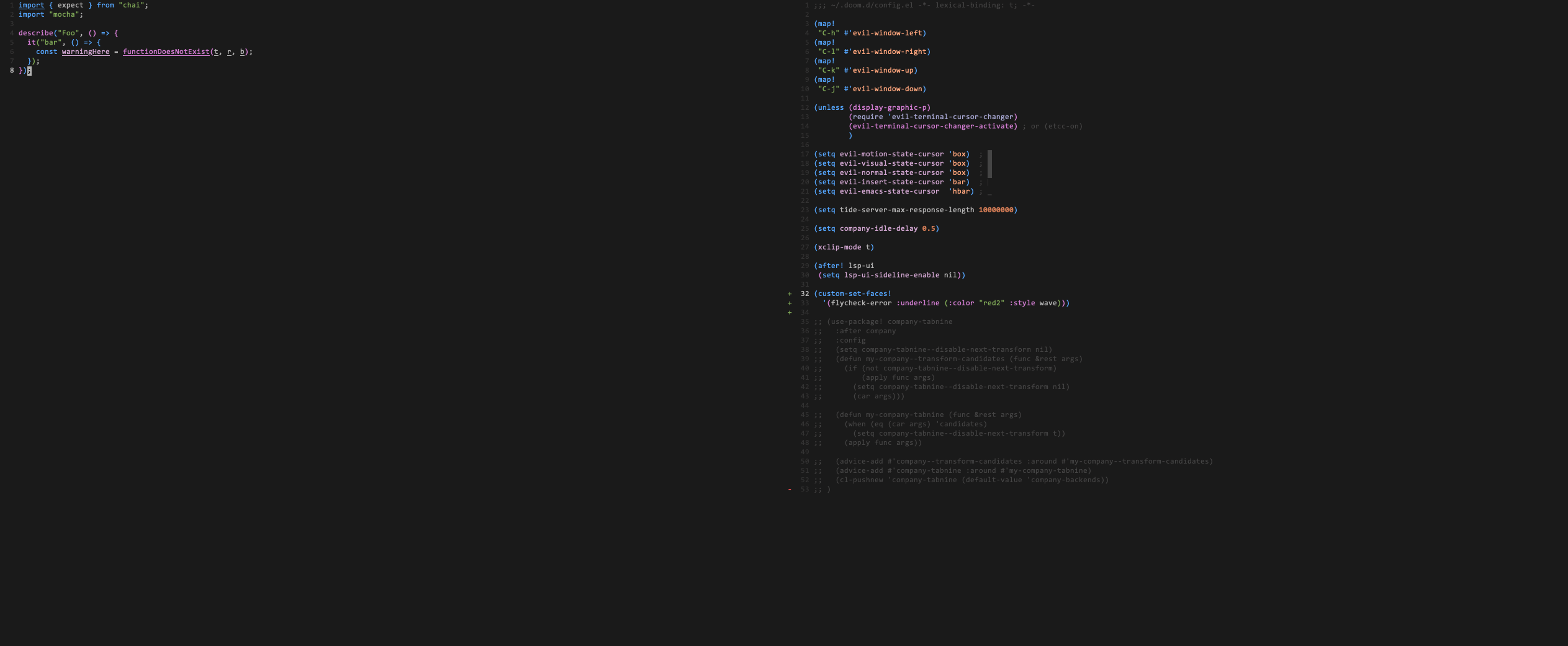
Thanks! I've updated my config.el and run doom refresh. But I still for some reason don't see the expected colours. Instead, the underline takes the colour of the text.
I've attached a screenshot of my emacs -nw. On the left, a file with flycheck errors and on the right my config.el.
jesuspc
on 16 Dec 2019
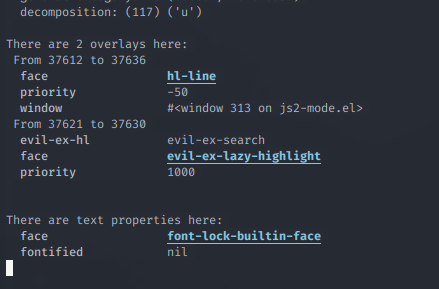
That's because js2-mode has its own syntax checker that does its own highlighting. Try applying these changes to the js2-warning face instead.
You can inspect what faces are at work somewhere by moving your cursor to it and pressing SPC h '. You'll see a list of active faces at the bottom of the results popup.
hlissner
on 16 Dec 2019
You could also disable js2-mode's built-in checker and let flycheck handle that instead:
(after! js2-mode
(setq js2-mode-show-parse-errors nil
js2-mode-show-strict-warnings nil))
These are already Doom's defaults for the :lang javascript module, however, so perhaps you've turned them back on in your private config?
hlissner
on 16 Dec 2019
The right pane on my previous screenshot is all there is on my config file. Unless there's something changing those properties under the hood I should be using defaults.
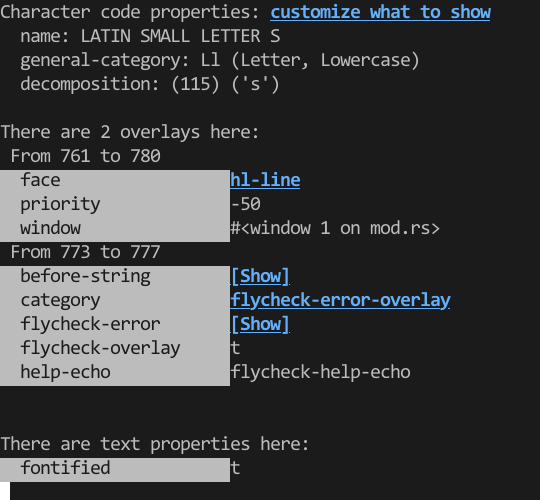
The issue is not happening only on js2-mode though. I am also seeing it on all other major modes. For instance, that's SPC h ' on an error in rust (lsp) mode. The word is underlined with a straight line with the colour of the font instead of red and wave.

Thanks for your help!
jesuspc
on 31 Dec 2019
Ah, I hadn't realized this before, but I believe this is simply terminal Emacs being unable to display a wave underline, so it degrades to a regular underline. I'm not sure there is any acceptable solution to this.
hlissner
on 31 Dec 2019
I see. The underline would be a nice to have but it'd be enough if it could have a different colour.
jesuspc
on 2 Feb 2020
That's also problematic, because your typical terminal can only display one foreground color and one background color per character (which includes its underline). The underline has to match the text's color.
I don't know Emacs' internals or what terminal you're using, so if, by some chance, your terminal supports differently colored underlines, the custom-set-faces! snippet above would change its color, but I don't think it'll work.
(custom-set-faces!
  '(flycheck-error :underline (:color "red2")))
As you suspected it didn't have any effect: the underline colour is still the font colour for both error and warning. In case it helps I use iTerm + tmux + zsh.
It sounds like for now there's not much else that can be done, but thank you very much for your support!
jesuspc
on 3 Feb 2020
Sorry we couldn't find a solution! But you're welcome; glad I could be of some help!
hlissner
on 3 Feb 2020
Related issues
 idoo
·
3Comments
idoo
·
3Comments
 gueorgui
·
3Comments
gueorgui
·
3Comments
 Ptival
·
3Comments
Ptival
·
3Comments
 AloisJanicek
·
3Comments
AloisJanicek
·
3Comments
 luisenrike
·
3Comments
luisenrike
·
3Comments
Most helpful comment
That's also problematic, because your typical terminal can only display one foreground color and one background color per character (which includes its underline). The underline has to match the text's color.
I don't know Emacs' internals or what terminal you're using, so if, by some chance, your terminal supports differently colored underlines, the
custom-set-faces!snippet above would change its color, but I don't think it'll work.